

 hackmdio
[Feature Request] TOC drop-down visible in Editor
Is your feature request related to a problem? Please describe.
When editing longer documents, it can become difficult to find specific sections without using the "split view" mode. One can use the "find in page" function of most browsers to find a specific section header or phrase, but this is inconvenient at best.
Describe the solution you'd like
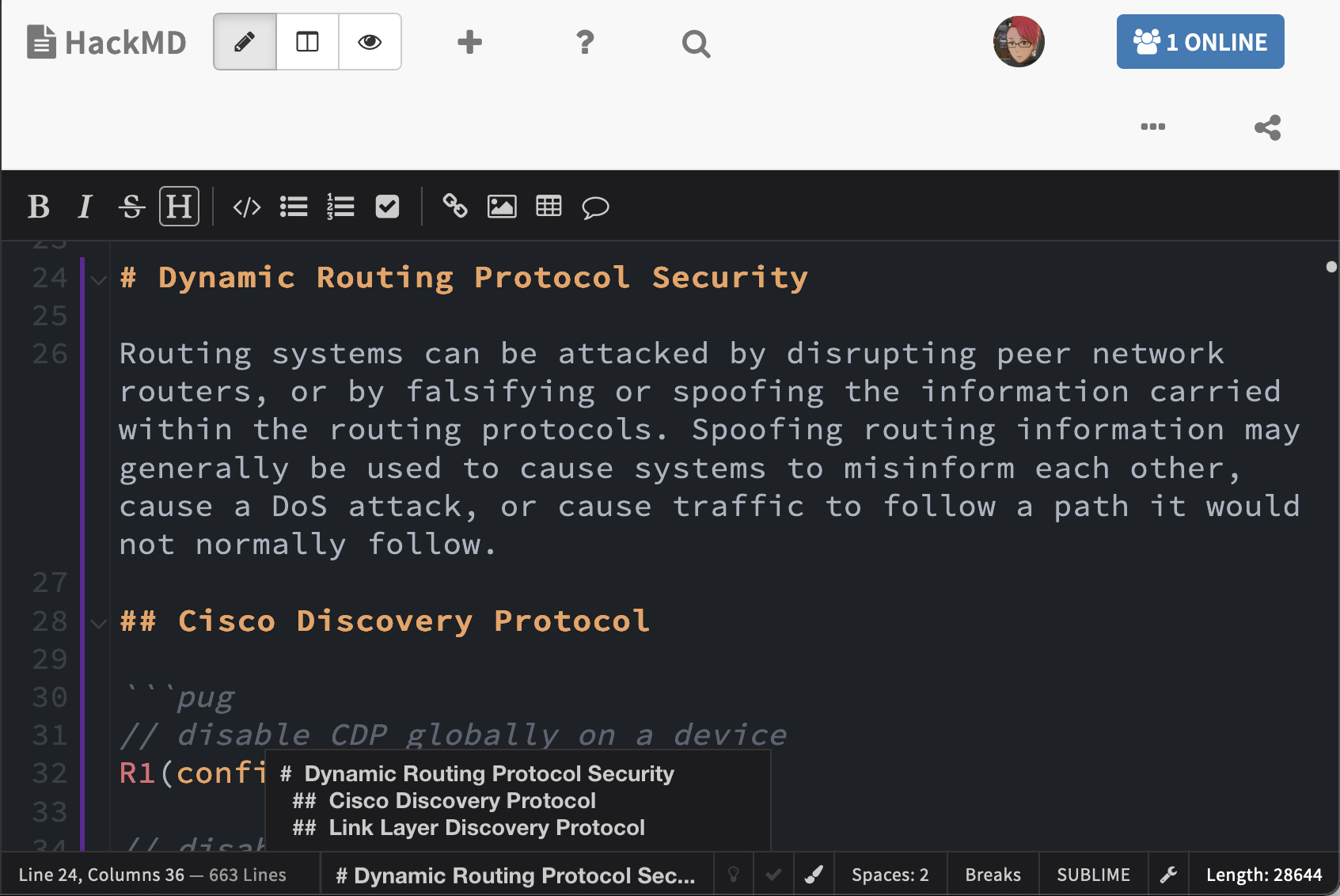
A "drop-down" pop-out TOC similar to the one provided in the bottom left corner of the viewing pane, but which is now visible in the editor. This could be placed in the bottom-right of the editor pane, so that it would line up with the pop-out TOC in the view pane. This way, even in split-view mode, when the editor and the view panes are not synced for scrolling, the pop-out TOC on each side of the split would control that particular view.
Additionally (or as alternatively), the space occupied by the "Red Panda" editor setting could instead display the text of the section header. Clicking on the text would then pop up a TOC menu from the bottom menu bar. An example of this is shown in the image below. Clicking on the headers in the bottom TOC menu would jump to the appropriate section at the top of the editor.
Describe alternatives you've considered
Using the browser's built in "Find in Page" somewhat helpful, if one can remember the specific names of sections. It is also possible to bookmark sections using section-links, but this requires manual set-up for each note.
