
angular-material-components
 angular-material-components copied to clipboard
 h2qutc
Whenever I select a new date in the panel, the local time will always jump back to the local current time
custom dayjsAdapter
import {Optional, Inject, InjectionToken, Injectable} from '@angular/core'; import {MAT_DATE_LOCALE} from '@angular/material/core'; import dayjs, {Dayjs} from 'dayjs'; import utc from 'dayjs/plugin/utc'; import localeData from 'dayjs/plugin/localeData'; import LocalizedFormat from 'dayjs/plugin/localizedFormat'; import customParseFormat from 'dayjs/plugin/customParseFormat'; import {NgxMatDateAdapter} from '@angular-material-components/datetime-picker';
export interface DayJsDateAdapterOptions { /** * Turns the use of utc dates on or off. * Changing this will change how Angular Material components like DatePicker output dates. * {@default false} */ useUtc?: boolean; }
/** InjectionToken for Dayjs date adapter to configure options. */ export const MAT_DAYJS_DATE_ADAPTER_OPTIONS = new InjectionToken<DayJsDateAdapterOptions>( 'MAT_DAYJS_DATE_ADAPTER_OPTIONS', { providedIn: 'root', factory: MAT_DAYJS_DATE_ADAPTER_OPTIONS_FACTORY });
export function MAT_DAYJS_DATE_ADAPTER_OPTIONS_FACTORY(): DayJsDateAdapterOptions { return { useUtc: false }; }
/** Creates an array and fills it with values. */ function range<T>(length: number, valueFunction: (index: number) => T): T[] { const valuesArray = Array(length); for (let i = 0; i < length; i++) { valuesArray[i] = valueFunction(i); } return valuesArray; }
/** Adapts Dayjs Dates for use with Angular Material. */ @Injectable() export class DayjsDateAdapter extends NgxMatDateAdapter<Dayjs> { private localeData: { firstDayOfWeek: number, longMonths: string[], shortMonths: string[], dates: string[], longDaysOfWeek: string[], shortDaysOfWeek: string[], narrowDaysOfWeek: string[] }; constructor(@Optional() @Inject(MAT_DATE_LOCALE) public dateLocale: string, @Optional() @Inject(MAT_DAYJS_DATE_ADAPTER_OPTIONS) private options?: DayJsDateAdapterOptions) { super(); this.initializeParser(dateLocale || dayjs.locale()); }
// TODO: Implement
setLocale(locale: string) {
    super.setLocale(locale);

    const dayJsLocaleData = this.dayJs().localeData();
    this.localeData = {
        firstDayOfWeek: dayJsLocaleData.firstDayOfWeek(),
        longMonths: dayJsLocaleData.months(),
        shortMonths: dayJsLocaleData.monthsShort(),
        dates: range(31, (i) => this.createDate(2017, 0, i + 1).format('D')),
        longDaysOfWeek: range(7, (i) => this.dayJs().set('day', i).format('dddd')),
        shortDaysOfWeek: dayJsLocaleData.weekdaysShort(),
        narrowDaysOfWeek: dayJsLocaleData.weekdaysMin(),
    };
}

getYear(date: Dayjs): number {
    return this.dayJs(date).year();
}

getMonth(date: Dayjs): number {
    return this.dayJs(date).month();
}

getDate(date: Dayjs): number {
    return this.dayJs(date).date();
}

getDayOfWeek(date: Dayjs): number {
    return this.dayJs(date).day();
}

getMonthNames(style: 'long' | 'short' | 'narrow'): string[] {
    return style === 'long' ? this.localeData.longMonths : this.localeData.shortMonths;
}

getDateNames(): string[] {
    return this.localeData.dates;
}

getDayOfWeekNames(style: 'long' | 'short' | 'narrow'): string[] {
    if (style === 'long') {
        return this.localeData.longDaysOfWeek;
    }
    if (style === 'short') {
        return this.localeData.shortDaysOfWeek;
    }
    return this.localeData.narrowDaysOfWeek;
}

getYearName(date: Dayjs): string {
    return this.dayJs(date).format('YYYY');
}

getFirstDayOfWeek(): number {
    return this.localeData.firstDayOfWeek;
}

getNumDaysInMonth(date: Dayjs): number {
    return this.dayJs(date).daysInMonth();
}

clone(date: Dayjs): Dayjs {
    return date.clone();
}

createDate(year: number, month: number, date: number): Dayjs {
    if (month < 0 || month > 11) {
        throw Error(`Invalid month index "${month}". Month index has to be between 0 and 11.`);
    }
    if (date < 1) {
        throw Error(`Invalid date "${date}". Date has to be greater than 0.`);
    }
    const returnDayjs = this.dayJs()
        .set('year', year)
        .set('month', month)
        .set('date', date);
    return returnDayjs;
}

today(): Dayjs {
    console.log('today', this.dayJs() + dayjs().locale());
    return this.dayJs();
}

parse(value: any, parseFormat: string): Dayjs | null {
    if (value && typeof value === 'string') {
        // return this.dayJs(value, dayjs().localeData().longDateFormat(parseFormat), this.locale);
        return this.dayJs(value, dayjs().format(parseFormat), this.locale);
    }
    return value ? this.dayJs(value).locale(this.locale) : null;
}

format(date: Dayjs, displayFormat: string): string {
    if (!this.isValid(date)) {
        throw Error('DayjsDateAdapter: Cannot format invalid date.');
    }
    return date.locale(this.locale).format(displayFormat);
}

addCalendarYears(date: Dayjs, years: number): Dayjs {
    return date.add(years, 'year');
}

addCalendarMonths(date: Dayjs, months: number): Dayjs {
    return date.add(months, 'month');
}

addCalendarDays(date: Dayjs, days: number): Dayjs {
    return date.add(days, 'day');
}

toIso8601(date: Dayjs): string {
    return date.toISOString();
}

/**
 * Attempts to deserialize a value to a valid date object. This is different from parsing in that
 * deserialize should only accept non-ambiguous, locale-independent formats (e.g. a ISO 8601
 * string). The default implementation does not allow any deserialization, it simply checks that
 * the given value is already a valid date object or null. The `<mat-datepicker>` will call this
 * method on all of it's `@Input()` properties that accept dates. It is therefore possible to
 * support passing values from your backend directly to these properties by overriding this method
 * to also deserialize the format used by your backend.
 * @param value The value to be deserialized into a date object.
 * @returns The deserialized date object, either a valid date, null if the value can be
 *     deserialized into a null date (e.g. the empty string), or an invalid date.
 */
deserialize(value: any): Dayjs | null {
    let date;
    if (value instanceof Date) {
        date = this.dayJs(value);
    } else if (this.isDateInstance(value)) {
        // NOTE: assumes that cloning also sets the correct locale.
        return this.clone(value);
    }
    if (typeof value === 'string') {
        if (!value) {
            return null;
        }
        date = this.dayJs(value).toISOString();
    }
    if (date && this.isValid(date)) {
        return this.dayJs(date); // NOTE: Is this necessary since Dayjs is immutable and Moment was not?
    }
    return super.deserialize(value);
}

isDateInstance(obj: any): boolean {
    return dayjs.isDayjs(obj);
}

isValid(date: Dayjs): boolean {
    return this.dayJs(date).isValid();
}

invalid(): Dayjs {
    return this.dayJs(null);
}

getHour(date: Dayjs): number {
    return this.dayJs(date).hour();
}

getMinute(date: Dayjs): number {
    return this.dayJs(date).minute();
}

getSecond(date: Dayjs): number {
    return this.dayJs(date).second();
}

setHour(date: Dayjs, value: number): void {
    this.dayJs(date).hour(value);
}

setMinute(date: Dayjs, value: number): void {
    this.dayJs(date).minute(value);
}

setSecond(date: Dayjs, value: number): void {
    this.dayJs(date).second(value);
}

private dayJs(input?: any, format?: string, locale?: string): Dayjs {
    if (!this.shouldUseUtc) {
        console.log('本地', dayjs(input, {format, locale}, locale));
        return dayjs(input, {format, locale}, locale);
    }
    console.log('非本地', dayjs(input, {format, locale, utc: this.shouldUseUtc}, locale).utc());
    return dayjs(input, {format, locale, utc: this.shouldUseUtc}, locale).utc();
}

private get shouldUseUtc(): boolean {
    const useUtc: DayJsDateAdapterOptions = this.options || {};
    // console.log(useUtc);
    return !!useUtc;
}

private initializeParser(dateLocale: string) {
    if (this.shouldUseUtc) {
        dayjs.extend(utc);
    }

    dayjs.extend(LocalizedFormat);
    dayjs.extend(customParseFormat);
    dayjs.extend(localeData);

    this.setLocale(dateLocale);
}
}
and i suffer a problem
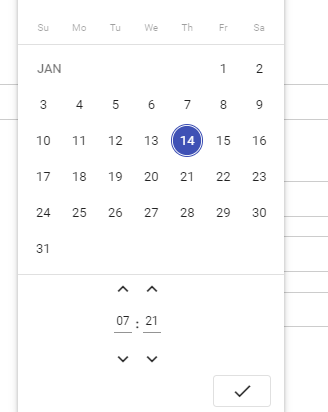 and when i adjust time later i chose another day, time always Redirect local time, then, i click 'ok' button, input always show local time
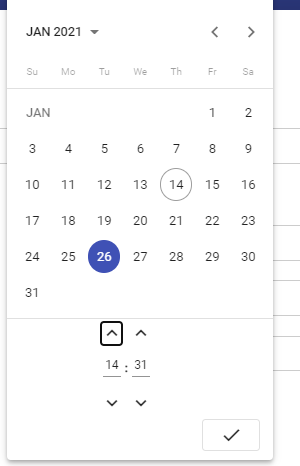

Thanks for you help if you can provide some :) Stay available for further informations if needed.
Regards,


Have you found a fix?
maybe you can refer to https://github.com/tabuckner/material-dayjs-adapter/blob/master/projects/material-dayjs-adapter/src/lib/adapter/dayjs-date-adapter.ts