
angular-material-components
 angular-material-components copied to clipboard
 h2qutc
Arrays with hours & minutes
Hi.
I know you have inputs like stepMinute, stepHour, etc... but would it be available to have arrays (regarding hours & minutes) on your product as for example [stepMinutes]="stepMinutes" (public stepMinutes = [00, 15, 30, 45]) & [stepHours]="stepHours" (public stepHours = [07, 08, 09.....16, 17, 18])?
For example, below this screenshot, if the current time is 09:04AM, then it will be like 09:15AM, selecting the nearest minute according to minutes array. I want to have an array of minutes to be only, 09:00AM, 09:15AM, 09:30AM, 09:45AM, 10:00AM. Same thing on hours like, 10:00AM, 11:00AM, 12:00AM, etc...
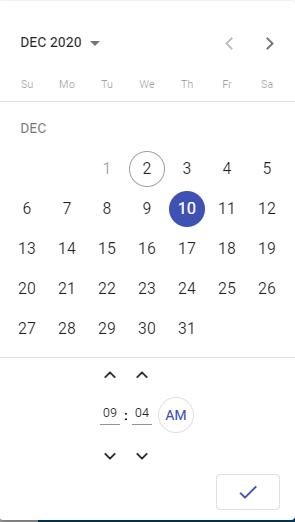
So once again, would it be available to have this kind of feature please? Because it would be very helpful for me and hopefully for every user that use your product.

I'd say just create a variable and use this variable to set the value onInit of your input and implement the logic yourself. It shouldn't be too hard.
You could achieve it like this:
Create variables.
selectedDate: Date = new Date(); minutesToSet: number = 0;
I haven't tested the following code but I think it should work or atleast help you achieve your goal ;)
ngOnInit() {
    // minutes between 0 and 14 become 15 etc...
    if (this.selectedDate.getMinutes() >= 0 && this.selectedDate.getMinutes() < 15) {
      this.minutesToSet = 15;
    } else if (this.selectedDate.getMinutes() >= 15 && this.selectedDate.getMinutes() < 30) {
      this.minutesToSet = 30;
    } else if (this.selectedDate.getMinutes() >= 30 && this.selectedDate.getMinutes() < 45) {
      this.minutesToSet = 45;
    } else if (this.selectedDate.getMinutes() >= 45 && this.selectedDate.getMinutes() < 60) {
      this.minutesToSet = 0;
    }

    this.selectedDate.setHours(this.selectedDate.getHours(), this.minutesToSet, 0, 0);
}
