
mui-datatables
 mui-datatables copied to clipboard
 gregnb
Column CustomHeadRender reuse the sortToggle function
Column CustomHeadRender rehuse the sort function
Right now I want to create a custom head and use the sort function provided by the table.
Current Behavior
right now is not possible,
Proposal
I noticed the sort function is passed on the customHeadRender function so I made a few changes on the MUIDataTableHead component
line 55
column.customHeadRender({ index, ...column }, (columnIndex) => this.handleToggleColumn(columnIndex))
This give us the oportunity of continue using the sortToggle using the current index or other column index. :) I changed the name to columnIndex because the name index is shared inside of the map function on columns array.
    const columns = ["Name", "Title", "Location", "Age", {
        name: "Salary",
        sortDirection: 'asc',
        options: {
          customHeadRender: ({index, ...column}, sortColumn) => {
            return (
              <TableCell onClick={() => sortColumn(index)} key={index}>
                {column.name}
              </TableCell>
            );
          }
        }
    }];
I can create the PR to include this small functionality.


Thanks @diegochavez . But if we use this as it is then we lost the sort icon which is provided by default on datatable. We can customize it as follow
const columnHeadRender = ({index, name,...column}, sortColumn) => (
  <th style={columnStyle} onClick={() => sortColumn(index)} key={index}>
    {name}
    <TableSortLabel active={column.sortDirection !== null} direction={column.sortDirection || "asc"}/>
  </th>
)
We can get this TableSortLabel component from
import TableSortLabel from '@material-ui/core/TableSortLabel';

If someone wants to open a PR for this behavior, I will take a look.

I would find this useful as well; for a tooltip I can use hint but I'd like to just override the basic Sort tooltip and skip the icon without re-implementing the rest of the header.

A quick heads up for this thread: a recent update in mui-datatables changed the default value of an unsorted sortDirection to "none" (as opposed to null).
Anyone who used the above example to build their own custom TH renderer, if upgrading to versions higher than 2.10.3 (when I noticed it, but may be in an earlier build as well) should update the code accordingly:
<TableSortLabel active={column.sortDirection !== "none"} ... />

If you continue to use null, it should still work, but you will get a console deprecation error warning you to change the behavior.
hi guys, how about the arrow icon? his direction doesn't change if i use ss sorting
from param 'column' i have this only :
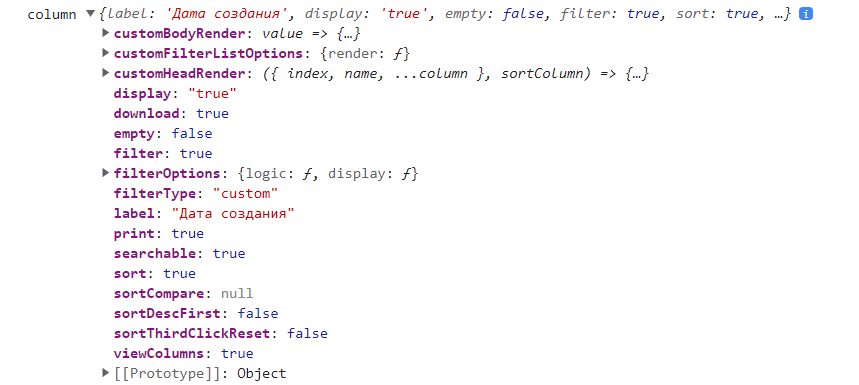 where the property sortDirection?

to change the styling of table header, use customHeadLabelRender instead :
customHeadLabelRender: (columnMeta) => ( <span className="tableheader" > {columnMeta.name} </span> ),
