
googleads-mobile-unity
 googleads-mobile-unity copied to clipboard
 googleads
app crash after reward video close
When i use reward video, watch it - close - app crash. Unity 2019.3.0f6, latest version plugin

Looks like this is the crash:
02-12 12:54:03.572: E/WindowManager(4334): win=Window{350cb60 u0 com.ShootMerge/com.google.android.gms.ads.AdActivity EXITING} destroySurfaces: appStopped=false win.mWindowRemovalAllowed=true win.mRemoveOnExit=true win.mViewVisibility=0 caller=com.android.server.wm.AppWindowToken.destroySurfaces:870 com.android.server.wm.AppWindowToken.destroySurfaces:851 com.android.server.wm.WindowState.onExitAnimationDone:5430 com.android.server.wm.-$$Lambda$01bPtngJg5AqEoOWfW3rWfV7MH4.accept:2 java.util.ArrayList.forEach:1262 com.android.server.wm.AppWindowToken.onAnimationFinished:2405 com.android.server.wm.-$$Lambda$yVRF8YoeNdTa8GR1wDStVsHu8xM.run:2
02-12 12:54:03.572: W/System.err(24551): java.lang.NullPointerException: Attempt to invoke virtual method 'int android.view.View.getVisibility()' on a null object reference
02-12 12:54:03.572: I/WindowManager(4334): Destroying surface Surface(name=com.ShootMerge/com.google.android.gms.ads.AdActivity[24551])/@0xfd8863e called by com.android.server.wm.WindowStateAnimator.destroySurface:1880 com.android.server.wm.WindowStateAnimator.destroySurfaceLocked:838 com.android.server.wm.WindowState.destroySurfaceUnchecked:3840 com.android.server.wm.WindowState.destroySurface:3821 com.android.server.wm.AppWindowToken.destroySurfaces:870 com.android.server.wm.AppWindowToken.destroySurfaces:851 com.android.server.wm.WindowState.onExitAnimationDone:5430 com.android.server.wm.-$$Lambda$01bPtngJg5AqEoOWfW3rWfV7MH4.accept:2
02-12 12:54:03.572: W/System.err(24551): 	at android.view.ViewRootImpl.getHostVisibility(ViewRootImpl.java:1809)
02-12 12:54:03.572: W/System.err(24551): 	at android.view.ViewRootImpl.handleAppVisibility(ViewRootImpl.java:1445)
02-12 12:54:03.572: W/System.err(24551): 	at android.view.ViewRootImpl$ViewRootHandler.handleMessage(ViewRootImpl.java:4827)
02-12 12:54:03.572: W/System.err(24551): 	at android.os.Handler.dispatchMessage(Handler.java:106)
02-12 12:54:03.572: I/SurfaceFlinger(3854): id=86736 Removed com.ShootMerge/com.google.android.gms.ads.AdActivity[24551]#0 (0/59)
02-12 12:54:03.572: W/System.err(24551): 	at android.os.Looper.loop(Looper.java:214)
02-12 12:54:03.572: W/System.err(24551): 	at android.app.ActivityThread.main(ActivityThread.java:7099)
02-12 12:54:03.572: W/System.err(24551): 	at java.lang.reflect.Method.invoke(Native Method)
02-12 12:54:03.572: W/System.err(24551): 	at com.android.internal.os.RuntimeInit$MethodAndArgsCaller.run(RuntimeInit.java:494)
02-12 12:54:03.572: W/System.err(24551): 	at com.android.internal.os.ZygoteInit.main(ZygoteInit.java:965)
02-12 12:54:03.580: D/Telecom:SamsungPrebindingServiceImpl(4334): handleMessage 0
02-12 12:54:03.580: I/Telecom:SamsungPrebindingServiceImpl(4334): isSktTPhoneMode supportTPhone: false
02-12 12:54:03.580: I/Telecom:SamsungPrebindingServiceImpl(4334): needToKeepBinding - false - match not found
02-12 12:54:03.581: W/SurfaceFlinger(3854): Attempting to set client state on removed layer: com.ShootMerge/com.google.android.gms.ads.AdActivity[24551]#0 [s.what : 40]
02-12 12:54:03.582: D/Layer(3854): [AppWindowToken{90c7de1 token=Token{b8bdb48 ActivityRecord{3f841eb u0 com.ShootMerge/com.google.android.gms.ads.AdActivity t5519}}}#0]::reparent oldParent:[Surface(name=AppWindowToken{90c7de1 token=Token{b8bdb48 ActivityRecord{3f841eb u0 com.ShootMerge/com.google.android.gms.ads.AdActivity t5519}}})/@0xff0d820 - animation-leash#0], newParent:[Task=5519#0]
02-12 12:54:03.582: I/SurfaceFlinger(3854): id=86740 Removed Surface(name=AppWindowToken{90c7de1 token=Token{b8bdb48 ActivityRecord{3f841eb u0 com.ShootMerge/com.google.android.gms.ads.AdActivity t5519}}})/@0xff0d820 - animation-leash#0 (0/58)
02-12 12:54:03.582: I/SurfaceFlinger(3854): id=86735 Removed 350cb60 com.ShootMerge/com.google.android.gms.ads.AdActivity#0 (0/57)
02-12 12:54:03.582: W/SurfaceFlinger(3854): Attempting to destroy on removed layer: com.ShootMerge/com.google.android.gms.ads.AdActivity[24551]#0
02-12 12:54:03.581: D/NetworkManagementSocketTagger(802): tagSocket(69) with statsTag=0x606d04c, statsUid=-1
02-12 12:54:03.583: I/WindowManager(4334): Cancelling animation restarting=false, leash=null, surface=Surface(name=AppWindowToken{90c7de1 token=Token{b8bdb48 ActivityRecord{3f841eb u0 com.ShootMerge/com.google.android.gms.ads.AdActivity t5519}}})/@0xff0d820, parent=Surface(name=Task=5519)/@0x39cbed9
02-12 12:54:03.584: D/FreeformController(4334): Fail to invalid task id :  -1
02-12 12:54:03.586: I/Layer(3854): id=86740 onRemoved Surface(name=AppWindowToken{90c7de1 token=Token{b8bdb48 ActivityRecord{3f841eb u0 com.ShootMerge/com.google.android.gms.ads.AdActivity t5519}}})/@0xff0d820 - animation-leash#0
02-12 12:54:03.586: I/Layer(3854): id=86735 onRemoved 350cb60 com.ShootMerge/com.google.android.gms.ads.AdActivity#0
02-12 12:54:03.586: D/SamsungAlarmManager(4334): setInexact Intent (T:2/F:0/AC:false) 20200212T131529 - CU:10035/CP:19620
02-12 12:54:03.586: I/Layer(3854): id=86736 onRemoved com.ShootMerge/com.google.android.gms.ads.AdActivity[24551]#0

one more problem. When i developed i use test id and all fine. But now i need check reward video on real situation - and i have problem. Rewarded ads can load. Error - internal error
Hi @marad747 can you share your sample? just the Assets folder with no build files would be good. then I can try to reproduce locally. Does it reproduce on any device / API version?
I am experiencing crashes too. Closing video ad before rewarded callback causing the issue in my test environment. Any suggestions? Edit : Unity 2019.2.11f1 - GoogleMobileAds-v4.2.1 Log file does not explains much, just internal error at main thread Edit2 : Log file : https://pastebin.com/zsYsjFG7 crash starts at bottom 9861

Hello, I have this problem too. Usually the crash happens after the user is rewarded, sometimes after, when the ad closes.
On reward, I call the server to credit the reward. This doesn't crash the game on it's own. On ad closed, I destroy the ad and preload another one. This doesn't crash the game on it's own (used when closing before completing the ad, or when loading a new Unity screen).
Fatal Exception: java.lang.Error: FATAL EXCEPTION [main]
Unity version     : 2019.2.15f1
Device model      : samsung SM-G950F
Device fingerprint: samsung/dreamltexx/dreamlte:9/PPR1.180610.011/G950FXXS6DTA1:user/release-keys
Here's the report I get in Crashlytics:
Caused by java.lang.Error: signal 11 (SIGSEGV), code 1 (SEGV_MAPERR), fault addr 000000000000209c
Build fingerprint: 'samsung/dreamltexx/dreamlte:9/PPR1.180610.011/G950FXXS6DTA1:user/release-keys'
Revision: '10'
pid: 11995, tid: 13061, name: Thread-131  >>> <package ID> <<<
    x0   0000000000000000  x1   0000007dd34a8748  x2   0000007dd34a8740  x3   0000007e036a4d24
    x4   0000000000000053  x5   0000007e03c2cc78  x6   000000000000004d  x7   000000000000004d
    x8   0000007dd34ab6a8  x9   0000000000000001  x10  0000000000000000  x11  0000000000000003
    x12  000000004f446900  x13  000000004f446900  x14  000000000000107e  x15  0000000000000030
    x16  0000007e03eb05c8  x17  0000007ea2c49660  x18  0000000000000000  x19  0000007dc7179b50
    x20  0000000000000001  x21  0000000000000001  x22  0000007e041f12b0  x23  0000000000000001
    x24  0000007e03eb2f40  x25  00000000000000ff  x26  0000000000000000  x27  0000007e03f26250
    x28  0000000000000000  x29  0000000000000001  x30  0000007e0379cc10
    sp   0000007dd34a8730  pc   0000007e0379cc10  pstate 0000000080000000

Same thing for me. Handlers for callbacks are not called on the main thread and when I called a function from there. Unity crashed.
I switched to checking if the ad is closed through a boolean in the Update. And I call the necessary code from there.
Is there a more optimal way in Unity and even if there isn't, please specify this way on your site, it could save a lot of time for new people.

Somebody at unityanswer mentioned about Unity's new TMP (Text Mesh Pro) causing the issue. Does anybody getting crashes because of using TMP? I think this is the case for me. I got another project with same Unity3d version and Admob Plugin version and it is working fine.
Hello there, I've been struggling with this one for weeks now. I tried various package and unity versions without success. Removing logic from callbacks or disabling TMP like some people suggested did not seemed to reduce my crash rate at first.
Finally I found out that both of them cause crashes.
So here is my little understanding and workarround for it : Admob's package for Unity runs on a separated thread than Unity to pause it while executing the Ad. Executing logic while in Admob's thread can have side effects (I was using UnityEvent and Dotween in the callback). I now set a simple bool is the callbacks when the Ad is done and check it in the Update() loop to execute my logic, to be run by the Unity thread.
Also if you are using Text Mesh Pro, it also seems to crash sometimes when rendering text during the first frame after the Ad. On a slow phone I observed a short lapse of time where Unity rendered a part of the scene before the crash happened, and the part not rendered was the UI with TMP. So I deactivated the UI just before the ad is called and activated back 0.1 sec after and it seems to work.
Hope it helps, cheers.
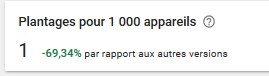
(2 days after deployment my crash rate finally dropped)
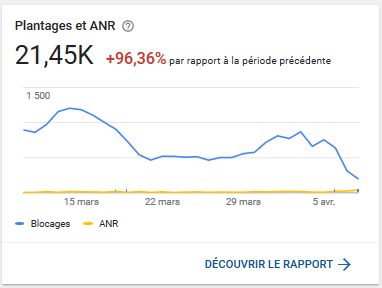
(crash / 1000 device compared to my previous version)

@kasspip Turns out we wrote a blog post about this some time ago: https://ads-developers.googleblog.com/2016/04/handling-android-ad-events-in-unity.html
To achieve this update functionality without booleans however, you can use MobileAdsEventExecutor, and call:
MobileAdsEventExecutor.executeInUpdate(() => <YOUR FUNCTION>
We did have code that did this automatically in the plugin, however this would have the effect of batching all callbacks that occurred when an app is in the background, which was undesirable.

@dominicdev if you have a reproducing sample then please share it and we can evaluate the cause of the issue for you. Better to share on our developer forum as there is a required turnaround time on responses and you can share information privately.
@dominicdev if you have a reproducing sample then please share it and we can evaluate the cause of the issue for you. Better to share on our developer forum as there is a required turnaround time on responses and you can share information privately.
its seems to work now in the latest version last one I tested was v5.1.0
I have wrap every RewardedAd's event with MobileAdsEventExecutor.ExecuteInUpdate and it seem the problem are not persist anymore
Should this SDK consider calling every event in update by default?

I had the same issue and in my case i was changing UI and sending requests to server after OnAdClosed and OnRewardEarned and so the crash happens when i close the ad. I think that the reason is that these changes actually apply before coming back to the app and in that time the app is Paused. So i fixed it by using bool to know that if OnAdClosed and OnRewardEarned are called that then change UI and send requests in OnApplicationPause function like the code below. Note: I send analytics events in OnAdClosed and OnRewardEarned and they work fine without any problem or crash.
    private void OnApplicationPause(bool isPaused)
    {
        if (!isPaused)
        {
            if (_isRewardEarned)
            {
                _onEarnedRewardEvent?.Invoke();
            }
            if (_isRewardedAdClosed)
            {
                _onRewardedAdClosedEvent?.Invoke();
                InitializeNextRewardedAd();
            }
        }
    }

The solution for me was to avoid activating any gameObject which contains a TextMesh component in it. You can use the invoke function to add a delay when you activate it, like this -> Invoke("FunctionName", Time);. Hope it helps you :)
You can disable them without worrying you about it, btw.
