
godot-proposals
 godot-proposals copied to clipboard
 godotengine
Create a new Node called AnimatedTextureRect
Describe the project you are working on: Working on a top-down shooter 2D
Describe the problem or limitation you are having in your project:
I Want to animate the HUD icons, but the current way is very inconvenient:
I Could use AnimatedTexture, but it doesnt support AtlasTexture, so I would have to cut my spritesheet into many pieces and reimport them, and configure AnimatedTexture.
Describe the feature / enhancement and how it helps to overcome the problem or limitation:
Creating a AnimatedTextureRect node that supports:
- AtlasTexture
- Works Like Sprite Node
Describe how your proposal will work, with code, pseudocode, mockups, and/or diagrams:
When dealing with animated stuff 2D Nodes are awesome has a excellent workflow, but the same is not true for Control-derived nodes, things are more tricky. For example, in my case I would like to animate hud this includes these two nodes:
- TextureRect
- TextureProgress
If I was working with 2D I just have to configure spriteframes and voilla:

Or even easier, Sprite3D Nodes has an awesome feature :
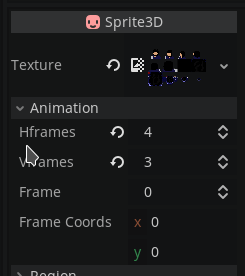
so I think this should be considered for those Control-Derived nodes
If this enhancement will not be used often, can it be worked around with a few lines of script?:
Well, Before Making this topic, I tried to animate a TextureProgress by defining a const array with the region rects and them changing this array's index to each frame, the region changes, but the sprite doesnt update.
So as Far as I know this must be modified on Core.
Is there a reason why this should be core and not an add-on in the asset library?:
This can improve the user's workflow

You could use an AnimatedSprite (or Sprite + AnimationPlayer) as the child of a Control node. This way, you can still use the anchor system.

First Node2D Derived nodes doesnt support scaling:
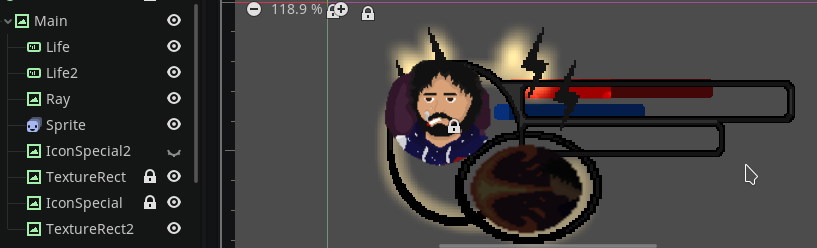
Second,if your tip was really a solution how I'm supposed to animate TextureProgress?
@nonunknown There's a Scale property you can adjust in Sprite. It just won't inherit the parent control's scaling.
(PS: Control scaling should generally only be used for animation purposes, not for anything else.)
You could use an AnimatedSprite (or Sprite + AnimationPlayer) as the child of a Control node. This way, you can still use the anchor system.
Since AnimatedSprite doesn't inherit Control, it doesn't report correct size values for layout when it's a child of a container.
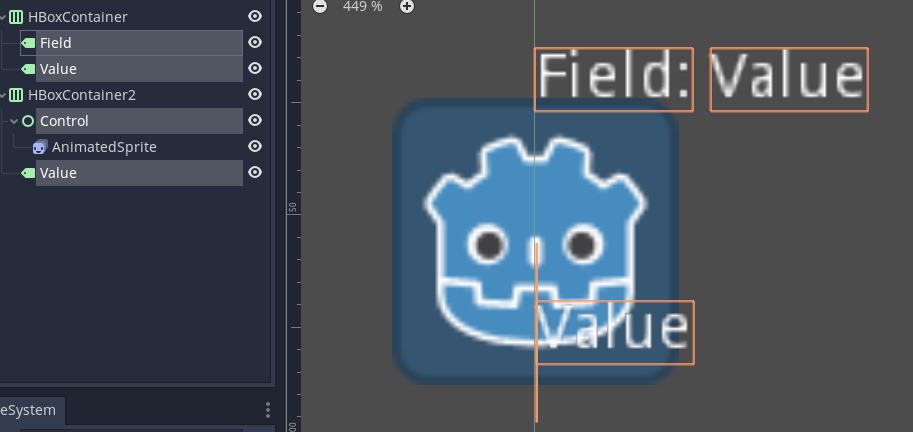

Since AnimatedSprite doesn't inherit Control, it doesn't report correct size values for layout when it's a child of a container.
You can set the parent Control's Rect Min Size to match the AnimatedSprite's size. If this rect size changes at run-time, you can update the Control's Rect Min Size at the same time.
I found that you can use a TextureRect and make a texture resource of AnimatedTexture, then load in each frame, does that work for you? What are any downsides that you can think of?

AnimatedTexture doesn't work if you already have all your frames on a single .png spritesheet. You have to cut all your frames into seperate files and then if you still want a spritesheet you have to reimport it as an AtlasTexture. It's an unnecessary step in the workflow. I don't even use AnimatedSprite, I just draw my spritesheet, throw it in the Sprite, edit the number of frames, and animate the frame property. No reason Tecture_Rect shouldn't work the same.

AnimatedTexture doesn't work if you already have all your frames on a single .png spritesheet. You have to cut all your frames into seperate files
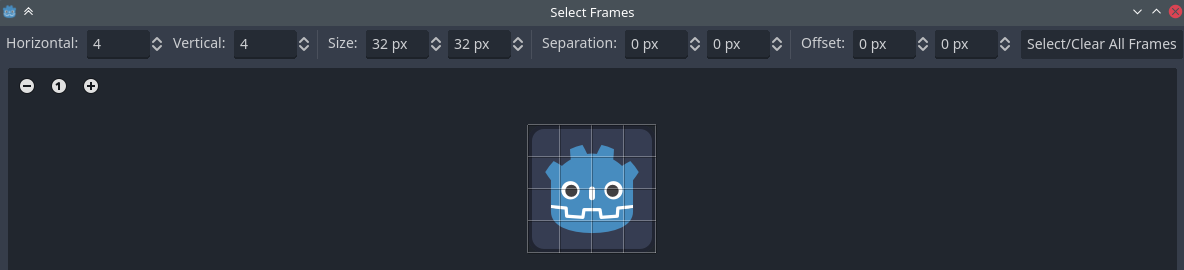

This feature is still lacking in Godot 4, are there plans to add this in newer versions of the engine?

This feature is still lacking in Godot 4, are there plans to add this in newer versions of the engine?
To my knowledge, nobody is currently working on implementing this. That said, there isn't a definitive consensus yet on whether this feature would be merged – there's also https://github.com/godotengine/godot-proposals/issues/1999 which would compete with this proposal. (In theory, we could have both implemented, but in practice, the added complexity may not be worth it. Both proposals already require duplicating functionality already found in Sprite2D and AnimatedSprite2D, leading to a lot of maintenance churn.)
Whether that we can animate a TextureRect directly or have a separate node for that, I think it's needed. I actually ran into an issue where, the AnimatedSprite2D should change size but like a control, and since it doesn't scale with the parent Control (here a Texture rect) it's actually... doesn't fit right. So there no way to have an Animated Icon for example, that may scale according to layout, containers or parent.
Well there is a way technically, but it would need to change the size of each texture in the spritesheet to fit the new Control size, which doesn't seem right, to complexify the operation that much for a mere Animated Control.

I think this feature is important in terms of a consistency of workflow for users. It feels wrong to me to add 2D nodes as children of a control, and if this is an intended workflow it's unintuitive as it stands and will add extra nodes to GUI scene trees for sprite containers which could be avoided if we just had an option for an animated TextureRect. If 2D nodes are intended to be used in GUI trees I think that should be made clear in the Docs because I would have assumed it was bad practice.
I understand the impulse to push back due to additional support needs for a node like this but I think animated UI elements are a pretty common thing that people will want, and the ability to use SpriteFrames in a control node of some sort would cover that in a way that's consistent with the 2D and 3D workflows users already have experience with.

Here's the full AnimatedTextureRext script @Franz-Inc and I created for Rift Riff to address our animation needs in Control nodes. Not at all feature complete, and this node should IMO still be part of the engine... but modifiable as a workaround for ya'll:
class_name AnimatedTextureRect
extends TextureRect

enum StopBehavior {
	STAY_ON_END_FRAME,
	RESET_TO_FIRST_FRAME,
	RESET_TO_EMPTY_FRAME,
}

@export var sprite_frames: SpriteFrames
@export var current_animation: StringName = &"default"
@export var autoplay: bool = false
@export var stop_behavior: StopBehavior = StopBehavior.STAY_ON_END_FRAME

var _is_playing: bool = false
var _timer: float = 0
var _frame_id: int = 0
var _frame_duration: float = 1.0
var _fps: float = 12
var _animation_frame_count: int = 0
var _loop: bool = false


func _ready() -> void:
	if autoplay:
		play()
	else:
		stop()


func _process(delta: float) -> void:
	if not _is_playing:
		return

	_timer += delta
	if _timer >= _frame_duration / _fps:
		_timer -= _frame_duration / _fps
		_increase_frame_id()
		_set_current_frame_texture()


func play(animation_name: StringName = current_animation) -> void:
	if not sprite_frames.has_animation(animation_name):
		push_error("Tried to play an animation named '", animation_name,"' that's not in the sprite frames.")
		_is_playing = false
		return

	current_animation = animation_name
	_timer = 0.0
	_frame_id = 0
	_fps = sprite_frames.get_animation_speed(current_animation)
	_animation_frame_count = sprite_frames.get_frame_count(current_animation)
	_frame_duration = sprite_frames.get_frame_duration(current_animation, _frame_id)
	_loop = sprite_frames.get_animation_loop(current_animation)
	_is_playing = true


func _increase_frame_id() -> void:
	if _frame_id + 1 >= _animation_frame_count:
		if _loop:
			_frame_id = 0
		else:
			stop()
			return
	else:
		_frame_id += 1

	_frame_duration = sprite_frames.get_frame_duration(current_animation, _frame_id)


func _set_current_frame_texture() -> void:
	texture = sprite_frames.get_frame_texture(current_animation, _frame_id)


func resume() -> void:
	_is_playing = true


func pause() -> void:
	_is_playing = false


func stop() -> void:
	_is_playing = false

	if stop_behavior == StopBehavior.STAY_ON_END_FRAME:
		pass
	elif stop_behavior == StopBehavior.RESET_TO_FIRST_FRAME and sprite_frames.has_animation(current_animation):
		_frame_id = 0
		_set_current_frame_texture()
	elif stop_behavior == StopBehavior.RESET_TO_EMPTY_FRAME:
		_frame_id = 0
		texture = null


func is_playing() -> bool:
	return _is_playing
