
FFXIVQuickLauncher
 FFXIVQuickLauncher copied to clipboard
 goatcorp
add new setting to ignore 'IsSteam' argument
Added a new setting (which should be defaulted off) to ignore the 'IsSteam' argument and also do the correct login to get correct startup info (maxExpansion).
I hope this doesnt complicate the code so you guys consider using it.
With regards, Ren Nagasaki

New Information about the Issue can be found here: https://github.com/goatcorp/FFXIVQuickLauncher/issues/1069
Me and a few people I know really need this feature. How do we get it added?


Why do you need it?
So that we can play the steam client with our mogstation accounts. See below thread.
https://github.com/goatcorp/FFXIVQuickLauncher/issues/1128
I believe this PR is just a very roundabout way of initializing the steam api irrespective of license…
Additionally this will still set the steam env variable with the standard windows license, creating a login flow not possible with the vanilla launcher.

I think what they really want could be handled by something like https://github.com/SkyLeite/linux-ffxiv-steam, although I'm not sure if that can init the steam overlay.
This tool, among others, could be integrated into the launcher directly (along with say, wine-discord-ipc-bridge, etc), but would also be a better candidate for work on autolaunching other addons from xlcore, which I know is a bit more involved than on Windows.

Uhm, actually it is totally possible with the vanilla launcher. I tried this PR myself before posting it. All it does is use the normal (Vanilla) way to get the account data and stuff to start FFXIV while still using the Steam API Init. But without it ALWAYS initing Steam. Only when the new setting is set.
So there is like 3 ways to Start the Game. Pure Vanilla. Pure Steam. Or Vanilla while Initing Steam but not trying to get Steam Linked Account Data.
Was talking about this here https://github.com/goatcorp/FFXIVQuickLauncher/blob/f9d4cb95cb487abf4d3bc210afc28b32328ae60c/src/XIVLauncher.Common/Game/Launcher.cs#L248 which is different from just vanilla + init steam. On the windows platform there are only 2 ways to log into the game: vanilla and steam. The steam init does not even have to happen from within XL, but can also from a tool like the one Franz linked above.
Changing this security-critical part of the code and sometimes replacing isSteam with shouldGetSteamLogin and/or ignoreIsSteamArgument can probably lead to unintended side effects (like setting the above env var on non-steam accounts)
Also maybe I am overthinking this but I believe it is confusing for the user (and also developers trying to understand the code there) to check the "LaunchAsSteam" and the "IgnoreIsSteamArgumentCheckBox" together; at least to me it is not obvious which effect on the login this would (or should) have.
Apart from that xlcore does not need that option at all since it already shows the desired behaviour of always initializing steam.
Jeah but Goat (iirc correctly it was him) said that its not intended to be kept that way for the core. It is to be changed later on. Thats why I added the feature there as well. Imo I made sure that no env would be set at all while using the extra setting I added, which is also defaulted to off so no one would use it unwillingly. And while the tool franz linked may work its still another Software needed to be installed (Python) and another Program/Script to start after starting via FF14 launcher. Only for a small tweak not added to the launcher itself. I myself would prefer it to be an option here. Heck I'd also be happy with a startup parameter for the launcher like -InitSteam or sth. where it'll do the neccessary small core bit off initing steam.
Jeah, but in the end I'd just really be happy to finally have a decision about this matter. So I either can be happy or settle on another solution.
With regards, Ren
A Linux distro without python of some version is like a Linux distro without Curl.
A theoretical possibility but incredibly rare in actuality given a large amount of tooling is for a number of distros is written in python.
Any news on this feature? would really love to use the steam features with a windows version account :/

Any news on this feature? would really love to use the steam features with a windows version account :/
As far as I know theres now some kind of functionality integrated into the launcher. All you have to do is install the Free Trial/Base Version via Steam and use the downloaded game there as base for XIVLauncher. Then Steam should start recognizing you playing.
Any news on this feature? would really love to use the steam features with a windows version account :/
As far as I know theres now some kind of functionality integrated into the launcher. All you have to do is install the Free Trial/Base Version via Steam and use the downloaded game there as base for XIVLauncher. Then Steam should start recognizing you playing.
Hello, that is not true. If you own a non-steam account version of FFXIV the launcher or trial launcher on steam will not allow you to sign in. Via SteamEdit we typically use a argument modification is_FFXIV Steam for that very reason so that we can allow the launcher to let us sign in with our FFXIV account and not get the wrong client error. Many of us want to be able to use the FFXIV Client on Steam but need to do a steamedit on every reboot of steam in order to sign into the game its annoying and something that could easily be addressed with a custom launcher just like with other mmorpgs that have the same problem.
Might be able to help you with that, it took me a while to figure out aswell...
In the Launcher Settings there is the option "Start Steam when starting XIVLauncher",
This setting is supposed to allow the steam-overlay when starting ff, yet since you are most probably using the Free Trial version on Steam with a Windows Account, you gotta go into the Launcher Game Settings and activate "Using free trial account". I have no idea why this fixes it, but it might have something to do with the Steam API declining your User for the regular FFXIV Version, since I dont own FFXIV on steam, but have the free trial, which is of course available to anyone.
I cannot guarantee this works across the bar as I've only been able to try it on my machine but it is definitely worth a try
What you can do, as a workaround, is point to %LocalAppData%\XIVLauncher\XIVLauncher.exe %command% in the Steam launch arguments for the FFXIV app. That should make Steam think that it's starting XIV, while it's actually starting XL, counting your hours as usual. You might have to use the full path instead - let me know if this works.
Any news on this feature? would really love to use the steam features with a windows version account :/
As far as I know theres now some kind of functionality integrated into the launcher. All you have to do is install the Free Trial/Base Version via Steam and use the downloaded game there as base for XIVLauncher. Then Steam should start recognizing you playing.
Hello, that is not true. If you own a non-steam account version of FFXIV the launcher or trial launcher on steam will not allow you to sign in. Via SteamEdit we typically use a argument modification is_FFXIV Steam for that very reason so that we can allow the launcher to let us sign in with our FFXIV account and not get the wrong client error. Many of us want to be able to use the FFXIV Client on Steam but need to do a steamedit on every reboot of steam in order to sign into the game its annoying and something that could easily be addressed with a custom launcher just like with other mmorpgs that have the same problem.
You misunderstood me. These are my settings:
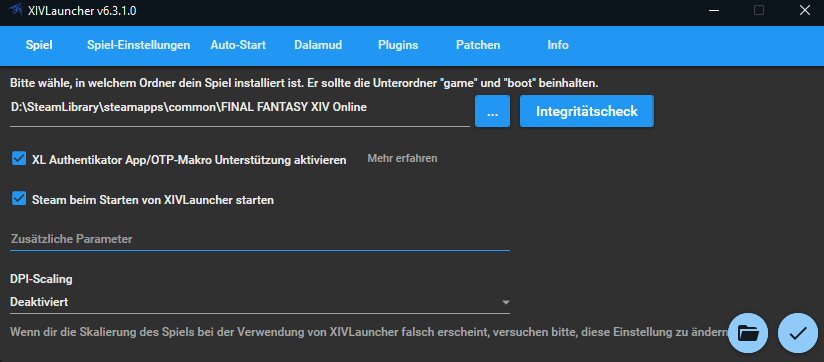
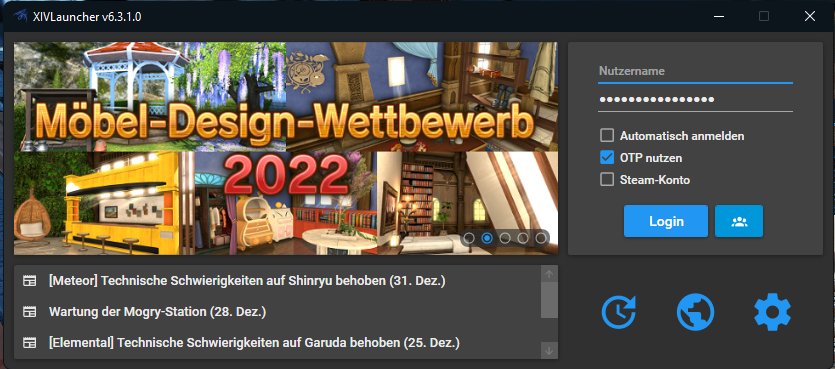
I installed the game via Steam AND via the normal NON STEAM Launcher, then copy pasted the NON STEAM Version on top of the Steam Version und suddenly Steam recognizes the game running even though you play the non Steam Version.