
gitea
 gitea copied to clipboard
 go-gitea
add/feature: button to copy citation file content, in APA and BibTex format, on repo home page
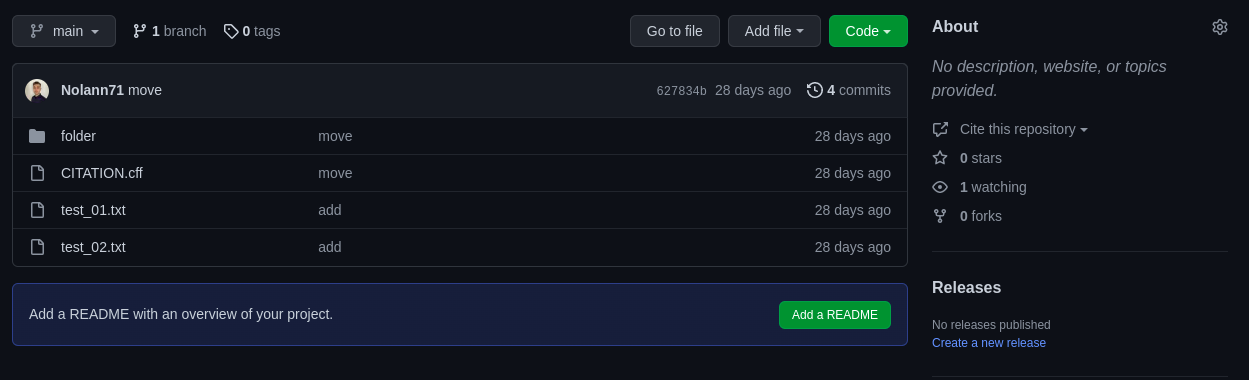
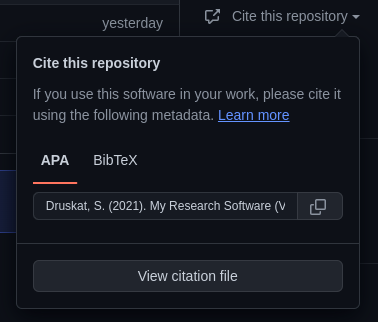
GitHub has a feature to easily copy CITATION.cff content in APA and BibTex format.

This PR impements this result on Gitea:

I had to install front-end library (citation-js) to format cff to APA and BibTex. I tried to do that on back-end but there are not library made for golang.
Possible Improvements
- [ ] Improve citation-js to have better format or code our library to make the conversion on the back-end.
Implement #16825 Signed-off-by: Nolann SABRE [email protected]

Hello @Gusted, I can't launch tests on my machine, I have this error message : "Init storage failed: Put "http://minio:9000/gitea/": dial tcp: lookup minio: no such hostmake: *** [Makefile:423: test-mysql] Error 1". I'm working on my computer based on Fedora36, I have a doubt if it's possible to launch tests on my OS. Have you an idea ?
Thank you
I can't launch tests on my machine, I have this error message : "Init storage failed: Put "http://minio:9000/gitea/": dial tcp: lookup minio: no such hostmake: *** [Makefile:423: test-mysql] Error 1".
Did you enable minio storage in your app.ini file? Also try to use make test-sqlite + make test.
I can't launch tests on my machine, I have this error message : "Init storage failed: Put "http://minio:9000/gitea/": dial tcp: lookup minio: no such hostmake: *** [Makefile:423: test-mysql] Error 1".
Did you enable
miniostorage in your app.ini file? Also try to usemake test-sqlite+make test.
I tried sqlite and pgsql tests and they work. I managed to get the mysql tests to work by running minio on docker, but I think it's not the correct way !?
work. I managed to get the mysql tests to work by running minio on docker, but I think it's not the correct way !?
Yeah indeed not how it should work. You could try to run make clean and then run make test-mysql, but overall I'd recommend running make test-sqlite to test locally the integration functions. CI can deal with the other databases.
work. I managed to get the mysql tests to work by running minio on docker, but I think it's not the correct way !?
Yeah indeed not how it should work. You could try to run
make cleanand then runmake test-mysql, but overall I'd recommend runningmake test-sqliteto test locally the integration functions. CI can deal with the other databases.
But tests that I wasn't passing was only in mysql, mssql and pgsql. In your opinion I run make test-sqlite, I push, and after I wait the result of the push ?
But tests that I wasn't passing was only in
mysql,mssqlandpgsql
You mean on the CI? It could be unrelated changes, we currently experience some flaky tests. We(the maintainers) mostly comment if we see any related error to the PR in the CI.
In your opinion I run
make test-sqlite, I push, and after I wait the result of the push ?
Yeah, database-specific code/fixes are rare for a normal PR like these. So sqlite should do.
But tests that I wasn't passing was only in
mysql,mssqlandpgsqlYou mean on the CI? It could be unrelated changes, we currently experience some flaky tests. We(the maintainers) mostly comment if we see any related error to the PR in the CI.
In your opinion I run
make test-sqlite, I push, and after I wait the result of the push ?Yeah, database-specific code/fixes are rare for a normal PR like these. So sqlite should do.
Okay, thank you for your explainations. Looking forward to your review's feedback.
Hello @Gusted, I'm curious to know your opinion on my work. How soon will I get a feedback ? It's possible to have a quick feedback ? Thank you.
I'm curious to know your opinion on my work. How soon will I get a feedback ? It's possible to have a quick feedback ? Thank you.
I normally don't review (feature) PR's from those unfamiliar with Gitea codebase in the weekend as they take quite longer to review than other PR's.
I'm curious to know your opinion on my work. How soon will I get a feedback ? It's possible to have a quick feedback ? Thank you.
I normally don't review (feature) PR's from those unfamiliar with Gitea codebase in the weekend as they take quite longer to review than other PR's.
Sorry, I didn't mean to disturb you. Now I know and it won't happen again. Thank you very much for your feedback. I will take care of correcting this.
The code looks, however the UI is currently not optimal. How does Gitlab/Github integrate this into their UI?

The code looks, however the UI is currently not optimal. How does Gitlab/Github integrate this into their UI?
Gitlab not integrate this feature, and GitHub integrate this in the "about" section.
Please put this function in a dropdown menu somewhere, it's not often needed so we shouldn't add a always-rendered button, e.g. keep the main view as clean as possible.

Please put this function in a dropdown menu somewhere, it's not often needed so we shouldn't add a always-rendered button, e.g. keep the main view as clean as possible.
This feature is only available when we have a CITATION. Cff file, it's not ok ?
 I'm not seeing other place on the page to display that.
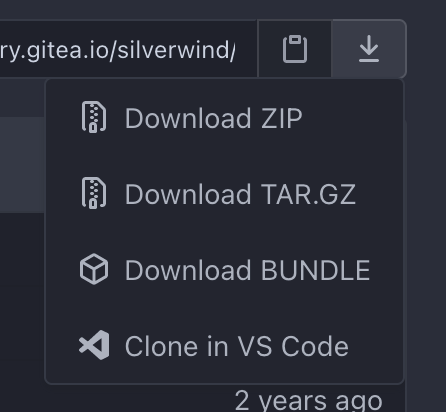
We have too many buttons on that row and we need to actually trim them down. How about renaming this menu to "More Actions", put a hamburger icon on it, and then insert a "Cite this repo" option in there that presents a modal dialog?
We have too many buttons on that row and we need to actually trim them down. How about renaming this menu to "More Actions", put a hamburger icon on it, and then insert a "Cite this repo" option in there that presents a modal dialog?
If I understand, you want to append a menu under « Clone in VsCode », if we click on, we have other menu with the an option « Cite repository » and if we click on, we have a dialog modal ? You think have a dropdown menu in other it’s ok ?
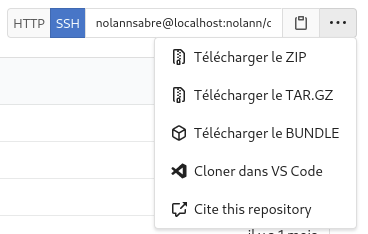
Yes, a entry below VSCode named "Cite this repository", which on click triggers a small Modal with additional content to select and copy the note.
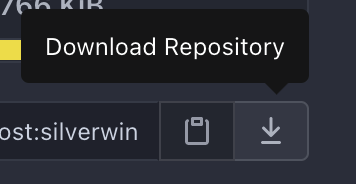
Change the trigger button icon to either https://primer.github.io/octicons/kebab-horizontal-16 or https://primer.github.io/octicons/three-bars-16 and the tooltip to "More Actions" so it makes more sense.
Yes, a entry below VSCode named "Cite this repository", which on click triggers a small Modal with additional content to select and copy the note.
Change the trigger button icon to either https://primer.github.io/octicons/kebab-horizontal-16 or https://primer.github.io/octicons/three-bars-16 and the tooltip to "More Actions" so it makes more sense.
Do you speak about download icon ? And where I need to add « More option » ?
Yes, I meant the download button and associated tooltip:
Okay, I will try to code that tommorow.
When opening the modal, the APA button is being focused which caused the weird coloring. The focusing is even done when the APA style is not preferred.
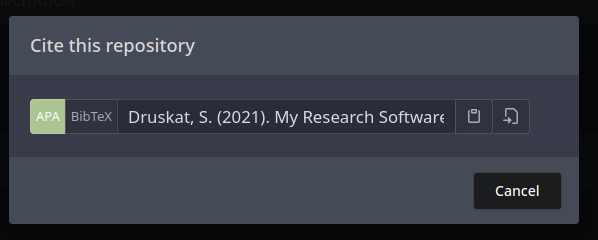
When opening the modal, the APA button is being
focusedwhich caused the weird coloring. The focusing is even done when the APA style is not preferred.
I just used the same components of clone buttons, it's the modal that produce this bug.
When opening the modal, the APA button is being
focusedwhich caused the weird coloring. The focusing is even done when the APA style is not preferred.
I think it's fine if one is focused by default. Ideally it should remember which one, similar to how the clone buttons remember it (IIRC, it's via localStorage).
When opening the modal, the APA button is being
focusedwhich caused the weird coloring. The focusing is even done when the APA style is not preferred.I think it's fine if one is focused by default. Ideally it should remember which one, similar to how the clone buttons remember it (IIRC, it's via localStorage).
Nice, it’s already like the clone button, it remember the last choice.
Tested it, it seems to currently not show the option in a repo with a CITATION.cff file in the root. No JS errors or anything visible. This had worked earlier. Can you reproduce?
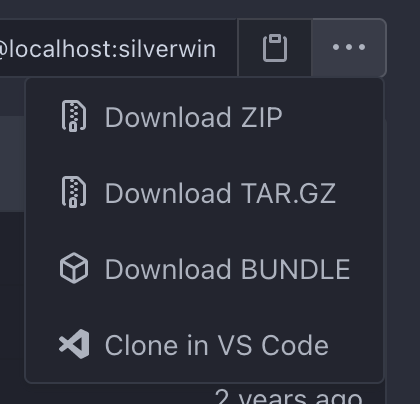
Tested it, it seems to currently not show the option in a repo with a
CITATION.cfffile in the root. No JS errors or anything visible. This had worked earlier. Can you reproduce?
It's work for me, I don't understand why it doesn't on your machine.
Codecov Report
:exclamation: No coverage uploaded for pull request base (
main@7690de5). Click here to learn what that means. The diff coverage is42.55%.
@@           Coverage Diff           @@
##             main   #19999   +/-   ##
=======================================
  Coverage        ?   46.88%
=======================================
  Files           ?      976
  Lines           ?   135266
  Branches        ?        0
=======================================
  Hits            ?    63416
  Misses          ?    64078
  Partials        ?     7772
| Impacted Files | Coverage Δ | |
|---|---|---|
| routers/web/repo/view.go | 41.01% <42.55%> (ø) |
