
Unity
 Unity copied to clipboard
 github-for-unity
Issue on Mac OS X with libsfw.bundle
Description
After Github for Unity is added to a Unity project, you will be prompted multiple times with the OS X App can't be opened because it is from an unidentified developer regarding libsfw.bundle. This happens every time you try to play your project.
This is due to settings on Gatekeeper that prevent applications from running unless they're from the App Store or an Identified Developer.
Steps to Reproduce
- Ensure your Security & Privacy settings in OS X are set to allow apps only from "App Store and Identified Developers" or "App Store"
- Import Github for Unity into your project
- (Optional?) Open up the GitHub window and connect to a repo
- Run your project in any scene
Expected behavior: The game to play without any prompts
Actual behavior: Multiple prompts pop up complaining that libsfw.bundle will not be opened because it's an unidentified developer.
Reproduces how often: 100% If you do launch with Allow app downloaded from "Anywhere", it appears that reproduction rate may be 0% once libsfw.bundle has been launched successfully once.
Additional Information
On earlier versions of OS X you can change your security settings to allow apps from anywhere to run, but as of Sierra this is no longer an option in the settings window.
There is a work around to disable Gatekeeper via the terminal, but it's not very obvious. You must run sudo spctl --master-disable. This will re-add the "Anywhere" option to your security settings window.
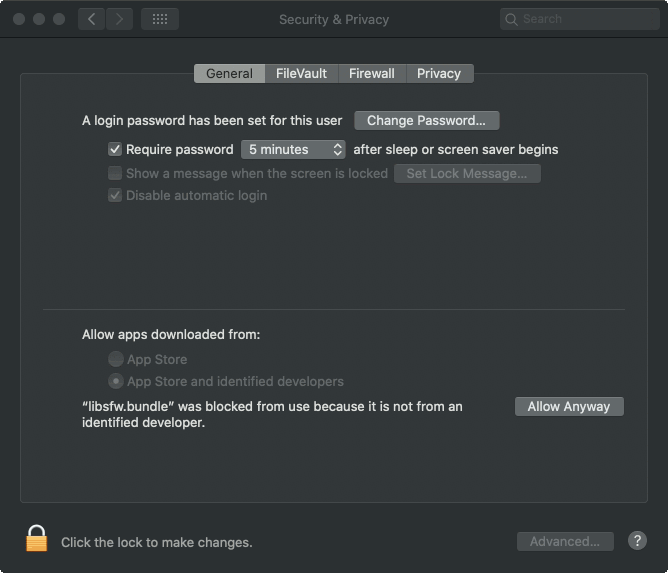
Also note that most applications that trip this setting up will have an option to "open anyways" within the OS X security window. But it won't do anything meaningful when you click "open anyways", and it won't be white listed for future launch requests.


Bump on this? We're looking to integrate this across a large team, but can't have every Mac user getting prompted 4 times in a row whenever they open the Unity project, especially the way the default option (if you hit Enter) being to move it to the bin.
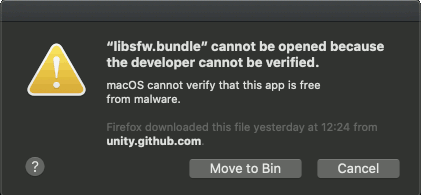

Update: Looks like you can go into System Preferences and click "Allow Anyway:
 ...then you get an "Open" button on the dialog:
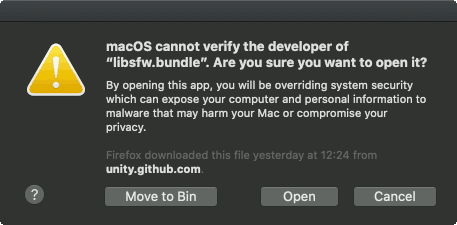 and after this it shouldn't prompt you again.
Any word on this yet? Some enterprise environments forbid the use of the Allow Anyway button for security reasons, I hope the idea isn't to just ignore those environments entirely?

This project is not maintained anymore. The replacement is Git for Unity, at https://github.com/spoiledcat/git-for-unity. If you have GitHub for Unity in your project, remove it first and then install the Git for Unity package, see the README in the link for instructions.
I'll figure out over there how to get the signing done for the library.