
gfx
 gfx copied to clipboard
 gfx-rs
WGPU GL Rendering Artifacts
I'm opening this issue to continue discusion of the rendering artifacts in the WIP gl backend for WGPU: https://github.com/gfx-rs/wgpu/issues/450#issuecomment-681312225.
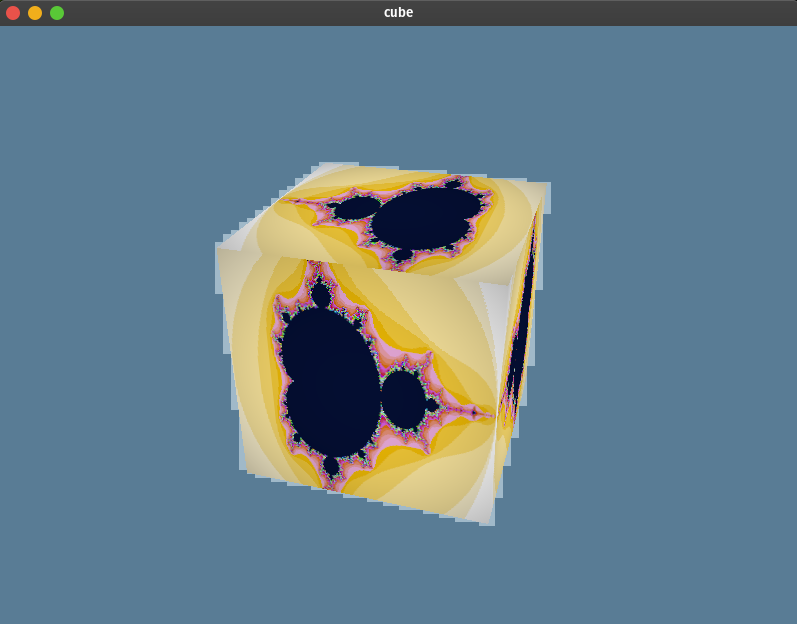
System Setup
I'm not the admin on my system so I can't change this at the moment, but I have to run the demo in a container because my host is missing some package so that it complains that the egl function could not be loaded. Also I'm running a hybrid GPU setup, so programs run on the CPU with a Mesa driver by default, but can optionally be started with the full Nvidia GPU. But I don't know that I can get the Nvidia GPU to work inside of the container so I can only really test how it runs with the Mesa driver right now, assuming I'm understanding the situation properly.
@kvark : So we should experiment. For example, try to bind the swapchain texture as glBindTexture on the surface context before blitting.
Got it, but, what texture am I supposed to bind? It doesn't seem that there are any textures associated to the surface. Maybe that's the problem? The only thing associated to the context seems to be the framebuffers:
pub struct Swapchain {
    // Underlying window, required for presentation
    pub(crate) context: Starc<RwLock<sm::Context>>,
    // Extent because the window lies
    pub(crate) extent: window::Extent2D,
    ///
    pub(crate) fbos: ArrayVec<[native::RawFrameBuffer; 3]>,
}

One way, is to get the texture object (temporarily) via https://docs.rs/surfman/0.3.0/surfman/device/trait.Device.html#tymethod.surface_texture_object
Another way to try is, instead of doing glBindTexture, do glBindFramebuffer(GL_READ_FRAMEBUFFER, ...) on that framebuffer, which should tell the driver to do the same thing.

@kvark I haven't tried any workarounds yet, I'm trying that next, but does it mean anything that the triangle demo works fine?
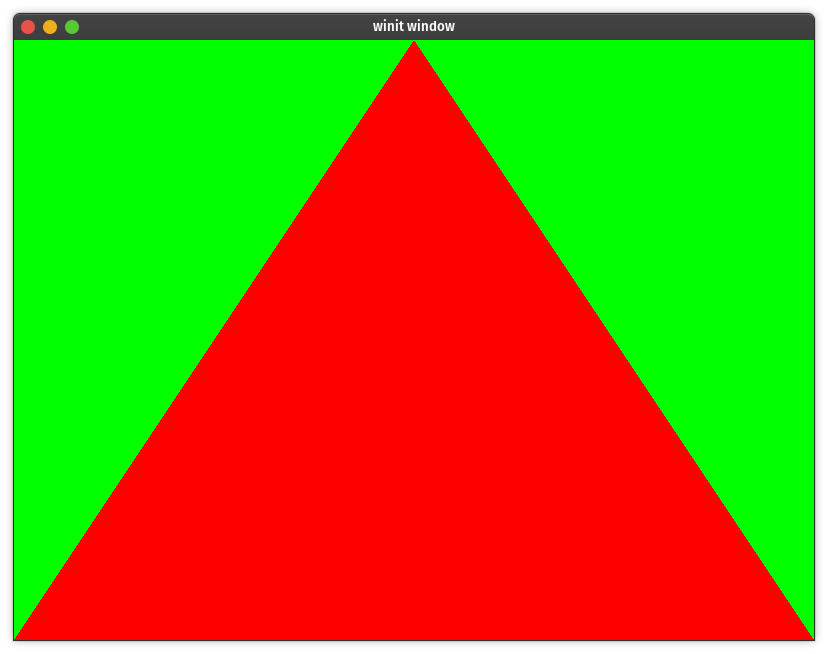
Does that give us any pointers?
OK, and another oddity. All I did was change the clear color in the cube demo from this:
ops: wgpu::Operations {
                        load: wgpu::LoadOp::Clear(wgpu::Color {
                            r: 0.1,
                            g: 0.2,
                            b: 0.3,
                            a: 1.0,
                        }),
                        store: true,
                    },
To this:
ops: wgpu::Operations {
                        load: wgpu::LoadOp::Clear(wgpu::Color {
                            r: 0.,
                            g: 0.,
                            b: 1.,
                            a: 1.0,
                        }),
                        store: true,
                    },
And now it works:

It seems to work as long as that clear color doesn't include any fractional components. If r, g, and b are all either 1 or 0 it works. without artifacts.
I tried doing an extra framebuffer bind on the surface and that didn't work:
// Use the framebuffer from the surfman context
        #[cfg(surfman)]
        let fbo = gl
            .surfman_device
            .read()
            .context_surface_info(&swapchain.context.read())
            .unwrap()
            .unwrap()
            .framebuffer_object;

        unsafe {
            gl.context.bind_framebuffer(glow::READ_FRAMEBUFFER, Some(fbo));
            gl.context.bind_framebuffer(glow::READ_FRAMEBUFFER, Some(swapchain.fbos[index as usize]));
            gl.context.bind_framebuffer(
                glow::DRAW_FRAMEBUFFER,
                #[cfg(surfman)]
                match fbo {
                    0 => None,
                    other => Some(other),
                },
                #[cfg(not(surfman))]
                None,
            );
// Do blit...
Was that what I was supposed to do? It seems like it wont be as easy to try to get the surface texture because that requires taking ownership of the surface and I don't have the surface at that point in the code. ( It would just take a little refactoring probably ).
It seems to work as long as that clear color doesn't include any fractional components. If r, g, and b are all either 1 or 0 it works. without artifacts.
The driver may be doing the clear differently depending on whether the color has this property or not. This isn't helping us, I think.
gl.context.bind_framebuffer(glow::READ_FRAMEBUFFER, Some(fbo)); Was that what I was supposed to do?
no, we'd need to bind that FBO on the swapchain.context (which owns it) instead of gl.context
Just a shot in the air: it appears that FBOs may not be share-able? https://stackoverflow.com/questions/4385655/is-it-possible-to-share-an-opengl-framebuffer-object-between-contexts-threads
In this case, we need to re-create the FBO on the main context using the shared Renderbuffer. To test this, we can even re-create it every frame.
no, we'd need to bind that FBO on the swapchain.context (which owns it) instead of gl.context
If I understand correctly that is what we are doing in this case because we previously set the current context to the swapchain/surface context:
#[cfg(surfman)]
        gl.surfman_device
            .write()
            .make_context_current(&swapchain.context.read())
            .unwrap()
And then we use gl.context to avoid the dereferencing gl which causes the root context to be made the current context. Since gl is just the container, and the swapchain context is the current context, I think that all the operations are being run on the swapchain context at that point.
In this case, we need to re-create the FBO on the main context using the shared Renderbuffer.
What FBO are we re-creating? As I understand currently we have 2 FBO's in question. We have the surface context FBO, which is the one that is tied to the visible screen:
let fbo = gl
            .surfman_device
            .read()
            .context_surface_info(&swapchain.context.read())
            .unwrap()
            .unwrap()
            .framebuffer_object;
That is the one we bind to the DRAW_FRAMEBUFFER before we blit to get the pixels to the screen.
The other FBO is the swapchain FBO which is the READ_FRAMEBUFFER before we blit: swapchain.fbos[index as usize]. This is what I'm assuming is being drawn to throughout the execution of the command buffer or something like that.
Is the swapchain FBO the one we would need to re-create every frame?
If I understand correctly that is what we are doing in this case because we previously set the current context to the swapchain/surface context
Yeah, looks like you are correct. The context at this point is the swapchain context. But my point still stands! We need to bind the result of rendering for reading (either as a texture, or as an FBO) on the context that produced it, which is the main device context. So this experiment still needs to be done.
Is the swapchain FBO the one we would need to re-create every frame?
Let's write this with the idea in mind that FBOs are not shared. Only thing that is shared is the renderbuffer (or RBO). So the device context, which produces the rendering, would need to have an FBO to do so (this would be the FBO that the user creates, like with all the other APIs). But then the swapchain context would have to create its own FBO just to attach that RBO and read/blut from it. Note: this problem is independent on the one discussed in the first half of this comment.
P.S. I wish you could join us on "#gfx:matrix.org"!
Here is the overview of things to try:
- Don't rely on FBOs shared. They aren't supposed to be shared. Only renderbuffers are.
- Try binding the FBO for reading on the device context after the rendering is done.
- Use
ARB_Syncto synchronize the contexts
Here is the overview of things to try:
OK, great. I'll try those out.
P.S. I wish you could join us on "#gfx:matrix.org"!
I know, I'm just behind a white-listed network proxy that doesn't allow Matrix, sorry.
Would you be able to use Telegram as an alternative by any chance? It has a strong story of bypassing firewalls.
No, because it's actually more like my dad's house firewall enforced by the house rules. :smile:
Being that we're dealing with synchronization issues specifically I was kind of thinking that maybe now would be a good time to get rid of Starc completely and actually provide a way around the single threading issue. I'm thinking of solving it by having a worker thread that will own all of the types such as the surfman device that are !Send/!Sync and then sending it closures of work to perform. I'm not sure exactly what that would look like, I'd have to experiment a little.
Do you think that's a reasonable direction? I figured getting the synchronization right and removing FBO sharing might require some refactoring anyway and we are going to need to get rid of Starc eventually right?
Don't worry about Starc yet. It's unlikely relevant to the core of the sync problem you are facing
On Sep 3, 2020, at 21:38, Zicklag [email protected] wrote:
Being that we're dealing with synchronization issues specifically I was kind of thinking that maybe now would be a good time to get rid of Starc completely and actually provide a way around the single threading issue. I'm thinking of solving it by having a worker thread that will own all of the types such as the surfman device that are !Send/!Sync and then sending it closures of work to perform. I'm not sure exactly what that would look like, I'd have to experiment a little.
Do you think that's a reasonable direction? I figured getting the synchronization right and removing FBO sharing might require some refactoring anyway and we are going to need to get rid of Starc eventually right?
— You are receiving this because you were mentioned. Reply to this email directly, view it on GitHub, or unsubscribe.
Don't worry about Starc yet.
Roger that. :+1:
So I just finished setting up a fence that is created in CommandQueue::submit and then waited on right before the blit. It didn't fix anything as far as I can tell, but I've still got to try the non-shared FBO and binding the FBO for reading.
@zicklag have you gotten stuck? Do you need any help investigating this further?
Just last night I think I got my head wrapped around framebuffer and renderbuffers. As soon as I can I'm going to try to create the an FBO each frame before the blit so that we aren't relying on the FBO being shared.
I think I finally get what you meant about that. For a while I didn't realize that just by attaching the FBO to the RBO it would allow us to read from the RBO by doing a blit from the attached FBO. It's starting to make a little more sense. Hopefully I can try that tonight.
If that doesn't work I might need some more help.
OK, so I tried creating the FBO every frame and for some reason I got a black screen. To make sure that I could understand what I'm doing enough to reproduce in a simple environment, I created a small test project here that goes through all of the logical steps that we are doing with the gl backend:
- creating a root context
- creating a surface context shared with the root context
- rendering to the root context on one FBO with an attached RBO
- switching to the surface context and creating a new FBO and attaching it to the same RBO
- and finally blitting onto the surface FBO from the newly created FBO
Thankfully it all worked ( granted with a simple test that just cleared the screen a certain color ). I think that proves that the concept should work and that I'm just missing something to result in a black screen in my gl backend attempt so I'm going to try a bit more at that now.
OK, I fixed the black screen ( simple oversight with identically named variables ), and we've unfortunately got no change in the rendering appearance.
You can check out my pr ( #3375 ) to see if I did that right. I think I did, but if I did then I guess we have to come up with more potential fixes.
Also, if we haven't tried that. Let's call glow.finish() after rendering to the RBO.
@kvark
Just to double-check, you weren't able to reproduce the issue on the quad example? I wonder if the clearing color takes part in this. Could you try changing wgpu-rs example to clear to a simple color (like black)? Could you try changing the quad example to clear to the same color as the cube does?
No I didn't have the issue with the Quad example. Clearing the color to black works without a problem on the cube. I actually tested that earlier: https://github.com/gfx-rs/gfx/issues/3353#issuecomment-683220698. It works as long as all of the R, G, and B values are either 1 or 0.
The quad example seems to work fine with the same clear color as the cube example had:

Ok, thanks. We really really need to reproduce it on the quad example. And also, we need to know precisely what HW and SW is on your platform that reproduces the issue.
And also, we need to know precisely what HW and SW is on your platform that reproduces the issue.
Does this output from the quad demo help?
AdapterInfo { name: "Mesa Intel(R) UHD Graphics (CML GT2)", vendor: 32902, device: 0, device_type: IntegratedGpu }
Memory types: [MemoryType { properties: CPU_VISIBLE | COHERENT | CPU_CACHED, heap_index: 1 }, MemoryType { properties: CPU_VISIBLE | COHERENT, heap_index: 1 }, MemoryType { properties: DEVICE_LOCAL, heap_index: 0 }, MemoryType { properties: DEVICE_LOCAL, heap_index: 0 }]
formats: Some([Rgba8Srgb, Bgra8Srgb])
SwapchainConfig { present_mode: FIFO, composite_alpha_mode: OPAQUE, format: Rgba8Srgb, extent: Extent2D { width: 1024, height: 768 }, image_count: 2, image_layers: 1, image_usage: COLOR_ATTACHMENT }
resized to PhysicalSize { width: 1024, height: 768 }
SwapchainConfig { present_mode: FIFO, composite_alpha_mode: OPAQUE, format: Rgba8Srgb, extent: Extent2D { width: 1024, height: 768 }, image_count: 2, image_layers: 1, image_usage: COLOR_ATTACHMENT }
resized to PhysicalSize { width: 1024, height: 798 }
SwapchainConfig { present_mode: FIFO, composite_alpha_mode: OPAQUE, format: Rgba8Srgb, extent: Extent2D { width: 1024, height: 798 }, image_count: 2, image_layers: 1, image_usage: COLOR_ATTACHMENT }
I don't have glxinfo in the container. Do you know what package installs that command?
Here's glxinfo | grep version on the host using the integrated graphics:
server glx version string: 1.4
client glx version string: 1.4
GLX version: 1.4
    Max core profile version: 4.6
    Max compat profile version: 4.6
    Max GLES1 profile version: 1.1
    Max GLES[23] profile version: 3.2
OpenGL core profile version string: 4.6 (Core Profile) Mesa 20.0.8
OpenGL core profile shading language version string: 4.60
OpenGL version string: 4.6 (Compatibility Profile) Mesa 20.0.8
OpenGL shading language version string: 4.60
OpenGL ES profile version string: OpenGL ES 3.2 Mesa 20.0.8
OpenGL ES profile shading language version string: OpenGL ES GLSL ES 3.20
    GL_EXT_shader_implicit_conversions, GL_EXT_shader_integer_mix,
And here's glxinfo | grep version on the host using the dedicated graphics card ( I haven't been able to run the example on dedicated card yet, I'll have to try installing the packages from this comment https://github.com/gfx-rs/wgpu/issues/450#issuecomment-684778167, but I need to get my system administrator to install those so I can't do it right now ):
server glx version string: 1.4
client glx version string: 1.4
GLX version: 1.4
OpenGL core profile version string: 4.6.0 NVIDIA 440.100
OpenGL core profile shading language version string: 4.60 NVIDIA
OpenGL version string: 4.6.0 NVIDIA 440.100
OpenGL shading language version string: 4.60 NVIDIA
OpenGL ES profile version string: OpenGL ES 3.2 NVIDIA 440.100
OpenGL ES profile shading language version string: OpenGL ES GLSL ES 3.20
    GL_EXT_shader_group_vote, GL_EXT_shader_implicit_conversions,
OK, my admin just installed the missing packages so I could test on the host. There are no jagged edges on the dedicated GPU.