
sentry-dotnet
 sentry-dotnet copied to clipboard
 getsentry
MinimumEventLevel and MinimumBreadcrumbLevel options ignored when configured through AddSentry extension
Package
Sentry.Extensions.Logging
.NET Flavor
.NET
.NET Version
6.0.0
OS
Windows
SDK Version
3.22.0
Self-Hosted Sentry Version
No response
Steps to Reproduce
Console app:
using var loggingFactory = LoggerFactory.Create(builder =>
{
    builder.AddSentry(o => {
        o.Dsn = "<your dsn here>";
        o.MinimumBreadcrumbLevel = LogLevel.Trace;
        o.MinimumEventLevel = LogLevel.Information;
        o.IsGlobalModeEnabled = true;
    });
});


var logger = loggingFactory.CreateLogger<Program>();

// should add a breadcrumb
logger.LogTrace("test trace");

// should send an event to Sentry.io, with the "test trace" breadcrumb above
logger.LogInformation("test information");

// should send a 2nd event to Sentry.io
logger.LogWarning("test warning");
Expected Result
Two events sent to Sentry.io. The first should include a breadcrumb "test trace".
Actual Result
A single event is sent to Sentry.io, with a breadcrumb "test information".


There are two parts to this issue.
1. There only appears to be one event in Sentry.
I was not able to reproduce getting only a single event - in all cases, two events come through. However, they are indeed grouped in the Sentry UI by the default grouping rules. Notice "Events = 2" on the single line

You can drill into the group, and use the older/newer buttons, or click "All Events" to see them in a list:
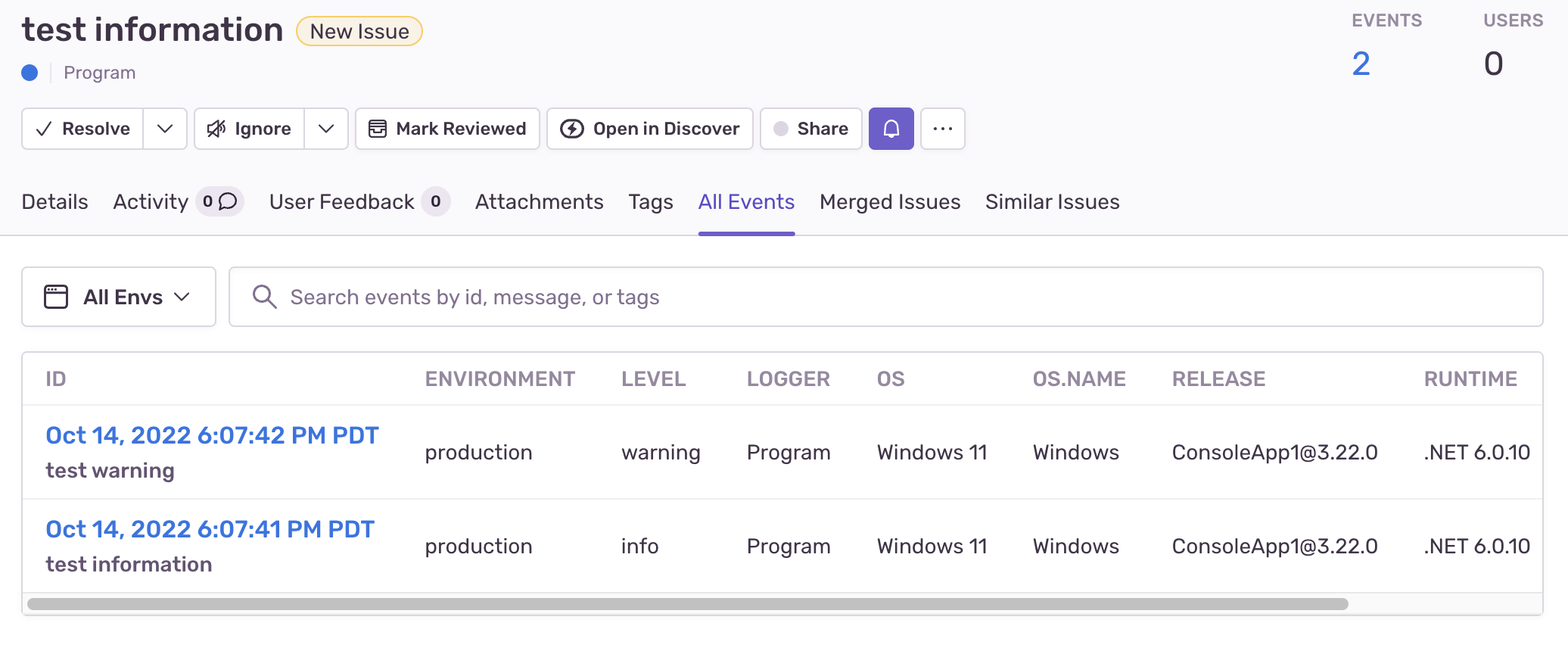
2. Logging options MinimumBreadcrumbLevel and MinimumEventLevel don't appear to be honored.
This is because there is no default logging level being set on on the ILoggingBuilder.
If you were initializing with appsettings.json (or other configuration), then you'd need to have a section outside of Sentry that is like this:
"Logging": {
    "LogLevel": {
      "Default": "Trace"
    }
  },
Since you're using code instead of config, then that is done like so:
using var loggingFactory = LoggerFactory.Create(builder =>
{
    builder.SetMinimumLevel(LogLevel.Trace);

    // and then the rest of the Sentry config
    builder.AddSentry(o => {
        // ...
    });
});
We show the config approach and the code approach in our docs here: https://docs.sentry.io/platforms/dotnet/guides/extensions-logging/#configuration
However, we need to update those docs to include builder.SetMinimumLevel.
Note the default level without specifying is Information. So any logging set at Debug or Trace never reaches the SentryLogger if the default level isn't lowered.
On the first part - If you're actually only getting one event, please let me know and also set o.Debug = true and send the console output. Thanks.
Thinking about this a bit more, while all of the above is the current behavior - I wonder if it would be possible to improve on this. In a scenario where there are other loggers than just Sentry, we'd hopefully not need to set trace-level logging on by default in order for Sentry's logger to pick up trace logs as breadcrumbs. I will investigate to see what's possible within the constraints of Microsoft's logging extensions. Thanks.
Ok, researching more, this was helpful (both "Default log level" and "Filter function" right below it). https://learn.microsoft.com/en-us/dotnet/core/extensions/logging#default-log-level
Thus, instead of SetMinimumLevel, we can use:
builder.AddFilter<SentryLoggerProvider>(_ => true);
That will send all logs to the SentryLogger regardless of level, then our own MinimumBreadcrumbLevel and MinimumEventLevel will always work as expected. I'll see if we can add this to AddSentry so it's the default, but you can add it safely to your own code as well.
Changing my mind about this - it certainly is a bug, not an enhancement. The intent was always that MinimumEventLevel and MinimumBreadcrumbLevel could be set independently of any other logging configuration and would work correctly, but presently it is constrained by the default global log level, or the log level set for a particular component or logging category.
Fixed in #1992, so that the MinimumEventLevel and MinimumBreadcrumbLevel can be set lower than the default.