
geocompy
 geocompy copied to clipboard
 geocompx
Some figures are stretched
Some of the figures are stretched, for example:
https://py.geocompx.org/03-spatial-operations#fig-raster-slope
Interestingly, they look fine in the local version:
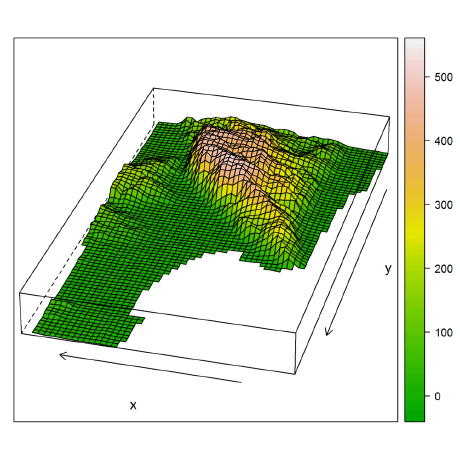

Stretched on my computer at https://py.geocompx.org/03-spatial-operations#fig-raster-slope also.
P.S. The image files themselves are fine, but in the GitHub version for some reason the <img> height HTML property is being set to a specific value, therefore the images appear stretched:
In the local version height isn't set so the images look fine:
So again my only idea is to re-install quarto or check it's settings on GitHub (don't know how to do that, will be happy if you can please help)
Maybe the quarto version on GitHub is different? Just a thought
Yes, that could be it. Will update Quarto version and check again.
However, probably won't be until next week sorry, will asign myself as reminder.
Apparently the issue is exactly the opposite, my local quarto was old :-) After installing the new version today, the figures are stretched locally too for me...
@Robinlovelace does it make sense to use quarto 1.3 on GitHub actions, at least as a temporary solution?
Quarto <1.5 has this bug btw -- https://github.com/geocompx/geocompy/issues/224#issuecomment-2122388111

Still doesn't seem to be fixed, sorry. Let's leave it a few more commits to ensure Docker and website is updated, we can fix in the geocompy .yml file if that doesn't do it.
Update on this: I think it is a Quarto bug, but that that bug persists after v1.5.41:
That is reproducible from inside the latest version of the image defined in our .devcontainer file.
Optimistically closed with upstream commit, let's see if it actually fixes it!
Minor update, can reproduce in devcontainer, going to try with latest version of quarto..
I think the best solution would be an upstream fix: https://github.com/quarto-dev/quarto-cli/issues/9927
Looks like there's a work-around documented by Quarto developer here: https://github.com/quarto-dev/quarto-cli/issues/10146
Can you give that a try if you get a chance @michaeldorman or anyone? It's odd because I thought we had captions and subcaps but not sure...
Looks like there's a work-around documented by Quarto developer here: quarto-dev/quarto-cli#10146
Can you give that a try if you get a chance @michaeldorman or anyone? It's odd because I thought we had captions and subcaps but not sure...
I don't really understand how to implement this fix and what's going on...
The "good" example from the thread you mentioned does work fine standalone:
#| label: fig-test
#| layout-ncol: 2
#| fig-subcap:
#|   - " "
#|   - " "
#| fig-cap: cap
import matplotlib.pyplot as plt
plt.plot([1,23,2,4])
plt.show()

plt.plot([8,65,23,90])
plt.show()
When embedded in our book, it becomes stretched but with digits also stretched only in the local preview:
Anyway, the other figures in our book do contain fig-subcap like you say, and still they are stretched, so I don't see how to implement the solution even if it is indeed a solution.
Also, using plt.subplots(figsize=(x,y)) does affect figure size but the figures still come out stretched, so it doesn't solve the issue either.
Many thanks for testing Michael, I've passed that info on in the upstream issue. I cannot think of any other work-arounds at this point and am hopeful of an upstream fix :pray:
Many thanks for testing Michael, I've passed that info on in the upstream issue. I cannot think of any other work-arounds at this point and am hopeful of an upstream fix 🙏
Maybe waiting for a quarto fix is a good idea. I just noticed that in the PDF version figures are not stretched, so I guess we can leave the HTML as-is for now
Not sure where things stand with this, but it was the first thing I noticed in the mapping chapter where all the 3-panel NZ maps are stretched :(

Not sure where things stand with this, but it was the first thing I noticed in the mapping chapter where all the 3-panel NZ maps are stretched :(
Yes, unfortunately, you're right. I hope that this will be fixed in quarto, otherwise we can avoid using the multi-panel functionality of quarto (i.e., place all panels in the same image file), which will make the code in the book more complicated (after the book is printed). What do you think @Robinlovelace , @Nowosad , @anitagraser ?
This unmerged PR shows a work-around, a bit verbose but worked as far as I recall: https://github.com/geocompx/geocompy/pull/233
This unmerged PR shows a work-around, a bit verbose but worked as far as I recall: #233
Yes, that's what I meant - to use your idea of combining all panels in one plot. But it's not optimal because (1) the code is longer, (2) makes the panels co-dependent, i.e., forces the reader to modify the code if they want to reproduce just one panel, and (3) makes labeling of the panels appear less elegant because the labels are then embedded in the image rather than part of the text. I suggest we can do it after the book is published and we can't find another solution by then
@michaeldorman @Robinlovelace @DOSull update: I think I've fixed the issue.
- I used Robin's reprex -- it helped me discover that while the images are stretched in html, when you open them separately they have a correct aspect ratio
- This suggested that the issue is in the css styling in quarto, not in the rendering
- I added a new tiny css file limiting the maximum width -- https://github.com/geocompx/geocompy/commit/aa9ec72a4fb4e0a9a04ea7a7c22a418bcfbf9348
- Result:
Please double-check if I have not destroyed anything else in the process...
Great fix @Nowosad sounds good to me. Indeed it is the CSS, not the figures themselves. I wonder if your fix could be useful upstream in Quarto..
@michaeldorman @Robinlovelace @DOSull update: I think I've fixed the issue.
1. I used Robin's reprex -- it helped me discover that while the images are stretched in html, when you open them separately they have a correct aspect ratio

2. This suggested that the issue is in the css styling in quarto, not in the rendering

3. I added a new tiny css file limiting the maximum width -- [aa9ec72](https://github.com/geocompx/geocompy/commit/aa9ec72a4fb4e0a9a04ea7a7c22a418bcfbf9348)

4. Result:
Please double-check if I have not destroyed anything else in the process...

Brilliant solution! Thanks @Nowosad , everything looks fine to me now