

 foundry-rs
Publish binaries to NPM
Component
Forge
Describe the feature you would like
I would like to be able to download forge as a binary npm package for easier integration into Frontend and Node applications. I am unclear on if it is even possible to package up forge as a standalone binary
Additional context
I would like to be able to download forge as a binary npm package for easier integration into Frontend and Node applications. As an example, if forge is a part of a build pipeline it becomes very awkward to integrate it into a vercel build.
I am happy to contribute to making this happen but I would need some guidance on
- Is it even possible to package up forge into a binary? Would I have to try to package up foundry-up and then execute foundry-up?
- A pointer to where to look in foundry to get started
My specific use case is Iam working to build a forge inspired ethers.js alternative. User would be able to write forge scripts. The API is similar to this
import { mutate } from 'ts-sol'
import { TransferEntireBalance } from './ERC20.s.sol'

....

<button onClick={() => mutate(TransferEntireBalance, { signer })} />
I want to reuse forge as much as possible but if I can't find a way to get forge on NPM I'm likely going to be forced to reimplement cheat codes into a javascript based VM or hardhat.

there's https://github.com/foundry-rs/hardhat/tree/develop/packages/hardhat-forge
and https://github.com/foundry-rs/hardhat/tree/develop/packages/easy-foundryup

Interesting I don't think hardhat-forge is super useful. We use that at OP Labs and I believe foundry is still a required dependency for it to work.
Easy foundry-up looks promising though. I will dig into that more later
Tried using easy-foundryup in vercel and looks like there are some issues getting foundry to do it's thing on vercel likely because of missing deps in the container
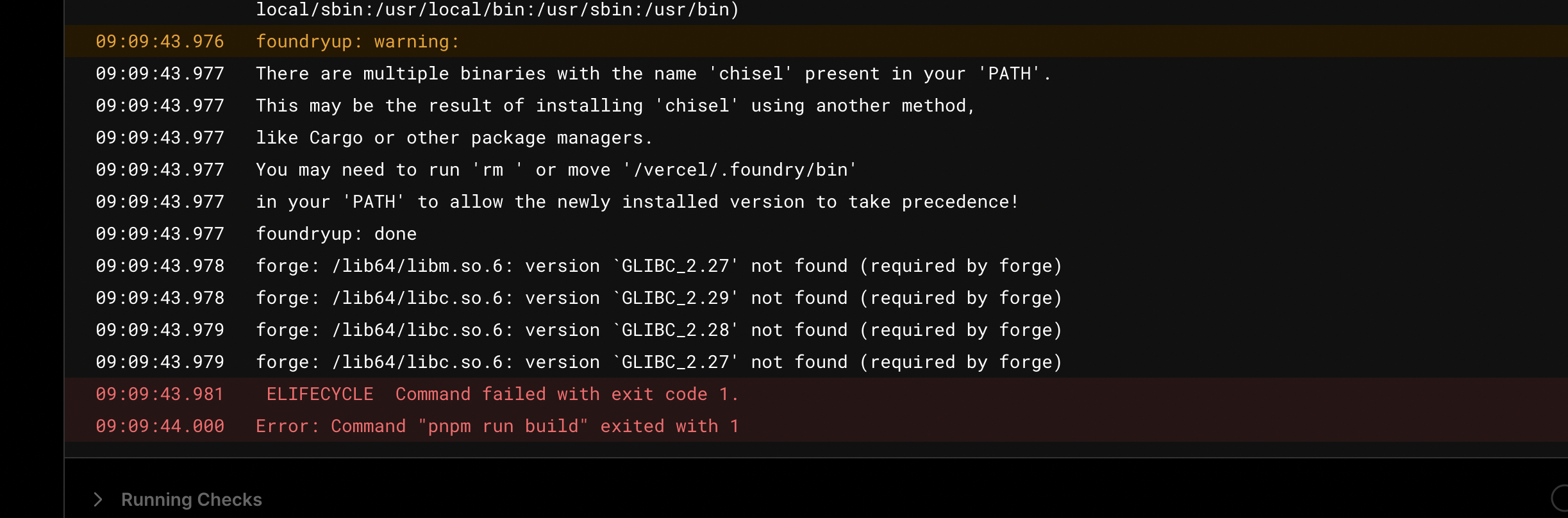 ```
foundryup: done
--
09:09:43.978 | forge: /lib64/libm.so.6: version `GLIBC_2.27' not found (required by forge)
09:09:43.978 | forge: /lib64/libc.so.6: version `GLIBC_2.29' not found (required by forge)
09:09:43.979 | forge: /lib64/libc.so.6: version `GLIBC_2.28' not found (required by forge)
09:09:43.979 | forge: /lib64/libc.so.6: version `GLIBC_2.27' not found (required by forge)
09:09:43.981 | ELIFECYCLE Command failed with exit code 1.
09:09:44.000 | Error: Command "pnpm run build" exited with 1
```
```
foundryup: done
--
09:09:43.978 | forge: /lib64/libm.so.6: version `GLIBC_2.27' not found (required by forge)
09:09:43.978 | forge: /lib64/libc.so.6: version `GLIBC_2.29' not found (required by forge)
09:09:43.979 | forge: /lib64/libc.so.6: version `GLIBC_2.28' not found (required by forge)
09:09:43.979 | forge: /lib64/libc.so.6: version `GLIBC_2.27' not found (required by forge)
09:09:43.981 | ELIFECYCLE Command failed with exit code 1.
09:09:44.000 | Error: Command "pnpm run build" exited with 1
```
My guess is they are using an alpine image that doesn't have the necessary deps.
Vercel is likely using musl. You either need to install glibc or follow these instructions: https://github.com/foundry-rs/foundry#out-of-date-glibc-error-when-running-forge-from-default-foundryup-install
You will not be able to use Forge as you described in your issue though, as Forge is not distributable on npm and is not importable as a module in JavaScript, as we do not support wasm.

@onbjerg you don’t need to be javascript or wasm to be on npm. Any binary can be on npm
Also I’m trying to use forge as a build tool. Using it in the browser, that isn’t what I’m trying to do (yet). I am trying to build a way of using forge like cheat codes in the browser but I’m building that myself in top of Ethereum js. Forge is for building contracts at buildtime not runtime though
Ah - well, bundling to npm is not on the horizon at the moment (we don't bundle to anywhere yet). You can check the foundry-toolchain repository which contains some JavaScript code to download the latest nightly off of GitHub.
Thanks helpful to know the timeline. What I think I will do is use that toolchain to create a NODE18 docker image that anybody can build in for now. It's not perfect, but hopefully works for most folks
FYI you don’t need to bundle anything. You can publish the repository exactly as it is to npm and Github Packages.

Wouldn’t that mean you had to build it though? It takes a very long time to build
Yes, I was commenting on the fact you that bundling is not a requirement to publish to npm or similar registries.
I think having an action that publishes the precompiled binaries which are available in the release page would be nice.
I think it's worth reopening this issue, or otherwise finding a way to enable the following workflow:
I'm using the Wagmi CLI foundry plugin to generate app code from my foundry project. I want to do this at build time on Vercel, so that configuration (like deployed contract addresses) is always up to date.
I imagine this is one of the most common dev setups right now and it doesn't seem like it's possible.

I think it's worth reopening this issue, or otherwise finding a way to enable the following workflow:
I'm using the Wagmi CLI foundry plugin to generate app code from my foundry project. I want to do this at build time on Vercel, so that configuration (like deployed contract addresses) is always up to date.
I imagine this is one of the most common dev setups right now and it doesn't seem like it's possible.
Indeed, I have the same issue. The only alternative now seems to be committing the generated files which is suboptimal.

I agree this issue is still worth reopening. NPM is for distributing anything not just javascript

also this goes for @forge-std package
Good point, cross-linking https://github.com/foundry-rs/forge-std/issues/170
@o-az and I will be looking into this for the next Foundry release
we will not be silenced
I can assure you that it is not our intention for any contributors to feel silenced or unheard, it is just a consequence of tickets going out of focus when they are not applicable / suitable at that point in time. If you feel that this is the case on any tickets feel free to tag me.
Now that we have a proper release flow it makes sense to reconsider and pick up tickets like this.

I am looking into this and I think the best way to do it is as explained in this blog post https://sentry.engineering/blog/publishing-binaries-on-npm#exploring-our-options @o-az and others in discussion, would this make sense? Thanks!

Considering the binaries are indeed quite large, totalling > 250mb zipped for all it is indeed a question whether it makes sense to bundle all versions into one package rather than install dynamically. A binary package I worked on before did not have that issue which is why you could just pick the correct one at runtime.
There are security considerations given that postinstall runs in user space without any sandboxing. Ensuring the integrity of the downloaded binary is very important here. Users can also disable postinstall scripts from running using the --ignore-scripts flag which they are encouraged to.
https://www.nodejs-security.com/blog/npm-ignore-scripts-best-practices-as-security-mitigation-for-malicious-packages
@o-az would this work for you?
IMO the best practices here can been seen in esbuild and is pretty much exactly your plan
- Esbuild publishes 1 npm package for every architecture
- Then they publish the main package
- That main package has a postinstall script
- That package then will dynamically install from npm based on architecture
Note: however that esbuild is doing a lot of work here that you might want to deprioritize.
Now myself as an end user I can npm install the main package for convenience. Or instead I can install directly the package that fits my architecture if I'd rather have control over that process and not run postinstall scripts.
# install the linux-riscv64 architecture but alias it as just esbuild
npm install esbuild@npm:@esbuild/linux-riscv64
I am less familiar with the setup here but a rust specific NPM tool for reference could be rspack since esbuild is go but I believe publishing binaries to NPM is independent of the language so esbuild should be a good reference too
I want to share as a follow up, napi-rs is a way to not only get your package onto NPM but also make it usable within node.js. I would call this nice to have but figured I'd share it as tevm will be using it as we start adding rust packages.
@grandizzy @zerosnacks the TL;DR rephrasing what you shared:
| # | Approach | Pros | Cons |
|---|---|---|---|
| 1 | Use a postinstall script to detect user’s arch and fetch one binary |
Faster download and smaller binary size | Relies on postinstall, which is considered a a potential security risk |
| 2 | Publish all binaries in one tarball | Zero reliance on postinstall; always works |
Package size explodes |
I used to live in camp #2, but the landscape shifted: runtimes now ship hard-coded “trusted dependencies” lists and silently ignore postinstall scripts from unlisted dependencies. Plus they take a trustedDependencies field in package.json.
Examples:
Because of those guardrails, option #1 has become safer than what it used to be.
I’m wrapping up with forge (multi-arch, uses postinstall), here are some sizes:
73.2 MB  darwin-x64/bin/forge
64.8 MB  darwin-arm64/bin/forge
52.1 MB  ~/.config/.foundry/bin/forge  # from foundryup
From a conversation with @pcaversaccio, we must make sure to generate a provenance statement in our release flow; this is similar to our attestation artifacts for our regular binaries. I am not sure if we already do this in the latest version of the proposed workflow.
https://docs.npmjs.com/generating-provenance-statements
https://github.com/pcaversaccio/snekmate/blob/main/.github%2Fworkflows%2Fpublish-npm.yml
It looks like this on NPM: https://www.npmjs.com/package/snekmate#provenance
Reference: https://github.com/OpenZeppelin/openzeppelin-contracts/pull/5644
cc @grandizzy / @o-az