
flutter
 flutter copied to clipboard
 flutter
In SystemUiMode.edgeToEdge overflows widgets outside of viewport
if i use SystemChrome.setEnabledSystemUIMode(SystemUiMode.edgeToEdge) in the deactivate function of a page;other page,The maximum height of Column contains the status bar; page 1:
  @override
  void deactivate() async{
    await SystemChrome.setPreferredOrientations([DeviceOrientation.portraitUp]);
    await SystemChrome.setEnabledSystemUIMode(SystemUiMode.edgeToEdge);
    super.deactivate();
  }
page 2:
@override
  Widget build(BuildContext context) {
    return Column(
      mainAxisAlignment: MainAxisAlignment.start,
      children: [
        Expanded(child: ListView.builder(
            itemCount: 100,
            itemBuilder: (BuildContext context, int index){
              return Text("index",style: TextStyle(color: Colors.red),);
        })),
        ConstrainedBox(constraints: BoxConstraints(minHeight: 100.rpx),child: MachineChatInput(),)
      ],
    );
  }
| Actual results | Expected results |
|---|---|
 |
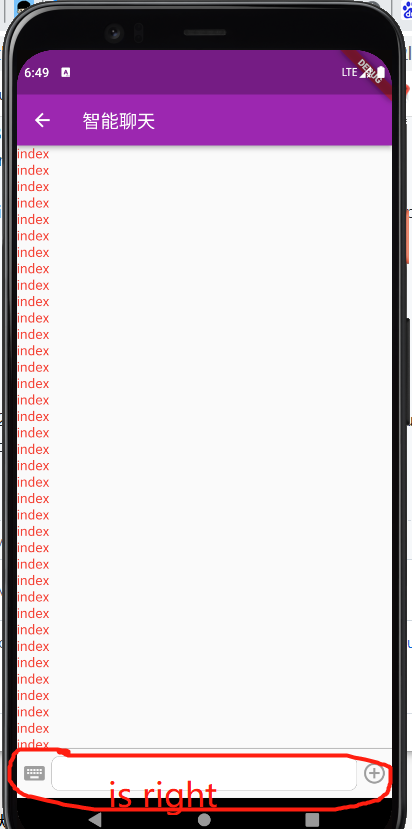 |

await SystemChrome.setEnabledSystemUIMode(SystemUiMode.edgeToEdge);
@lalLAL95828 Not sure why would you make that initialization in deactivate method, That method won't be executed unless the widget is removed from the widget tree. In edge to edge mode, I see the Column Displaying all the contents.
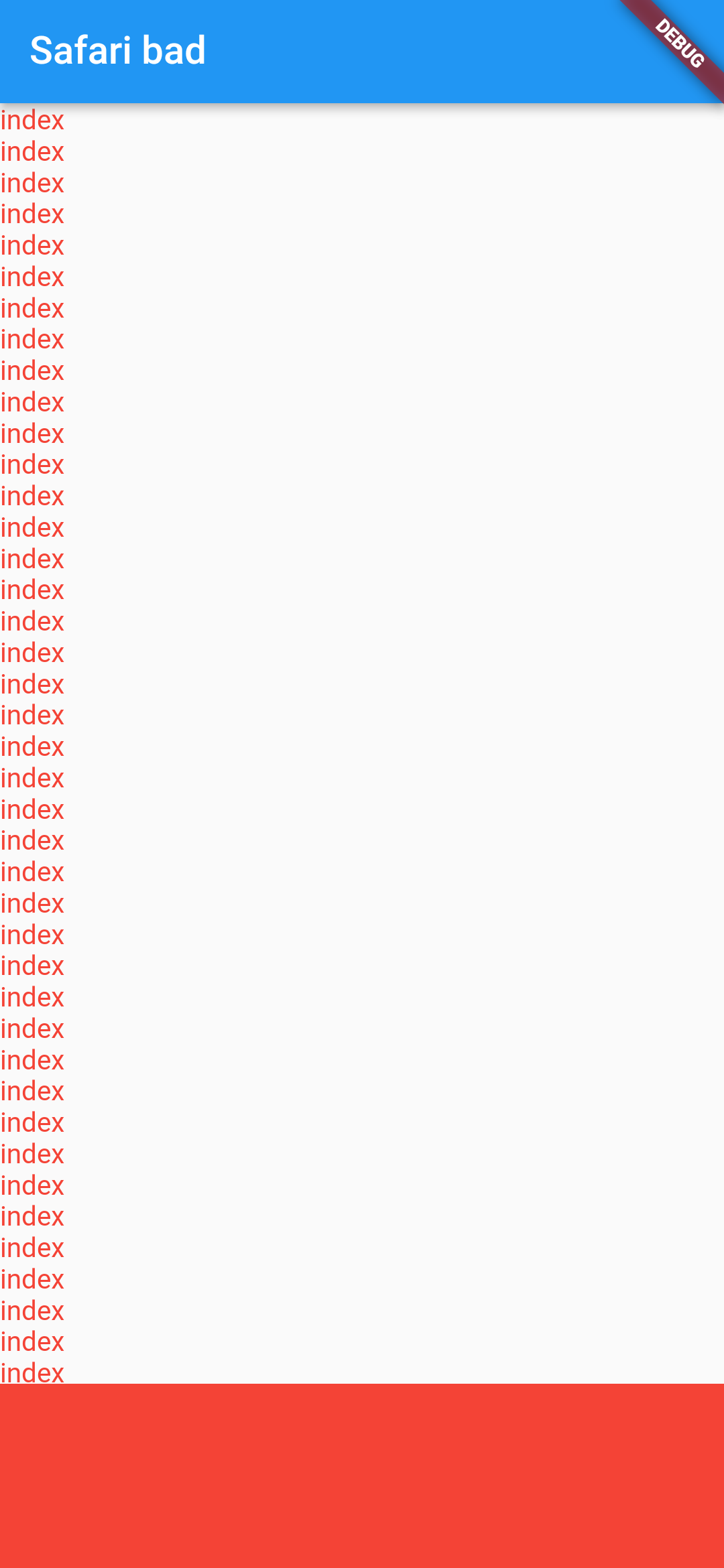
Please share your output of flutter doctor -v along with the complete code sample.
code sample
import 'package:flutter/material.dart';
import 'package:flutter/services.dart';

Future<void> main() async {
  // await SystemChrome.setPreferredOrientations([DeviceOrientation.portraitUp]);
  WidgetsFlutterBinding.ensureInitialized();
  await SystemChrome.setEnabledSystemUIMode(SystemUiMode.edgeToEdge)
      .then((value) => runApp(const MyApp()));
}

class MyApp extends StatelessWidget {
  const MyApp({Key? key}) : super(key: key);

  @override
  Widget build(BuildContext context) {
    return MaterialApp(
      title: 'Flutter Demo',
      theme: ThemeData(
        primarySwatch: Colors.blue,
      ),
      home: const MyHomePage(),
    );
  }
}


class MyHomePage extends StatefulWidget {
  const MyHomePage({Key? key}) : super(key: key);

  @override
  State<MyHomePage> createState() => _MyHomePageState();
}

class _MyHomePageState extends State<MyHomePage> {

  @override
  Widget build(BuildContext context) {
    return Scaffold(
        appBar: AppBar(
          title: const Text('Safari bad'),
        ),
        body: Column(
          mainAxisAlignment: MainAxisAlignment.start,
          children: [
            Expanded(
                child: ListView.builder(
                    itemCount: 100,
                    itemBuilder: (BuildContext context, int index) {
                      return Text(
                        "index",
                        style: TextStyle(color: Colors.red),
                      );
                    })),
            ConstrainedBox(
              constraints: BoxConstraints(minHeight: 100),
              child: MachineChatInput(),
            )
          ],
        ));
  }
}

class MachineChatInput extends StatelessWidget {
  const MachineChatInput({Key? key}) : super(key: key);

  @override
  Widget build(BuildContext context) {
    return Container(
      height: 100,
      color: Colors.red,
    );
  }
}
flutter doctor -v
[✓] Flutter (Channel stable, 2.5.3, on macOS 12.0.1 21A559 darwin-arm, locale en-GB)
    • Flutter version 2.5.3 at /Users/mahesh/Documents/flutter
    • Upstream repository https://github.com/flutter/flutter.git
    • Framework revision 18116933e7 (12 days ago), 2021-10-15 10:46:35 -0700
    • Engine revision d3ea636dc5
    • Dart version 2.14.4

[✓] Android toolchain - develop for Android devices (Android SDK version 31.0.0)
    • Android SDK at /Users/mahesh/Library/Android/sdk
    • Platform android-31, build-tools 31.0.0
    • ANDROID_HOME = /Users/mahesh/Library/Android/sdk
    • Java binary at: /Applications/Android Studio.app/Contents/jre/jdk/Contents/Home/bin/java
    • Java version OpenJDK Runtime Environment (build 11.0.8+10-b944.6916264)
    • All Android licenses accepted.

[✓] Xcode - develop for iOS and macOS
    • Xcode at /Applications/Xcode.app/Contents/Developer
    • Xcode 13.0, Build version 13A233
    • CocoaPods version 1.10.2

[✓] Chrome - develop for the web
    • Chrome at /Applications/Google Chrome.app/Contents/MacOS/Google Chrome

[✓] Android Studio (version 4.2)
    • Android Studio at /Applications/Android Studio.app/Contents
    • Flutter plugin can be installed from:
      🔨 https://plugins.jetbrains.com/plugin/9212-flutter
    • Dart plugin can be installed from:
      🔨 https://plugins.jetbrains.com/plugin/6351-dart
    • Java version OpenJDK Runtime Environment (build 11.0.8+10-b944.6916264)

[✓] IntelliJ IDEA Community Edition (version 2021.2.1)
    • IntelliJ at /Applications/IntelliJ IDEA CE.app
    • Flutter plugin version 60.1.4
    • Dart plugin version 212.5080.8

[✓] VS Code (version 1.59.1)
    • VS Code at /Applications/Visual Studio Code.app/Contents
    • Flutter extension version 3.27.0

[✓] Connected device (4 available)
    • Redmi K20 Pro (mobile)    • d9dac45d      • android-arm64  • Android 11 (API 30)
    • sdk gphone arm64 (mobile) • emulator-5554 • android-arm64  • Android 11 (API 30) (emulator)
    • macOS (desktop)           • macos         • darwin-arm64   • macOS 12.0.1 21A559 darwin-arm
    • Chrome (web)              • chrome        • web-javascript • Google Chrome 95.0.4638.54

• No issues found!
Thanks

flutter doctor -v
[√] Flutter (Channel stable, 2.5.1, on Microsoft Windows [Version 10.0.19042.1288], locale zh-CN)
    • Flutter version 2.5.1 at D:\flutter\flutter
    • Upstream repository https://github.com/flutter/flutter.git
    • Framework revision ffb2ecea52 (6 weeks ago), 2021-09-17 15:26:33 -0400
    • Engine revision b3af521a05
    • Dart version 2.14.2
    • Pub download mirror https://pub.flutter-io.cn
    • Flutter download mirror https://storage.flutter-io.cn

[√] Android toolchain - develop for Android devices (Android SDK version 30.0.0)
    • Android SDK at C:\Users\14456\AppData\Local\Android\Sdk
    • Platform android-30, build-tools 30.0.0
    • ANDROID_HOME = C:\Users\14456\AppData\Local\Android\Sdk
    • Java binary at: D:\softAndroidStudioSettings\jre\bin\java
    • Java version OpenJDK Runtime Environment (build 11.0.8+10-b944.6842174)
    • All Android licenses accepted.

[√] Chrome - develop for the web
    • Chrome at C:\Program Files (x86)\Google\Chrome\Application\chrome.exe

[√] Android Studio (version 4.2)
    • Android Studio at D:\softAndroidStudioSettings
    • Flutter plugin can be installed from:
       https://plugins.jetbrains.com/plugin/9212-flutter
    • Dart plugin can be installed from:
       https://plugins.jetbrains.com/plugin/6351-dart
    • Java version OpenJDK Runtime Environment (build 11.0.8+10-b944.6842174)

[√] IntelliJ IDEA Ultimate Edition (version 2020.3)
    • IntelliJ at D:\softIdealU\IntelliJ IDEA 2020.3.2
    • Flutter plugin can be installed from:
       https://plugins.jetbrains.com/plugin/9212-flutter
    • Dart plugin can be installed from:
       https://plugins.jetbrains.com/plugin/6351-dart

[√] Connected device (3 available)
    • Android SDK built for x86 (mobile) • emulator-5554 • android-x86    • Android 11 (API 30) (emulator)
    • Chrome (web)                       • chrome        • web-javascript • Google Chrome 94.0.4606.81
    • Edge (web)                         • edge          • web-javascript • Microsoft Edge 94.0.992.50

• No issues found!
this is my app flutter-douban-master.zip
Please set main.dart under info folder as the main file for running.

When you open this app for the first time, if you directly open the fifth bottomnavigationbaritem, the sub page you can see is like this.

If you first open the video under the second bottomnavigationbaritem and play a video,

the column will display abnormally after you open the sub page under the fifth bottomnavigationbaritem

I compared the difference between the two operations, that is, I set systemchrome. Setenabledsystemuimode (systemuimode. Edgetoedge) in deactiva
 te
te
@lalLAL95828 I ran your application with info/main.dart as the root file and see this

Can you please create a project containing minimal reproducible code and share the reproducible steps?
Thanks
code sample
import 'package:flutter/material.dart';
import 'package:flutter/services.dart';

void main()=>runApp(MyApp());

List widgetList = [VideoPlay(),ColumnTest()];


class MyApp extends StatefulWidget {

  const MyApp({Key? key}) : super(key: key);

  @override
  State<MyApp> createState() => _MyAppState();
}

class _MyAppState extends State<MyApp> {
  static int _chooseIndex = 0;
  @override
  Widget build(BuildContext context) {
    return MaterialApp(
      title: "lal Test",
      home:Scaffold(
        appBar: AppBar(
          title: Text("home"),
        ),
        body:widgetList[_chooseIndex],
        bottomNavigationBar: BottomNavigationBar(
          //item超过3个,配置此项可以去除点击动画
          type: BottomNavigationBarType.fixed,
          onTap: (int index) {
            setState(() {
              _chooseIndex = index;
            });
          },
          showUnselectedLabels: true,
          currentIndex: _chooseIndex,
          items: [
            BottomNavigationBarItem(
              icon: Icon(Icons.home),
              label: "videoPlay",
            ),
            BottomNavigationBarItem(
              icon: Icon(Icons.people),
              label: "column",
            ),
          ],
        ),
      )
    );
  }
}

class VideoPlay extends StatefulWidget {
  const VideoPlay({Key? key}) : super(key: key);

  @override
  _VideoPlayState createState() => _VideoPlayState();
}

class _VideoPlayState extends State<VideoPlay> {
  @override
  Widget build(BuildContext context) {
    return Container(
      child: ElevatedButton(
          onPressed:(){
            Navigator.of(context).push(MaterialPageRoute(builder: (ctx){
                return VideoHasDeactivate();
            }));

          },
        child: Text("A button"),
      ),
    );
  }
}
class VideoHasDeactivate extends StatefulWidget {
  const VideoHasDeactivate({Key? key}) : super(key: key);

  @override
  _VideoHasDeactivateState createState() => _VideoHasDeactivateState();
}
class _VideoHasDeactivateState extends State<VideoHasDeactivate> {
  @override
  Widget build(BuildContext context) {
    return Scaffold(
      appBar: AppBar(
        title: Text("do Deactivate"),
      ),
    );
  }

  @override
  void deactivate() {
    SystemChrome.setPreferredOrientations([DeviceOrientation.portraitUp]);
    //TODO bug
    SystemChrome.setEnabledSystemUIMode(SystemUiMode.edgeToEdge);
    super.deactivate();
  }
}


class ColumnTest extends StatefulWidget {
  const ColumnTest({Key? key}) : super(key: key);

  @override
  _ColumnTestState createState() => _ColumnTestState();
}

class _ColumnTestState extends State<ColumnTest> {
  @override
  Widget build(BuildContext context) {
    return Container(
      child: ElevatedButton(
        onPressed:(){
          Navigator.of(context).push(MaterialPageRoute(builder: (ctx){
            return ColumnShow();
          }));

        },
        child: Text("B button"),
      ),
    );
  }
}

class ColumnShow extends StatefulWidget {
  const ColumnShow({Key? key}) : super(key: key);

  @override
  _ColumnShowState createState() => _ColumnShowState();
}

class _ColumnShowState extends State<ColumnShow> {
  @override
  Widget build(BuildContext context) {
    return Scaffold(
      appBar: AppBar(
        title: Text("column height problem"),
      ),
      body: Column(
        mainAxisAlignment: MainAxisAlignment.start,
        children: [
          Expanded(child: ListView.builder(

              itemCount:200 ,
              itemBuilder: (BuildContext context, int index){
                return Text("${index}");
              })),
          Container(
            height: 50,
            color: Colors.red,
            child:Text("can hide or show"),
          )
        ],
      ),
    );
  }
}
I wrote a demo to run directly. You can click button A on the home page, and then click button B on the column page. You will find that there is a problem with the height of the column in the open page. Of course, if you have not clicked button A, there will be no problem,Thanks for your help

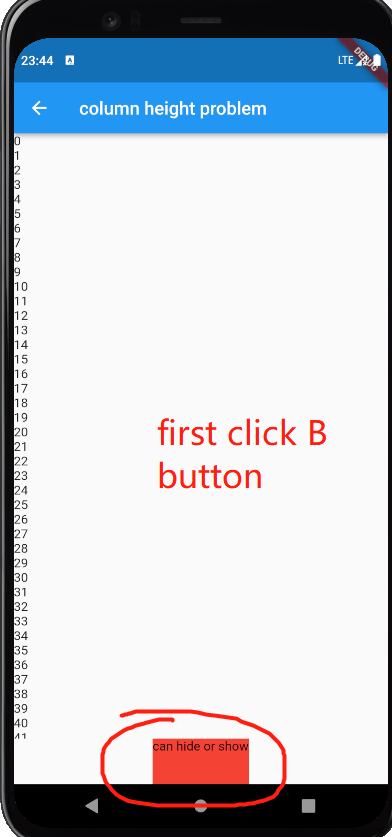
@lalLAL95828 Thanks for the code sample, I can reproduce the issue, after enabling
SystemChrome.setEnabledSystemUIMode(SystemUiMode.edgeToEdge);
The content from the column is getting out of the viewport.
https://user-images.githubusercontent.com/31410839/139247325-097ef9ec-251f-4052-a230-ad825d74d947.mov
code sample
import 'package:flutter/material.dart';
import 'package:flutter/services.dart';

void main() => runApp(MyApp());

List widgetList = [VideoPlay(), ColumnTest()];

class MyApp extends StatefulWidget {
  const MyApp({Key? key}) : super(key: key);

  @override
  State<MyApp> createState() => _MyAppState();
}

class _MyAppState extends State<MyApp> {
  static int _chooseIndex = 0;
  @override
  Widget build(BuildContext context) {
    return MaterialApp(
        title: "lal Test",
        home: Scaffold(
          appBar: AppBar(
            title: Text("home"),
          ),
          body: widgetList[_chooseIndex],
          bottomNavigationBar: BottomNavigationBar(
            //item超过3个,配置此项可以去除点击动画
            type: BottomNavigationBarType.fixed,
            onTap: (int index) {
              setState(() {
                _chooseIndex = index;
              });
            },
            showUnselectedLabels: true,
            currentIndex: _chooseIndex,
            items: [
              BottomNavigationBarItem(
                icon: Icon(Icons.home),
                label: "videoPlay",
              ),
              BottomNavigationBarItem(
                icon: Icon(Icons.people),
                label: "column",
              ),
            ],
          ),
        ));
  }
}

class VideoPlay extends StatefulWidget {
  const VideoPlay({Key? key}) : super(key: key);

  @override
  _VideoPlayState createState() => _VideoPlayState();
}

class _VideoPlayState extends State<VideoPlay> {
  @override
  Widget build(BuildContext context) {
    return Container(
      child: ElevatedButton(
        onPressed: () {
          Navigator.of(context).push(MaterialPageRoute(builder: (ctx) {
            return VideoHasDeactivate();
          }));
        },
        child: Text("A button"),
      ),
    );
  }
}

class VideoHasDeactivate extends StatefulWidget {
  const VideoHasDeactivate({Key? key}) : super(key: key);

  @override
  _VideoHasDeactivateState createState() => _VideoHasDeactivateState();
}

class _VideoHasDeactivateState extends State<VideoHasDeactivate> {
  @override
  Widget build(BuildContext context) {
    return Scaffold(
      appBar: AppBar(
        title: Text("do Deactivate"),
      ),
    );
  }

  @override
  void deactivate() {
    SystemChrome.setPreferredOrientations([DeviceOrientation.portraitUp]);
    //TODO bug
    SystemChrome.setEnabledSystemUIMode(SystemUiMode.edgeToEdge);
    super.deactivate();
  }
}

class ColumnTest extends StatefulWidget {
  const ColumnTest({Key? key}) : super(key: key);

  @override
  _ColumnTestState createState() => _ColumnTestState();
}

class _ColumnTestState extends State<ColumnTest> {
  @override
  Widget build(BuildContext context) {
    return Container(
      child: ElevatedButton(
        onPressed: () {
          Navigator.of(context).push(MaterialPageRoute(builder: (ctx) {
            return ColumnShow();
          }));
        },
        child: Text("B button"),
      ),
    );
  }
}

class ColumnShow extends StatefulWidget {
  const ColumnShow({Key? key}) : super(key: key);

  @override
  _ColumnShowState createState() => _ColumnShowState();
}

class _ColumnShowState extends State<ColumnShow> {
  @override
  Widget build(BuildContext context) {
    return Scaffold(
      appBar: AppBar(
        title: Text("column height problem"),
      ),
      body: Column(
        mainAxisAlignment: MainAxisAlignment.start,
        children: [
          Expanded(
              child: ListView.builder(
                  itemCount: 200,
                  itemBuilder: (BuildContext context, int index) {
                    return Text("${index}");
                  })),
          Container(
            height: 50,
            color: Colors.red,
            child: Text("can hide or show"),
          )
        ],
      ),
    );
  }
}
flutter doctor -v
[✓] Flutter (Channel master, 2.6.0-12.0.pre.478, on macOS 12.0.1 21A559 darwin-arm, locale en-GB)
    • Flutter version 2.6.0-12.0.pre.478 at /Users/mahesh/Documents/flutter_master
    • Upstream repository https://github.com/flutter/flutter.git
    • Framework revision abecef6ed3 (32 hours ago), 2021-10-26 20:31:29 -0700
    • Engine revision 925bae45ee
    • Dart version 2.15.0 (build 2.15.0-250.0.dev)

[✓] Android toolchain - develop for Android devices (Android SDK version 31.0.0)
    • Android SDK at /Users/mahesh/Library/Android/sdk
    • Platform android-31, build-tools 31.0.0
    • ANDROID_HOME = /Users/mahesh/Library/Android/sdk
    • Java binary at: /Applications/Android Studio.app/Contents/jre/jdk/Contents/Home/bin/java
    • Java version OpenJDK Runtime Environment (build 11.0.8+10-b944.6916264)
    • All Android licenses accepted.

[✓] Xcode - develop for iOS and macOS (Xcode 13.0)
    • Xcode at /Applications/Xcode.app/Contents/Developer
    • CocoaPods version 1.10.2

[✓] Chrome - develop for the web
    • Chrome at /Applications/Google Chrome.app/Contents/MacOS/Google Chrome

[✓] Android Studio (version 4.2)
    • Android Studio at /Applications/Android Studio.app/Contents
    • Flutter plugin can be installed from:
      🔨 https://plugins.jetbrains.com/plugin/9212-flutter
    • Dart plugin can be installed from:
      🔨 https://plugins.jetbrains.com/plugin/6351-dart
    • Java version OpenJDK Runtime Environment (build 11.0.8+10-b944.6916264)

[✓] IntelliJ IDEA Community Edition (version 2021.2.1)
    • IntelliJ at /Applications/IntelliJ IDEA CE.app
    • Flutter plugin version 60.1.4
    • Dart plugin version 212.5080.8

[✓] VS Code (version 1.59.1)
    • VS Code at /Applications/Visual Studio Code.app/Contents
    • Flutter extension version 3.27.0

[✓] Connected device (3 available)
    • Redmi K20 Pro (mobile) • d9dac45d • android-arm64  • Android 11 (API 30)
    • macOS (desktop)        • macos    • darwin-arm64   • macOS 12.0.1 21A559 darwin-arm
    • Chrome (web)           • chrome   • web-javascript • Google Chrome 95.0.4638.54

• No issues found!
[✓] Flutter (Channel stable, 2.5.3, on macOS 12.0.1 21A559 darwin-arm, locale en-GB)
    • Flutter version 2.5.3 at /Users/mahesh/Documents/flutter
    • Upstream repository https://github.com/flutter/flutter.git
    • Framework revision 18116933e7 (13 days ago), 2021-10-15 10:46:35 -0700
    • Engine revision d3ea636dc5
    • Dart version 2.14.4

[✓] Android toolchain - develop for Android devices (Android SDK version 31.0.0)
    • Android SDK at /Users/mahesh/Library/Android/sdk
    • Platform android-31, build-tools 31.0.0
    • ANDROID_HOME = /Users/mahesh/Library/Android/sdk
    • Java binary at: /Applications/Android Studio.app/Contents/jre/jdk/Contents/Home/bin/java
    • Java version OpenJDK Runtime Environment (build 11.0.8+10-b944.6916264)
    • All Android licenses accepted.

[✓] Xcode - develop for iOS and macOS
    • Xcode at /Applications/Xcode.app/Contents/Developer
    • Xcode 13.0, Build version 13A233
    • CocoaPods version 1.10.2

[✓] Chrome - develop for the web
    • Chrome at /Applications/Google Chrome.app/Contents/MacOS/Google Chrome

[✓] Android Studio (version 4.2)
    • Android Studio at /Applications/Android Studio.app/Contents
    • Flutter plugin can be installed from:
      🔨 https://plugins.jetbrains.com/plugin/9212-flutter
    • Dart plugin can be installed from:
      🔨 https://plugins.jetbrains.com/plugin/6351-dart
    • Java version OpenJDK Runtime Environment (build 11.0.8+10-b944.6916264)

[✓] IntelliJ IDEA Community Edition (version 2021.2.1)
    • IntelliJ at /Applications/IntelliJ IDEA CE.app
    • Flutter plugin version 60.1.4
    • Dart plugin version 212.5080.8

[✓] VS Code (version 1.59.1)
    • VS Code at /Applications/Visual Studio Code.app/Contents
    • Flutter extension version 3.27.0

[✓] Connected device (2 available)
    • macOS (desktop) • macos  • darwin-arm64   • macOS 12.0.1 21A559 darwin-arm
    • Chrome (web)    • chrome • web-javascript • Google Chrome 95.0.4638.54

• No issues found!

I found a workaround for this!
you can set it to manual whenever not required and want to switch back to normal behaviour, This fixes the widget going out of viewport
SystemChrome.setEnabledSystemUIMode(
      SystemUiMode.manual,
      overlays: [
        SystemUiOverlay.top,
        SystemUiOverlay.bottom,
      ],
    );
Still SystemUiMode.edgeToEdge has a viewport issue which needs to be fixed