

 flutter
New UI incompatibilities
The new UI does not show the Project view by default. Our project creation code forces it open. That's probably not great. Edit: This is fine. New projects are likely going to require interacting with the Project view. Creating a new Java project also opens the Project view.

The Dart Analysis tool window is completely hidden. You have to use a menu to open it. We should at least make sure its icon shows up in the border.
We need new icons for the inspector, outline, and performance views. They probably should be monochrome rather than colored.

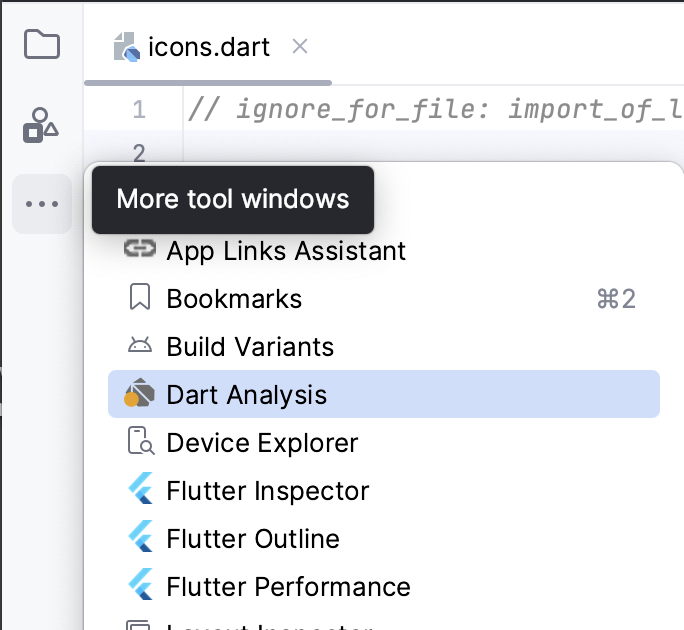
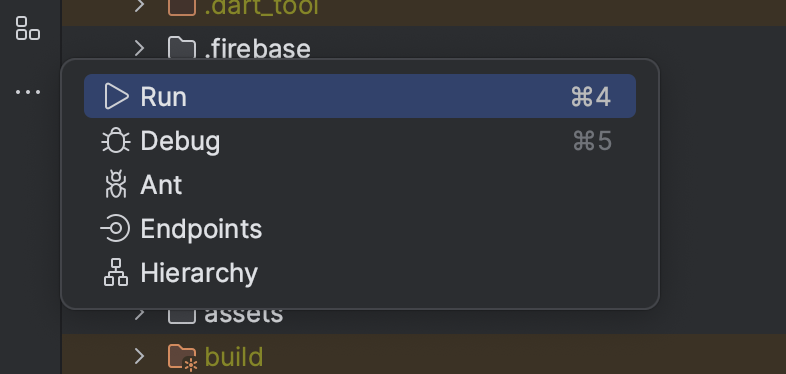 Interesting, this option is not visible for me. Do you use IntelliJ for Mac or Windows? @stevemessick
My screen shot was from Android Studio 2022.3 on a Mac. It looks like you are using IntelliJ 2023.1. My More Tool Windows does have some Flutter and Dart items in 2023.1, though. Are you sure you have the Dart and Flutter plugins installed correctly? Also check the menu bar: View > Tool Windows for Dart and Flutter items.
Ok I have no idea why, but the Analysis Server appeared on the menu button. Finally I can test the new UI, thank you for your help @stevemessick ! :)
Some public bugs filed on Android Studio that relate to the Flutter plugin in the New UI:
- Buttons like Hot Reload missing from main toolbar by default: https://issuetracker.google.com/294776109
- Active process indicator on Run button causes layout issues: https://issuetracker.google.com/295119370
For 1) this can be remedied in the Flutter plugin manifest by adding the actions to the new toolbar groups in the New UI: Main Toolbar Left/Center/Right. Likely the Right group considering the previous design.

Release 76 is coming out without any attention here, bumping to 77 for the time being.

I recently switched to the New UI, and the missing Hot Reload button threw me for a while. It would be great to fix.
Once one figures it out, it's straightforward to work around as a user by manually doing the same thing as the expected fix:
adding the actions to the new toolbar groups in the New UI: Main Toolbar Left/Center/Right. Likely the right considering the previous design.
That makes it an issue that's easy to forget about in one's own daily use. But as more and more people try the New UI — presumably upcoming IntelliJ versions will be nudging people more and more toward it until it becomes the default — it'll affect each of those people in turn. That button is a flagship feature of Flutter's development experience, with a prominent place in the tutorial before even starting the codelab, so having it go missing is conspicuous.
(Especially in conjunction with the separate issue of the keyboard shortcut Ctrl+\ not working: #6991.)

I want to confirm that Hot reload button is still missing on
Android Studio Hedgehog | 2023.1.1
Build #AI-231.9392.1.2311.11076708, built on November 9, 2023
Runtime version: 17.0.7+0-17.0.7b1000.6-10550314 aarch64
VM: OpenJDK 64-Bit Server VM by JetBrains s.r.o.
macOS 14.0
GC: G1 Young Generation, G1 Old Generation
Memory: 2048M
Cores: 8
Metal Rendering is ON
Registry:
    external.system.auto.import.disabled=true
    debugger.new.tool.window.layout=true
    ide.text.editor.with.preview.show.floating.toolbar=false
    ide.experimental.ui=true

Non-Bundled Plugins:
    com.intellij.marketplace (231.9392.3)
    Dart (231.9409)
    zielu.gittoolbox (500.1.3+222)
    io.flutter (77.1.2)

The Hot Reload button is still not on the toolbar, also doesn't seem to be customizable in the settings with our current implementation.
Flutter Device Selection is on the RHS of the run buttons by default, which is also jarring. (this can be changed in the configuration by right-clicking on the toolbar)
The icons we have for Flutter Inspector / Flutter Performance / Flutter Outline are all the same, we should have the flutter icon annotated with to at least see that there is a difference and the same view isn't being contributed 3 times. Dart Devtools has different icons for each of the associated tabs, these icons should be included on the bottom right corner of our Flutter icons. @helin24
Hey, very important to fix this ASAP. Thanks!
IntelliJ IDEA 2023.3.4 (Ultimate Edition) Build #IU-233.14475.28, built on February 13, 2024 Runtime version: 17.0.10+1-b1087.17 amd64 VM: OpenJDK 64-Bit Server VM by JetBrains s.r.o. Windows 10.0 GC: G1 Young Generation, G1 Old Generation Memory: 4074M Cores: 16 Registry: ide.experimental.ui=true Non-Bundled Plugins: Dart (233.13763.5) com.github.copilot (1.4.18.4775) org.jetbrains.android (233.14475.28) io.flutter (78.1.1) Kotlin: 233.14475.28-IJ
