
flutter-intellij
 flutter-intellij copied to clipboard
Published
20 hours ago •
 flutter
flutter
Actual colors of the colors shades should be visible on the code completion menu
Steps to Reproduce
- Code is
Colors.blue.shade - Open the code completion
Expected:
To see all shades, along their colors, similar to
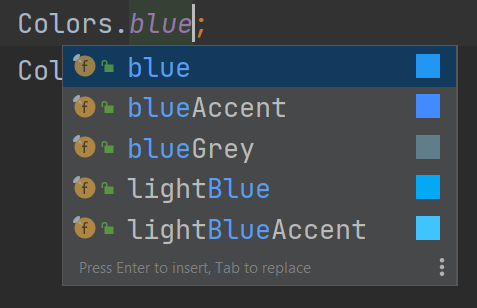
Actual:
The colors of individual shades is not shown.
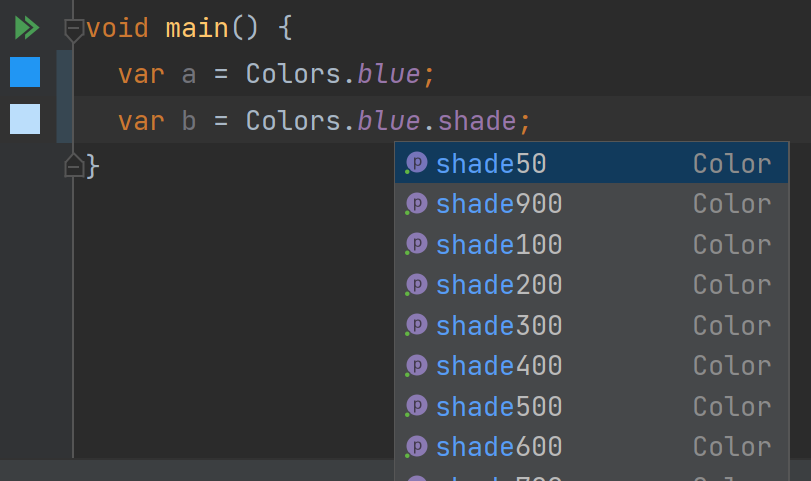
Interestingly, the color is shown in the gutter, but not in code completion.
Version info
doctor -v
[√] Flutter (Channel master, 2.11.0-0.0.pre.869, on Microsoft Windows [Version 10.0.19042.1466], locale en-US)
    • Flutter version 2.11.0-0.0.pre.869 at c:\use\flutter
    • Upstream repository https://github.com/asashour/flutter.git
    • Framework revision 1223e87f7b (3 hours ago), 2022-03-10 21:09:49 -0800
    • Engine revision 6239bfb884
    • Dart version 2.17.0 (build 2.17.0-182.0.dev)
    • DevTools version 2.11.1

[!] Android toolchain - develop for Android devices (Android SDK version 32.0.0)
    • Android SDK at C:\Users\ahmed_ashour\AppData\Local\Android\Sdk
    X cmdline-tools component is missing
      Run `path/to/sdkmanager --install "cmdline-tools;latest"`
      See https://developer.android.com/studio/command-line for more details.
    X Android license status unknown.
      Run `flutter doctor --android-licenses` to accept the SDK licenses.
      See https://flutter.dev/docs/get-started/install/windows#android-setup for more details.

[√] Chrome - develop for the web
    • Chrome at C:\Program Files\Google\Chrome\Application\chrome.exe

[√] Visual Studio - develop for Windows (Visual Studio Community 2019 16.11.2)
    • Visual Studio at C:\Program Files (x86)\Microsoft Visual Studio\2019\Community
    • Visual Studio Community 2019 version 16.11.31624.102
    • Windows 10 SDK version 10.0.19041.0

[√] Android Studio (version 2021.1)
    • Android Studio at C:\Program Files\Android\Android Studio
    • Flutter plugin can be installed from:
       https://plugins.jetbrains.com/plugin/9212-flutter
    • Dart plugin can be installed from:
       https://plugins.jetbrains.com/plugin/6351-dart
    • Java version OpenJDK Runtime Environment (build 11.0.11+9-b60-7590822)

[√] IntelliJ IDEA Community Edition (version 2021.3)
    • IntelliJ at C:\Program Files\JetBrains\IntelliJ IDEA Community Edition 2021.2.1
    • Flutter plugin version 65.2.4
    • Dart plugin version 213.7227

[√] IntelliJ IDEA Ultimate Edition (version 2022.1)
    • IntelliJ at C:\Program Files\JetBrains\IntelliJ IDEA 221.3427.89
    • Flutter plugin can be installed from:
       https://plugins.jetbrains.com/plugin/9212-flutter
    • Dart plugin version 221.3427.93

[√] VS Code (version 1.64.2)
    • VS Code at C:\Users\ahmed_ashour\AppData\Local\Programs\Microsoft VS Code
    • Flutter extension version 3.34.0

[√] Connected device (4 available)
    • Android SDK built for x86 (mobile) • emulator-5554 • android-x86    • Android 11 (API 30) (emulator)
    • Windows (desktop)                  • windows       • windows-x64    • Microsoft Windows [Version 10.0.19042.1466]
    • Chrome (web)                       • chrome        • web-javascript • Google Chrome 99.0.4844.51
    • Edge (web)                         • edge          • web-javascript • Microsoft Edge 99.0.1150.30

[√] HTTP Host Availability
    • All required HTTP hosts are available

! Doctor found issues in 1 category.

Good catch. This is handled by FlutterCompletionContributor, which knows nothing about shades.

Unfortunately, this depends on information not available to FlutterCompletionContributor at this time. I filed an issue with the Dart plugin to get it implemented.
https://youtrack.jetbrains.com/issue/WEB-55625/Dart:-Missing-color-info-in-CompletionSuggestion
cc @jwren