
flutter-intellij
 flutter-intellij copied to clipboard
 flutter
Since a few weeks I do not have Code Completion for Imports and Classes in Flutter anymore

@derChris77, thanks for the report. Can you include information about the flutter version you're using (flutter doctor -v), and the IntelliJ / Android Studio and Flutter plugin version? Thanks!

I noticed the same issue:
Flutter: Channel stable, v1.17.3, on Microsoft Windows [Version 10.0.18362.836]
Android studio:
Android Studio 4.0 Build #AI-193.6911.18.40.6514223, built on May 20, 2020 Runtime version: 1.8.0_242-release-1644-b01 amd64 VM: OpenJDK 64-Bit Server VM by JetBrains s.r.o Windows 10 10.0 GC: ParNew, ConcurrentMarkSweep Memory: 1237M Cores: 8 Registry: ide.new.welcome.screen.force=true, debugger.watches.in.variables=false Non-Bundled Plugins: Dart, com.bloc.intellij_generator_plugin, com.google.services.firebase, io.flutter, izhangzhihao.rainbow.brackets
Flutter plugin : 46.0.2
I noticed this problem while i was still on version 3.6 of Android Studio with the latest compatible flutter plugin for that version. Flutter version was Stable 1.17.0. I tried Invalidate Chaches / Restart but did not notice a change.

C:\FlutterSDK\flutter\bin\flutter.bat doctor --verbose [√] Flutter (Channel stable, v1.17.3, on Microsoft Windows [Version 10.0.18363.836], locale de-DE) • Flutter version 1.17.3 at C:\FlutterSDK\flutter • Framework revision b041144f83 (5 days ago), 2020-06-04 09:26:11 -0700 • Engine revision ee76268252 • Dart version 2.8.4
[√] Android toolchain - develop for Android devices (Android SDK version 29.0.3) • Android SDK at C:/AndroidSDK • Platform android-29, build-tools 29.0.3 • ANDROID_HOME = C:/AndroidSDK • Java binary at: C:\Program Files\Java\jdk1.8.0_231\bin\java • Java version Java(TM) SE Runtime Environment (build 1.8.0_231-b11) • All Android licenses accepted.
[!] Android Studio (not installed) • Android Studio not found; download from https://developer.android.com/studio/index.html (or visit https://flutter.dev/docs/get-started/install/windows#android-setup for detailed instructions).
[√] IntelliJ IDEA Ultimate Edition (version 2019.3) • IntelliJ at C:\Program Files\JetBrains\IntelliJ IDEA 2019.2.3 • Flutter plugin version 46.0.3 • Dart plugin version 201.7846.93
[√] Connected device (1 available) • AOSP on IA Emulator • emulator-5554 • android-x86 • Android 9 (API 28) (emulator)
! Doctor found issues in 1 category. Process finished with exit code 0
Can confirm some case:
Here there is no ChangeNotifierProvider in list:
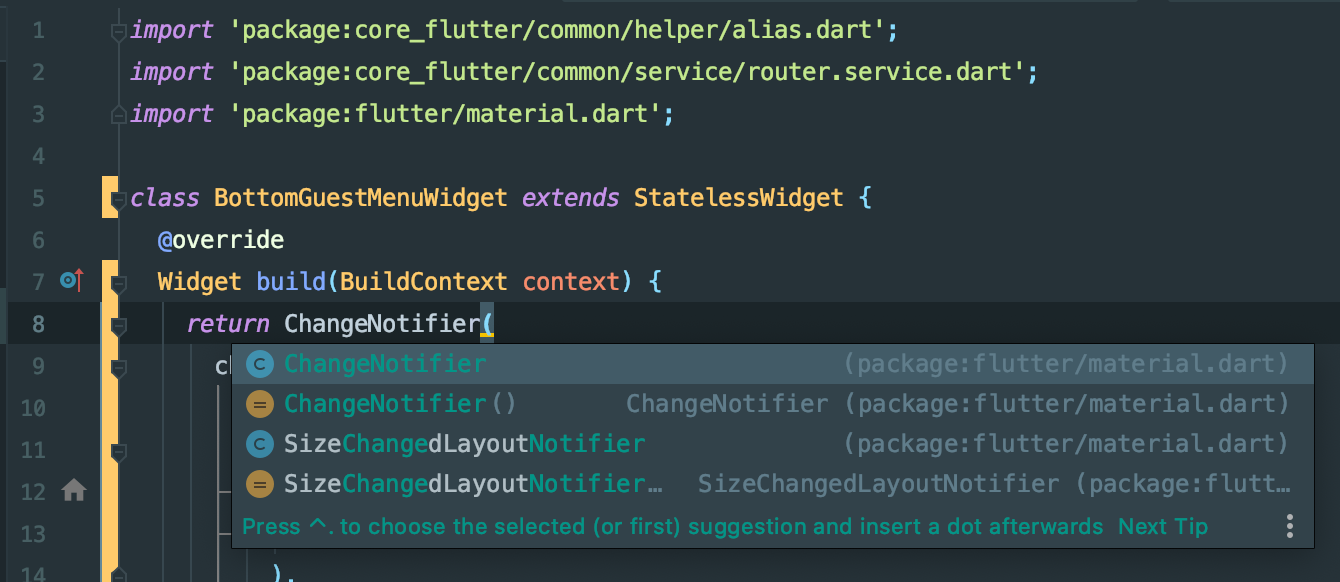
Import autocomplete also wot work:

But it indeed exists and when manually typed - it works:
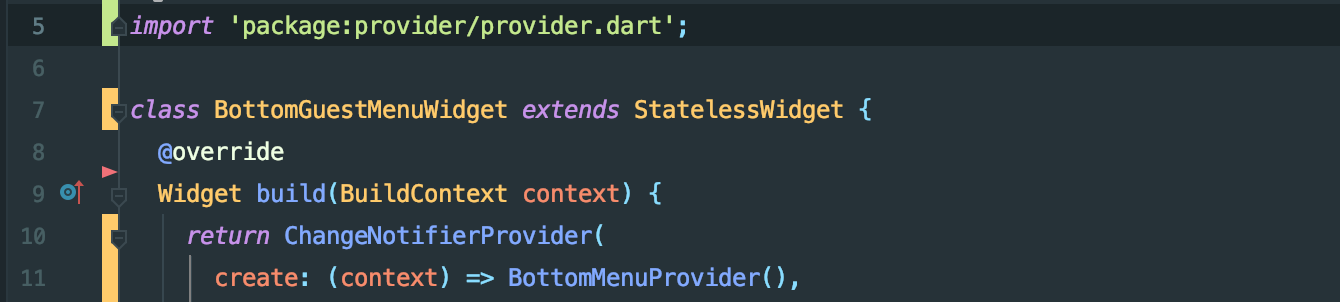
IMPORTANT DETAIL: The provider package is part of custom core_flutter package that loaded locally via path. Like this:
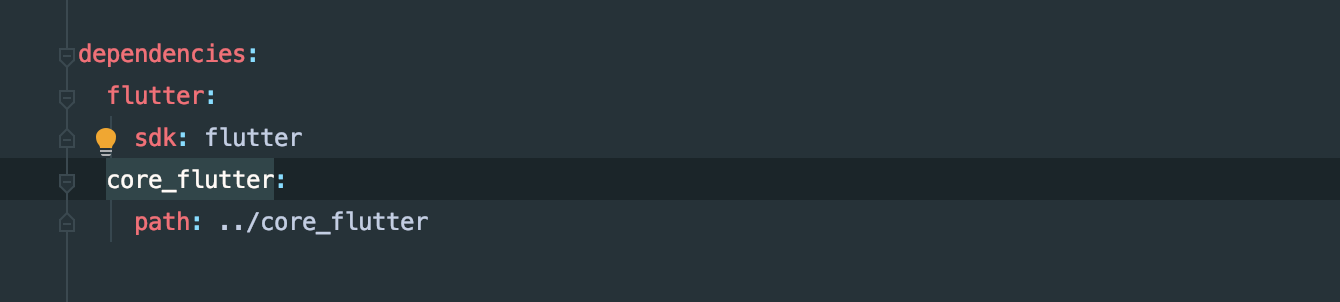
So I'm not sure if I doing it right by using packages that dependencies of another local package (despite it being desired behaviour).


I have noticed that the plugin does not set up Dart Packages in External Libraries when I open a project with IntelliJ. When I open the same project in Android Studio, Dart Packages become available in both Android Studio and IntelliJ. Code completion and searching for classes from packages starts to work at that point.

Not sure if I am missing something but it seems I do have Dart Packages set up in my Android Studio project but still cannot get package autocomplete.

Ideas and suggestions welcome; I already tried rolling AS back to 3.6 to no avail. I was also thinking about deleting the idea/iml project files but I had a similar issue in the past where the project wasn't recognized as flutter project which is obviously something I would like to avoid.
EDIT: I did end up deleting several folders and files in a copy of the project and when opened everything worked again. Here is a list of the things I removed:
.dart_tool/
.idea/
.flutter_plugins
.flutter_plugins-dependencies
.packages
.pubspec.lock (for good measure)
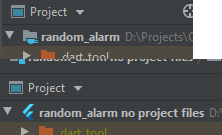
Now I don't know which one of them made the difference but I noticed that after opening the project where I had all the things deleted, the project icon changed (top is the project where I didn't have package autocomplete; bottom is the "fixed" one):
All the deleted files and folders were regenerated on import in AS/pub get but apparently they are better now!

Sorry to bring this back to life if this is the wrong place for this, but I was experiencing the same issue but strictly with a Flutter Plugin project only.
On a fresh project via the Android Studio wizard everything is marked as a non-project file (highlighted yellow).
After a flutter clean all of my files are included properly, but of course imports and such don't work anymore.
Doing a flutter pub get also does not show the Dart Packages in the External Libraries, but if I delete just the bottom most line in the .packages file that references my project, everything seems to work completely fine again.
I have to do this every time after each flutter pub get though.
Before:
 After deleting
 encrypted_file_flutter:lib/:

I know the dot packages file is deprecated, but it seems to still be in use here. Are there plans to remedy this?
Thanks.
$ flutter doctor --verbose
[✓] Flutter (Channel stable, 2.5.1, on macOS 11.1 20C69 darwin-x64, locale en-US)
    • Flutter version 2.5.1 at /usr/local/Caskroom/flutter/2.2.3/flutter
    • Upstream repository https://github.com/flutter/flutter.git
    • Framework revision ffb2ecea52 (2 weeks ago), 2021-09-17 15:26:33 -0400
    • Engine revision b3af521a05
    • Dart version 2.14.2

[✓] Android toolchain - develop for Android devices (Android SDK version 30.0.3)
    • Android SDK at ~/Library/Android/sdk
    • Platform android-30, build-tools 30.0.3
    • ANDROID_HOME = ~/Library/Android/sdk
    • ANDROID_SDK_ROOT = ~/Library/Android/sdk
    • Java binary at: /Applications/Android Studio 2.app/Contents/jre/Contents/Home/bin/java
    • Java version OpenJDK Runtime Environment (build 11.0.10+0-b96-7281165)
    • All Android licenses accepted.

[✓] Xcode - develop for iOS and macOS
    • Xcode at /Applications/Xcode_12.5.1.app/Contents/Developer
    • Xcode 12.5.1, Build version 12E507
    • CocoaPods version 1.10.2

[✓] Chrome - develop for the web
    • Chrome at /Applications/Google Chrome.app/Contents/MacOS/Google Chrome

[✓] Android Studio (version 4.2)
    • Android Studio at /Applications/Android Studio.app/Contents
    • Flutter plugin can be installed from:
      🔨 https://plugins.jetbrains.com/plugin/9212-flutter
    • Dart plugin can be installed from:
      🔨 https://plugins.jetbrains.com/plugin/6351-dart
    • Java version OpenJDK Runtime Environment (build 11.0.8+10-b944.6916264)

[✓] Android Studio (version 2020.3)
    • Android Studio at /Applications/Android Studio 2.app/Contents
    • Flutter plugin can be installed from:
      🔨 https://plugins.jetbrains.com/plugin/9212-flutter
    • Dart plugin can be installed from:
      🔨 https://plugins.jetbrains.com/plugin/6351-dart
    • Java version OpenJDK Runtime Environment (build 11.0.10+0-b96-7281165)

[✓] IntelliJ IDEA Ultimate Edition (version 2021.1.3)
    • IntelliJ at /Applications/IntelliJ IDEA.app
    • Flutter plugin can be installed from:
      🔨 https://plugins.jetbrains.com/plugin/9212-flutter
    • Dart plugin version 211.7792

[✓] VS Code (version 1.60.2)
    • VS Code at /Applications/Visual Studio Code.app/Contents
    • Flutter extension can be installed from:
      🔨 https://marketplace.visualstudio.com/items?itemName=Dart-Code.flutter

[✓] Proxy Configuration
    • HTTP_PROXY is set
    • NO_PROXY is localhost,10.0.2.2,127.0.0.1
    • NO_PROXY contains 127.0.0.1
    • NO_PROXY contains localhost

[✓] Connected device (2 available)
    • Nathan’s iPhone (mobile) • d2c75943df065039bfe4b5dfe5271b2a5b20c778 • ios            • iOS 14.6 18F72
    • Chrome (web)             • chrome                                   • web-javascript • Google Chrome 94.0.4606.61

• No issues found!

I've been having this issue for quite a while. I tried git bisect as a last resort to check if it was due to a non-config change and I found the culprit: for some reason at one point I removed flutter as an explicit dependency in my pubspec.yaml. Surprisingly more or less everything still worked (apart from completions and being able to right-click to run tests) since then. I added this back in to pubspec.yaml and it's working 100% again:
dependencies:
  flutter:
    sdk: flutter
