
devtools
 devtools copied to clipboard
 flutter
Layout Explorer not displaying accurate height of Widget in visualizer
Steps to Reproduce
- Replace the contents of main.dart with the following code:
import 'package:flutter/material.dart';

void main() {
  runApp(MyApp());
}

class MyApp extends StatelessWidget {
  @override
  Widget build(BuildContext context) {
    return MaterialApp(
      title: 'Flutter Demo',
      home: Scaffold(
        appBar: AppBar(
          title: Text('Demo'),
        ),
        body: Column(children: [
          Row(
            children: [
              Text('hello'),
              VerticalDivider(
                thickness: 5.0,
              ),
              Text('Word'),
            ],
          ),
        ]),
      ),
    );
  }
}
- Run the program using debug mode.
- Open DevTools
- Select Row widget in the Flutter Inspector.
- Open Layout Explorer.
- Change Cross Axis to Stretch mode.
Expected results:
Nothing shows on Layout Explorer screen since adding CrossAxisAlginment.Stretch to the Row widget will create an error.
Actual results:
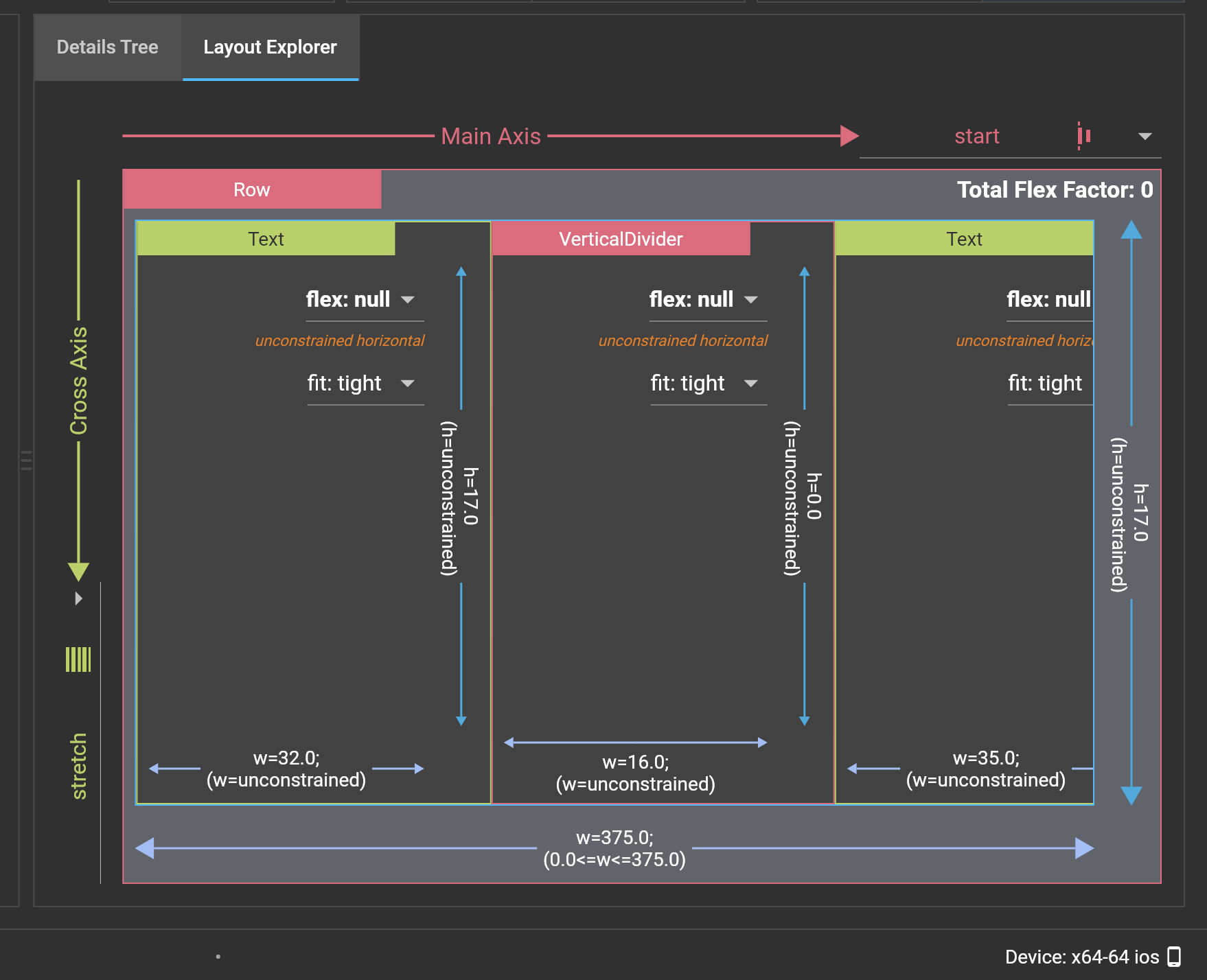
VerticalDivider increases in height in the Layout Explorer visualizer, but the actual height remains 0.
Logs

flutter doctor -v
[✓] Flutter (Channel master, 1.20.0-1.0.pre.132, on Mac OS X 10.15.5 19F101,
    locale en-GB)
    • Flutter version 1.20.0-1.0.pre.132 at
      /Users/tahatesser/Code/flutter_master
    • Framework revision 5995661777 (2 days ago), 2020-06-19 16:15:58 -0700
    • Engine revision 676cd566f7
    • Dart version 2.9.0 (build 2.9.0-17.0.dev 7e72c9ae7e)


[✓] Android toolchain - develop for Android devices (Android SDK version 29.0.3)
    • Android SDK at /Users/tahatesser/Code/sdk
    • Platform android-29, build-tools 29.0.3
    • ANDROID_HOME = /Users/tahatesser/Code/sdk
    • Java binary at: /Applications/Android
      Studio.app/Contents/jre/jdk/Contents/Home/bin/java
    • Java version OpenJDK Runtime Environment (build
      1.8.0_242-release-1644-b3-6222593)
    • All Android licenses accepted.

[✓] Xcode - develop for iOS and macOS (Xcode 11.5)
    • Xcode at /Applications/Xcode.app/Contents/Developer
    • Xcode 11.5, Build version 11E608c
    • CocoaPods version 1.9.3

[✓] Chrome - develop for the web
    • Chrome at /Applications/Google Chrome.app/Contents/MacOS/Google Chrome

[✓] Android Studio (version 4.0)
    • Android Studio at /Applications/Android Studio.app/Contents
    • Flutter plugin version 46.0.2
    • Dart plugin version 193.7361
    • Java version OpenJDK Runtime Environment (build
      1.8.0_242-release-1644-b3-6222593)

[✓] VS Code (version 1.46.1)
    • VS Code at /Applications/Visual Studio Code.app/Contents
    • Flutter extension version 3.11.0

[✓] Connected device (5 available)
    • SM M305F      • 32003c30dc19668f          • android-arm64  • Android 10
      (API 29)
    • Taha’s iPhone • 00008020-001059882212002E • ios            • iOS 13.5.1
    • macOS desktop • macos                     • darwin-x64     • Mac OS X
      10.15.5 19F101
    • Web Server    • web-server                • web-javascript • Flutter Tools
    • Chrome        • chrome                    • web-javascript • Google Chrome
      83.0.4103.106

• No issues found!

Interestingly we are showing the height as zero in your screenshot although we are visualizing it like it is non-zero.

@jacob314 because of the early design and decision on the scaling algorithm in Layout Explorer, we will always try to display and visualize a zero width/height on the Layout Explorer. But yes this is indeed a bug on the visualization widget. In this case the Layout Explorer should not have visualized the Text and VerticalDivider height equally...
