
plugins
 plugins copied to clipboard
 flutter-tizen
[video_player_avplay] Unable to build a single '.tpk' for multiple Tizen api versions
Hi Flutter-tizen team!
First of all: thanks for all the good work, the flutter-tizen extension and plugins work really great and I’m making great progress with them.
Unfortunately, I’m having some issues with building the video_player_avplay plugin against multiple Tizen api-versions. I hope you can clarify that for me.
I read the following on the video_player_avplay github page, but I’m unable to get this to work: “This plugin does not provide OS version compatibility. When you build an application with this plugin, version-specific dynamic libraries are packaged together based on the api-version information in tizen-manifest.xml. If you are planning to distribute an application that includes this plugin, you will need to build a TPK package for each TizenOS version (api-version in tizen-manifest.xml). Please refer to the Samsung Developers for information on TizenOS versions by TV model groups.”
Currently I’m using this command to generate the ‘.tpk’ file that is needed to update my Alpha release:
flutter-tizen build tpk -t lib/main.dart
After running this command and distributing the app as an Alpha version via the ‘Samsung Apps TV Seller Office’, the app in general works fine on all Tizen api-versions (6.0 and higher), except for the video player. The video player only works with the specified Tizen version in the ‘tizen-manifest.xml’. In my case the ‘api-version’ is set to ‘6.0’, because I want to support Tizen 6.0 and higher.
So my question is: how exactly do I build the ‘video_player_avplay’ for multiple api-versions and still have a single ‘.tpk’ file that i can upload to the ‘Seller Office’?
Any help would be greatly appreciated, so i can move forward with testing and distributing my app.
Thanks in advance!

@Nygashi avplay plugin is a special plugin, because the plugin includes all native player dynamic libraries, but the system interface is different between different platform versions, so we compiled different versions of the native player libraries: https://github.com/flutter-tizen/plugins/tree/master/packages/video_player_avplay/tizen/lib/armel so you need to build TPK package for each TizenOS version.
if you want to upload tpk to Seller Office, You need to compile a different TPK for each version,for example:
V5.2.80 (api-verion == 8.0)
	24TV_STANDARD3
	24TV_STANDARD2
	24TV_STANDARD1
	24TV_PREMIUM6
	24TV_PREMIUM5_LIC
	24TV_PREMIUM5
	24TV_PREMIUM4
	24TV_PREMIUM2
	24TV_PREMIUM1
	24TV_BASIC4
	24TV_BASIC3
	24TV_BASIC2_LIC2
	24TV_BASIC2_LIC
	24TV_BASIC2
V5.2.70(api-verion == 7.0)
	23TV_STANDARD1
	23TV_PREMIUM5
	23TV_PREMIUM4
	23TV_PREMIUM3
	23TV_PREMIUM2
	23TV_PREMIUM1
	23TV_BASIC3
	23TV_BASIC2
	23TV_BASIC1_LIC2
	23TV_BASIC1_LIC
	23TV_BASIC1
V5.2.65 (api-verion == 6.5)
	22TV_STANDARD1
	22TV_PREMIUM4
	22TV_PREMIUM3
	22TV_PREMIUM2
	22TV_PREMIUM1
	22TV_BASIC3
	22TV_BASIC1
V5.2.60 (api-verion == 6.0)
	21TV_STANDARD1
	21TV_PREMIUM3
	21TV_PREMIUM2
	21TV_PREMIUM1
	21TV_BASIC4_LIC
	21TV_BASIC1

You can't have a single TPK that works for all OS versions when using the avplay plugin. Instead, you have to create multiple TPKs by manually editing the api-version value in your tizen-manifest.xml and running flutter-tizen build tpk.
You can upload multiple TPKs in the Request New Release page in TV Seller Office and select matching TV model groups for each TPK.

Thanks for the quick response! So if I understand correctly, I can only upload multiple TPK files when creating a 'release' or 'beta' version?
So this won't work for an Alpha release? Because if I start an Alpha release for my application, I do not get the option to select matching TV model groups.
Do you have any suggestions for how to test the Alpha version of my app on all api-versions? Or is this just not possible, and should I just start a 'Beta' release to test my app on all api versions?
Actually I've never heard of the concept of Alpha releases before so I could be wrong, but according to this page
https://developer.samsung.com/tv-seller-office/guides/applications/distributing-application.html#Proceeding-to-Alpha-Test
the Alpha testing seems to mean that you test your app on your own TVs by registering the devices' DUIDs. So if you have only one testing device, there's no problem (you can upload a TPK built for the specific OS version). However, if you have multiple devices with different OS versions, I'm not sure how it will work. You may only be able to test one version at a time so you can, for example, set the test period to just one day and test each device every day.
I also think that the Alpha version indeed only supports one version at a time.
Then I will limit the Alpha test phase to one device and one TPK version at a time, and use the Beta release track to start testing all TPK/api-versions.
Thanks for answering my question!
I uploaded multiple TPKs to my Beta Test, one for each api-version I want to support. But I can only select 1 TPK with 1 set of TV model groups. Then once I update the beta page, the previous set is overwritten.
So this means that the below does not seem to work yet in my case: "You can upload multiple TPKs in the Request New Release page in TV Seller Office and select matching TV model groups for each TPK."
What is it that I'm doing wrong? Does this mean I have to create multiple applications, 1 application for each Tizen version we want to support?
The process for testing multiple model groups is not clearly stated in https://developer.samsung.com/tv-seller-office/guides/applications/distributing-application.html, but I managed to upload multiple TPKs and request beta testing for specific model groups as shown below.
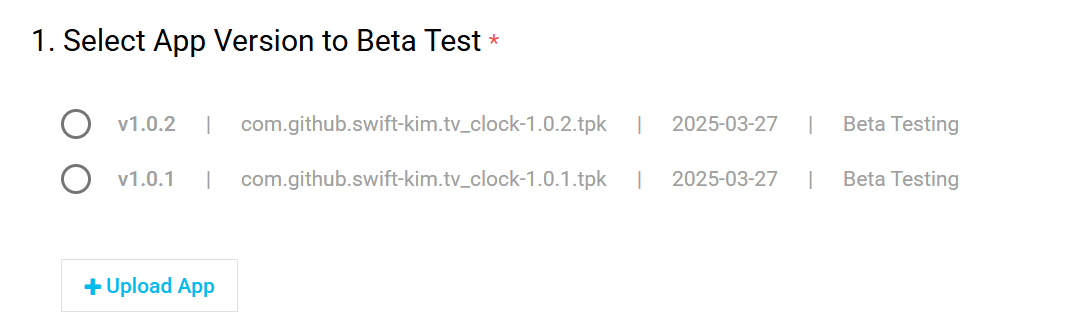
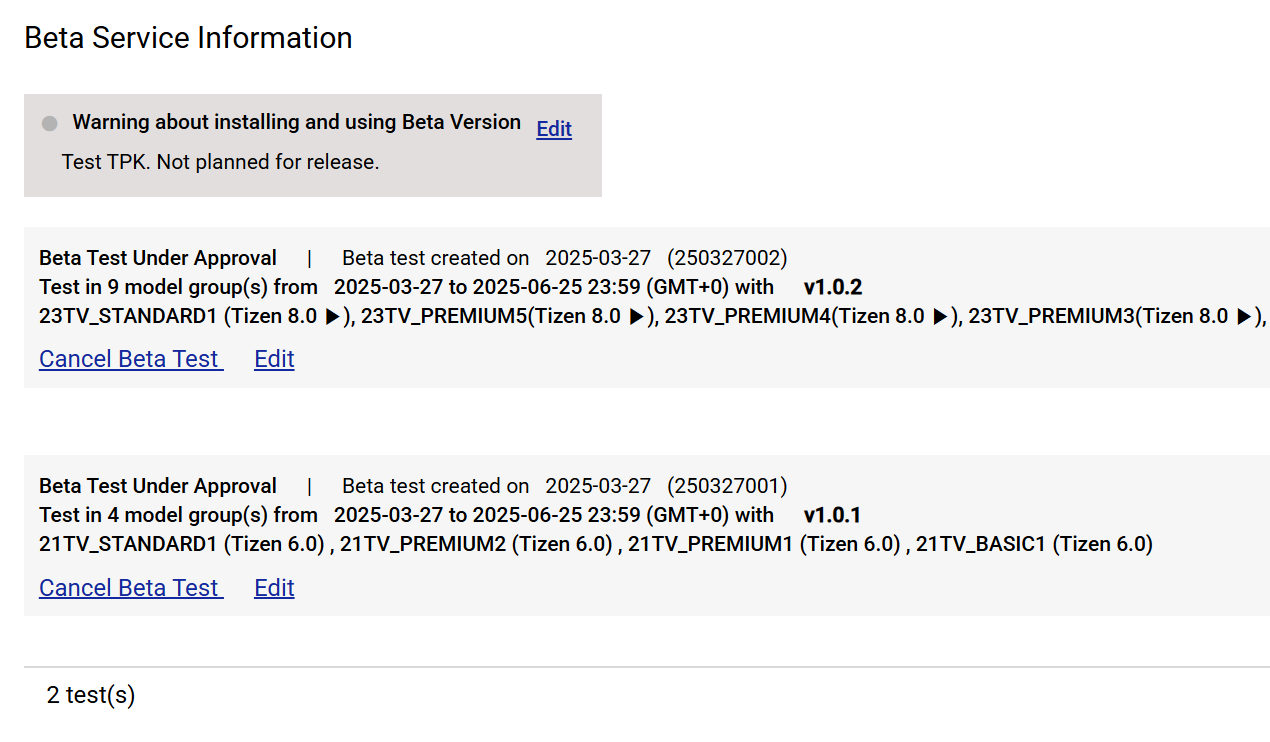
An important note is that the package versions should be different (e.g. 1.0.001 and 1.0.002). Otherwise the pre-test will fail. Is the above different from what you see?
In fact I just tested this today. If anyone has experience regarding this, please let us know.
If you need help from the store team, you can also create a 1:1 Q&A ticket at https://seller.samsungapps.com/tv/qna.
I managed to create multiple 'Beta tests' in my application that have a single TPK and multiple TV models based on api-version. It was indeed unclear to me that this was possible. So I think this solved the problem I had. Now waiting to get the Beta test approved.
Thanks again for your support, it's very much appreciated! 👍 🙇
This page has been automatically closed since there has not been any recent activity. If you are still experiencing a similar issue, please open a new issue with additional information about the issue.
![github-actions[bot] avatar](https://avatars.githubusercontent.com/in/15368?v=4 "Published by a pub.dev verified publisher")