

 flamendless
InputNumberSlider ignores Options.Step and has undocumented rounding behaviour
Nice work with the slider! It's awesome that you can double-click to edit the value. However, I find the way InputNumberSlider vs InputNumberDrag work a bit confusing. I'd expect the difference is just the visible slider, it looks like the drag behaviour is also different, but also they have different rounding behaviour.
InputNumberDrag takes a Step value which allows the user to determine if the output is an float.
InputNumberSlider takes no Step value and seems to use maximum precision. To make the result an float, you need to pass a float as either MinNumber or MaxNumber (which seems elegant, but I rarely pass floats as limits).
For me, a common value to adjust is in [0,1]. To use InputNumberSlider, I have to limit my choices so either 0 or 1 is not a valid value or allow going outside of my desired range. I find the slider handle to be a useful visual for where the current value is within the range. If I use InputNumberDrag, then I lose this visualization.
The documentation for GetInputNumber() doesn't mention the rounding behaviour. Even if it did, it would be confusing like this:
If Options.DrawSlider is true or InputNumberSlider was used and both Options.MinNumber and Options.MaxNumber were integers, the result is an integer.
the InputNumberSlider documentation implies that Step would be valid since it's an option for Slab.Input.
Options: [Table] List of options for how this input control is displayed. See Slab.Input for all options.
So maybe it's a bug that Step is not used by InputNumberSlider?

Glad you like the sliders @idbrii. This is a first pass implementation of the sliders and I am glad to hear some feedback on this so soon. The behavior of the sliders is based off of what is done by Dear ImGui.
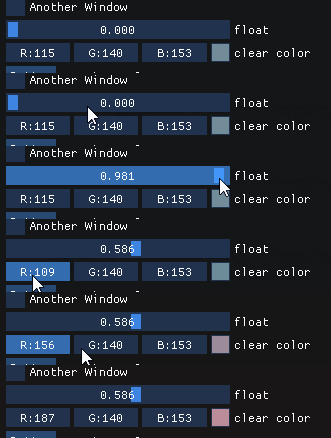
The step value was added to control the speed of the sliders, and whether to drag with integer values or floating point values. The reason for not passing the step value to InputNumberSlider is because the value is dictated by the position of the cursor where as InputNumberDrag and not some changing value based on mouse delta.
I do see the issues you bring up with wanting floating point vs integer. I am thinking of changing Step to Precision so that the step is controlled more by how precise the return value should be. This should help with your situation where you want sliders between 0 and 1 and the precision will dictate how many decimals to operate on, which by default will be 3 so the values will be between 0.000 and 1.000.
Along with this, I want to change the speed of the drag change to be based on the size of the range. Hopefully these changes will improve the usability.

Hi @coding-jackalope I just wanted confirm this issue with sliders. And let You know I also use it in my project :blush:
