
atom
 atom copied to clipboard
 file-icons
Wrong Icon bug
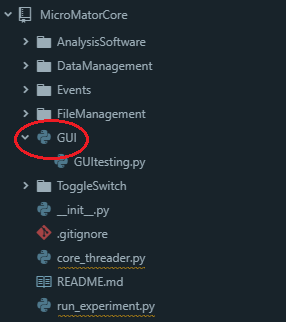
hello,
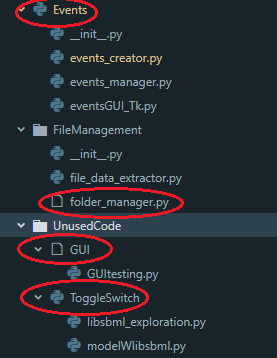
I've witnessed a weird bug after doing some project refactoring. As you can see there seems to be an error concerning on of the icons, the GUI folder as th wrong icon. it seems that this bug is only concerning this folder and sometimes the Events folder. All the other folders and all the other projects are fine. I don't exactly know what information would be relevant to help solve this problem so please ask me more specifics i'll be glad to provide more information!
Thanks

Hey mate,
It sounds like you may have been bitten by a known bug where deleting a file and creating a directory at the same path results in the folder receiving the deleted file's icon.
You can resolve this by emptying the package's cache. If that doesn't work, please let me know.
Thanks!

So yeah i had already tried that and tried it again just now, but this is what im seeing now:
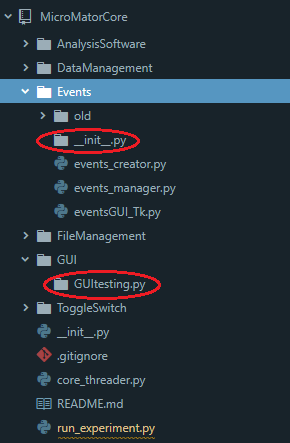 or this after doing the cache clearing one more time:
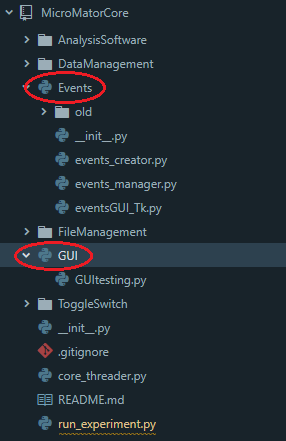
Yikes. Okay, then we definitely have an issue on our hands.
Could you give me a list of packages you have installed, along with the version of Atom you're using? You can acquire the former using apm ls -i.
list_packages.txt here is the list of packages. I can't for the life of me find the version but i do keep atom updated, so i guess the latest version?
That'll probably be v1.28.2, then. You can find the Atom version in "Help -> About" which will bring up the about page for your installation (or by running atom --version from command-line).
As for the packages you've installed... nothing there that looks suspect. Are the files being loaded from a network share, or something not entirely local?
indeed it's version 1.28.2
So no all the projects are in the local disk. Each project folder contains it's own git, which has always been the case. But before this problem surfaced i did do one thing which was delete the old version of the project MicroMator and replace it with MicroMatorCore. So i suspect it has something to do with that.
But before this problem surfaced i did do one thing which was delete the old version of the project MicroMator and replace it with MicroMatorCore. So i suspect it has something to do with that.
If so, it suggests there's a bug with the file-icons:clear-cache command. Try this:
- Run the
file-icons:clear-cachecommand (but don't reload Atom) - Click the
MicroMatorCorefolder in the tree-view to hide your project files - Click it again to bring them back into view
Alright, so that confirms that there might be an issue with the clear-cache command not fully clearing the session's state from the package's memory.
I'll try to look into this in greater depth next time I'm on a computer with Atom. Thanks for being patient. =)
Great! if i can be of any more help providing things do not hesitate!! Thanks again!
Sorry for the slow response. Can you please tell me what your "File System Watcher" setting is set to? Open up the Settings panel and look for this dropdown menu (it's under the first subsection you see, the one labelled "Core"):
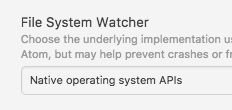
Hrm. 😟 Well, there goes that theory.
I'll crank the cache version with the next release, so whatever you're seeing will either be gone, or entirely unrelated to caching whatsoever (and that'll be the point I can't help you, since nothing short of demonic possession could be at fault...)
@Goldensteev I've published v2.1.23, could you let me know if you're still experiencing this issue after upgrading?
Thanks!
Okay, I want you to run the following steps:
- Open up the dev-console
- Run
AtomFS.grep("name-of-affected-file.py"); - You'll see an array like this. How many entries does it have?
Hey i'm jumping in here to say that I'm having similar issues. It does seem to get "triggered" by deleting a file and making a folder of the same name, but after that there will be days or weeks of this package having issues with all kinds of paths in that project, even after clearing the cache.
It also really fucks with a lot of other parts of atom when it happens. Grammars will apply wrong, if a file has a folder icon on it it will open in a "background" tab (it will open, but it won't be the focused tab when it does), and my linter won't run on that file. Often times clearing the file-icons cache will cause it to switch from a folder and icon both having the "folder" icon, to both having the "file" icon (in my case, usually JS or CSS), which causes less weirdness but still is broken and often other file in that folder are still a bit weird acting.
I'm currently not having the problem, but I figured if it can help narrow down anything I might as well try.
Windows 10 Atom 1.30.0-beta1 A metric ton of plugins, i can get a full list if you want it.
Importantly, disabling this plugin doesn't seem to help fix the problem when i'm having it (the symptoms still show, even though the icons are correct), until after a restart, but then enabling the plugin again will instantly cause the problem to show back up (even uninstalling instead of disabling shows the same results).


so here is the output, as you can see i think it doesn't detect Events as a Directory it seems.
To add to what Klathmon just said, for me disabling the package does solve the issue and the native icons are not bugged.
Just to clarify, the native icons are always correct when I disable the plugin, but the "side effects" (tabs opening unfocused, wrong grammars applied, etc..) are still there for me.
Oh yes indeed yeah i'm having those issues also when the plugin is active.
JFC.
Alright, this is a shot-in-the-dark, but try editing the installed package's package.json file to remove these lines:
"atom.file-icons": {
	"versions": {
		"1.0.0": "suppressFOUC"
	}
}
@Goldensteev You're running on Windows, right? I'm using a friend's MacBook and can't reproduce this when I delete a file and create a folder of the same name... :\
Okay, so that suggests it might be a Windows-specific issue.
I'll have a second shot at getting Vagrant/VirtualBox installed on this thing (it gave weird install errors last time) to investigate what might be happening on Windows. 😞
Nope not doing anything (FYI my package.json doesn't look like the one that is in the git the lines where on line 140 or something (not too familiar with .json) is that normal?
Alright, good to know.
FYI my package.json doesn't look like the one that is in the git the lines where on line 140 or something (not too familiar with .json) is that normal?
Yeah, that's normal. 😉 Installing Atom packages or NPM modules will mangle package.json files with site-specific metadata relating to the installed dependencies and stuff. No need to worry.
 Having the same issue with file-icons 2.1.24 and atom 1.29 on Windows 10. None of the fixes in this thread worked.

I've been unsuccessful with replicating this, I'm afraid. 😞 However, I have noticed something strange (which affects macOS). The weirdness occurs when using the "Save as..." command to save an opened document to a different file extension – having the old filename open in a tab causes some very weird behaviour where both icons update if either of them changes.
Looking at the code shows a pretty obvious race condition, so I'll have to fix it...
I can still see this effect in versions below:
Atom: 1.32.2 x64 on windows 10 file-icons package: 2.1.26
Here is a screenshot:

@Alhadis To check yourself you can checkout the mremoteng git repo and look in: mRemoteV1\Resources\Help\
This should give you the same results.
Tested with and without tree sitter and it the results are the same. Not sure if it could have something to do with it loading Git/Github tab.
