
react
 react copied to clipboard
 facebook
Devtools tabs should not appear in chrome-extension pages when using react-devtools as an entry point
Do you want to request a feature or report a bug?
Bug
What is the current behavior?
The React devtools tabs in Chrome devtools can be displayed in extension pages, even though modifying extensions in other extensions is not supported by Chrome, and React devtools are therefore broken.


If the current behavior is a bug, please provide the steps to reproduce and if possible a minimal demo of the problem. Your bug will get fixed much faster if we can run your code and it doesn't have dependencies other than React. Paste the link to your JSFiddle (https://jsfiddle.net/Luktwrdm/) or CodeSandbox (https://codesandbox.io/s/new) example below:
- Install Chrome and React devtools
- Open devtools in a chrome-extension page implemented with React
Example: prettier-chrome-extension (install from source and open extension options)
What is the expected behavior?
React devtools should not appear when it's not supported, just like when devtools are opened on a page that doesn't use React.
Which versions of React, and which browser / OS are affected by this issue? Did this work in previous versions of React?
- React 16.11.0
- React Developer Tools 4.2.0 (10/3/2019)
- Chrome 78.0.3904.70
- macOS 10.15


This comment on a similar issue could be useful:
The intuitive way [to detect chrome-extension pages] is to check
location.protocol.
https://github.com/facebook/react/issues/8409#issuecomment-319755594
There's also a pull request: https://github.com/facebook/react/pull/10359

I can reproduce with a fresh install of the example: prettier-chrome-extension (install from source and open extension options)
Sorry, I just realized I changed the example I gave previously in a way that no longer reproduces the issue.
Here's a new minimal reproduction: https://gist.github.com/nickmccurdy/5d53943c3c31587991713b29a04c8009
It seems like this is specifically an issue with adding react-devtools as an entry point in webpack. It works if I remove the entry point and import "react-devtools", but the docs suggest that both should work and I'd prefer to toggle devtools support in development/production with entry points. I'm not sure if the source of the issue is my webpack configuration or a bug in React Devtools, so I'd appreciate help figuring that out.
Steps to reproduce
- Clone/download example
- Run
yarn - Install Chrome and React Devtools Extension (
chrome://extensions/) - Open Chrome extension settings
- Enable developer mode
- Load unpacked extension
- Select path to dist directory
- Open extension details
- Open extension options
- Open Chrome Devtools
- Open Components tab of React Devtools
That's...a really specific and unusual set of steps. Why is your extension importing react-devtools?
I can't use React devtools extension because Chrome doesn’t support extensions (like React devtools) injecting devtools into extension pages (like my extension’s options page which uses React). I also can’t run a separate webpack dev server because my React components rely on Chrome extension APIs. As a result, I’m using the standalone react-devtools command and adding it as a webpack entry so I can conditionally enable it in development (following Usage with React DOM).
Here's a screenshot which shows the broken React devtools tab (which is missing the App component):
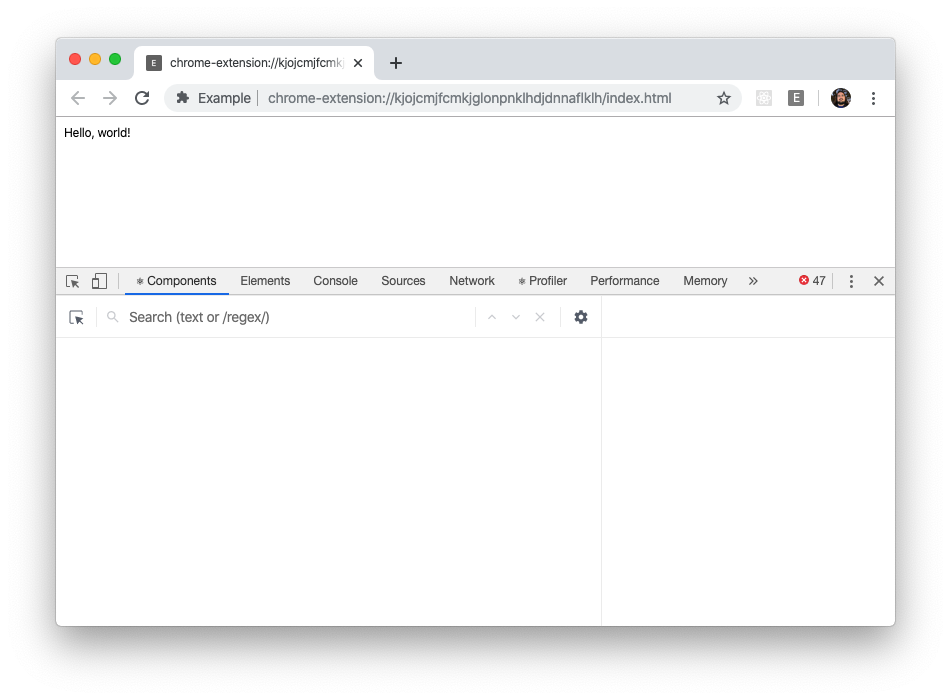
I also built a zip file if you'd like to test this without building from source:
- Install Chrome and React Devtools Extension
- Open Chrome extension settings (
chrome://extensions/) - Enable developer mode
- Download and unzip dist.zip
- Click load unpacked and select the unzipped directory
- Open extension details
- Open extension options
- Open Chrome Devtools
- Open Components tab of React Devtools
This issue has been automatically marked as stale. If this issue is still affecting you, please leave any comment (for example, "bump"), and we'll keep it open. We are sorry that we haven't been able to prioritize it yet. If you have any new additional information, please include it with your comment!
![stale[bot] avatar](https://avatars.githubusercontent.com/in/1724?v=4 "Published by a pub.dev verified publisher")
This issue has been automatically marked as stale. If this issue is still affecting you, please leave any comment (for example, "bump"), and we'll keep it open. We are sorry that we haven't been able to prioritize it yet. If you have any new additional information, please include it with your comment!
@nickmccurdy Realistically, I don't think anyone is going to work on this issue considering how unusual the use case is. If it's important to you, you might need to pick it up.
This issue has been automatically marked as stale. If this issue is still affecting you, please leave any comment (for example, "bump"), and we'll keep it open. We are sorry that we haven't been able to prioritize it yet. If you have any new additional information, please include it with your comment!
I have just seen this same problem of the react-devtools Components tab incorrectly appearing in the inspector of my extension's options page when it shouldn't. However in my case it was triggered with rollup+vite and import 'react-devtools' in the options page's index.tsx rather than via a webpack entry point.

This issue has been automatically marked as stale. If this issue is still affecting you, please leave any comment (for example, "bump"), and we'll keep it open. We are sorry that we haven't been able to prioritize it yet. If you have any new additional information, please include it with your comment!
![github-actions[bot] avatar](https://avatars.githubusercontent.com/in/15368?v=4 "Published by a pub.dev verified publisher")
Closing this issue after a prolonged period of inactivity. If this issue is still present in the latest release, please create a new issue with up-to-date information. Thank you!