
jupyter-book
 jupyter-book copied to clipboard
 executablebooks
Cell table output displays unreadable
Describe the bug
context
I am using Thebe in Jupyterbook to display a pandas dataframe as cell output. When the static notebook is displayed, the tables look fine. But after running it with Thebe's live code button, the outputted table looks very messy/ Previously, the table would display in a scrollable format (with output_scroll in the cell's tags). As of my latest deployment, though, this does not happen.
expectation I expected a readable table output to appear
bug But instead, the dataframe table output shows without properly alignment in an unreadable form. Like the following.
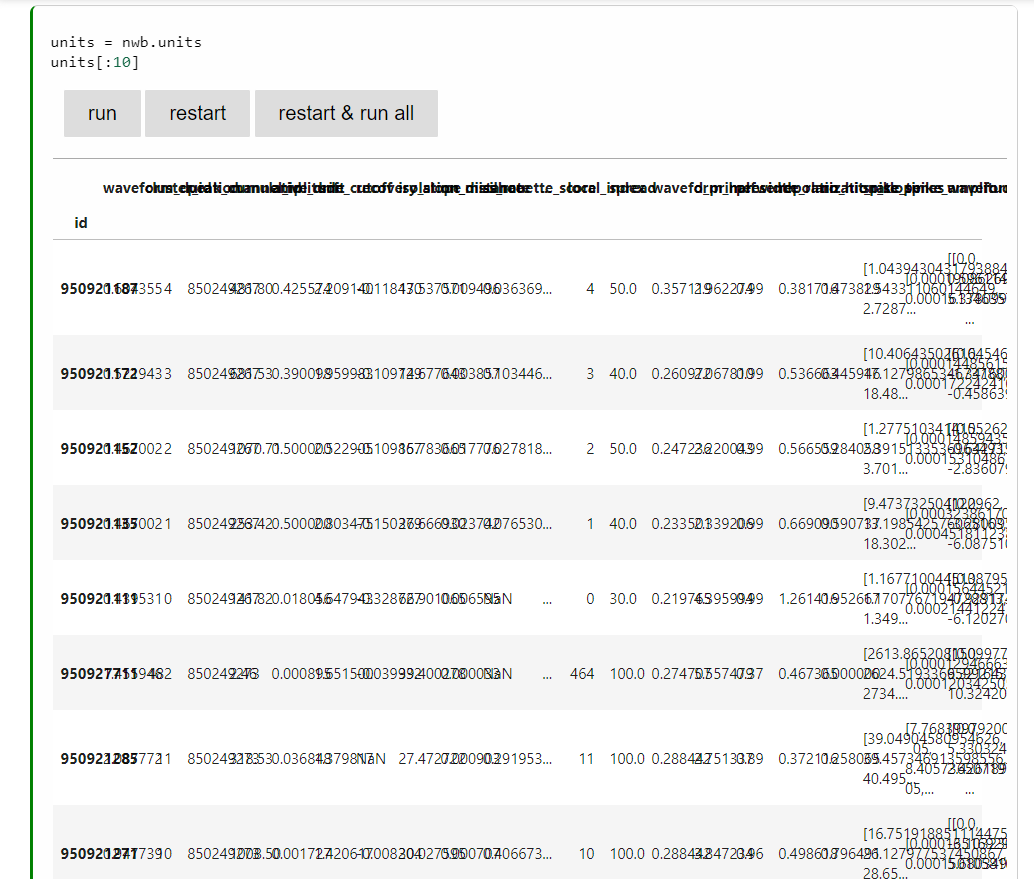
problem This significantly reduces the usability of outputting pandas tables.
Reproduce the bug
- Download this jupyter notebook file https://github.com/AllenInstitute/openscope_databook/blob/main/docs/first-order/optotagging.ipynb
- In the repository, run the latest jupyterbook build with
jupyter-book build ./ - Open the file and scroll down to view the tables. (running the file is not necessary)
List your environment
I am using the latest version of Jupyter Book available on Pip; 0.15.0

Thanks for opening your first issue here! Engagement like this is essential for open source projects! :hugs:
If you haven't done so already, check out EBP's Code of Conduct. Also, please try to follow the issue template as it helps other community members to contribute more effectively.
If your issue is a feature request, others may react to it, to raise its prominence (see Feature Voting).
Welcome to the EBP community! :tada:
![welcome[bot] avatar](https://avatars.githubusercontent.com/in/4141?v=4 "Published by a pub.dev verified publisher")
Confirmed that this is not an issue with jupyter book 0.13.2 but is for version 0.14.0
It appears not to happen only with pandas tables but any form of output table.