
jupyter-book
 jupyter-book copied to clipboard
 executablebooks
Can't use {cite} role inside table/figure title
Describe the problem
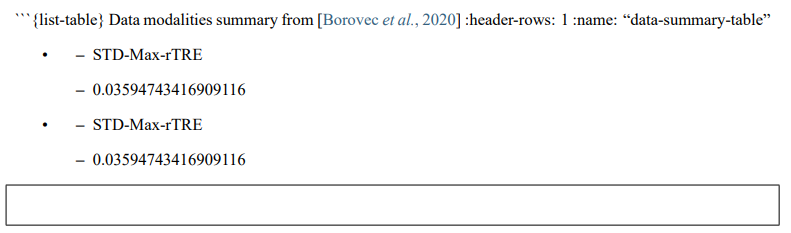
While creating a table, e.g. with ```{list-table} My title from {cite}`my-citation` :header-rows: 1 :name: "my-table"
-
- Column1
- Column 2
-
- data 1
- data 2
```
the {cite} role breaks the creation of the table resulting in:
Link to your repository or website
No response
Steps to reproduce
- Create a table with the {list-tabe} directive
- Add {cite} role in the title
- Build the book
The version of Python you're using
3.9.9
Your operating system
Windows 11
Versions of your packages
Jupyter Book : 0.12.0 External ToC : 0.2.3 MyST-Parser : 0.15.2 MyST-NB : 0.13.1 Sphinx Book Theme : 0.1.7 Jupyter-Cache : 0.4.3 NbClient : 0.5.8
Additional context
No response

Thanks for opening your first issue here! Engagement like this is essential for open source projects! :hugs:
If you haven't done so already, check out EBP's Code of Conduct. Also, please try to follow the issue template as it helps other community members to contribute more effectively.
If your issue is a feature request, others may react to it, to raise its prominence (see Feature Voting).
Welcome to the EBP community! :tada:
![welcome[bot] avatar](https://avatars.githubusercontent.com/in/4141?v=4 "Published by a pub.dev verified publisher")
In case anyone would want to do the same: I figured out a way to do this in figures.
Based on this at least in figures case it's a problem with latex. I overcame this by directly adding a hyperlink in dollar notation with the \protect command ${[}\protect\hyperlink{cite.intro:id26}{1}{]}$.
The drawback is you need to find the citation id manually in output.tex file.
found the \protect work-around in https://github.com/mcmtroffaes/sphinxcontrib-bibtex/issues/276 :)
