

 exceljs
Append rows to existing table
Hello, I'm having an issue when appending new rows to existing table
const workbook = new ExcelJS.Workbook()
workbook.xlsx.readFile(filename).then(async function () {
    let worksheet = workbook.getWorksheet(1)
    let table = worksheet.getTable('MyTable')
    table.addRow(['One','Two'])
    table.commit()
    await workbook.xlsx.writeFile(filename)
})
I'm getting this error :
TypeError: Cannot read property 'length' of undefined
    at Table.get height [as height] (C:\Users\SatSuki\Desktop\FootScrap\node_modules\exceljs\lib\doc\table.js:88:32)
    at Table.get filterHeight [as filterHeight] (C:\Users\SatSuki\Desktop\FootScrap\node_modules\exceljs\lib\doc\table.js:93:21)
    at Table.get tableHeight [as tableHeight] (C:\Users\SatSuki\Desktop\FootScrap\node_modules\exceljs\lib\doc\table.js:98:21)
    at Table.cacheState (C:\Users\SatSuki\Desktop\FootScrap\node_modules\exceljs\lib\doc\table.js:272:35)
    at Table.addRow (C:\Users\SatSuki\Desktop\FootScrap\node_modules\exceljs\lib\doc\table.js:322:14)
    at C:\Users\SatSuki\Desktop\FootScrap\spread.js:62:27
    at process._tickCallback (internal/process/next_tick.js:68:7)
When appending just after creating the table it works fine.


Has this bug been fixed? I am getting the same behaviour.
Looks like it is caused by no value for rows in table... rows is referenced in multiple places in tables.js
I've been looking a bit into the code and it looks like the rows are never added to the table when reading from a file.
I tried adding an empty array (table.rows = [];) in lib/xlsx/xlsx.js#_processTableEntry to continue the execution:
  async _processTableEntry(entry, model, name) {
    const xform = new TableXform();
    const table = await xform.parseStream(entry);
    table.rows = [];
    model.tables[`../tables/${name}.xml`] = table;
  }
but then I get the following error when I try to do a table.commit():
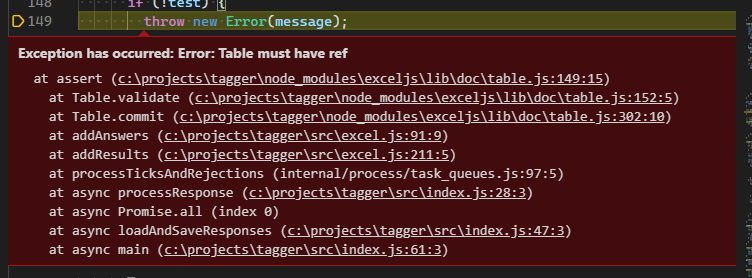
Exception has occurred: Error: Table must have ref
  at assert (c:\projects\tagger\node_modules\exceljs\lib\doc\table.js:149:15)
    at Table.validate (c:\projects\tagger\node_modules\exceljs\lib\doc\table.js:152:5)
    at Table.commit (c:\projects\tagger\node_modules\exceljs\lib\doc\table.js:302:10)
    at addAnswers (c:\projects\tagger\src\excel.js:91:9)
    at addResults (c:\projects\tagger\src\excel.js:211:5)
    at processTicksAndRejections (internal/process/task_queues.js:97:5)
    at async processResponse (c:\projects\tagger\src\index.js:28:3)
    at async Promise.all (index 0)
    at async loadAndSaveResponses (c:\projects\tagger\src\index.js:47:3)
    at async main (c:\projects\tagger\src\index.js:61:3)
It looks to me like the re-hydration of tables is missing a few properties 😞
I think rows should be added in the model setter of the worksheet, more or less at the same time this._parseRows(value) is done but a bit more guidance on what should be done and how would really be appreciated.
For the other problem I have no idea. Maybe in table-xform.js?

@HatemSat @dannycdannydo I've opened a PR that should fix this in #1222
You might want to give it a try and see if it works in your case as well.
Hello,
Though I have updated ExcelJs in latest version but I still get the same problem about appending rows to existing table.
My code is like
const Excel = require('exceljs'); const workbook = new Excel.Workbook(); await workbook.xlsx.readFile(filepath + '/template_file.xlsx'); const mysheet = workbook.getWorksheet('MyWorksheet'); mysheet.unprotect(); const mytable = mysheet.getTable('MyTable'); for (var i: number = 0; i< myArray.length; i++) { mytable.addRow([ myArray[i].field1, myArray[i].field2 ]); } mytable.commit();
When I test with console.log(mytable) and I got
Table { worksheet: undefined, table: { name: 'MyTable', displayName: 'MyTable', tableRef: 'A1:N2', totalsRow: false, headerRow: false, columns: [ [Object], [Object], [Object], [Object], [Object], [Object], [Object], [Object], [Object], [Object], [Object], [Object], [Object], [Object] ], autoFilterRef: 'A1:N2', style: { theme: 'TableStyleMedium2', showFirstColumn: false, showLastColumn: false, showRowStripes: true, showColumnStripes: false } } }
Thanks in advance for your help

I get the same error(don't have rows filed for table) and I need to finish my project to the end of this week. I'm going to switch to another npm package if I won't find a solution.

This issue can be replicated simply by adding rows to an existing worksheet. Here are the steps to reproduce.
// setup writer
const workbookWriter = new WorkbookWriter({ filename: 'tmp/test.xslx' });
const worksheetName = 'Cool new sheet';

// create new sheet and add rows
const originalSheet = workbookWriter.addWorksheet(worksheetName);
await originalSheet.addRow(['Hello', 'World').commit();
await originalSheet.commit();

// retrieve the sheet a second time and add rows
const retreivedSheet = workbook.getWorksheet(worksheetName);
retreivedSheet.addRow(['One','Two']); // <-- throws here, even before committing row
The exception:
TypeError: Cannot read property 'length' of null
  at WorksheetWriter.get _nextRow [as _nextRow] (node_modules/exceljs/lib/stream/xlsx/worksheet-writer.js:308:39)
  at WorksheetWriter.addRow (node_modules/exceljs/lib/stream/xlsx/worksheet-writer.js:374:36)


@jakawell I get the same error at [email protected] & node.js 10.23. @Alanscut @bvisonl @molant I was able to avoid this issue with the patch below. Please check someone else and make a pull request.
--Before ./Node_modules\exceljs\lib\stream\xlsx\worksheet-writer.js : line number 228;
commit() {
    if (this.committed) {
      return;
    }
    // commit all rows
    this._rows.forEach(cRow => {
      if (cRow) {
        // write the row to the stream
        this._writeRow(cRow);
      }
    });

    // we _cannot_ accept new rows from now on
 -    this._rows = null;
--After ./Node_modules\exceljs\lib\stream\xlsx\worksheet-writer.js : line number 228;
+ this._rows = [];
Only 1 line changed!


This patch works for me: From 5835689cd79515dc0ca0678e35ab44483903889e Mon Sep 17 00:00:00 2001 From: Erich Ino [email protected] Date: Tue, 16 Mar 2021 10:12:53 +0100 Subject: [PATCH] - make table workable
lib/doc/worksheet.js | 42 +++++++++++++++++++++++++++-- lib/xlsx/xform/table/table-xform.js | 1 + 2 files changed, 41 insertions(+), 2 deletions(-)
diff --git a/lib/doc/worksheet.js b/lib/doc/worksheet.js index f4b6088..ffc3be3 100644 --- a/lib/doc/worksheet.js +++ b/lib/doc/worksheet.js @@ -861,6 +861,7 @@ class Worksheet { }
set model(value) {
- const that = this; this.name = value.name; this._columns = Column.fromModel(this, value.cols); this._parseRows(value); @@ -875,8 +876,45 @@ class Worksheet { this._media = value.media.map(medium => new Image(this, medium)); this.sheetProtection = value.sheetProtection; this.tables = value.tables.reduce((tables, table) => {
-
const t = new Table(); -
t.model = table;
-
/** -
* Once we have the table information and the sheet we can add the rows related to it. -
* We parse the start and end via the reference and then we iterate over all the -
* cells the sheet has to see if they are inside the table to add their values to its rows. -
*/ -
const [ -
, -
startColumnStr, -
startRowStr, -
endColumnStr, -
endRowStr -
] = /(\D+)(\d+):(\D+)(\d+)/i.exec(table.tableRef); -
var startColumn = 0; -
for (let i = 0; i < startColumnStr.length; i++) -
startColumn = -
startColumn * 26 + startColumnStr[i].toUpperCase().charCodeAt(0) - 64; -
var endColumn = 0; -
for (let i = 0; i < endColumnStr.length; i++) -
endColumn = -
endColumn * 26 + endColumnStr[i].toUpperCase().charCodeAt(0) - 64; -
const startRow = parseInt(startRowStr, 10); -
const endRow = parseInt(endRowStr, 10); -
const offset = table.headerRow ? 1 : 0; -
const rows = []; -
for (let i = startRow + offset; i <= endRow; i++) { -
const rowValues = []; -
that.getRow(i).eachCell((cell, colNumber) => { -
if (colNumber >= startColumn && colNumber <= endColumn) { -
rowValues.push(cell.value); -
} -
}); -
rows.push(rowValues); -
} -
table.rows = rows; -
// Need to pass `that` so the table has a sheet associated -
}, {}); diff --git a/lib/xlsx/xform/table/table-xform.js b/lib/xlsx/xform/table/table-xform.js index 002fbda..fdf7177 100644 --- a/lib/xlsx/xform/table/table-xform.js +++ b/lib/xlsx/xform/table/table-xform.js @@ -64,6 +64,7 @@ class TableXform extends BaseXform { this.model = { name: attributes.name, displayName: attributes.displayName || attributes.name,const t = new Table(that, table); tables[table.name] = t; return tables; -
    ref: attributes.ref,
     tableRef: attributes.ref,
     totalsRow: attributes.totalsRowCount === '1',
     headerRow: attributes.headerRowCount === '1',
-- 2.26.0.windows.1


I get the same error(don't have rows filed for table) and I need to finish my project to the end of this week. I'm going to switch to another npm package if I won't find a solution.
May I know the alternative package
