

 erikrichardlarson
6.6.3 Update - Rekordbox Real Time
I need the currently playing track in .txt file to display in BUTT. Looking through the unbox files the only directory with a text file is 'rekordbox_realtime' but that only works with 6.5.2 as the latest version.
Im currently running Rekordbox 6.6.3. I guess I can't simply change the asot.html page to asot.txt as the script and other stuff wont work.
How can I output artist and title in a .txt file only but using the Rekordbox only and not Rekordbox Real Time?

You should be able to use the latest unbox version with rb 6.6.3 on Windows, here's an example of someone's configuration to make unbox work with rb 6.6.3, note that they just set the path to the 6.6.3 executable and unbox launched @unreal-dan's hook as expected: https://github.com/erikrichardlarson/unbox/issues/35#issuecomment-1094084118
Lmk if you run into any issues, happy to help!

You should be able to use the latest unbox version with rb 6.6.3 on Windows, here's an example of someone's configuration to make unbox work with rb 6.6.3, note that they just set the path to the 6.6.3 executable and unbox launched @Unreal-Dan's hook as expected: #35 (comment)
Lmk if you run into any issues, happy to help!
Unfortunately it isn't working for me. I changed the path and it opens Rekordbox but the first time, it had an exception error and closed (it's a DMP file so I cant attach it here and opening it in notepad it is just symbols) The second time it opened fine and didn't crash but I was getting no display on the decks (the controller) when I dragged tracks onto deck 1 and 2.
Tried once more and it opened but closed a minute later.
So there's obviously something it doesn't like for me.
Gotcha are you using the latest unbox version? https://github.com/erikrichardlarson/unbox/releases/download/10.0/unbox_windows.zip
I downloaded again from the windows link on the description assuming you'd update that link once you released an update but I'll try this link tomorrow 👍
On Sun, 17 Apr 2022, 23:28 erikrichardlarson, @.***> wrote:
Gotcha are you using the latest unbox version? https://github.com/erikrichardlarson/unbox/releases/download/10.0/unbox_windows.zip
— Reply to this email directly, view it on GitHub https://github.com/erikrichardlarson/unbox/issues/82#issuecomment-1100959747, or unsubscribe https://github.com/notifications/unsubscribe-auth/ATAOZC7ZPQBWNENOSU3Y453VFSGARANCNFSM5TKPZO2A . You are receiving this because you authored the thread.Message ID: @.***>
Ah yeah that's my bad, I have the previous version in the description right now since Denon is having some issues in the latest release. I think rb will work for you in this latest release, lmk if you run into any issues though.
Ok great, downloaded the version from the link you gave and all working. The track updates instantly which is great. Couple of bugs for me though.
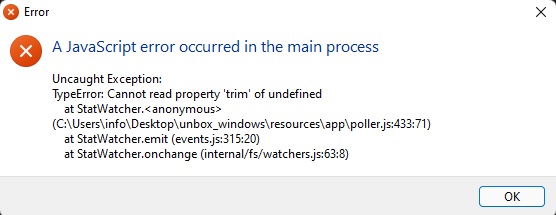
- Once I mix a track in and the previous deck is stopped I get a javascript error (see attached) This happens after every mix.
-
- If I minimize rekordbox to look on desktop which I do often for my radio show notes etc. the music stutters like it is struggling to cope but memory etc. is all good on this machine.
- If I minimize rekordbox to look on desktop which I do often for my radio show notes etc. the music stutters like it is struggling to cope but memory etc. is all good on this machine.
So the JavaScript error you're seeing usually comes from the Artist / Track field being empty, you may need to fill out the metadata on some of your tracks?
For the lag you're seeing I'll have to look into this, and see if I can recreate. For now maybe you could keep the rb window maximized, and open file explorer to get to your desktop instead of minimizing the rb window?
So the JavaScript error you're seeing usually comes from the Artist / Track field being empty, you may need to fill out the metadata on some of your tracks?
For the lag you're seeing I'll have to look into this, and see if I can recreate. For now maybe you could keep the rb window maximized, and open file explorer to get to your desktop instead of minimizing the rb window?
All the metadata is 100%, it has to be for my radio show BUT...one thing I didn't mention is it does work still so when I get the javascript error, the artist and title are in fact writing to the text file so in theory I could hit ok on the error and carry on but wanted to make you aware of it.
For the minimize issue, its no big deal if I just get in the habit of not doing that, I can always use a laptop alongside things so this isn't a problem.