
lsp-dart
 lsp-dart copied to clipboard
 emacs-lsp
SDKs can't be located if you installed using snap on Ubuntu 20.04
TLDR Solution
(setq lsp-dart-sdk-dir "/home/YOURUSERNAME/snap/flutter/common/flutter/bin/cache/dart-sdk")
(setq lsp-dart-flutter-sdk-dir "/home/YOURUSERNAME/snap/flutter/common/flutter")
These paths may change in the future but you can likely find them again via flutter doctor -v
I'm not sure if this is an "issue", but it's a problem that I ran into and couldn't find the solution to anywhere.
Describe the bug (short)
The docs list lsp-dart-sdk-dir and lsp-dart-flutter-sdk-dir as optional. That appears to not be the case if you installed via snapd. Being able to find flutter, does not lead to lsp-dart being able to locate the flutter sdk and then locating the dart-sdk from that as suggested by the docs.
Describe the bug (longer to help others searching Google)
The docs list lsp-dart-sdk-dir and lsp-dart-flutter-sdk-dir as optional. That appears to not be the case if you installed via snapd... as is the first suggested method on linux: https://flutter.dev/docs/get-started/install/linux#install-flutter-using-snapd
Leaving these as the default and then running (M-x lsp) lead to the following:
Command "[LSP Dart] Dart command not found in path ’/usr/bin/cache/dart-sdk/bin/dart’ /usr/bin/cache/dart-sdk/bin/snapshots/analysis_server.dart.snapshot --lsp --client-id emacs.lsp-dart --client-version 1.19.1 (package: 20210715.1659)" is not present on the path.
I figured out after some google fu that I needed to point the dart-sdk to where ever dart was.
> which dart
/snap/bin/dart
I had no idea where the SDK was as I hadn't gone though the manual install and snap did all the work.
Trying to use /snap/bin I get
Command "[LSP Dart] Dart command not found in path ’/snap/bin/bin/dart’ /snap/bin/bin/snapshots/analysis_server.dart.snapshot --lsp --client-id emacs.lsp-dart --client-version 1.19.1 (package: 20210715.1659)" is not present on the path.
I initially didn't realise why I was ending up with /bin/bin. It should have clicked that I needed to point to the actual sdk directory and that would contain both /bin and /bin/snapshots/analysis_server, but it didn't.
Instead I tried setting the path to /snap (stupid I know, but I was just tying lots of things and I want to put it all here to help any others in the future searching for keywords) in the hopes that the other things needed would be accessible from /snap/bin.
I got what seemed like progress:
Server dart_analysis_server:26758/starting exited with status exit(check corresponding stderr buffer for details). Do you want to restart it? (y or n) n
Could not find a command named "/snap/bin/snapshots/analysis_server.dart.snapshot".
I probably would have solved this faster except everything in /snap/bin is just a simlink to /usr/bin/snap
It turns out that snap works quite differently to everything else so it's not possible to just look at the symlink destination and then use that.
To Reproduce
Install Flutter on Ubuntu 20.04 via snapd
Try to run lsp M-x lsp
Expected behavior The docs to be correct either by a fix to the code that locates the sdks or removal of the part about those settings being optional and that they can automatically locate the sdks. Or at least adding (Optional - unless you are using snapd)
Version [LSP Dart] 1.19.1 (package: 20210715.1659) at 2021.07.27 @ Emacs 27.2 [Dart SDK] Dart SDK version: 2.13.4 (stable) (Wed Jun 23 13:08:41 2021 +0200) on "linux_x64"
[Flutter SDK] /usr/ [Flutter project] true [Project entrypoint] /home/hello/StudioProjects/helloworld/lib/main.dart
Other tickets Google sent me to https://github.com/emacs-lsp/lsp-dart/issues/50 https://github.com/emacs-lsp/lsp-dart/issues/80 https://github.com/emacs-lsp/lsp-dart/issues/4 https://github.com/emacs-lsp/lsp-dart/issues/17

thank you for the report!
Actually, this is not related to snap install but emacs not finding the command in your PATH. if you start emacs from terminal probably will work, but you can configure your path with (setenv ...) and (genenv ...)
The docs are correct, we may need to improve making it clear that it relies on how emacs configure your PATH.
Overall, your solution to set the SDK manually is the recommended indeed, as a code improvement we can avoid the need to set lsp-dart-sdk-dir if lsp-dart-flutter-sdk-dir is already set.

What is it that should be in my path though?
#+begin_src elisp
(member "/snap/bin" (split-string (getenv "PATH") ":"))
#+end_src

#+RESULTS:
| /snap/bin | /home/hello//.krew/bin |
It seems to me that lsp-dart is finding flutter, but it follows the simlink and treats it as if it were a link to flutter, when it's actually a link to snap. When the simlink doesn't actually lead it to the sdk directory but instead to /usr/bin/ as this is where /usr/bin/snap lives. It then tries to find the other SDK parts relative to this:
Command "[LSP Dart] Dart command not found in path ’/usr/bin/cache/dart-sdk/bin/dart’
It seems like code-dart might have similar issues: https://github.com/Dart-Code/Dart-Code/issues/2791#issuecomment-711866042
Hum, maybe it's a bug, we need to investigate... These are the functions that do the work: https://github.com/emacs-lsp/lsp-dart/blob/master/lsp-dart-utils.el#L98-L121 Could you debug/call it from your project file buffer and check what's the issue?
@gerrywastaken maybe you should take a look at this as well: https://github.com/purcell/exec-path-from-shell
(executable-find lsp-dart-flutter-executable)
evaluates to
/snap/bin/flutter
Looking at the code, I'm new to lisp, but I can't see any special handling for the strange way in which all snap roads lead to /usr/bin/snap
I don't think you are getting from /snap/bin/flutter to /home/YOURUSERNAME/snap/flutter/common/flutter without some code to somehow use /usr/bin/snap to locate the real flutter location.
Just so things are clear: My paths in emacs are already identical to the paths outside of emacs. It's locating flutter on the path, the problem is that it doesn't understand how to treat that path as it's not normal.
Perhaps this might help:
/snap/bin> ls -lah
total 8,0K
drwxr-xr-x  2 root root 4,0K jul 26 19:02 .
drwxr-xr-x 29 root root 4,0K jul 24 15:25 ..
lrwxrwxrwx  1 root root   13 jul 22 19:00 chromium -> /usr/bin/snap
lrwxrwxrwx  1 root root   13 jul 22 19:00 chromium.chromedriver -> /usr/bin/snap
lrwxrwxrwx  1 root root   13 jul 17 19:00 code -> /usr/bin/snap
lrwxrwxrwx  1 root root   13 jul 17 19:00 code.url-handler -> /usr/bin/snap
lrwxrwxrwx  1 root root   13 jul  5 19:02 color-picker -> /usr/bin/snap
lrwxrwxrwx  1 root root   12 jul 24 15:25 dart -> flutter.dart
lrwxrwxrwx  1 root root   13 mei 25  2020 fasd -> /usr/bin/snap
lrwxrwxrwx  1 root root   13 jul 24 15:25 flutter -> /usr/bin/snap
lrwxrwxrwx  1 root root   13 jul 24 15:25 flutter.dart -> /usr/bin/snap
lrwxrwxrwx  1 root root   13 jul 24 15:25 flutter.openurl -> /usr/bin/snap
lrwxrwxrwx  1 root root   13 mrt 21 17:41 glances -> /usr/bin/snap
lrwxrwxrwx  1 root root   13 jul 15 04:03 helm -> /usr/bin/snap
lrwxrwxrwx  1 root root   13 mrt 30 19:08 jq -> /usr/bin/snap
lrwxrwxrwx  1 root root   13 mei 14 19:02 kube-apiserver -> /usr/bin/snap
lrwxrwxrwx  1 root root   13 jul 26 19:02 microk8s -> /usr/bin/snap
lrwxrwxrwx  1 root root   13 jul 26 19:02 microk8s.add-node -> /usr/bin/snap
lrwxrwxrwx  1 root root   13 jul 26 19:02 microk8s.cilium -> /usr/bin/snap
lrwxrwxrwx  1 root root   13 jul 26 19:02 microk8s.config -> /usr/bin/snap
lrwxrwxrwx  1 root root   13 jul 26 19:02 microk8s.ctr -> /usr/bin/snap
lrwxrwxrwx  1 root root   13 jul 26 19:02 microk8s.dashboard-proxy -> /usr/bin/snap
lrwxrwxrwx  1 root root   13 jul 26 19:02 microk8s.dbctl -> /usr/bin/snap
lrwxrwxrwx  1 root root   13 jul 26 19:02 microk8s.disable -> /usr/bin/snap
lrwxrwxrwx  1 root root   13 jul 26 19:02 microk8s.enable -> /usr/bin/snap
lrwxrwxrwx  1 root root   13 jul 26 19:02 microk8s.helm -> /usr/bin/snap
lrwxrwxrwx  1 root root   13 jul 26 19:02 microk8s.helm3 -> /usr/bin/snap
lrwxrwxrwx  1 root root   13 jul 26 19:02 microk8s.inspect -> /usr/bin/snap
lrwxrwxrwx  1 root root   13 jul 26 19:02 microk8s.istioctl -> /usr/bin/snap
lrwxrwxrwx  1 root root   13 jul 26 19:02 microk8s.join -> /usr/bin/snap
lrwxrwxrwx  1 root root   13 jul 26 19:02 microk8s.juju -> /usr/bin/snap
lrwxrwxrwx  1 root root   13 jul 26 19:02 microk8s.kubectl -> /usr/bin/snap
lrwxrwxrwx  1 root root   13 jul 26 19:02 microk8s.leave -> /usr/bin/snap
lrwxrwxrwx  1 root root   13 jul 26 19:02 microk8s.linkerd -> /usr/bin/snap
lrwxrwxrwx  1 root root   13 jul 26 19:02 microk8s.refresh-certs -> /usr/bin/snap
lrwxrwxrwx  1 root root   13 jul 26 19:02 microk8s.remove-node -> /usr/bin/snap
lrwxrwxrwx  1 root root   13 jul 26 19:02 microk8s.reset -> /usr/bin/snap
lrwxrwxrwx  1 root root   13 jul 26 19:02 microk8s.start -> /usr/bin/snap
lrwxrwxrwx  1 root root   13 jul 26 19:02 microk8s.status -> /usr/bin/snap
lrwxrwxrwx  1 root root   13 jul 26 19:02 microk8s.stop -> /usr/bin/snap
lrwxrwxrwx  1 root root   13 mrt 27 19:00 nmap -> /usr/bin/snap
lrwxrwxrwx  1 root root   13 mrt 27 19:00 nmap.ncat -> /usr/bin/snap
lrwxrwxrwx  1 root root   13 mrt 27 19:00 nmap.nping -> /usr/bin/snap
lrwxrwxrwx  1 root root   13 jun 21 19:01 slack -> /usr/bin/snap
lrwxrwxrwx  1 root root   13 jun 21 19:01 snap-store -> /usr/bin/snap
lrwxrwxrwx  1 root root   13 jun 21 19:01 snap-store.ubuntu-software -> /usr/bin/snap
lrwxrwxrwx  1 root root   13 jun 21 19:01 snap-store.ubuntu-software-local-file -> /usr/bin/snap
lrwxrwxrwx  1 root root   13 jun  1 04:01 ticker -> /usr/bin/snap
As you can see, everything points to /usr/bin/snap I'm guessing /usr/bin/snap then does something like looking at $argv[0] to do an internal lookup of the actual program that the user was attempting to launch. It probably then launches it inside a bunch of linux namespaces: https://man7.org/linux/man-pages/man7/namespaces.7.html so that the process is isolated.
When I get some time I'll look into how this works and if I can fix it I'll submit a PR.
@mvo5 Perhaps you could provide some input? I've searched but can't find information on how /usr/bin/snap locates the final application. It seems this issue also has ramifications for a similar team working on the vs-code LSP for dart and they were also stumped.
The code here attempts to find the flutter SDK, it does so by first looking for futter on the path:
https://github.com/emacs-lsp/lsp-dart/blob/master/lsp-dart-utils.el#L120
It finds /snap/bin/flutter
It then follows the symlink to /usr/bin/snap and assumes this will be where the SDK is located, as this is normally the case in systems that are not using Snap.
Is there a way to programmatically get from
/snap/bin/flutter to /home/YOURUSERNAME/snap/flutter/common/flutter that would also apply for other /snap/bin files and won't break on systems that use a different directory for storing the Snap applications?
Hum, looks a edge case indeed, maybe we should do what @DanTup did here? treat snap as a specific case
Yeah, this setup was a bit weird and I wasn't actually able to find much documentation on exactly how it's intended to work (eg. why the symlinks point to Snap) - maybe your namespace link above explains it.
I think once the Snap has bee initialised correctly, there is a valid binary on PATH, but if it's never been run (eg. you just installed it) then things are in a weird state. I simplified how Dart-Code handles it a little earlier this year, the change is here:
https://github.com/Dart-Code/Dart-Code/pull/3292/files
The main idea is that if we find a symlink pointing to Snap (which is just have a hard-coded path for), we run a flutter command to trigger initialisation (I think we run flutter config --machine, but anything like flutter doctor would probably also do - although might trigger a bit more work) and then re-search for the SDK (and expect to find a new symlink/binary that points to a real SDK).

I see, thank you for the explanation @DanTup, I'll take a closer look on that change and try to reproduce the same behavior on lsp-dart side
@ericdallo Yeah that would work in the case of Ubuntu, but I don't believe it will on other distros and may break again in the future. I'm also not sure on the idea of directly calling stuff that was intended to be run within the locked down environment set up when run via the Snap wrapper. That's why I was asking for advice from the primary dev (mvo5) as they likely have a best practice way of implementing such things that is some sort of a public API. This way it would be unlikely to break on different distros or with snap updates. But I'm not sure.
@DanTup
I wasn't actually able to find much documentation on exactly how it's intended to work (eg. why the symlinks point to Snap) Yeah from what I can tell that's pretty much it. They just want to run it within an isolated namespace (or set of namespaces) and lock down what parts of the system it can mess with.
I did manage to track down the initial entry point in the snap code where it does the conversion, but still trying to see if there is an easy way to get the true path: https://github.com/snapcore/snapd/blob/25b3dda50c55946eae29a46103ef11077186d5c1/cmd/snap/main.go#L474
I think once the Snap has bee initialised correctly, there is a valid binary on PATH, but if it's never been run (eg. you just installed it) then things are in a weird state.
Which binary though? The one located within the SDK directory? e.g. /home/YOURUSERNAME/snap/flutter/common/flutter/bin/flutter . The problem for us isn't getting that binary to run. It's that we then use the path of that binary to then find other parts of the flutter system via their paths (which are not within PATH).
The problem for us isn't getting that binary to run. It's that we then use the path of that binary to then find other parts of the flutter system via their paths (which are not within PATH).
I'm not sure I understand. For me, once I find the real Flutter (the one at /home/YOURUSERNAME/snap/flutter/common/flutter/bin/flutter) we drop the bin/flutter from the end and use that as the "Flutter SDK root", then we can find all the other tools from there (eg. Dart at bin/cache/dart-sdk/bin/dart, Pub at bin/cache/dart-sdk/bin/pub, analysis server snapshot at bin/cache/dart-sdk/bin/snapshots/analysis_server.snapshot etc.).
I don't think there's much more we need to call though, so that seems to be enough.
Oh so "/home/YOURUSERNAME/snap/flutter/common/flutter/bin" ends up in your path? Interesting, although I'm not sure how. However I tested your extension and it does indeed work so I guess I'll read the code to figure it out. :)
Actually so it looks like this is the line that is allowing it to work for me:
isLinux ? "~/snap/flutter/common/flutter" : undefined,
https://github.com/Dart-Code/Dart-Code/blob/1db9412f2708c892be375c710f50e5cbbf406ae0/src/extension/sdk/utils.ts#L262
@gerrywastaken we can take this same approach, checking if $HOME/snap/flutter/common/flutter is a valid file/folder in lsp-dart, right?
We could, I'm just not sure how often it might not work. :) It will also sidestep the snap and any of it's security if you call things form that location... I think :D
The best bet would be to call /snap/bin/flutter and not it's symlink and the same for dart and then using $HOME/snap/flutter/common/flutter for anything that isn't within that path. Although I'm completely new to all of this :D
Hum, I don't see any issues with that approach, as the flutter/dark sdk are really on $HOME/snap/flutter/common/flutter, but I may be wrong
There exist same issue for me.
I download the latest stable release of the fullter sdk from here.
https://flutter.dev/docs/get-started/install/linux#android-setup
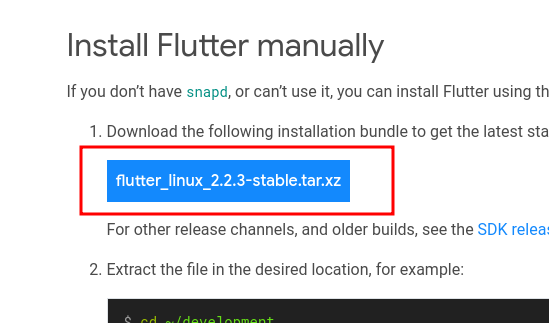
After unzip, you can see a folder structure like this:
├── bin
│   ├── cache
│   │   ├── .dartignore
│   │   ├── android-internal-build-artifacts.stamp
│   │   ├── android-sdk.stamp
│   │   ├── artifacts
│   │   │   ├── engine
│   │   │   │   ├── android-arm
│   │   │   │   │   └── flutter.jar
│   │   │   │   ├── android-arm-profile
│   │   │   │   │   ├── flutter.jar
│   │   │   │   │   └── linux-x64
│   │   │   │   ├── android-arm-release
│   │   │   │   │   ├── flutter.jar
│   │   │   │   │   └── linux-x64
│   │   │   │   ├── android-arm64
│   │   │   │   │   └── flutter.jar
│   │   │   │   ├── android-arm64-profile
│   │   │   │   │   ├── flutter.jar
│   │   │   │   │   └── linux-x64
│   │   │   │   ├── android-arm64-release
│   │   │   │   │   ├── flutter.jar
│   │   │   │   │   └── linux-x64
│   │   │   │   ├── android-x64
│   │   │   │   │   ├── flutter.jar
│   │   │   │   │   └── libflutter.so
│   │   │   │   ├── android-x64-profile
│   │   │   │   │   ├── flutter.jar
│   │   │   │   │   └── linux-x64
│   │   │   │   ├── android-x64-release
│   │   │   │   │   ├── flutter.jar
│   │   │   │   │   └── linux-x64
│   │   │   │   ├── android-x86
│   │   │   │   │   ├── flutter.jar
│   │   │   │   │   └── libflutter.so
│   │   │   │   ├── android-x86-jit-release
│   │   │   │   │   └── flutter.jar
│   │   │   │   ├── common
│   │   │   │   │   ├── flutter_patched_sdk
│   │   │   │   │   └── flutter_patched_sdk_product
│   │   │   │   ├── linux-x64
│   │   │   │   │   ├── const_finder.dart.snapshot
│   │   │   │   │   ├── flutter_linux
│   │   │   │   │   ├── flutter_tester
│   │   │   │   │   ├── font-subset
│   │   │   │   │   ├── frontend_server.dart.snapshot
│   │   │   │   │   ├── icudtl.dat
│   │   │   │   │   ├── isolate_snapshot.bin
│   │   │   │   │   ├── libflutter_linux_gtk.so
│   │   │   │   │   └── vm_isolate_snapshot.bin
│   │   │   │   ├── linux-x64-profile
│   │   │   │   │   ├── flutter_linux
│   │   │   │   │   ├── gen_snapshot
│   │   │   │   │   └── libflutter_linux_gtk.so
│   │   │   │   └── linux-x64-release
│   │   │   │       ├── flutter_linux
│   │   │   │       ├── gen_snapshot
│   │   │   │       └── libflutter_linux_gtk.so
│   │   │   ├── gradle_wrapper
│   │   │   │   ├── gradle
│   │   │   │   │   └── wrapper
│   │   │   │   ├── gradlew
│   │   │   │   └── gradlew.bat
│   │   │   ├── ios-deploy
│   │   │   ├── libimobiledevice
│   │   │   ├── libplist
│   │   │   ├── material_fonts
│   │   │   │   ├── MaterialIcons-Regular.otf
│   │   │   │   ├── MaterialIcons_LICENSE.txt
│   │   │   │   ├── Roboto-Black.ttf
│   │   │   │   ├── Roboto-BlackItalic.ttf
│   │   │   │   ├── Roboto-Bold.ttf
│   │   │   │   ├── Roboto-BoldItalic.ttf
│   │   │   │   ├── Roboto-Italic.ttf
│   │   │   │   ├── Roboto-Light.ttf
│   │   │   │   ├── Roboto-LightItalic.ttf
│   │   │   │   ├── Roboto-Medium.ttf
│   │   │   │   ├── Roboto-MediumItalic.ttf
│   │   │   │   ├── Roboto-Regular.ttf
│   │   │   │   ├── Roboto-Thin.ttf
│   │   │   │   ├── Roboto-ThinItalic.ttf
│   │   │   │   ├── RobotoCondensed-Bold.ttf
│   │   │   │   ├── RobotoCondensed-BoldItalic.ttf
│   │   │   │   ├── RobotoCondensed-Italic.ttf
│   │   │   │   ├── RobotoCondensed-Light.ttf
│   │   │   │   ├── RobotoCondensed-LightItalic.ttf
│   │   │   │   ├── RobotoCondensed-Regular.ttf
│   │   │   │   ├── RobotoCondensed_LICENSE.txt
│   │   │   │   ├── Roboto_LICENSE.txt
│   │   │   │   └── codepoints
│   │   │   ├── openssl
│   │   │   └── usbmuxd
│   │   ├── dart-sdk
│   │   │   ├── LICENSE
│   │   │   ├── README
│   │   │   ├── bin
│   │   │   │   ├── dart
│   │   │   │   ├── dart2js
│   │   │   │   ├── dart2native
│   │   │   │   ├── dartanalyzer
│   │   │   │   ├── dartaotruntime
│   │   │   │   ├── dartdevc
│   │   │   │   ├── dartdoc
│   │   │   │   ├── dartfmt
│   │   │   │   ├── pub
│   │   │   │   ├── resources
│   │   │   │   │   └── dartdoc
│   │   │   │   ├── snapshots
│   │   │   │   │   ├── analysis_server.dart.snapshot   # <= i guess what we need is here.
But our following code get wrong place
(defun lsp-dart-get-flutter-sdk-dir ()
  "Return the Flutter SDK path.
Check for `lsp-dart-flutter-sdk-dir` then
flutter executable on PATH then
FLUTTER_ROOT environment variable."
  (or lsp-dart-flutter-sdk-dir
      (-some-> (executable-find lsp-dart-flutter-executable)
        file-truename
        (locate-dominating-file "bin")
        file-truename)
      (getenv "FLUTTER_ROOT")))
will return same folder as flutter binary, that result not correct i guess.
├── bin
 |          flutter            # <= flutter binary, return here,
│   ├── cache
│   │   ├── dart-sdk
│   │   │   ├── bin
│   │   │   │   ├── snapshots
│   │   │   │   │   ├── analysis_server.dart.snapshot   # <=  what we need is here.

Another issue is, though i set correct lsp-dart-flutter-sdk-dir, i still could not findout correct sdk folder, because
(defun lsp-dart-get-sdk-dir ()
  "Return the Dart SDK path.
Check for PATH environment variable.
When editing a Flutter project, the version of Dart included in the Flutter SDK
is used in preference."
  (or lsp-dart-sdk-dir
      (when (lsp-dart-flutter-project-p)            ;; < = because this condition, it never use lsp-dart-get-flutter-sdk-dir.
        (let ((dart-sdk (expand-file-name "bin/cache/dart-sdk/" (lsp-dart-get-flutter-sdk-dir))))
          (if (file-exists-p dart-sdk)
              dart-sdk
            (error "Dart SDK not found inside flutter cache dir %s.  Consider setting `lsp-dart-sdk-dir` variable" dart-sdk))))
      (-some-> (executable-find "dart")
        file-truename
        (locate-dominating-file "bin")
        file-truename)))
so, the only fix is, set lsp-dart-sdk-dir directly to correct folder.
But our following code get wrong place
@zw963 I think lsp-dart is correct actually, there are 2 functions at lsp-dart, one called lsp-dart-get-flutter-sdk-dir which should return the root of flutter folder, and lsp-dart-get-sdk-dir which should return the dart SDK root folder.
Another issue is, though i set correct lsp-dart-flutter-sdk-dir, i still could not findout correct sdk folder, because
That function looks correct to me, can you elaborate what do you think it's wrong?
lsp-dart-flutter-project-p returns t if your project is a flutter one, if so, it will use the dart-sdk folder inside your flutter folder
Not sure if it's of any value to someone else, but I'm also on Ubuntu and installed using snap.
In order to get things working, I used this configuration:
(defun wal/find-dart-flutter-sdk-dir ()
  "Find the Dart Flutter SDK directory."
  (when-let* ((flutter-bin (executable-find "flutter"))
              (sdk-dir (string-trim (shell-command-to-string "flutter sdk-path"))))
    sdk-dir))

(use-package lsp-dart
  :custom
  (lsp-dart-flutter-sdk-dir (wal/find-dart-flutter-sdk-dir))
  :after lsp-mode)
Clunky, but it works for getting things somewhat working. Unfortunately, things like lsp-dart-run still fail with exit code 1. I tried edebugging but couldn't find the reason. My guess is this solution is not the right way to go but I don't really need to be able to run from Emacs I guess.

@Walheimat lsp-dart-run uses dap-mode under the hood that as you can see here get the dart sdk, so configuring it correctly it should work 🤔
Also, your workaround expect flutter sdk-path works, but I suspect only recent flutter versions have that?
Ah, interesting.
Not sure how this works, but I notice that (lsp-dart-get-sdk-dir) resolves to either the correct path or just "/usr/" depending on the buffer I evaluate it in ...
As for the other question: No idea, I just started learning Flutter this week. I don't propose this as an actual solution, but that's how I got things working okay-ish.
So, edebugging this, it also looks fine, I'm guessing the issue lies somewhere else, here's the last log before it fails:
Result: (:type "flutter" :name "Flutter Run" :program "/home/walheimat/tests/flutters/myapp/lib/main.dart" :args nil :noDebug t :request "launch" :dartSdkPath "/home/walheimat/snap/flutter/common/flutter/bin/ca..." :maxLogLineLength 2000 :cwd "/home/walheimat/tests/flutters/myapp/" :vmAdditionalArgs "" :vmServicePort 0 :debugExternalLibraries nil :debugSdkLibraries nil :evaluateGettersInDebugViews t :evaluateToStringInDebugViews t :flutterSdkPath "/home/walheimat/snap/flutter/common/flutter" :flutterTrackWidgetCreation t :useFlutterStructuredErrors t :useWriteServiceInfo t :debuggerHandlesPathsEverywhereForBreakpoints t :flutterMode "debug" :dap-server-path ("node" "/home/walheimat/.emacs.d/.extension/github/Dart-Co..." "flutter") :output-filter-function lsp-dart-dap--output-filter-function)

Sending:
{
  "command": "initialize",
  "arguments": {
    "clientID": "vscode",
    "clientName": "Visual Studio Code",
    "adapterID": "flutter",
    "pathFormat": "path",
    "linesStartAt1": true,
    "columnsStartAt1": true,
    "supportsVariableType": true,
    "supportsVariablePaging": true,
    "supportsRunInTerminalRequest": true,
    "locale": "en-us"
  },
  "type": "request",
  "seq": 1
}
Debug session process exited with status: exited abnormally with code 1
@Walheimat the (lsp-dart-get-sdk-dir) checks the current buffer to know if it's a flutter project, so running from a flutter project evals to something otherwise it tries other ways
Okay, so my bad, I apparently can't read and had not run lsp-dart-dap-setup.
After that it would still crash, but the reason is that I have multiple devices "connected" as in I created the project using flutter config --enable-linux-desktop. I saw in the *Messages* that it aborted because of that? Strange.
So yeah, now both running from Emacs and debugging works without a hitch. Really cool.
#182 should fix this, It's not a ideal fix, but seems good enough to fix it for now for most people