
Elmish.WPF
 Elmish.WPF copied to clipboard
 elmish
missing elmish.program method?
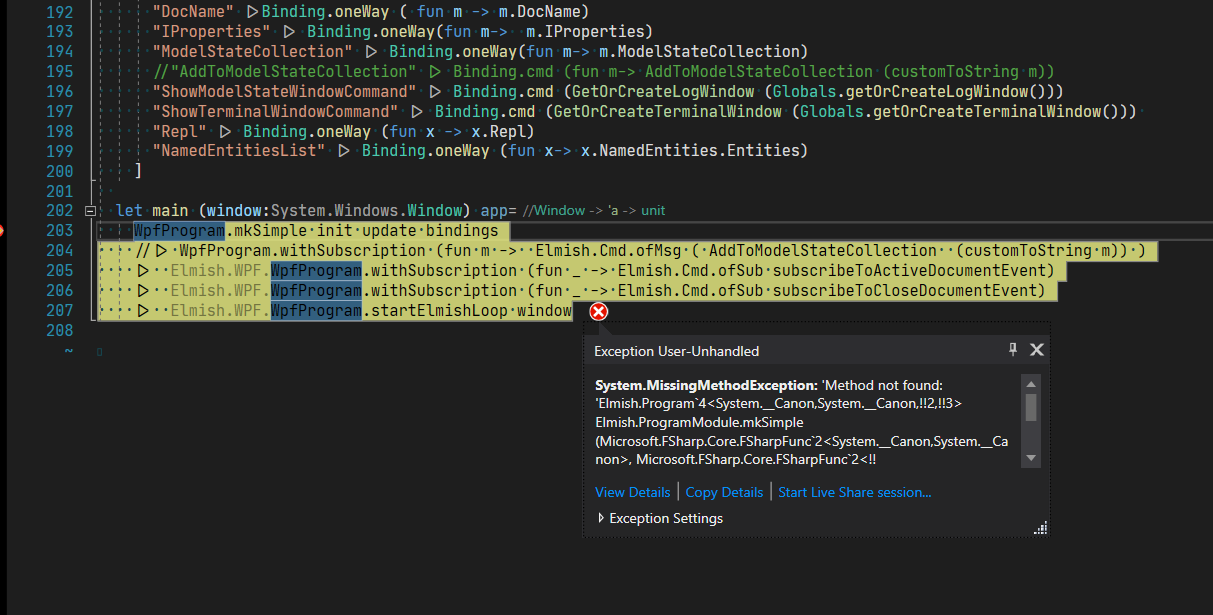
just trying to run the program does this now. I'm completely lost, do you have any idea why this might be happening?
the <system.__cannon> thing apparently has to do with generics..
I'm at a loss as to why it would say it's missing when i can clearly see it's not missing, i can navigate to it in visual studio..
Elmish.WPF version: 4.0.0beta45 Target framework version: net48


even if i could, you don't have Inventor, so I'm not sure how to even give you a small repro that would be usable..
I did however, figure out that the latest update requiring fsharp.core 6 and greater broke things for the plugin. I tried it with fsharp.core 6 and 4.6.2, but it wouldn't even step into the debugger if i couldn't load the correct version.
stepping back to beta-44 and fsharp.core 4.6.2 has restored the ability to use elmish.wpf, so essentially im back to where i was before updating.
Its mysterious to me why the plugin breaks when using the newer versions, but there's my ignorance showing again.. lol..
That information is helpful. I think we might be able to better understand this problem.
What is inventor? Can you share a link to a web page for it? What are its dependencies, especially on FSharp.Core?
Inventor has no dependencies on fsharp core normally, but I'm authoring a plugin that uses fsharp and this library, because this is awesome and I'd much rather do it the elmish way.
so, Inventor starts, then runs through a the process of loading a whole host of first and third party plugins from specific locations, or at least, checks a list of common locations for things to be, and then uses the place it found the .manifest and .Inventor.addin files for a particular plugin to look for whatever dependencies it needs.
i have my plugin output dir going to the standard place that version independent plugins go, into
"C:\ProgramData\Autodesk\Inventor Addins".
after that it's my plugin name and either debug or release, then my main plugin dll,
"C:\ProgramData\Autodesk\Inventor Addins\Intellidraft\Debug\Intellidraft.dll"
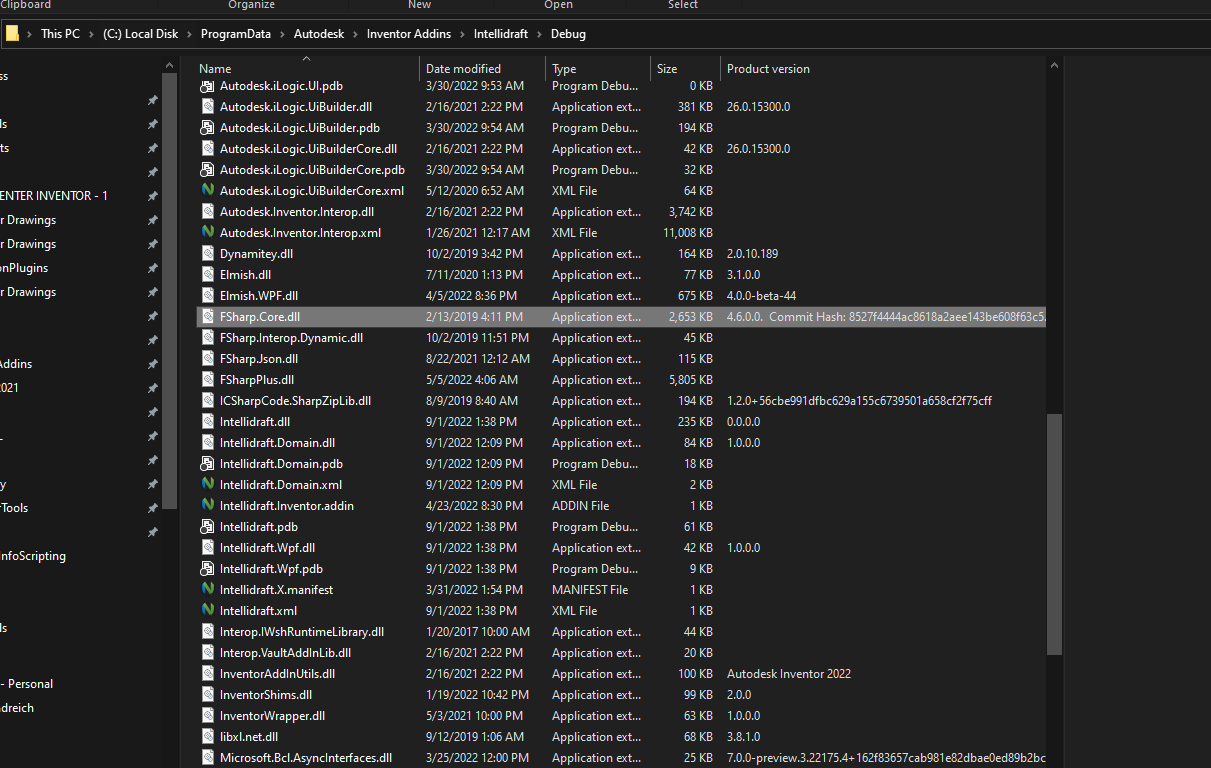
Interestingly, I have been trying to use fsharp.interop.dynamic, because Inventor's .Net interop api is all running off of COM interfaces instead of the actual objects, as those are all native code, which makes sense, but when I try to use the ? operator for a dynamic object, like another plugin i'd like to reference from mine, it throws an exception for not having access to fsharp core 4.4.1.0, because of course 4.6.2 is what's currently copied to that directory for your library to work.
I can't have multiple versions in the same folder, as far as I'm aware, and I also have no idea how to point to another location in the case of it not finding a version to load that makes it happy, so, I suppose i have to not use the other library, or find away to modify it, or.. something? haha. I'm really not sure.
I can't have multiple versions in the same folder, as far as I'm aware, and I also have no idea how to point to another location in the case of it not finding a version to load that makes it happy
The location doesn't matter. You can only load one DLL of a given name.
Have you tried looking into Assembly Binding Redirection? Here is a relevant SO question that seems to summarize it fairly well: https://stackoverflow.com/questions/43365736/assembly-binding-redirect-how-and-why

@marner2 and @TysonMN thank you for your patience and help, I appreciate it! I'm not sure how I would do it, because I don't control what Autodesk Inventor has for settings this way? Like i don't think i can access it's binding redirects? or can i just put an app.config in my library? Would Inventor even look at it?
You said that Inventor doesn't depend on FSharp.Core, so I think that means this must be an issue among your dependencies (other than Inventor).
@TysonMN yep, I'm trying to use elmish.wpf and fsharp.interop.dynamic because of the COM object late binding, and since ive set up with 4.6.2 to be able to use Elmish.wpf, then it fails when trying to invoke any thing dynamic because the dynamic lib only runs on fsharp.core 4.4.1.0.
I opened an issue on that repo, and he gave me the link to the same stack-overflow article that @marner2 gave, which is wonderful, except I'm not sure how I implement the binding redirect when I don't have control of Inventor's App.config, assuming it exists somewhere and they're not doing anything else funky, which they very well may be, it's a huge codebase with a lot of native code mixed in with .net framework code.. it's pretty hard to follow sometimes.
Just thought I'd mention it here in case someone sees this problem, and hopes to get a resolution.
I found the way to correct some of this at least, the Inventor.exe.config is in it's bin folder.
for some reason simply adding the <autoGenerateBindingRedirects>true</autoGenerateBindingRedirects> to it does not result in a happy fix for inventor, but if you specifically add your binding redirect to it, you can get it to work, at least for FSharp.Core 4.6.0
here's my altered Inventor.exe.config
<?xml version="1.0" encoding="utf-8"?>
<!-- //inventor/Main/sources/AppFw/app/Inventor.exe.config -->
<!-- This config file is mastered to Bin\Inventor.exe.config by //inventor/Main/sources/AppFw/app/app.install.xml -->
<configuration>
  <configSections>
    <sectionGroup name="autodesk.inventor.content">
      <section name="logging" type="System.Configuration.DictionarySectionHandler,system, Version=1.0.3300.0, Culture=neutral, PublicKeyToken=b77a5c561934e089, Custom=null"/>
    </sectionGroup>
    <section name="microsoft.web.services3" type="Microsoft.Web.Services3.Configuration.WebServicesConfiguration, Microsoft.Web.Services3, Version=3.0.0.0, Culture=neutral, PublicKeyToken=31bf3856ad364e35" />
  </configSections>

  <appSettings>
    <!-- Controls client cache allocation limit. MaxCachedObjects controls the maximum number
		 of cached objects before a purge is done. CachePurgeInterval controls how many objects
		 are removed when a purge is done -->
    <add key="Connectivity.Content.MaxCachedObjects" value="500"/>
    <add key="Connectivity.Content.CachePurgeInterval" value="100"/>
    <add key="Connectivity.Content.MaxSearchResults" value="2500"/>
    <!-- WebService timeout (in milliseconds) -->
    <add key="WebServiceTimeout" value="1000000"/>
    <add key="EnableWindowsFormsHighDpiAutoResizing" value="true" />
  </appSettings>

  <microsoft.web.services3>
    <messaging>
      <maxMessageLength value="51200"/>
      <mtom clientMode="On" maxMimeParts="1024"/>
    </messaging>
    <security>
      <!-- Specifies the time buffer used by WSE to determine when a SOAP message is valid.
           Set to the max of 24hr in seconds. -->
      <timeToleranceInSeconds value="86400" />
    </security>
  </microsoft.web.services3>
  <startup useLegacyV2RuntimeActivationPolicy="true">
    <supportedRuntime version="v4.0" sku=".NETFramework,Version=v4.8"/>
  </startup>
  <!-- .NET 3.5 and earlier allowed managed code to catch access violations and other corrupted
       process states.  Starting in .NET 4.0, managed code no longer catches these exceptions.
       The "legacyCorruptedStateExceptionsPolicy" element restores the .NET 3.5 behavior.

       "loadFromRemoteSources" allows DLLs to load from network shares. Customers have requested
       this capability in iLogic rules. -->
  <runtime>
    <legacyCorruptedStateExceptionsPolicy enabled="true"/>
    <loadFromRemoteSources enabled="true"/>
    <assemblyBinding xmlns="urn:schemas-microsoft-com:asm.v1">
      <dependentAssembly>
        <assemblyIdentity name="Fsharp.core" publicKeyToken="b03f5f7f11d50a3a" culture="neutral" />
        <bindingRedirect oldVersion="0.0.0.0-4.6.0.0" newVersion="4.6.0.0" />
      </dependentAssembly>
      <dependentAssembly>
        <assemblyIdentity name="Newtonsoft.Json" publicKeyToken="30ad4fe6b2a6aeed" culture="neutral" />
        <bindingRedirect oldVersion="0.0.0.0-12.0.0.0" newVersion="12.0.0.0" />
      </dependentAssembly>
      <dependentAssembly>
        <assemblyIdentity name="Microsoft.Extensions.Logging.Abstractions" publicKeyToken="adb9793829ddae60" culture="neutral" />
        <bindingRedirect oldVersion="0.0.0.0-3.1.6.0" newVersion="3.1.6.0" />
      </dependentAssembly>
	  <dependentAssembly>
        <assemblyIdentity name="Microsoft.Extensions.DependencyInjection.Abstractions" publicKeyToken="adb9793829ddae60" culture="neutral" />
        <bindingRedirect oldVersion="0.0.0.0-2.0.0.0" newVersion="2.0.0.0" />
      </dependentAssembly>
      <dependentAssembly>
        <assemblyIdentity name="System.Buffers" publicKeyToken="cc7b13ffcd2ddd51" culture="neutral" />
        <bindingRedirect oldVersion="0.0.0.0-4.0.3.0" newVersion="4.0.3.0" />
      </dependentAssembly>
    </assemblyBinding>
    <!--
        Switch.System.Windows.Interop.MouseInput.OptOutOfMoveToChromedWindowFix=true
        Switch.System.Windows.Interop.MouseInput.DoNotOptOutOfMoveToChromedWindowFix=true
        To follow MS update: https://support.microsoft.com/en-us/topic/february-9-2021-kb4601056-cumulative-update-for-net-framework-3-5-and-4-8-for-windows-10-version-1909-and-windows-server-version-1909-f3e984f3-d534-7c61-d8e9-b5d9885832fe
    -->
	<AppContextSwitchOverrides value="Switch.System.ServiceModel.DisableUsingServicePointManagerSecurityProtocols=false;Switch.System.Net.DontEnableSchUseStrongCrypto=false;Switch.System.Windows.Interop.MouseInput.OptOutOfMoveToChromedWindowFix=true;Switch.System.Windows.Interop.MouseInput.DoNotOptOutOfMoveToChromedWindowFix=true" />
  </runtime>
</configuration>
This doesn't seem to allow me to update Elmish.WPF past version 4.0.0-beta-44 though, I end up with it complaining it can't find Elmish.Program again.
But I can successfully use FSharp.Interop.Dynamic and Elmish.WPF in the same plugin now, which helps.
I'm going to close the issue, I suppose. Thanks for the help guys, assembly binding redirect really was the way to fix it, it just took a while to figure out where Autodesk was doing that. Now I just have to figure out a good way to alter the config for everyone that installs my plugin..