
Elmish.WPF
 Elmish.WPF copied to clipboard
 elmish
Ability to override update filtering logic
I am trying to implement a copy and paste feature and I am relying on the Clipboard to save and restore copied data (this allows cross-instances copy/paste and also to be able to paste again when relaunching the app). I have decided not to store the copied object on my model and I have defined my paste command like:
"Paste" |> Binding.cmdIf (fun _ ->
	if Clipboard.ContainsData(ClipboardKey)
    then Clipboard.GetData(ClipboardKey) :?> string |> Paste |> Some
    else None)
I can see that the state is re-evaluated correctly and I can see that the command is available through the keyboard shortcut but the button remains disabled.
Doing a couple of tests, it seems that there is some kind of caching occurring and as the model didn't change then the cmdIf is ignored. I could understand this position but what I don't get is why is the binding function called then? And why is the InputBinding correctly picking up the changes while the button doesn't?
I have created a workable demo here https://github.com/Evangelink/Elmish.Wpf.Experiments/pull/4 where I am testing 3 cases:
-
Add something on the model (I went with a bool
CanPastebut the ideal would be to store an option of the item that can be copied). To test this case, look atAppPasteOnModel, you will need to change the running app in theApp.xaml.cstoo. This solution seems elegant, but I am stuck with how to restore the initial state without having a direct call to the clipboard in my init. -
Use
cmdIfwith only the clipboard. Look atAppPasteClipboard, that's the default state. -
Use
cmdParamIfwhich seems to be working correctly. You will have to swap lines 49 and 50.

I am trying to implement a copy and paste feature and I am relying on the
Clipboardto save and restore copied data (this allows cross-instances copy/paste and also to be able to paste again when relaunching the app). I have decided not to store the copied object on my model [...] but the button remains disabled.
That is the intended behavior. You are wanting the UI to change based on global OS-level state. In MVU, the view is supposed to be fully determined by the model. Elmish.WPF and all the other MVU implementations are highly optimized to not change the individual parts of the UI when the corresponding individual parts of the model don't change. Because the part of the model corresponding to the Paste binding doesn't change, Elmish.WPF doesn't check to see if a change notification should be raised for the Paste binding.
With that in mind, it is now easy to see that you are facing the classic programing problem of caching. Your source of truth is the Clipboard, and you want to your application to stay in sync with it. As always, there are two options: polling or pushing. In this branch, the paste button is properly enabled or disabled and the application stays in sync with the Clipboard via polling. Typically pushing would be achieved by subscribing to an event on (in this case) the Clipboard. However, there are no such events on the Clipboard and my initial searches for how to subscribe to notified when the Clipboard changes look gross. Doesn't seem worth it to me unless you can find a NuGet package to do that gross work for you. (SharpClipboard is the first one I found with a description that seems to do this.)

Interestingly, cmdParamIf works because it always returns Some cmd in this code.
https://github.com/elmish/Elmish.WPF/blob/04dc145cdd2923c7625338a440f886261c927341/src/Elmish.WPF/ViewModel.fs#L703-L708
The use case for a cmdParamIf binding is similar to your use case: the button could be enabled or disabled based on data outside the model but specifically in the command parameter, which can be explicitly specified like in the UiBoundCmdParam sample or come from an event like in the EventBindingsAndBehaviors sample.
It is reasonable to consider overriding the default optimized behavior of Elmish.WPF for specific bindings. This sounds like it would fit in well with the composable binding API that I am working on for version 4. I will reopen this issue with that as the goal.
On a related note, I have already been looking at https://github.com/elmish/Elmish.WPF/blob/04dc145cdd2923c7625338a440f886261c927341/src/Elmish.WPF/ViewModel.fs#L776-L790 and wanting to better separate the pure part of deciding what to update and the impure part of actually performing the updates. Then the pure part can be further split into the data needed to perform an update and the filtering logic that decides if an update will occur. Given that separation, this feature would be to override just that filtering logic.
As an example, both Cmd and CmdParam would return Some cmd for the data need to perform the update. Then filtering would be (something like)
fun newModel currentModel -> canExec newModel = canExec currentModel
for Cmd and (something like) fun _ -> true for CmdParam.
That is the intended behavior.
I was guessing so but current experience is confusing/broken:
-
Why is the function called if the goal is to ignore result? I would have expected the caching mechanism to not trigger this call rather than doing the call and disregarding the results.
-
The caching is somehow/somewhere broken because the keyboard shortcut does work properly and pick-up the fact that the function is now returning
Some.
In this branch, the paste button is properly enabled or disabled and the application stays in sync with the
Clipboardvia polling.
Thanks for the help here. I once again didn't think of this polling loop.
It is reasonable to consider overriding the default optimized behavior of Elmish.WPF for specific bindings. This sounds like it would fit in well with the composable binding API that I am working on for version 4. I will reopen this issue with that as the goal.
As I said previously, I am pretty new to F#, MVU and Elmish so do not feel obliged to make changes if you think that my suggestions/explorations are not worth it.
A view model for a WPF command must implement the ICommand interface, which has two methods
- CanExecute and
- Execute
and one event
Elmish.WPF implements that interface in this file.
- Why is the function called if the goal is to ignore result? I would have expected the caching mechanism to not trigger this call rather than doing the call and disregarding the results.
I don't think I know what you are referring to. In what case is the function in the Cmd binding executed but the result ignored?
Maybe you are experiencing something related to the following. Some overloads of Binding.cmdIf and Binding.cmdParamIf take a single function this one.
https://github.com/elmish/Elmish.WPF/blob/04dc145cdd2923c7625338a440f886261c927341/src/Elmish.WPF/Binding.fs#L963-L971
Then that one function is used to implement both CanExecute as well as Execute. This means the function will be called twice in a row when CanExec returns true. That is not ideal, but having the API be more functional is worth it.
- The caching is somehow/somewhere broken because the keyboard shortcut does work properly and pick-up the fact that the function is now returning
Some.
I just tested. When the keyboard shortcut is used, WPF first calls CanExecute and then calls Execute if and only if CanExecute returned true.
Again, the behavior for the button is that it is disabled if CanExecute previously returned false. That prevents the user from clicking the button and directly invoking Execute. A necessary condition for the button to become enabled is for the view model to raise the CanExecuteChanged event, but Elmish.WPF doesn't do that for the non-param Cmd bindings if the model hasn't changed.
It is reasonable to consider overriding the default optimized behavior of Elmish.WPF for specific bindings. This sounds like it would fit in well with the composable binding API that I am working on for version 4. I will reopen this issue with that as the goal.
As I said previously, I am pretty new to F#, MVU and Elmish so do not feel obliged to make changes if you think that my suggestions/explorations are not worth it.
No worries. I think this is a good change. One of my goals with v4 is to remove "all the duplication". I think this idea would help me do that while at the same time exposing more functionality to the user. I think every part of the composable binding API is like that.
I don't think I know what you are referring to. In what case is the function in the
Cmdbinding executed but the result ignored?
If you get back to my repro case, you should be able to observe the following behavior:
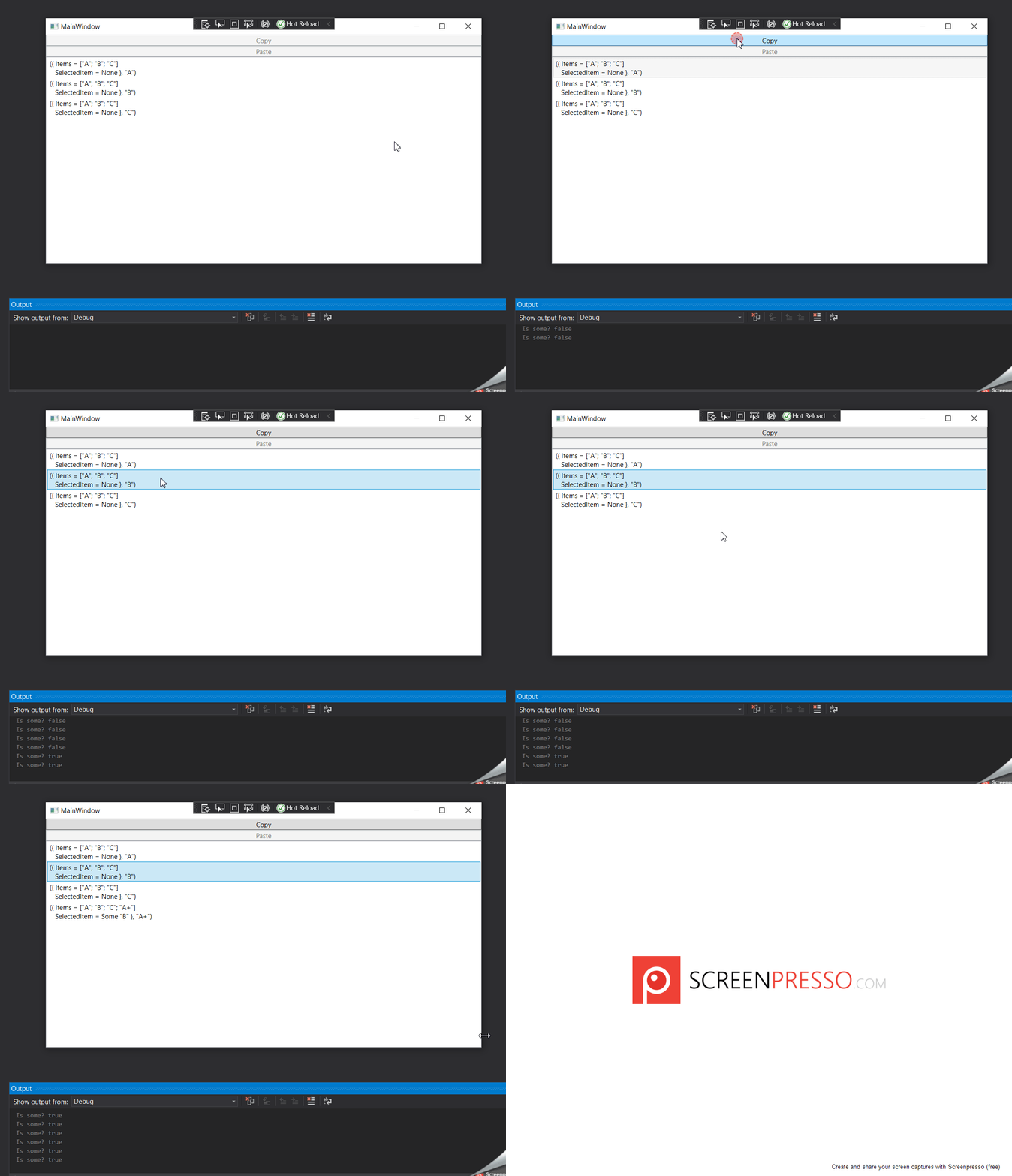
On the app start I get the content of the "Paste" |> Binding.cmdIf returning 'false' (i.e. 'None') (I am printing result in the output window). Then when clicking the copy button, I still have 'false' because at this stage there was no update of the model but as soon as you select another item in the list, the results updates to 'true'. While the result is now 'true' (i.e. 'Some _') the button remains disabled BUT the bound shortcut which also evaluates the CanExecute of the command binding now allows me to paste (as proven by the new item added to the list).
I added a bunch of logging in an attempt to makes the behavior clearer.
I clicked "Copy".
[main] CanExecute Copy
[main] canExec (0ms): Copy
[main] Execute Copy
[main] exec (0ms): Copy
New message: Copy "A"
Updated state:
{ Items = ["A"; "B"; "C"]
  SelectedItem = Some "A" }
getSubModels (0ms): Items
getId (0ms): Items
getId (0ms): Items
getId (0ms): Items
getId (0ms): Items
getId (0ms): Items
getId (0ms): Items
get (0ms): SelectedItem
get (0ms): SelectedItem
canExec (0ms): Copy
canExec (0ms): Copy
Is some? false
canExec (5ms): Paste
Is some? false
canExec (14ms): Paste
I typed Ctrl+V.
[main] CanExecute Paste
Is some? true
[main] canExec (3ms): Paste
[main] Execute Paste
Is some? true
[main] exec (0ms): Paste
New message: Paste "A"
Updated state:
{ Items = ["A"; "B"; "C"; "A+"]
  SelectedItem = Some "A" }
[main] getSubModels (0ms): Items
[main] getId (0ms): Items
[main] getId (0ms): Items
[main] getId (0ms): Items
[main] getId (0ms): Items
[main] getId (0ms): Items
[main] getId (0ms): Items
[main] getId (0ms): Items
[main] bindings (0ms): Items
[main.Items.A+] Initializing bindings
[main] get (0ms): SelectedItem
[main] get (0ms): SelectedItem
[main] canExec (0ms): Copy
[main] canExec (0ms): Copy
Is some? true
[main] canExec (0ms): Paste
Is some? true
[main] canExec (0ms): Paste
After I typed Ctrl+V, WPF calls CanExecute for the Paste binding to see if that command can be executed. It returns true, so WPF calls Execute. This binding is used in two places: the "Paste" button and the Ctrl+V key binding. Two possibility come to mind. Either these calls are "for" the Ctrl+V key binding (so WPF isn't in position to enable the "Paste" button) or WPF is deciding not to consider changing the enable/disable state in this part of the code. My guess is that the latter is happening. It would be interesting to look at the WPF source code to confirm this.
The last two calls to canExec are by Elmish.WPF via this line.
https://github.com/elmish/Elmish.WPF/blob/44674cea739547fa88f9b9d3667d6068e38db7d5/src/Elmish.WPF/ViewModel.fs#L453
The code compares the output of the canExec function when given the current model and the new model (which will shortly become the current model). Since both return true, Elmish.WPF does not raise the CanExecuteChanged event for the Paste binding.
Weird behavior results from being impure.
Interestingly, I have been considering changing this code to cache the output of canExec currentModel. I think it would be faster in cases that are slow, marginally slower in cases that are already fast, result in cleaner logs (by only logging that canExec was called once instead of twice), and it would improve the behavior in impure cases like this. See #342.
Of course I recommend keeping these functions pure and instead polling or pushing updates from Clipboard via commands. However, here is another way you could achieve your desired behavior with your impure function.
Interestingly, I have been considering changing this code to cache the output of
canExec currentModel. I think it would be faster in cases that are slow, marginally slower in cases that are already fast, result in cleaner logs (by only logging thatcanExecwas called once instead of twice), and it would improve the behavior in impure cases like this. See #342.
This change isn't enough by itself to get this working perfectly for you. The "Paste" button would still remain disabled after copying until pasting via Ctrl+V. This is because Elmish first calls SetState and then executes the commands. That is why the the first block of logs in my previous comment ends with Is some? false (twice).
In addition to that change, you need to have SetState called after your command executes. You can do that by dispatching a NoOp message after your command finishes executing. Then the logs would look like this after clicking the "Copy" button.
[main] CanExecute Copy
[main] canExec (0ms): Copy
[main] Execute Copy
[main] exec (0ms): Copy
New message: Copy "A"
Updated state:
{ Items = ["A"; "B"; "C"]
  SelectedItem = Some "A" }
[main] getSubModels (0ms): Items
[main] getId (0ms): Items
[main] getId (0ms): Items
[main] getId (0ms): Items
[main] getId (0ms): Items
[main] getId (0ms): Items
[main] getId (0ms): Items
[main] get (0ms): SelectedItem
[main] get (0ms): SelectedItem
[main] canExec (0ms): Copy
[main] canExec (0ms): Copy
Is some? false
[main] canExec (16ms): Paste
Is some? false
[main] canExec (0ms): Paste
New message: NoOp
Updated state:
{ Items = ["A"; "B"; "C"]
  SelectedItem = Some "A" }
[main] getSubModels (0ms): Items
[main] getId (0ms): Items
[main] getId (0ms): Items
[main] getId (0ms): Items
[main] getId (0ms): Items
[main] getId (0ms): Items
[main] getId (0ms): Items
[main] get (0ms): SelectedItem
[main] get (0ms): SelectedItem
[main] canExec (0ms): Copy
[main] canExec (0ms): Copy
Is some? true
[main] canExec (17ms): Paste
Is some? true
[main] canExec (5ms): Paste
Thank you for all these detailed explanation, it makes sense to me. I am still puzzled by the difference of behavior but do agree that it seems to be a problem on WPF side rather than on yours.
I don't know if you want to close this issue as it is mainly handled and is referred to in the other threads.
I will keep this open because I want it to be possible to precisely create the binding you want. For example, we could remove this filtering logic in Cmd so that Cmd and CmdParam are the same. Then the filtering currently used by Cmd could be achieved with the recently added laziness (c.f. #344).
https://github.com/elmish/Elmish.WPF/blob/04dc145cdd2923c7625338a440f886261c927341/src/Elmish.WPF/ViewModel.fs#L703-L708
I will keep this open
OK
Your source of truth is the
Clipboard, and you want to your application to stay in sync with it. As always, there are two options: polling or pushing. In this branch,
I update my code to have the copied items on my model and introduce the polling mechanism as shown. And it made me think again about #331, as I think that's a good example of a case where I would want to avoid "polluting" my update function with un-needed/wanted messages. Maybe that's the expected MVU/Elm way of doing things but it feels more natural to me to say that I can filter before dispatching.
You could add caching to the polling loop so that you only dispatch a message when there is a change to the Clipboard.
You could add caching to the polling loop so that you only dispatch a message when there is a change to the
Clipboard.
That will reduce the number of push but still won't prevent equal state. In my code, when I do a copy I will call a SetInClipboardCmd which will set the new value in the Clipboard, on the next poll the value will be different from the cached one (except if I also update the cache from within the handle of SetInClipboardCmd) so we will dispatch the value.
Sure. You could have the copy button create a SetInClipboardCmd only and leave your model unchanged. Then the background thread with notice the value is different from its cache and dispatch a message the updates the state of your model. It seems a bit convoluted at first glance, but it will all happen quickly, the logs will be "clean", and there is some essential complexity involved with having the Clipboard be the source of truth. And some NuGet package might allow you to replace polling with pushing (but definitely use polling first because it is clearly correct...you can optimize later if needed).