
element-ios
 element-ios copied to clipboard
 element-hq
Keyboard send message text field disappears after pressing send.
Steps to reproduce
- Open a chat and open the keyboard.
- Press send.
- See text field disappear.
Outcome
What did you expect?
The text field above the keyboard shouldn’t disappear
What happened instead?
The text field disappeared.
Your phone model
iPhone SE First gen
Operating system version
iOS 14.8.1
Application version
1.9.6
Homeserver
My own
Will you send logs?
No

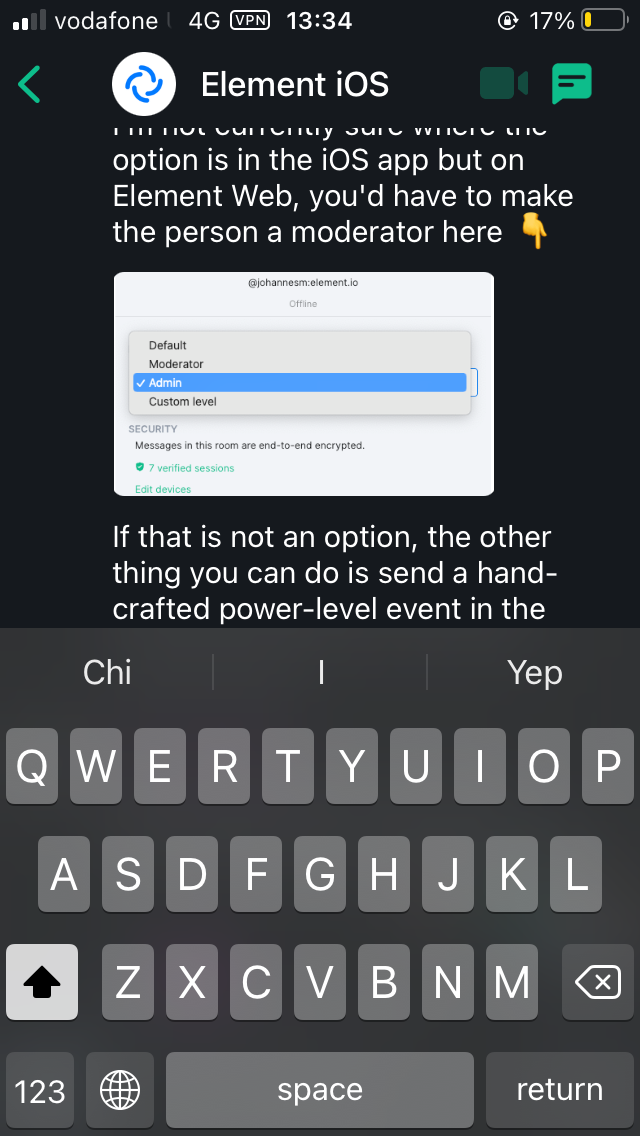
You can still type and send messages but you can’t see what you are typing until you dismiss and keyboard by swiping down and then reopening it.
Hi, same thing here. I temporarily solved it by using the beta version, but the bug is now back. I'm also using an Iphone SE first generation.


@pixlwave I'm not sure. This issue was found by navigating from the all chats screen to a room screen.

I can confirm it isn't fixed by that PR. Also it is reproducible on iOS 14, but doesn't occur on iOS 15.
Issue has returned on iOS 17. But swiping Down doesn’t dismiss the keyboard and you must return to the main chat list then return to get the keyboard to be dismissed.

