
electron-vite-react
 electron-vite-react copied to clipboard
 electron-vite
require is not defined

 )
)
I faced no issues when running the application with your setup. Maybe you can provide some of your code if you have added/modified it?
I also have Windows 11 of the latest build and installed your Node version from its distros. Though I would recommend updating your Node.js to the LTS version at least.
Also electron-vite-react recently received some updates and it would be good if you could fresh-clone and start over.

I updated node to 16.16.0 and created a new project from the template and its working. Thank you very much. Sorry for the silly issue.
I'm reopening because this is still a problem. I've tested it with Node 16.16.0 and 18.6.0 on Windows. Usage of ipcRenderer in the renderer process causes this error in browsers:

steps to reproduce:
- create a fresh project with
npm create electron-vite - in main.tsx, uncomment
import "./samples/node-api"
Maybe I am missing something. What is the recommended approach for sending messages between the main & renderer processes without breaking browser support?
I was able to get it working by enabling the contextBridge and extending the global Window interface.
// electron > main > index.ts
win = new BrowserWindow({
  title: "Main window",
  icon: join(ROOT_PATH.public, "favicon.svg"),
  webPreferences: {
    preload,
    nodeIntegration: true,
    contextIsolation: true,
  },
});
// electron > preload > index.ts
contextBridge.exposeInMainWorld("ipc", {
send: (channel: EventChannel, ...args: any[]) =>
  ipcRenderer.send(channel, ...args),
on: (channel: EventChannel, func: (...args: any[]) => void) =>
  ipcRenderer.on(channel, (event, ...args) => func(...args)),
});
example with typings:
// src > types > global.d.ts
declare global {
  type EventChannel = "main-process-message" | "window-event";

  type WindowEvent =
    | "focus"
    | "blur"
    | "close"
    | "minimize"
    | "maximize"
    | "unmaximize";

  type EventMessage<Channel extends EventChannel> =
    Channel extends "window-event"
      ? WindowEvent
      : Channel extends "main-process-message"
      ? string
      : any;

  type EventHandler<Channel extends EventChannel> = (
    type: EventMessage<Channel>
  ) => void;

  interface Window {
    ipc: {
      send: <Channel extends EventChannel>(
        channel: Channel,
        msg: EventMessage<Channel>
      ) => void;
      on: <Channel extends EventChannel>(
        channel: Channel,
        handler: EventHandler<Channel>
      ) => Electron.IpcRenderer;
    };
  }
}

export {};
// src > samples > node-api.ts
// IDE recognizes args as type 'WindowEvent'
window.ipc?.on("window-event", (args) => {
  console.log(args);
  // => "focus" | "blur" | "close" ...etc
});
if this is the intended approach, can it be mentioned in the README?
@caoxiemeihao I guess your help will be needed here. I have always been working with ipcRenderer by passing its functionality in contextBridge. You implemented the feature to use it directly in renderer so you know better 😅
As about contextBridge, @Cuppachino. It is actually considered a more secure way to write the application (if it interacts with third-party services/websites). If you're going that way, don't forget to remove the renderer option in vite.config.ts, and also you can turn off nodeIntegration as in your example:
// electron > main > index.ts
win = new BrowserWindow({
  title: "Main window",
  icon: join(ROOT_PATH.public, "favicon.svg"),
  webPreferences: {
    preload,
-   nodeIntegration: true,
+   nodeIntegration: false,
    contextIsolation: true,
  },
});
None of them is an "intended approach", people can use contextBridge and can not, it all depends on what their application does and on their considerations. I'm not sure why direct import of ipcRenderer causes errors, will take a look when I have time, but maybe @caoxiemeihao knows better
English
I think you are a developer new to Electron
First of all you need to determine whether you need to use the Node.js/Electron API in the Renderer-process, if you want to use them in the Renderer-process, then you need to do the following two things
- Enable Renderer-process support in
vite-plugin-electron
# vite.config.ts

electron({
+ renderer: {}
})
- Enable Node.js integration in the Main-process
webPreferences: {
+  nodeIntegration: true
}
// src/main.tsx
import { ipcRenderer } from 'electron'
// ✅ work normally
For security reasons you don't want to use the Node.js/Electron API in the Renderer-process, then you need to pay attention to the following
- Don't use
ipcRendererdirectly in the Renderer-process because it means you want to use the Node.js/Electron API in the renderer - this is important
// src/main.tsx
import { ipcRenderer } from 'electron'
// ❌ Please don't do this, it means you are using the Node.js API
- Remove Node.js integration in Main-process
webPreferences: {
-  nodeIntegration: true
}
- Remove the Renderer configuration in
vite-plugin-electron
# vite.config.ts

electron({
- renderer: {}
})
- Serving
ipcRenderervia Preload-script
see preload/index.ts
// electron/preload.ts
import { contextBridge, ipcRenderer } from 'electron'
contextBridge.exposeInMainWorld('ipcRenderer', ipcRenderer)
// src/main.tsx
window.ipcRenderer.on('main-process-message', (event) => { console.log(event) })
see global.d.ts
// src/electron-env.d.ts(need create)
export { }
declare global {
  interface Window {
    // Expose some Api through preload script
    ipcRenderer: import('electron').IpcRenderer
  }
}
require is not definedBecause you are using the Node.js API in the Renderer-process but not enabling the Node.js integration option in the Main-processsamples/node-apiis the example code to enable Node.js API integration, if you don't understand it, then don't use it.- If you not need use Node.js API in Electron-Renderer, place remove
vite-plugin-electron-rendererinvite.config.ts
简体中文
我想你是个刚刚接触 Electron 没多长时间的开发者
首先你需要明确你是否需要在渲染进程中使用 Node.js/Electron API,如果你希望在渲染进程中使用它们,那么你要做到下面两点
- 在 vite-plugin-electron 中开启渲染进程支持
# vite.config.ts

electron({
+ renderer: {}
})
- 在主进程中开启 Node.js 集成
webPreferences: {
+  nodeIntegration: true
}
// src/main.tsx
import { ipcRenderer } from 'electron'
// ✅ work normally
相反的,出于安全的考虑你不希望在渲染进程中使用 Node.js/Electron API,那么你需要注意如下几点
- 不要直接在渲染进程中使用 ipcRenderer,因为它代表你想要在渲染进程使用 Node.js/Electron API - 这个很重要
// src/main.tsx
import { ipcRenderer } from 'electron'
// ❌ 请不要这样做,这代表你使用了 Node.js API
- 移除主进程中关于 Node.js 集成的配置
webPreferences: {
-  nodeIntegration: true
}
- 将 vite-plugin-electron 中的渲染进程配置移除
# vite.config.ts

electron({
- renderer: {}
})
- ipcRenderer 功能将通过 preload 脚本提供
see preload/index.ts
// electron/preload.ts
import { contextBridge, ipcRenderer } from 'electron'
contextBridge.exposeInMainWorld('ipcRenderer', ipcRenderer)
// src/main.tsx
window.ipcRenderer.on('main-process-message', (event) => { console.log(event) })
see global.d.ts
// src/electron-env.d.ts(need create)
export { }
declare global {
  interface Window {
    // Expose some Api through preload script
    ipcRenderer: import('electron').IpcRenderer
  }
}
require is not defined因为你在渲染进程中使用了 Node.js API 但是没有在主进程中开启 Node.js 集成选项samples/node-api是开启 Node.js API 集成的实例代码,如果你弄不明白它,那么不要使用它- 如果你需要在渲染进程中使用 Node.js API, 那么你应该把
vite.config.ts中的vite-plugin-electron-renderer删掉

- create a fresh project with
npm create electron-vite- in main.tsx, uncomment
import "./samples/node-api"
I managed to reproduce your steps (Sorry that took really long 😅) and... everything works fine?
Screenshot

I mean you must have forgotten to turn something on. Again my environment is Windows 11 Home of latest build and Node.js v18.6.0 and everything works fine
What @caoxiemeihao said is how to configure application for use in both ways, but I believe you already found your way. What I wanted to add to his words is that you should also turn on contextIsolation when using contextBridge and turn off when not and that's it.
@Cuppachino What's your current status with the problem?
@caoxiemeihao I've only been working with electron for the past couple of months, so your guess isn't too far off! I think what you have written here will be very helpful to new devs.
@PAXANDDOS the issue is when using the first method, the default method, and expecting the app to load in browser during dev.
steps to reproduce:
1. create a fresh project with `npm create electron-vite`
2. in main.tsx, uncomment `import "./samples/node-api"`
3. open chrome or firefox
4. navigate to localhost:7777
I don't think we should say "use contextIsolation & contextBridge for security reasons..." if NOT using them means losing access to dev tool extensions unsupported by electron.
I will plan to write a very detailed document, which will be time consuming work.
同时开启nodeIntegration和contextIsolation的问题,若contextIsolation: false则正常:
代码片段:
electron\main\index.ts
    webPreferences: {
      webSecurity: false, // 允许跨域请求
      preload,
      nodeIntegration: true,
      contextIsolation: true,
    },
electron\preload\index.ts
import { contextBridge } from 'electron'
import Store from 'electron-store'

const store = new Store()

contextBridge.exposeInMainWorld('store', {
  get: (key) => store.get(key),
  set: (key, value) => {
    store.set(key, value)
  }
})
vite.config.ts
  plugins: [
    react(),
    electron({
      main: {
        entry: 'electron/main/index.ts',
        vite: withDebug({
          build: {
            outDir: 'dist/electron/main',
          },
        }),
      },
      preload: {
        input: {
          // You can configure multiple preload scripts here
          index: join(__dirname, 'electron/preload/index.ts'),
        },
        vite: {
          build: {
            // For debug
            sourcemap: 'inline',
            outDir: 'dist/electron/preload',
          }
        },
      },
      // Enables use of Node.js API in the Electron-Renderer
      renderer: {}
    }),
    createStyleImportPlugin({
      resolves: [AntdResolve()], libs: [
        // If you don’t have the resolve you need, you can write it directly in the lib, or you can provide us with PR
        {
          libraryName: 'antd',
          esModule: true,
          resolveStyle: (name) => {
            return `antd/es/${name}/style/index`
          },
        },
      ],
    })
  ],
结果:Uncaught ReferenceError: require is not defined at promises:1:13
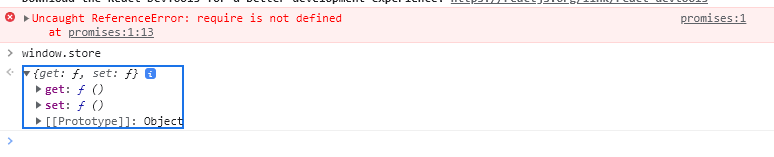


@ashen114 I might not understand the Chinese text, but here's what I can say depending on your code:
- Since you are using
contextBridgeyou should turn offnodeIntegration:
// electron\main\index.ts

webPreferences: {
  webSecurity: false, // 允许跨域请求
  preload,
- nodeIntegration: true,
+ nodeIntegration: false,
  contextIsolation: true,
}
- And remove
rendereroption as well:
// vite.config.ts

plugins: [
    react(),
    electron({
      ...
-     renderer: {}
    })
]
- And finally, storing logic in
preloadis a bad thing and your code must not work because of it. Create a listener for a store inmain/index.tsand call it in preload instead.
Simple example:
// electron/main/index.ts

import { ipcMain } from 'electron'
import Store from 'electron-store'

const store = new Store()

ipcMain.handle('electron-store-get', async (_event, key: string) => {
   return store.get(key)
})
ipcMain.on('electron-store-set', async (_event, key: string, value: string) => {
    store.set(key, value)
})
// electron/preload/index.ts

import { ipcMain } from 'electron'
import Store from 'electron-store'

contextBridge.exposeInMainWorld('api', {
    send: ipcRenderer.send,
    invoke: ipcRenderer.invoke,
})
// src/*

const value = window.api.invoke('electron-store-get', 'foo') // returns store value with key 'foo'
window.api.send('electron-store-set', 'foo', 'bar') // sets new value to store
Hi everyone, i have similar issue here, i trying to send message from main process to renderer process, so i defined this :
// defined win BrowserWindow
win = new BrowserWindow({
        title: 'Main window',
        icon: join(ROOT_PATH.public, 'favicon.svg'),
        show: false,
        frame: false,
        resizable: true,
        webPreferences: {
            preload,
            nodeIntegration: false,
            contextIsolation: true,
        },
    });
    .....
// Send message to preload
win.webContents.send('token', `{ token: ${json.token} }`);
So, in preload i define my context Bridge like always:
import { contextBridge, ipcRenderer } from 'electron';

const api = {
    token: (data) => ipcRenderer.on('token', data),
};

contextBridge.exposeInMainWorld('api', api);
I'm reading above on this problem and from what I understand I also need to declare this for typescript:
export {};

declare global {
    interface Window {
        api: any;  // I don't know if i defined correctly maybe my error is here
    }
}
So, my final file is renderer process:
export default function App() {
    console.log('token', window.api.token); //this don't return error simply return the image below

    return (
        <Box>
            <Router />
        </Box>
    );
}
finally my console return this, not exactly an error but it doesn't return my main message either
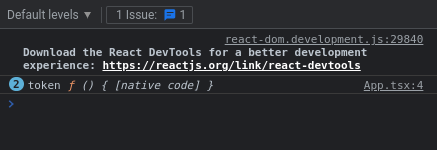

Hi @caoxiemeihao thanks for your reply, i trying to change this in preload but unfortunately don't work for me, i reading the electron docs and this method only accepts apiKey and API (apiKey only can be a string) and i see window is of type Window & typeof globalThis.
So, if i persist your change from above. i have the issue of a image (also, window.api changes to undefined)

later, i change this exposeInMainWorld(window, { api }); to exposeInMainWorld('api', { api }); and the console.log changes, not with an error but is not the expected request.

I trying log the token key inside api.api object but its same case
console.log(window.api.api.token);
@caoxiemeihao Your explanation here was really helpful! Please consider making a demo with this configuration or linking to the document from the README. It took me awhile to find your comment but once I did I was able to quickly get the context bridge working.

@spmonahan okay! I plan to do better in subsequent vite-plugin-electron-renderer versions and prompt users directly in the console how to resolve it.