
embed
 embed copied to clipboard
 editor-js
Twitter has big extra space
I have tested with two tweets and there is a big space after the tweet preview


@hatchli I am using custom Twitter config like this: (Just copied it from here and added embed-tool__content--twitter class to the IFrame. Well, if someone wish this can be automated in the plugin itself, embed-tool__content--${service})
        twitter: {
          regex: /^https?:\/\/twitter\.com\/(?:#!\/)?(\w+)\/status(?:es)?\/(\d+)(?:\/.*)?$/,
          embedUrl:
            'https://twitframe.com/show?url=https://twitter.com/<%= remote_id %>',
          html: '<iframe class="embed-tool__content--twitter"></iframe>',
          id: ids => ids.join('/status/')
        },
And in SCSS I have: (Those not using SCSS can simply compile this in any online SCSS to CSS compiler.)
@mixin caption {
  margin: 2em auto;
  padding: 0;
  text-align: center;

  &__caption {
    border: 0;
    box-shadow: none;
    color: #757575;
    padding: 0;
    text-align: center;

    &[contentEditable='true'][data-placeholder]:empty::before {
      display: inline !important;
    }

    &[contentEditable='false']:empty {
      display: none;
      visibility: hidden;
    }
  }
}

.embed-tool {
  @include caption;

  &__content {
    background-color: transparent;
    border: 0px solid;

    &--twitter {
      width: 80% !important;
    }
  }
}
Now using Twitframe's support for postMessage API and JQuery, (Ref.)
  const handleTweets = () => {
    $('.embed-tool__content--twitter:not([id])').each(function () {
      const val = $(this).attr('src');
      const _id = `tweet_${val.substr(val.lastIndexOf('/') + 1)}_`;
      const id = _id + $(`iframe[id^=${_id}]`).length;

      setTimeout(() => {
        // eslint-disable-next-line
        this.contentWindow.postMessage(
          { element: id, query: 'height' },
          'https://twitframe.com'
        );
      }, 1000);

      $(this).attr({ id });
    });
  };

  const bindListener = () => {
    $(window).on('message', function (e) {
      const oe = e.originalEvent;
      if (oe.origin !== 'https://twitframe.com') return;

      if (oe.data.height && oe.data.element.match(/^tweet_/))
        $(`#${oe.data.element}`).css(
          'height',
          `${parseInt(oe.data.height, 10) + 30}px`
        );
    });
  };
EditorJS Config:
  const editor = new EditorJS({
    // ...
    onReady: () => {
      bindListener();

      // ...
    },
    onChange: () => {
      handleTweets();

      // ...
    },
    // ...
  });
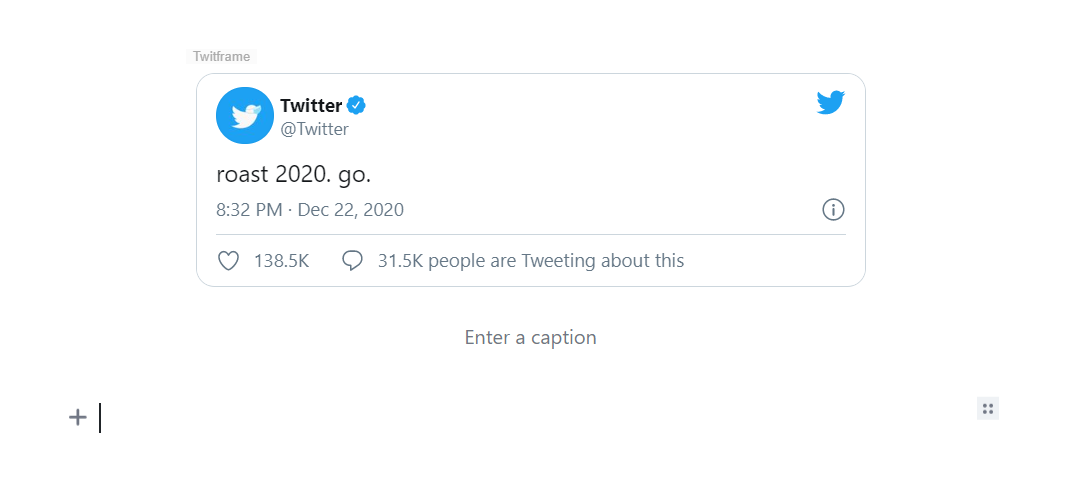
This is the rendered output:

@hatchli I am using custom Twitter config like this: (Just copied it from here and added
embed-tool__content--twitterclass to the IFrame. Well, if someone wish this can be automated in the plugin itself,embed-tool__content--${service})twitter: { regex: /^https?:\/\/twitter\.com\/(?:#!\/)?(\w+)\/status(?:es)?\/(\d+)(?:\/.*)?$/, embedUrl: 'https://twitframe.com/show?url=https://twitter.com/<%= remote_id %>', html: '<iframe class="embed-tool__content--twitter"></iframe>', id: ids => ids.join('/status/') },And in SCSS I have: (Those not using SCSS can simply compile this in any online SCSS to CSS compiler.)
@mixin caption {
  margin: 2em auto;
  padding: 0;
  text-align: center;

  &__caption {
    border: 0;
    box-shadow: none;
    color: #757575;
    padding: 0;
    text-align: center;

    &[contentEditable='true'][data-placeholder]:empty::before {
      display: inline !important;
    }

    &[contentEditable='false']:empty {
      display: none;
      visibility: hidden;
    }
  }
}

.embed-tool {
  @include caption;

  &__content {
    background-color: transparent;
    border: 0px solid;

    &--twitter {
      width: 80% !important;
    }
  }
}
Now using Twitframe's support for postMessage API and JQuery, (Ref.)
  const handleTweets = () => {
    $('.embed-tool__content--twitter:not([id])').each(function () {
      const val = $(this).attr('src');
      const _id = `tweet_${val.substr(val.lastIndexOf('/') + 1)}_`;
      const id = _id + $(`iframe[id^=${_id}]`).length;

      setTimeout(() => {
        // eslint-disable-next-line
        this.contentWindow.postMessage(
          { element: id, query: 'height' },
          'https://twitframe.com'
        );
      }, 1000);

      $(this).attr({ id });
    });
  };

  const bindListener = () => {
    $(window).on('message', function (e) {
      const oe = e.originalEvent;
      if (oe.origin !== 'https://twitframe.com') return;

      if (oe.data.height && oe.data.element.match(/^tweet_/))
        $(`#${oe.data.element}`).css(
          'height',
          `${parseInt(oe.data.height, 10) + 30}px`
        );
    });
  };
EditorJS Config:
  const editor = new EditorJS({
    // ...
    onReady: () => {
      bindListener();

      // ...
    },
    onChange: () => {
      handleTweets();

      // ...
    },
    // ...
  });
This is the rendered output:
I mean that's great. But can't it be the default instead?


Please remove the 600px fixed height for the twittframe iframe. Please make it auto height (ideal) or give an option for height in the embed's tune menu.

Also, all embeds have the same class embed-tool__content which makes it hard to target the embed via CSS. Please make it something like embed-tool__content embed-tool__content__twitter to make it easier to control the output superficially.
Somehow, providing only { height: xyz } in tools.embed.services.twitter obj is not overriding the default height.