
html2pdf.js
 html2pdf.js copied to clipboard
 eKoopmans
Table with pagebreak: { avoid: "tr" } breaks correctly, but every page is off by 1px (per page)
Does anybody know why a table with pagebreak: { avoid: "tr" } would break correctly but every page would be off by 1 pixel (per page)? What I mean is between page 1 and 2, it seems like it's 100% perfect, then on bottom of page 2, you can see 1 line of pixels from page 3, then at bottom of page 3, you can see two lines of pixels from page 4, etc... every page has +1 line of pixels from the next page. After like 6-7 pages, the last row of a page will become unreadable, because it will be split on two pages.
Any ideas I can try to fix this?


I have a similiar issue (but with different element). Does anyone know a solution?


It's worth mentioning that when I print it seems to disappear, so the issue is much more benign than I initially thought. It might be a browser bug causing this display glitch.
It's worth mentioning that when I print it seems to disappear, so the issue is much more benign than I initially thought. It might be a browser bug causing this display glitch.
Tried to print it but got the same result as viewing pdf in the browser (every next page cuts a new pixel - begins from page 5 or so)

Ah, that may be why I didn't see it happening when printing yesterday. My reports typically only have 1 to 3 pages. This bug has been opened for 40 days, I wonder if and when developer will see it?


for information, same here:
 var pdfOpt = {
                margin: 20,
                filename: "untitled.pdf",
                image: {
                    type: "jpeg",
                    quality: 0.5
                },
                pagebreak: {
                    mode: ['css'],
                    before: ['.pageBreak'],
                    after: ['.breakAfter'],
                    avoid: ['.breakInsideAvoid']
                },
                html2canvas: {
                    scale: 2,
                    scrollX: 0,
                    scrollY: 0,
                    useCORS: true
                },
                jsPDF: {
                    unit: "mm",
                    format: "a4",
                    orientation: "portrait",
                }
            };
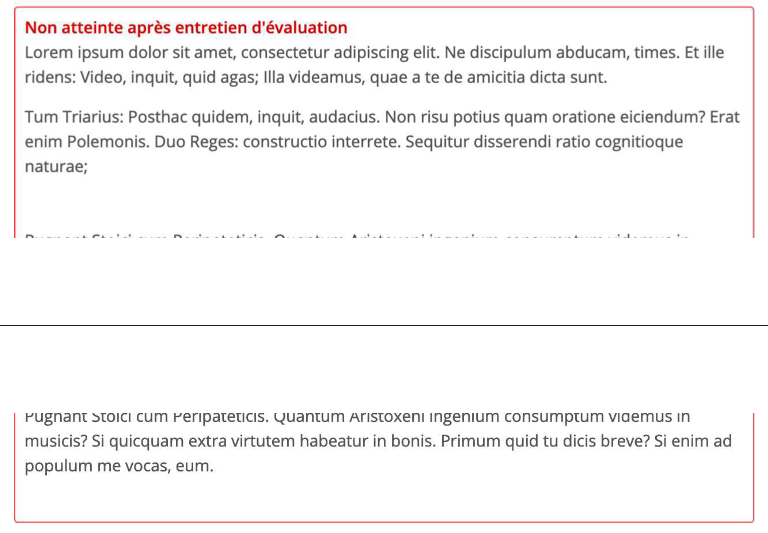
btw, thank you so much for the great work, very usefull lib !
