
html2pdf.js
 html2pdf.js copied to clipboard
 eKoopmans
CSS rules are not getting applied
Thanks for the library. I was using jspdf that was showing black screen. This lib works fine but, the css rules are not getting applied. This is how I am using this with Angular
Installed
yarn add html2pdf.js
and then in my .ts file
import * as html2pdf from "html2pdf.js";
and
var opt = {
            margin: 1,
            filename: 'Invoice.pdf',
            image: { type: 'jpeg', quality: 0.98 },
            html2canvas: { scale: 2 },
            jsPDF: { unit: 'in', format: 'letter', orientation: 'portrait' }
};

html2pdf(__domElement, opt);
And this is the DOM element
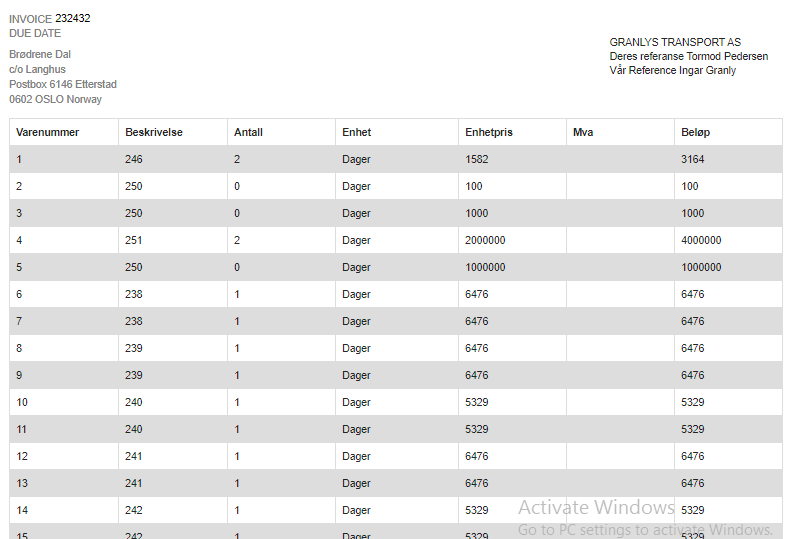
and this is the output

any solutions?


It looks like your style file isn't being downloaded. I believe that stuff is refetched via html2canvas. Froala passes this extra bit of config to html2pdf:
html2canvas: {
  useCORS: true
}
Give that a try :)
It looks like your style file isn't being downloaded. I believe that stuff is refetched via
html2canvas. Froala passes this extra bit of config tohtml2pdf:html2canvas: { useCORS: true }Give that a try :)
@brendon not working :(
Hi @ermarkar, sorry you've been having trouble. I suspect this is related to the way nodes are currently cloned in html2pdf.js. If so, it's something I've been meaning to fix for ages.
I've worked out a potential fix but it's not yet fully tested. Could you give it a spin and let me know if it solves your problem? It's here:
html2pdf.js/bugfix/clone-nodes-BUILD
Specifically, you can go into the /dist/ directory and pull out whichever files your project relies on.

@eKoopmans Thanks for the reply, Actually the CSS rules that are written in .css files are not getting applied, so i copied directly to my html (inline styling
Yes sure, I will try the given link as well.
Thanks!!! :)
Glad you got things working! That said, we definitely want external stylesheets to work properly. If you have a chance, please test the other build (with your original stylesheets) and see if it solves things - thanks!
Hi @eKoopmans , I have external scss file and styles are not getting applied while generating pdf? Is there any way to attach '.scss' file in html2pdf.js ?

@Zankhna95, you'd need to compile this to css first at the very least I would say.
@eKoopmans Thanks for the reply, Actually the CSS rules that are written in .css files are not getting applied, so i copied directly to my html (inline styling
Yes sure, I will try the given link as well.
Thanks!!! :) Hello Champs, I have html contents with inline styling, for me style is not getting applied to the generated pdf. I have used below options for html2pdf in my react project. const PDF_OPTIONS = { margin: [5, 5, 5, 5], pagebreak: { after: '#pageBreakers' }, image: { type: 'jpg', quality: 0.95 }, html2canvas: { scale: 4, dpi: 192, letterRendering: true, useCORS: true }, jsPDF: { unit: 'pt', format: 'A4', orientation: 'portrait', autosize : false } }; html2pdf().from(dataContainer, 'element').set(PDF_OPTIONS).to('pdf').save("TermSheet.pdf"); Would you be able to help with any pointer? I am using below dependencies versions in my react project. html2pdf.js version = 0.9.2 "es6-promise": "^4.2.5", "html2canvas": "^1.0.0-alpha.12", "jspdf": "^1.4.1"

I came here cause I had a similar issue.
I use Vue as frontend framework, in case you are not familiar typically the structure in a Vue component is as follows
<template>
Here goes your HTML
</template

<script>
Your component data, methods etc
</script>

<styles>
Your CSS
</styles>
When wotking locally, and watching my changes on localhost, I could generate an html (it was dinamically generated by concat string with html code inside) and the styles would apply. But after deploying my brack to test in staging the styles were not applied.
I also solved this by adding inline styles in the html.
Posting this in case you are still looking into this issue.

I just ran into this issue and happened upon a solution for my particular case.
My case is a 20+ page document generated from an app, with the CSS being compiled from Sass. The doc contains a page for each of ~22 items, with various metrics for each. The styles were working fine when I exported the parent div; once I split up each item onto its own page, I ran into this issue - #19 . I implemented the workaround explained here and here in which each page is generated via a separate canvas. However, selecting the individual items within the parent div rather than the parent div itself caused the styling to break.
What fixed it for me was unnesting the selectors in my Sass files such that the selectors targeting the divs being used for the pdf pages were not nested within any other selector. I.e. they are separate / on the first level / all the way left, etc.
Once I made that switch, the styling started working again in the PDFs.

Please decrease the value of scale in html2canvas options keep scale:0.8 and try it will work

Please decrease the value of scale in html2canvas options keep scale:0.8 and try it will work
for me it worked. but quality is too low. Also sometime in higher scale I have got correct output.

What fixed it for me was unnesting the selectors in my Sass files such that the selectors targeting the divs being used for the pdf pages were not nested within any other selector. I.e. they are separate / on the first level / all the way left, etc.
Once I made that switch, the styling started working again in the PDFs.
Thanks @tobias-fyi, this alone worked for me. Although it was bit of work it really made me understand how SCSS makes my life a bit easier.

I am using Angular 12 and the styling that is missing is getting incorporated into my project from a third party UI library (DevExtreme), and auto generates the css on build. Are there plans on making this work without the workarounds of moving all the css around and manually unnesting the selectors after each generation of the styling?

It was an easier fix for me. I wasn't seeing any styling, until I realised the CSS was loading after the script.
I put the css above the script and now the PDF is beautiful.
Thanks!

Is this still an issue? I am not able to see CSS styles in my PDF. I have my styles directly in my html page within

const options = { margin: 1, filename: 'ROI_results.pdf', image: { type: 'jpeg', quality: 0.98 }, html2canvas: { scale: 2 }, jsPDF: { unit: 'in', format: 'letter', orientation: 'portrait' } }; const savePDF = function() { html2pdf().set(options).from(element).save(); }

Is this still an issue? I am not able to see CSS styles in my PDF. I have my styles directly in my html page within
const options = { margin: 1, filename: 'ROI_results.pdf', image: { type: 'jpeg', quality: 0.98 }, html2canvas: { scale: 2 }, jsPDF: { unit: 'in', format: 'letter', orientation: 'portrait' } }; const savePDF = function() { html2pdf().set(options).from(element).save(); }
I guess it is, i also have no css here when generating pdf from vue

I had the same issue.
Im using Vue as a fronted framework and I didn't want to use in-line styles, so I solved by doing the following :
I had this before and it didn't working:
<template>
    <div ref="toPrint" class="d-none">
        <v-card outlined flat>
            <v-simple-table >
                  ...
            </v-simple-table>
        </v-card>
    </div>
</template>
I remembered that for all classes in Vue to work as expected, they have to be inside the class .v-application, so I did this change:
<template>
    <div ref="toPrint" class="v-application d-none">
        <div class="v-application--wrap">
             <v-card outlined flat>
                  <v-simple-table >
                       ...
                   </v-simple-table>
                </v-card>
          </div>
    </div>
</template>
Once I made that change, the Vue classes started showing in the PDF.

I somehow found out that some rules applied and some didn't in my css file and the differences between them were like below
(In my .css file)
.viewer_bg .doc { max-width:640px; height: 920px !important; padding: 80px; margin: 60px auto; background-color:#FFF; overflow-y:auto; box-shadow: 10px 10px 5px #454545; }
above one wasn't applied
.doc { max-width:640px; height: 920px !important; padding: 80px; margin: 60px auto; background-color:#FFF; overflow-y:auto; box-shadow: 10px 10px 5px #454545; }
this one was applied to pdf
i cannot figure out how did this happen ,
hope this would help though.
for detailed info, i was using 0.9.3 and below code is to call html2pdf ` $('#toPdf').click(function (e) {
        console.log("topdf");

        let element = document.getElementById("pdf_wrap");

        var opt = {
            margin: 10,
            filename: 'myfile.pdf',
            image: { type: 'png', quality: 1 },
            html2canvas: {
                scale: 1,
                ignoreElements: function (el) {
                    return el.classList.contains("noPdf");
                }
            },
            jsPDF: { unit: 'mm', format: 'a4', orientation: 'portrait' },
        };

        html2pdf().set(opt).from(element).save();
    });
`
