

 dotnet
Add proposal for simplified output paths (version 2)
Based on feedback from a discussion of #278, this is another attempt at simplifying output paths which should be more consistent.


Hi folks! I've made another update to the proposal:
- Switch from using
bintoartifacts - Put configurations in lower case in new output path format
- Add details about complications with intermediate output path and multi-targeted builds
Have a look and keep the feedback coming. Thanks!
Switch from using bin to artifacts
This will be a major breaking change and generate work for every other project out there. We should think twice whether this cosmetic change is really worth it.

Switch from using bin to artifacts
This will be a major breaking change and generate work for every other project out there. We should think twice whether this cosmetic change is really worth it.
@jkotas Are you referring to any change we make to the output path format, or specifically this version of the proposal which would switch to using an artifacts path?
I'm not sure that switching to an artifacts path is significantly more breaking than the previous versions of the proposal which changed the output path format but still put everything under bin.
@jkotas Are you referring to any change we make to the output path format, or specifically this version of the proposal which would switch to using an artifacts path?
I feel that the bin and obj directories are hardcoded and will need to be updated in more places than the rest. I agree with you that the rest is also significantly breaking.
For reference, I have spent almost a day earlier this week on debugging and working around a much smaller breaking change in the directory layout in .NET 7.0.200 SDK (https://github.com/dotnet/sdk/issues/29177). I expect that the cost to update for the breaking change proposed here in any larger project is going to be very non-trivial.
It'd be great to have a list of actual properties that are being changed at some point. I understand that all of those might not be known yet, but it'd be great to have them documented.

Building software as a concept always needs two contexts at minimum, temporary one which can be discarded or overwritten and a permanent one which can be used, shared or published. That's why I proposed two root paths, one for building/testing and one for publishing/staging the final artifacts.
Initial Proposals:
-
https://github.com/dotnet/msbuild/issues/3497#issuecomment-665904972
-
https://github.com/dotnet/sdk/issues/867#issuecomment-665906776
The original structure I proposed is in dotnet/msbuild#6105. This has the following changes...
Summary
-
Introduce
BuildDiras the one-stop directory for all things build (e.g.,bin,obj, etc...). -
Move
MSBuildProjectExtensionsPathto$(BuildDir)\extwhich freesBaseIntermediateOutputPathfrom common props import. -
Promote
PublishDirto root as one-stop directory for all things publish ($(PackageOutputPath)can be$(PublishDir)\$(Configuration)). -
Use
BuildDirNamesimilar toPublishDirNameto change the name of the build directory.
The pros to this structure are...
-
The property name is intuitive and similar to existing ones like
PublishDirandOutDir. -
Just as mentioned before, we can bring in all build tools folders under a common build directory. We can also make it as a symbolic link or junction to a common publish directory. We can also point it to a server share.
-
We can have a custom folder for our custom workflow without needing to worry about collision. Since, we can append build parameters like
TargetFrameworkto build directory itself which I observed many like to do. -
For Docker builds, caching NuGet restore is an important optimization. This gives us a way to separate those Assets from
objfolder into a new oneextunderbuildand thus can be cached in a single command step. -
We can also bring
IntDirto close the gap from C++ project system. This is currently an issue in MSBuild. -
The changes can go into MSBuild which can be applied to all projects if they choose to and still provide previous structure for compatibility.
The only con against this is having two directories instead of one. But I'm sure you can solve this with a simple property switch to make the publish come under build if users want it that way.
Ultimately, I recommend this way if we want to have a structure that works for all projects and still have the ability to customize it when required.

I'm late to this proposal. Sorry about that.
I see a few goals:
- One artifacts directory.
- Collapse the directories required.
- Fix idiosyncrasies, like the current model for
publish.
I find bin -> artifacts/bin a hard pill swallow as a trade for getting rid of obj. For my use, obj has never bothered me much.
I'm wondering if it would be better to have two directory modes: simple and fully-descriptive. Simple mode would be bin/debug and fully-descriptive would be what we have today. I'd make simple mode the default.
The way publish works should be changed. It's very ugly as-is. I've listened to our conversations and I always find it barely explainable.

Hi folks,
Thanks for all the feedback so far. Based on some of the feedback, I think it would be a good idea to go back to using bin as the first folder name instead of artifacts. So the build output for a simple project would go in bin\build\debug (instead of artifacts\bin\debug as in the current version of the proposal).
Using bin as the folder name would be a bit less breaking, and would work better with multi-targeted projects.
Breaking impact
It is true that any change to the output format will break things that look for the output in a specific folder (for example deployment scripts, CI setup, etc). However there are other scenarios where the full output path isn't known, but it is assumed to be under the bin folder. Some examples are .gitignore files (even though the default .gitignore for Visual Studio / .NET project includes artifacts, many people may have authored their own and not have that entry) and the default globs used by the .NET SDK for finding source files.
If we used the artifacts folder as the output folder name, then we would need to ignore the artifacts folder in the globs used to find source files and other project items, even for projects that did not use the new output format. This is because a project could change back and forth between the old and new output formats (either by retargeting back and forth between .NET 8 and an earlier version, or by explicitly turning the new format on and off), and thus would have output under both bin and artifacts, which should not be picked up by the globs. However, this in turn would break projects that already have an artifacts folder with source code in it that should be included, and it would be difficult to resolve this.
Multi-targeting
Another concern with using artifacts is that it causes more problems with multi-targeting. For multi-targeted projects, ideally we would like to use a consistent output format for each TargetFramework, and use the new output format if any of the TargetFrameworks are .NET 8 or greater. Unfortunately, this is not possible, as we need to know the output format during the MSBuild evaluation phase, and at that point it's not possible to get the TargetFramework information (accounting for TargetFramework aliasing) for other target frameworks to see if any of them target .NET 8 or greater.
So we are left with the following options for multi-targeted projects:
- Allow different output path formats for each target framework
- Always use the old output format
- Always use the new output format
The first option isn't really acceptable if the .NET 7 output goes in bin\Debug\net7.0 and the .NET 8 output goes in artifacts\bin\debug_net8.0. It might be OK if the paths are bin\Debug\net7.0 and bin\build\debug_net8.0 instead.
Controlling the output format
One downside of switching back to bin is that it no longer makes much sense to use the UseArtifactsOutput property to opt into or out of the new output format. So we'd have to come up with another property name. UseNewOutputFormat is not great, as eventually the new format won't be very "new".
Next steps
What do folks think about changing back from artifacts to bin?
I'm going to go ahead and work on updating the spec to switch back to bin. I'll also work on responding to and applying the rest of the feedback we've received.
Thanks again!
@ViktorHofer @Nirmal4G May you expand on any remaining concerns you have with this proposal? Is it the engineering limitation, which we cannot change:
So we are left with the following options for multi-targeted projects: Allow different output path formats for each target framework Always use the old output format Always use the new output format
Is it the staying power of bin instead of BuildDir? If this is ever a default feature, Idk if we see bin changing. If this is a side-feature, then maybe we do see it changing. If it is something else, please let us know so we can consider it once more.

Adding to my proposal above...
The goal here should be to introduce a top-level directory, so that setting that once cascades into various other output paths that's already present in various targets in various MSBuild toolkits. This itself a huge change. This should go into MSBuild common targets instead of here. After that we can override them here to suit .NET specific needs.
I see various ways that people construct their output layout, even if SDK provides a singular way, the properties we design here should allow various ways in which the output layering can be defined.
- Does the output properties work when set after project file contents or just before SDK targets start, except
BuildDir?
Also, today, setting the paths in dir targets (assuming you want to set them after project file contents because you need to depend on certain properties set in individual projects that changes the output paths) doesn't work properly and is broken due to way that SDK is layered. We should definitely fix this.
- Can you construct a merged path of all projects into single directory for each context (bin, obj, ext) and still build successfully without file name collision?
Also, some files in the output paths like NuGet restores and intermediate files have a common name that collides when directories are merged. In non-sdk world, this didn't happen as those files had project name prefixed. This changed when sdk targets came into picture. We should also fix this too!
- Does the new properties provide a way for the build context information to be exposed as a build identifier or the like, pragmatically?
One of the problems I regularly see when doing a build infra for a project is that it's hard to get the build context out in a single file name friendly way so that we can resolve output paths dynamically without hard-coding. We should fix this too!
For Example, In this proposal, we have net8. 0_win10-arm64_debug as part of output disambiguation which consists of several build context-specific properties arranged and formatted. This should be exposed as a separate property and should be overridable before appending to a path.
https://github.com/dotnet/designs/pull/281#discussion_r1043982746
I hate to bring this up again, but I wonder if anyone has answered the questions I've brought up. Several of us have said "Personally" and "I feel that..." but the changes being discussed involve a much wider community than those in this GitHub issue. The risks are incredibly high for the changes being proposed here. If we have high feedback from the dotnet Community that these are actively blocking them from doing their job, that could be used to justify the rest of this work and the risks involved.

With respect to @ChristopherHaws's https://github.com/dotnet/designs/pull/281#discussion_r1095423599
My proposal is similar to the above except my structure as per my proposal is as follows...
Solution/
├── build/{Project.Lib, Project.Web,...}
│   ├── bin/{$(BuildContext)=net7.0_win10-amd64_debug}
│   ├── ext/{NuGet-restores}  # This would be the "cacheable" directory
│   └── obj/
└── publish/
    ├── Project.Lib.nupkg
    ├── Project.App.msix
    └── Project.Web/
Where the top-level build and publish dirs can be prefixed with ~ if we need the MSBuild directories to be listed before regular directories. You can see the build context concept and a separate folder for NuGet restores in the above tree as per my proposal. There'll be breaking changes but only if you opt-in. Existing structure will be preserved since we're not changing the existing property names. The only two introduced are BuildDir{Name} properties.
I hate to bring this up again, but I wonder if anyone has answered the questions I've brought up. Several of us have said "Personally" and "I feel that..." but the changes being discussed involve a much wider community than those in this GitHub issue. The risks are incredibly high for the changes being proposed here. If we have high feedback from the dotnet Community that these are actively blocking them from doing their job, that could be used to justify the rest of this work and the risks involved.
We are planning on doing user studies and the like to get feedback. We would also like to ship this in an early preview of .NET 8 to help get more feedback.
Finally, changing the default output paths would be a very impactful change, so we aren't planning to do that initially. You will need to opt in to the new output format. If feedback on the new output path format is very positive, we may eventually try to change the default.
I'm working on an update to the design proposal which I hope to have out today.
@dsplaisted Sounds good. Can't wait to see the updated proposal. Here are a few "features" I am hoping make it in:
- Allow for the customization of the name of the top level directory via an msbuild property
- Have a single directory that contains the files that can be cached in a CI build (see https://docs.github.com/en/actions/using-workflows/caching-dependencies-to-speed-up-workflows)
- Ensure that the top level directory contains a prefix to prevent it from being sorted with the rest of the solution folders
FYI, here is a list of a bunch of examples from the GitHub cache action that might help you find patterns from other frameworks that provide cacheable directories: https://github.com/actions/cache/blob/main/examples.md
Based on my quick look through of those examples, most frameworks seem to either be putting data into a .cache/{framework name} or .{framework name} directory (i.e. .cache/msbuild or .msbuild)
I realize that MAX_PATH was a big issue in the past (I lived through it and hated every second of it lol), but at the same time I also feel like this would be an opt-in feature so the path length shouldn't be a reason to name a folder poorly just to keep the name short. Especially now that windows and .NET both support long paths. In order for someone to be using this feature, they would need to be on the latest version of the SDK right? I might be a bit naïve here, but it seems like this shouldn't be the deciding factor.
Just my 2¢. Glad that this feature is in the works. I have wanted this for a very long time! :)

I realize that
MAX_PATHwas a big issue in the past (I lived through it and hated every second of it lol), but at the same time I also feel like this would be an opt-in feature so the path length shouldn't be a reason to name a folder poorly just to keep the name short. Especially now that windows and .NET both support long paths. In order for someone to be using this feature, they would need to be on the latest version of the SDK right? I might be a bit naïve here, but it seems like this shouldn't be the deciding factor.
I thought similarly, but after the long path issue was raised here, I decided to experiment with how well .NET projects build in paths that are longer than MAX_PATH. I figured if a vanilla .NET build worked, then maybe we could fix or file bugs on whatever tools the .NET Maui builds use that don't work with long paths, so eventually the issue would be resolved.
However, I found that basic .NET builds don't work if the path is too long. I hit an error during NuGet restore as well as in the CreateAppHost task (probably because that calls some native code which doesn't support long paths well). We should probably fix those bugs, but there may be other ones we run into once those are fixed, so the path to a place where we don't have to worry about path length restrictions for a build unfortunately looks like a long one.
Thanks for the feedback so far folks, it has been very helpful and I've updated the proposal accordingly.
The main changes:
- The new output format will for now not be on by default, but will require an opt-in by setting
UseArtifactsOutputto true (or by settingArtifactsPath). - By default the output folder will be named
.artifacts, and will go in theDirectory.Build.propsor.slnfolder if one exists - There are properties which can be used to customize the different elements of the output path
Let us know what you think. Thanks!
@dfederm Have a look at the updated proposal. It still puts everything in a root .artifacts folder by default, but also includes hooks that let you customize the output paths, so you can more easily separate out the outputs that you want to ship / upload from the ones you don't.
Does that help address your concerns? Most projects are nowhere near as large as the ones you're dealing with, so I think it's reasonable for those that are to do some customization to deal with their large size.
However, I found that basic .NET builds don't work if the path is too long. I hit an error during NuGet restore as well as in the CreateAppHost task (probably because that calls some native code which doesn't support long paths well). We should probably fix those bugs, but there may be other ones we run into once those are fixed, so the path to a place where we don't have to worry about path length restrictions for a build unfortunately looks like a long one.
@dsplaisted Visual Studio's devenv.exe doesn't have a win32 manifest (a special xml file embedded in the exe) that opts into long paths, so no matter what bugs we try to fix, any code running in devenv's process (which includes NuGet) can not work with long paths (unless you're suggesting that running in-proc extensions in VS is itself a bug, but in 2020 when I last checked, servicehost.exe also did not enable long path support). NuGet actually works fine with long paths on the command line, since dotnet.exe, msbuild.exe and nuget.exe all have the appropriate win32 manifest entry.
So in my opinion, helping customers avoid MAX_PATH issues is more than just fixing bugs in code, we also need to take into consideration that Windows requires each .exe to opt-in to long path support, and that Visual Studio hasn't, so we probably need to design around this technical constraint.

@dsplaisted Is there any reason that .artifacts is being used as the folder name? I feel like this name is going to get confusing when using GitHub's actions/upload-artifacts action or Azure DevOps' PublishPipelineArtifact task. Users are going to see an artifacts directory and publish that directory but bin and obj shouldn't be published for example.
Maybe this should actually be 2 folders, .msbuild and .artifacts?
@zivkan Ah, I probably don't have those issues because I have this group policy set to true. I guess it is false by default:
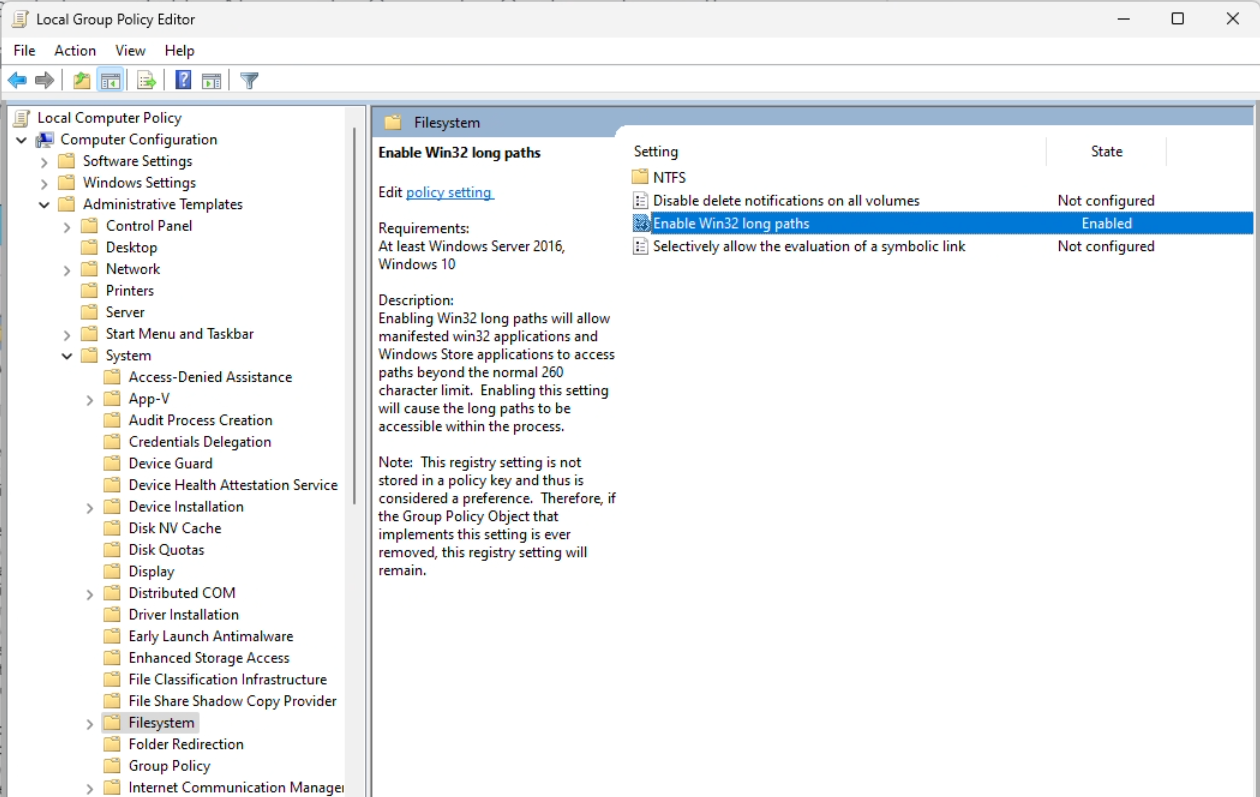
Ah, I probably don't have those issues because I have this group policy set to true. I guess it is false by default:
@ChristopherHaws that's only half the story. Yes, that is default to off on clean installs, it needs to be set to true otherwise Windows will continue to enforce MAX_PATH. However, WinPE exe files also need the manifest that opt-in to long path support as well. A program written in C that allocates char[MAX_PATH] will buffer overflow if Windows returns a longer path, so Windows enforces that the exe must also opt-in to long path, as a signal that the developer of the app has taken responsibility for handling longer paths correctly. Both of these conditions (registry/group policy setting, and WinPE manifest) must be true for long pahs to work. Only one of the two is insufficient.
Hi @Nirmal4G,
Thanks for the feedback, and sorry for not responding earlier. I will try to do that now.
As far as two top-level output paths, the design does not include this by default but allows you to customize the paths to work this way. As @dfederm pointed out, for large repos there may be lots of projects which should not be included in the published output. So if we tried to have the two folders you describe by default, they wouldn't necessarily always include the right output. I think it's better to have a simple, single top-level folder by default, and allow that to be customizable.
This proposal doesn't change where NuGet packages are by default downloaded to. That is the global packages folder, and can be set using the RestorePackagesPath MSBuild property or via other ways. By default that is a folder that is shared between all projects for a user on a machine. This can save on disk space since each project doesn't need its own copies of all the NuGet packages it uses.
For things like CI and Docker builds it can make sense to change the global packages folder to something that can be cached. But for the defaults we want something that will work reasonably well for local developer builds as well as CI, etc.
This should go into MSBuild common targets instead of here.
I looked at this a bit, and it seems like it would be possible. But who would this be for? It seems like the main uses of MSBuild outside of the .NET SDK are non-SDK style .NET projects, and C++ projects. We don't think people with non SDK-style .NET projects are likely to be interested in this, they generally don't want to make big changes to their builds. I believe that C++ projects also handle the output paths somewhat differently. If you have more insight into how C++ handles output paths, or what other project types this could apply to, I'd be interested in understanding that better.
- Does the output properties work when set after project file contents or just before SDK targets start, except
BuildDir?Also, today, setting the paths in dir targets (assuming you want to set them after project file contents because you need to depend on certain properties set in individual projects that changes the output paths) doesn't work properly and is broken due to way that SDK is layered. We should definitely fix this.
We can't change the existing import order, as that would likely cause breaking changes for lots of projects. What we can do (and is in the proposal) is add a new extension point which allows the output path to be modified at the right place.
- Can you construct a merged path of all projects into single directory for each context (bin, obj, ext) and still build successfully without file name collision?
Also, some files in the output paths like NuGet restores and intermediate files have a common name that collides when directories are merged. In non-sdk world, this didn't happen as those files had project name prefixed. This changed when sdk targets came into picture. We should also fix this too!
Fixing this for project.assets.json is tracked by https://github.com/NuGet/Home/issues/4463. I would love to have this fixed, but it's outside of the scope of this proposal.
Can you explain more about what you're looking for here? Is the scenario where you have more than one project in each directory, which is generally where people would run into the project.assets.json issue? Or do you have separate project directories but want to merge the output directories?
I'm planning to update the proposal to specify that if UseCommonOutputDirectory is set to true, then the project name won't be added to the output paths (it would still be included in the intermediate path). I can't guarantee that everything will work in all cases, since that property is rarely used today, but I think it will generally work. And if not, hopefully we can fix it.
- Does the new properties provide a way for the build context information to be exposed as a build identifier or the like, pragmatically?
One of the problems I regularly see when doing a build infra for a project is that it's hard to get the build context out in a single file name friendly way so that we can resolve output paths dynamically without hard-coding. We should fix this too!
For Example, In this proposal, we have
net8. 0_win10-arm64_debugas part of output disambiguation which consists of several build context-specific properties arranged and formatted. This should be exposed as a separate property and should be overridable before appending to a path.
I think the ArtifactsPivots property described in the design will allow this.
Is there a mechanism to clean up pivot folders that are no longer relevant? For example, if you remove a target framework, there's a lingering folder that's no longer being updated. This is no different to what we currently have of course, so may be unrelated to the proposal here.

Is there a mechanism to clean up pivot folders that are no longer relevant? For example, if you remove a target framework, there's a lingering folder that's no longer being updated. This is no different to what we currently have of course, so may be unrelated to the proposal here.
Yes, this can happen in either case. With the new format it's marginally better as you can have a single root folder you can delete to clean up everything.
Overall looks good. I very much like the idea of the central place (the Arcade way), but this bin\MyApp\debug_net8.0 makes me uneasy...

I was just pointed here from https://github.com/dotnet/sdk/pull/30660#issuecomment-1434044039 (outlines my exact publish process right now). In short I'm setting a PublishTo property on each publishable project with the folder name it should be put in, then in Directory.Build.targets I'm directing everything into a common artifacts folder. That lets me do dotnet publish App.sln --no-build --output ./artifacts to get /artifacts/project-1, /artifacts/project-2, etc. My takeaway from this is a big 👍 since it should simplify how most of my projects are publishing artifacts.

Hi folks,
The artifacts path functionality will be in .NET 8 Preview 3. We're hoping that people will try it out and give us feeedback.
The biggest question right now seems to be whether using .artifacts as the default folder name makes sense, especially given that it will be hidden in some contexts. Somewhat related to that is whether it makes sense to have separate UseArtifactsOutput and ArtifactsPath properties.
Thanks!
Personally, I use Windows 11, macOS, and Linux pretty much every day. I don't have any data to back this up, but I think it is pretty common knowledge for macOS power users (including developers) that command+shift+. shows the hidden files. I use it as a simple way to switch between contexts. If I am focusing on coding, I keep everything hidden, but when I am working on infra changes, I show hidden files.
This pattern is already used by many other tools for similar purposes, for example .config/dotnet-tools.json, .github, .editorconfig, .vs, .vscode, .git, .gitignore, .gitattributes, .yarn, .idea, etc, etc.
I personally feel like the benefits of the folder name being less likely to conflict with an existing artifact folder and having it sort above any other folders are both really good reasons to keep the period prefix. Having said that, so long as it is easily configurable, I am happy with any name! ^_^
Just tried this on Preview 3. One major issue I ran into immediately is that everything breaks if you have multiple projects with the same project file name (e.g. core.csproj). I do this in many of my repos because I can't stand the bizarre convention in the .NET world where project file names have 4-5 components on top of being nestled in deep directory hierarchies...
I would have suggested using AssemblyName or something, but it seems that's not going to work given how early MSBuildProjectName is currently added to the artifacts path.
Perhaps an IncludeProjectDirectoryInArtifactsPath property could be the answer? So if I have src/language/core/core.csproj and src/runtime/core/core.csproj, these would go under .artifacts/bin/src/language/core/... and .artifacts/bin/src/runtime/core/..., respectively. (This would also be more in line with how many other build tools work, incidentally.)

@alexrp I think that since you are not following the standard naming convention it would make sense for you to configure ArtifactsProjectName in your projects directly (or in Directory.Build.props). I also don't follow the standard conventions, but I don't have duplicate project names in my solution. I don't know whether this should be something handled out of the box or not since the default behavior of .NET is that the PackageId is based on the project name which should be unique (you can't publish two packages with the same PackageId to nuget).
@dsplaisted Would it make sense for the artifact folder name to default to the PackageId property if it exists instead since this property is defined as being unique? This property is not used by all project types so there should probably be fallback logic such as ArtifactsProjectName -> PackageId -> AssemblyName -> ProjectName?