
aspnetcore
 aspnetcore copied to clipboard
 dotnet
IIS Applications hosting (in site-folder) is not working for Blazor Server deployment
Is there an existing issue for this?
- [X] I have searched the existing issues
Describe the bug
See https://docs.microsoft.com/en-us/aspnet/core/blazor/host-and-deploy/?view=aspnetcore-6.0&tabs=visual-studio#app-base-path Try to test "Option 1" OR "Option 2" on IIS for your Blazor Server template projects' Counter
cc: @guardrex https://github.com/dotnet/AspNetCore.Docs/issues/26667
Expected Behavior
A working site/CoolApp/
Steps To Reproduce
No response
Exceptions (if any)
No response
.NET Version
Azure VM: dotnet --info Host (useful for support): Version: 6.0.3 Commit: c24d9a9c91
Anything else?
On my dev machine I have Microsoft.AspNetCore.App 6.0.7

@LarsOutzen ... "Azure VM" ... You didn't mention that in your docs issue. Did you set it up for the Azure SignalR Service with sticky sessions?
https://docs.microsoft.com/en-us/aspnet/core/blazor/host-and-deploy/server?view=aspnetcore-6.0#azure-signalr-service

No - it is a plain DataCenter 2016 VM with IIS (and SQL Express) and no other Azure services ..
Are WebSockets enabled? ...
https://docs.microsoft.com/en-us/aspnet/core/fundamentals/websockets?view=aspnetcore-6.0#enabling-websockets-on-iis
Yes -  We are actually very happy with Blazor https://www.youtube.com/watch?v=2OsWFpWUhJk&t=35s even have an hybrid MAUI app https://play.google.com/store/apps/details?id=com.companyname.scsome.mobileapp and iOS on the way today
https://dev.startupcentral.dk/coolapp/
Hi @LarsOutzen, thanks for reaching out. Can you please clarify what exact issue you're running into using Blazor Server and IIS?

I am looking for at way to host a CoolApp on an existing (Umbraco CMS) site/CoolApp/ hence as a sub-app According to https://docs.microsoft.com/en-us/aspnet/core/blazor/host-and-deploy/?view=aspnetcore-6.0&tabs=visual-studio#app-base-path there are "Option 1" OR "Option 2" - but none of them work
@LarsOutzen Thanks. Unfortunately we still don't know what specific problem you encounter. Is there an error message?
One way we might be able to investigate is if you give us exact repro steps, i.e., how to recreate the same problem starting from the default project template. This includes specifying each step in configuring IIS. Would you be able to provide that info?

Hi @LarsOutzen. We have added the "Needs: Author Feedback" label to this issue, which indicates that we have an open question for you before we can take further action. This issue will be closed automatically in 7 days if we do not hear back from you by then - please feel free to re-open it if you come back to this issue after that time.

New default Windows (Windows Server 2022 Datacenter Azure Edition)
+ IIS defaults except for WebSockets that had to be added manually
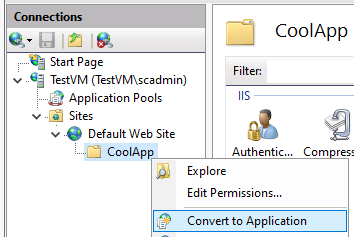 Published CoolApp files copied
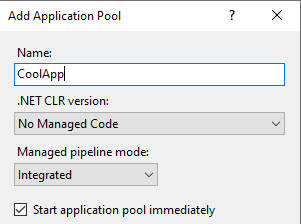 and App pool manually set

dotnet --info

global.json file:
  Not found

Host:
  Version:      6.0.8
  Architecture: x64
  Commit:       55fb7ef977

.NET SDKs installed:
  No SDKs were found.

.NET runtimes installed:
  Microsoft.AspNetCore.App 3.1.28 [C:\Program Files\dotnet\shared\Microsoft.AspNetCore.App]
  Microsoft.AspNetCore.App 5.0.17 [C:\Program Files\dotnet\shared\Microsoft.AspNetCore.App]
  Microsoft.AspNetCore.App 6.0.8 [C:\Program Files\dotnet\shared\Microsoft.AspNetCore.App]
  Microsoft.NETCore.App 3.1.28 [C:\Program Files\dotnet\shared\Microsoft.NETCore.App]
  Microsoft.NETCore.App 5.0.17 [C:\Program Files\dotnet\shared\Microsoft.NETCore.App]
  Microsoft.NETCore.App 6.0.8 [C:\Program Files\dotnet\shared\Microsoft.NETCore.App]

Download .NET:
  https://aka.ms/dotnet-download

Learn about .NET Runtimes and SDKs:
  https://aka.ms/dotnet/runtimes-sdk-info
End of modified Program.cs
app.UseHttpsRedirection();

app.UseStaticFiles("/CoolApp");

app.UsePathBase("/CoolApp");
// ...
app.UseRouting();

app.MapBlazorHub();
app.MapFallbackToPage("/_Host");

app.Run();
@LarsOutzen ... That looks like a failure to even start the app in IIS, not an app base path problem.
We're vaguely† guiding devs to use the Publish to IIS guidance for Blazor Server apps ...
https://docs.microsoft.com/aspnet/core/tutorials/publish-to-iis
... which includes the prohibition on virtual directories ~and doesn't guide devs to convert to an ASP.NET Application~ (Correction: Our main doc set IIS docs DO say to do that for sub-apps).
†vaguely ... Several spots across Blazor docs refer devs to the main doc set for Blazor Server; but in this particular case, I left the docs issue open because I detect that some improvements can be made on where and how we cross-link IIS coverage.
I'm 👂 for further PU remarks here to include on the docs issue.
@SteveSandersonMS @TanayParikh ... I do have a ❓ on middleware placement.
We made an adjustment a while back to tell devs ...
Call
UsePathBaseearly in the app's request processing pipeline ...
... and show calling it prior to UseRouting. It was updated because a reader had an app 💥 when they placed it too late to work.
However, can we be explicit on how early to call UsePathBase? For example, can I tell devs to 'call it first' (i.e., immediately after the WebApplicationBuilder is built, even before HTTPS Redirection Middleware)?
.. the .NET Core Hosting Bundle was already installed on that server-type, however it did not work until it was "Repaired"
The root WebSite works fine with Blazor, however the sub-app is still broken:

I see. I did just notice that we guide devs for Convert to Application for sub-apps. It's been a while since I've looked at this scenario ... several years!
Right-click the sub-app folder in IIS Manager and select Convert to Application.
https://docs.microsoft.com/en-us/aspnet/core/host-and-deploy/iis/advanced?view=aspnetcore-6.0#sub-applications
I'll be 👂 for troubleshooting here and will fix up the docs on the open docs issue when this is resolved.
Some of the write-up here might also help.
@guardrex feel free to make an honest doc out of my comment 😄

We started with basic app base path guidance. In a series of perhaps four reader doc issues over the last couple of years, we improved the guidance with each reader leaving happy in the end with a working app 🎉.
I see from your post, @javiercn, that we need another round of updates. @LarsOutzen, I'm going to use your issue to work on it, along with the other items that I've identified. However, there will be a delay. I'm working .NET 7 doc issues, which have a high priority. When RC1 lands, I'm going to be very busy 🏃, so it's likely that doc work on this will be more EOY or 23Q1. We'll see.
~@javiercn ... One specific ❓ that I don't see you mention: For those scenarios where the current guidance works, can I tell devs when they place UsePathBase to place it immediately after the WebApplicationBuilder is built, even before HTTPS Redirection Middleware? Merely saying "call it early" isn't specific and doesn't seem particularly helpful.~
I thought this placement aspect over 🤔 and surmise that UsePathBase should be called first, so I'm patching that now on https://github.com/dotnet/AspNetCore.Docs/pull/26733.
