
aspnetcore
 aspnetcore copied to clipboard
 dotnet
Conflicting assets with the same target path after upgrading Blazor from .net 5 to .net 6
I have spent a long time trying to figure what is the problem, looking for similar issues, but just could not find the answer.
Describe the bug
I have Blazor WASM hosted, with a couple of Razor Class Libraries which uses Shared project which references some .net framework library CIBWM.Markets.FxF.Adapters.FxSales.Contracts. There are no multiple runnable wasm clients so I have no idea what is causing this problem.
What I did
Just switched Blazor Client and Blazor Server from .net5.0 to .net6.0, upgrade nugget packages
Exceptions (if any)
Conflicting assets with the same target path '_framework/CIBWM.Markets.FxF.Adapters.FxSales.Contracts.pdb'. For 'Build' assets 'Identity: C:\Users\ab017jh\Source\Repos\fxonfront\src\FxSalesBlazorWasm\FxSalesBlazor.Client\bin\Debug\wwwroot_framework\CIBWM.Markets.FxF.Adapters.FxSales.Contracts.pdb, SourceType: Computed, SourceId: FxSalesBlazor.Client, ContentRoot: C:\Users\ab017jh\Source\Repos\fxonfront\src\FxSalesBlazorWasm\FxSalesBlazor.Client\bin\Debug\wwwroot, BasePath: lol, RelativePath: _framework/CIBWM.Markets.FxF.Adapters.FxSales.Contracts.pdb, AssetKind: Build, AssetMode: All, AssetRole: Primary, RelatedAsset: , AssetTraitName: BlazorWebAssemblyResource, AssetTraitValue: symbol, CopyToOutputDirectory: PreserveNewest, CopyToPublishDirectory: Never, OriginalItemSpec: C:\Users\ab017jh\Source\Repos\fxonfront\src\FxSales\Application.Common.Interfaces\bin\Debug\CIBWM.Markets.FxF.Adapters.FxSales.Contracts.pdb' and 'Identity: C:\Users\ab017jh\Source\Repos\fxonfront\src\FxSalesBlazorWasm\FxSalesBlazor.Client\bin\Debug\wwwroot_framework\CIBWM.Markets.FxF.Adapters.FxSales.Contracts.pdb, SourceType: Computed, SourceId: FxSalesBlazor.Client, ContentRoot: C:\Users\ab017jh\Source\Repos\fxonfront\src\FxSalesBlazorWasm\FxSalesBlazor.Client\bin\Debug\wwwroot, BasePath: lol, RelativePath: _framework/CIBWM.Markets.FxF.Adapters.FxSales.Contracts.pdb, AssetKind: Build, AssetMode: All, AssetRole: Primary, RelatedAsset: , AssetTraitName: BlazorWebAssemblyResource, AssetTraitValue: symbol, CopyToOutputDirectory: PreserveNewest, CopyToPublishDirectory: Never, OriginalItemSpec: C:\Users\ab017jh\Source\Repos\fxonfront\src\FxSales\Application.Common.Interfaces\bin\Debug\CIBWM.Markets.FxF.Adapters.FxSales.Contracts.pdb'. FxSalesBlazor.Client C:\Program Files\dotnet\sdk\6.0.100\Sdks\Microsoft.NET.Sdk.Razor\targets\Microsoft.NET.Sdk.Razor.StaticWebAssets.targets 411
Further technical details
- visual studio 2022
dotnet --info Output
.NET SDK (reflecting any global.json):
 Version:   6.0.100
 Commit:    9e8b04bbff

Runtime Environment:
 OS Name:     Windows
 OS Version:  10.0.19042
 OS Platform: Windows
 RID:         win10-x64
 Base Path:   C:\Program Files\dotnet\sdk\6.0.100\

Host (useful for support):
  Version: 6.0.0
  Commit:  4822e3c3aa

.NET SDKs installed:
  3.1.102 [C:\Program Files\dotnet\sdk]
  5.0.401 [C:\Program Files\dotnet\sdk]
  6.0.100 [C:\Program Files\dotnet\sdk]

.NET runtimes installed:
  Microsoft.AspNetCore.All 2.1.30 [C:\Program Files\dotnet\shared\Microsoft.AspNetCore.All]
  Microsoft.AspNetCore.App 2.1.30 [C:\Program Files\dotnet\shared\Microsoft.AspNetCore.App]
  Microsoft.AspNetCore.App 3.1.2 [C:\Program Files\dotnet\shared\Microsoft.AspNetCore.App]
  Microsoft.AspNetCore.App 3.1.19 [C:\Program Files\dotnet\shared\Microsoft.AspNetCore.App]
  Microsoft.AspNetCore.App 3.1.21 [C:\Program Files\dotnet\shared\Microsoft.AspNetCore.App]
  Microsoft.AspNetCore.App 5.0.10 [C:\Program Files\dotnet\shared\Microsoft.AspNetCore.App]
  Microsoft.AspNetCore.App 5.0.12 [C:\Program Files\dotnet\shared\Microsoft.AspNetCore.App]
  Microsoft.AspNetCore.App 6.0.0 [C:\Program Files\dotnet\shared\Microsoft.AspNetCore.App]
  Microsoft.NETCore.App 2.1.30 [C:\Program Files\dotnet\shared\Microsoft.NETCore.App]
  Microsoft.NETCore.App 3.1.2 [C:\Program Files\dotnet\shared\Microsoft.NETCore.App]
  Microsoft.NETCore.App 3.1.19 [C:\Program Files\dotnet\shared\Microsoft.NETCore.App]
  Microsoft.NETCore.App 3.1.21 [C:\Program Files\dotnet\shared\Microsoft.NETCore.App]
  Microsoft.NETCore.App 5.0.10 [C:\Program Files\dotnet\shared\Microsoft.NETCore.App]
  Microsoft.NETCore.App 5.0.12 [C:\Program Files\dotnet\shared\Microsoft.NETCore.App]
  Microsoft.NETCore.App 6.0.0-rc.1.21451.13 [C:\Program Files\dotnet\shared\Microsoft.NETCore.App]
  Microsoft.NETCore.App 6.0.0 [C:\Program Files\dotnet\shared\Microsoft.NETCore.App]
  Microsoft.WindowsDesktop.App 3.1.2 [C:\Program Files\dotnet\shared\Microsoft.WindowsDesktop.App]
  Microsoft.WindowsDesktop.App 3.1.19 [C:\Program Files\dotnet\shared\Microsoft.WindowsDesktop.App]
  Microsoft.WindowsDesktop.App 3.1.21 [C:\Program Files\dotnet\shared\Microsoft.WindowsDesktop.App]
  Microsoft.WindowsDesktop.App 5.0.10 [C:\Program Files\dotnet\shared\Microsoft.WindowsDesktop.App]
  Microsoft.WindowsDesktop.App 5.0.12 [C:\Program Files\dotnet\shared\Microsoft.WindowsDesktop.App]
  Microsoft.WindowsDesktop.App 6.0.0 [C:\Program Files\dotnet\shared\Microsoft.WindowsDesktop.App]

@AB017JH thanks for contacting us.
Can you create a minimal repro project as a public github repository and share it with us?
I believe you can set CopyOutputSymbolsToOutputDirectory to false in your project file to potentially workaround this issue.

Hi @AB017JH. We have added the "Needs: Author Feedback" label to this issue, which indicates that we have an open question for you before we can take further action. This issue will be closed automatically in 7 days if we do not hear back from you by then - please feel free to re-open it if you come back to this issue after that time.

Hello @javiercn thank you for a fast response.
I am now quite lost. I have isolated the behavior to the three projects. I have even deleted all the classes inside, removed bin/ obj folders, so I was happy I can provide you a minimal sample I created a new project copied the projects and the error disappeared, wow what a surprise, so I removed copied project and only referenced those projects from new solution and the error was right back... interesting, then I was like, what about something wrong with visual studio 2022 so I tried it in vs 2019 (had to disable the implicit using) and error was gone.
I have no idea what is going on nor how can I provide you with more information to help you figure it out. The CopyOutputSymbolsToOutputDirectory seems to work in VS 2022 so I will stick to that right now I guess.
@AB017JH if you perform a build from the command line, does it reproduce? (for example with dotnet build).
If you have a minimal repro you could create a binary log and share it with us by running dotnet build /bl or if it only reproduces in visual studio, creating a binlog as described in this link https://github.com/dotnet/project-system-tools#build-logging
Please make sure that you don't have any sensitive info on the projects or in your environment variables as the binlog might capture some of those things.
@AB017JH thanks for the additional details.
It seems that in your project you are targeting .NET 6.0 but still referencing 5.x packages. I believe that is likely what is causing the issue.
Sorry, I forgot to upgrade them in the minimal repro solution, since it does not help. msbuildWithUpgradedPackages.zip .
@AB017JH thanks for the additional details.
No worries, I think I got a hint of what's going on. It seems that some file is being added multiple times to ReferenceCopyLocalPaths
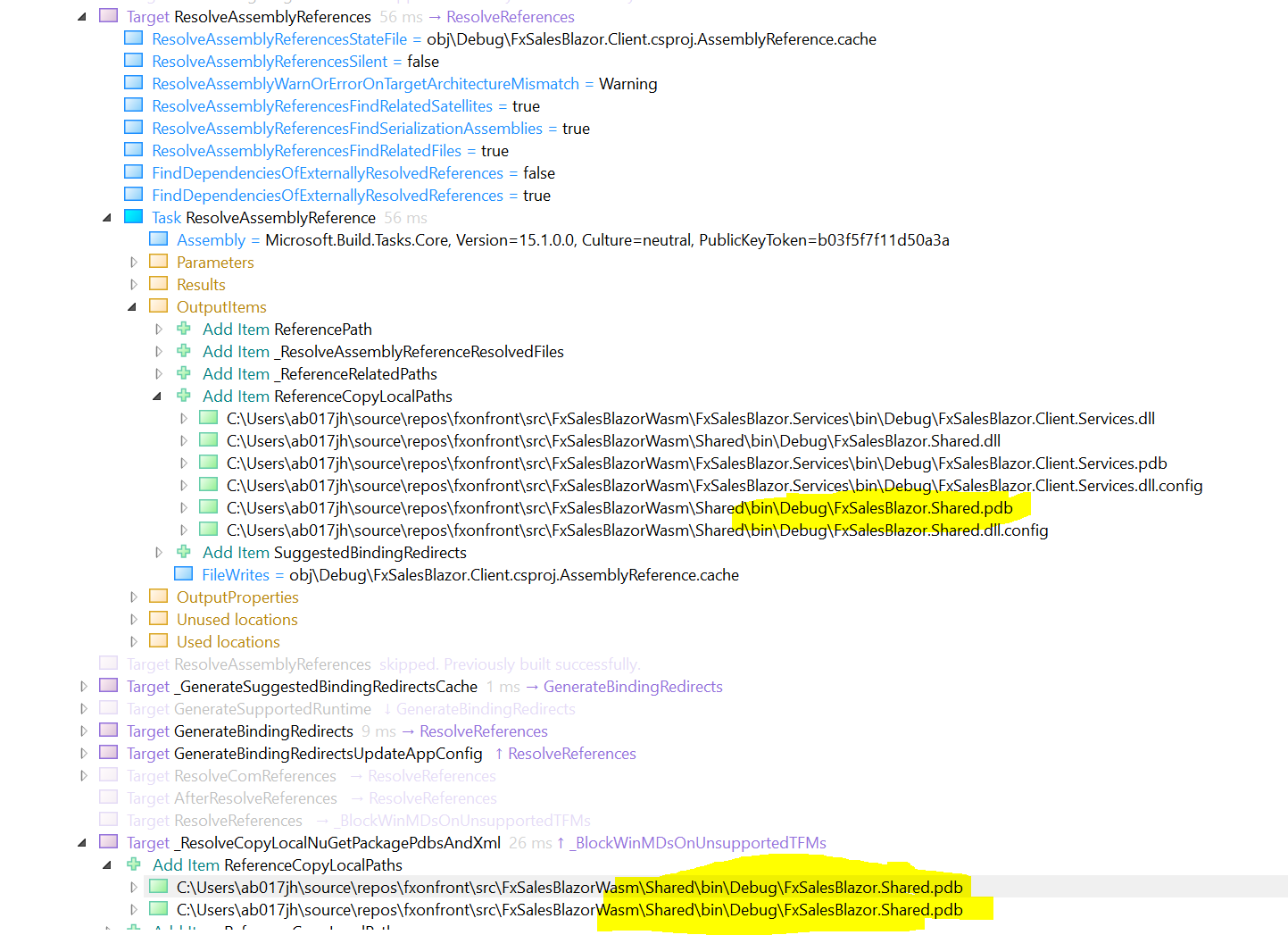
That is causing it to appear duplicated in the list of candidates.

And producing the error.
I wouldn't expect the file to be duplicated in the list of ReferenceCopyLocalPaths, so I think we need to follow up with some other folks on the build team.
I have the same issue. Here is the minimal repo project: https://github.com/Ne4to/issues-22564 I'm building a developer helper tool with web UI and would like to distribute it as a dotnet tool. I added two lines in .csproj for a new blazorserver project.
    <IsPackable>true</IsPackable>
    <PackAsTool>true</PackAsTool>
Execute dotnet pack and get the following error:
C:\Program Files\dotnet\sdk\6.0.100\Sdks\Microsoft.NET.Sdk.Razor\targets\Microsoft.NET.Sdk.Razor.StaticWebAssets.targets(411,5): error : Conflicting assets with the same target path 'issues-22564.styles.css'. For 'All' assets 'Identity: C:\Users\Ne4to\projects\GitHub\Ne4to\issues-22564\obj\Debug\net6.0\scopedcss\bundle\issues-22564.styles.css, SourceType: Computed, SourceId: issues-22564, ContentRoot: C:\Users\Ne4to\projects\GitHub\Ne4to\issues-22564\obj\Debug\net6.0\scopedcss\bundle, BasePath: _content/issues-22564, RelativePath: issues-22564.styles.css, AssetKind: All, AssetMode: CurrentProject, AssetRole: Primary, RelatedAsset: , AssetTraitName: ScopedCss, AssetTraitValue: ApplicationBundle, CopyToOutputDirectory: Never, CopyToPublishDirectory: PreserveNewest, OriginalItemSpec: C:\Users\Ne4to\projects\GitHub\Ne4to\issues-22564\obj\Debug\net6.0\scopedcss\bundle\issues-22564.styles.css' and 'Identity: C:\Users\Ne4to\projects\GitHub\Ne4to\issues-22564\obj\Debug\net6.0\scopedcss\bundle\issues-22564.styles.css, SourceType: Computed, SourceId: issues-22564, ContentRoot: C:\Users\Ne4to\projects\GitHub\Ne4to\issues-22564\obj\Debug\net6.0\scopedcss\bundle, BasePath: _content/issues-22564, RelativePath: issues-22564.styles.css, AssetKind: All, AssetMode: CurrentProject, AssetRole: Primary, RelatedAsset: , AssetTraitName: ScopedCss, AssetTraitValue: ApplicationBundle, CopyToOutputDirectory: Never, CopyToPublishDirectory: PreserveNewest, OriginalItemSpec: C:\Users\Ne4to\projects\GitHub\Ne4to\issues-22564\obj\Debug\net6.0\scopedcss\bundle\issues-22564.styles.css'. [C:\Users\Ne4to\projects\GitHub\Ne4to\issues-22564\issues-22564.csproj]

@Ne4to your issue strikes me as different.
Could you file a separate issue in the aspnetcore repo with a minimal repro project as a public github repository?
@pranavkm can you loop in the right folks here? since the source of the issue is duplicated items in ReferenceCopyLocalPaths?

We've discussed this in the team and we think we can filter out duplicates as part of this fix so even if there are duplicate files, the build will succeed.
Thanks for contacting us.
We're moving this issue to the .NET 7 Planning milestone for future evaluation / consideration. We would like to keep this around to collect more feedback, which can help us with prioritizing this work. We will re-evaluate this issue, during our next planning meeting(s).
If we later determine, that the issue has no community involvement, or it's very rare and low-impact issue, we will close it - so that the team can focus on more important and high impact issues.
To learn more about what to expect next and how this issue will be handled you can read more about our triage process here.

Issue can be manifested easily in two steps (VS 2022, .NET 6):
- Create blazor wasm hosted project with individual accounts.
- In Server project -> Add -> New Scaffolded Item -> Identity -> Add -> Overwrite All files => Select DbContext -> Add.
Try to rebuild -> Conflicting assets error.


Does a temporary workaround exists?
I found a workaround, but it may be specific to my circumstances. The issue occurs for me because I have IsPacking and GeneratePackageOnBuild set to true. I also have a 'Host' project that builds a background worker service that I install as a service to self-host the output from the WASM. It too had IsPacking and GeneratePackageOnBuild set to true, but it also has PackAsTool set to true. Setting them to false in both project works but doesn't produce the output I want. I use Azure DevOps Pipelines to build my code, so the workaround involves changes to that pipeline. The steps are:
- Change the Host so that it's webroot is a custom folder (I named mine Wasm instead of wwwroot)
This is neccessary because if you use a folder called wwwroot, it will be packed differently and will not be able to host the content as expected
- Remove the reference entirely from the Host project
This is neccessary so that the host project itself can be packed on the pipeline
- Leave IsPacking and PackAsTool as true in the Host project
- Set IsPacking and GeneratePackageOnBuild to false in the Wasm project
- Set the pipeline to Publish the Wasm project
- Create a powershell script that copies the published output of the Wasm project to a folder named Wasm (as above) within the source folder of the Host project
- Set the pipeline to execute the powershell script after the Wasm Publish step
- Set the pipeline to publish the Host package after the powershell step has executed
Unfortunately the code that benefits from this workaround is hosted in a private repo that I cannot share - the following snippets may however prove useful:
MergeWasmWithHosts.ps1
param ($Source, $Wasm)

foreach ($project in Get-ChildItem -Path $Wasm -Directory -Name)
{
    $origin = Join-Path -Path $Wasm -ChildPath $project
    $origin = Join-Path -Path $origin -ChildPath "wwwroot"

    $destination = Join-Path -Path $Source -ChildPath $project
    $destination = $destination.Substring(0, $destination.Length - 4)
    $destination = -join($destination, "Host")
    $destination = Join-Path -Path $destination -ChildPath "Wasm"

    Write-Host "Copying $origin to $destination"

    Copy-Item -Path $origin -Destination $destination -Recurse -Force

    Write-Host "Copied $origin to $destination"
}

Write-Host "Script Execute Completed"
YAML Pipeline Steps
  - task: DotNetCoreCLI@2
    condition: and(succeeded(), eq(variables.isPublishingLibraries, 'true'), eq(variables.isPublishingWasm, 'true'))
    displayName: 'Publish Blazor WASM Projects ($(publishConfiguration))'
    inputs:
      arguments: '--configuration $(publishConfiguration) --no-restore --output $(wasmOutput) $(versions)'
      command: 'publish'
      projects: '$(wasm)'
      publishWebProjects: true
      zipAfterPublish: false

  - task: PowerShell@2
    condition: and(succeeded(), eq(variables.isPublishingLibraries, 'true'), eq(variables.isPublishingWasm, 'true'))
    displayName: 'Integrate Blazor WASM Artifacts with Host for Packaging'
    inputs:
      arguments: >
        -Source $(source)
        -Wasm $(wasmOutput)
      filePath: '$(scripts)/MergeWasmWithHosts.ps1'
      pwsh: true
      targetType: 'filePath'

  - task: DotNetCoreCLI@2
    condition: and(succeeded(), eq(variables.isPublishingLibraries, 'true'))
    displayName: 'Publish Nuget Packages ($(publishConfiguration))'
    inputs:
      arguments: '$(packages) --configfile $(nugetConfig) --configuration $(publishConfiguration) --no-restore --output $(packagesOutput) $(versions)'
      command: 'custom'
      custom: 'pack'
I hope this helps.

Thanks for contacting us.
We're moving this issue to the .NET 7 Planning milestone for future evaluation / consideration. We would like to keep this around to collect more feedback, which can help us with prioritizing this work. We will re-evaluate this issue, during our next planning meeting(s).
If we later determine, that the issue has no community involvement, or it's very rare and low-impact issue, we will close it - so that the team can focus on more important and high impact issues.
To learn more about what to expect next and how this issue will be handled you can read more about our triage process here.
In case this helps someone else, I ran into this issue and for me the fix was to specify an explicit AssemblyName. The default value uses $(MSBuildProjectName) as the AssemblyName. In my case the project name was "CAF.Blazor.Sidebar (.NET 6.0)". I explicitly changed AssemblyName to "CAF.Blazor.Sidebar" and the error went away. I wonder if it has something to do with the space in the project name?
