
moveable
 moveable copied to clipboard
 daybrush
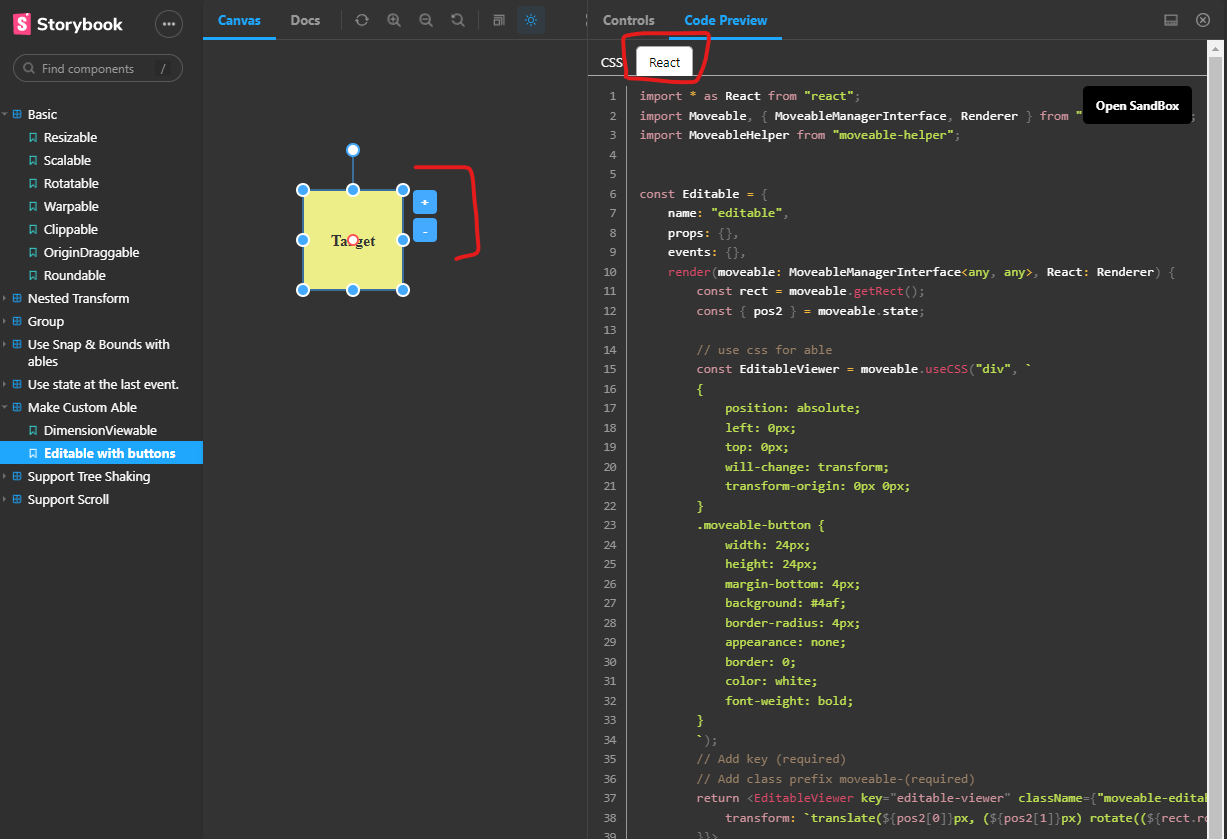
please add editable with buttons support in Angular, same as you have in React
Subject: please add editable with buttons support in Angular, same as you have in React
https://daybrush.com/moveable/storybook/?path=/story/make-custom-able--editable-with-buttons
works in react but not in Angular
pleases add
thanks for a great project

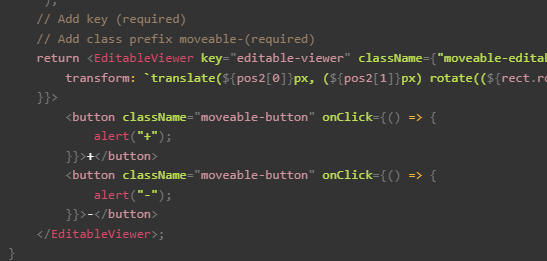
@born2net If the jsx part is changed to js, it can be used in any framework.
Other framework demos are in preparation.
const Editable = {
    name: "editable",
    props: {},
    events: {},
    render(moveable: MoveableManagerInterface<any, any>, React: Renderer) {
        const rect = moveable.getRect();
        const { pos2 } = moveable.state;

        // use css for able
        const EditableViewer = moveable.useCSS("div", `
        {
            position: absolute;
            left: 0px;
            top: 0px;
            will-change: transform;
            transform-origin: 0px 0px;
        }
        .moveable-button {
            width: 24px;
            height: 24px;
            margin-bottom: 4px;
            background: #4af;
            border-radius: 4px;
            appearance: none;
            border: 0;
            color: white;
            font-weight: bold;
        }
        `);
        // Add key (required)
        // Add class prefix moveable-(required)
        return React.createElement(EditableViewer, { key: "editable-viewer", className: "moveable-editable", style: {
            transform: `translate(${pos2[0]}px, (${pos2[1]}px) rotate((${rect.rotation}deg) translate(10px)`,
        }}, [
            React.createElement("button", { className: "moveable-button", onClick: () => alert("+") }, ["+"]),
            React.createElement("button", { className: "moveable-button", onClick: () => alert("-") }, ["-"]),
       ]);
    }
} as const;

I tried to add with some issues, re-opened and maybe we can close once demos for angular exist?
thanks again for an awesome project.
@born2net If the jsx part is changed to js, it can be used in any framework.
Other framework demos are in preparation.
const Editable = {
    name: "editable",
    props: {},
    events: {},
    render(moveable: MoveableManagerInterface<any, any>, React: Renderer) {
        const rect = moveable.getRect();
        const { pos2 } = moveable.state;

        // use css for able
        const EditableViewer = moveable.useCSS("div", `
        {
            position: absolute;
            left: 0px;
            top: 0px;
            will-change: transform;
            transform-origin: 0px 0px;
        }
        .moveable-button {
            width: 24px;
            height: 24px;
            margin-bottom: 4px;
            background: #4af;
            border-radius: 4px;
            appearance: none;
            border: 0;
            color: white;
            font-weight: bold;
        }
        `);
        // Add key (required)
        // Add class prefix moveable-(required)
        return React.createElement(EditableViewer, { key: "editable-viewer", className: "moveable-editable", style: {
            transform: `translate(${pos2[0]}px, (${pos2[1]}px) rotate((${rect.rotation}deg) translate(10px)`,
        }}, [
            React.createElement("button", { className: "moveable-button", onClick: () => alert("+") }, ["+"]),
            React.createElement("button", { className: "moveable-button", onClick: () => alert("-") }, ["-"]),
       ]);
    }
} as const;
any example of how to use in Angular would be great!