http
 http copied to clipboard
 dart-lang
Connection failure for some users: "Failed host lookup: "exemple.com'"
I use the HTTP package to send data to the company's API. However, I'm having issues on certain cell phone models (Android and iOS), I've been getting "Failed host lookup: "example.com'" connection failure responses.
 http: ^0.13.5
 http_parser: ^4.0.1
I did a lot of research on the error, found some possible solutions, but none fixed…
I put the connection permission:
  <uses-permission android:name="android.permission.INTERNET"/>
   <uses-permission android:name="android.permission.ACCESS_NETWORK_STATE"/>
On iOS:
   <key>NSAppTransportSecurity</key>
   <dict>
       <key>NSAllowsLocalNetworking</key>
       <true/>
Even with these permissions, the connection error still remains for around 5% of App users.
I left all dependencies up to date, as well as the Dart SDK version (sdk: ">=2.17.6 <3.0.0"). In tests in Debug, I could not reproduce the error, only in production on certain devices.
I used Firebase to catch the try catch, and the error message I get is the following: "Failed host lookup: "exemple.com'".
This is the connection code:
import 'dart:async';
  import 'dart:io';

  import 'package:flutter/foundation.dart';
  import 'package:http/http.dart' as http;
  import 'package:http/http.dart';

  http.StreamedResponse? response;

  final Uri url = Uri.https(https://example.com, 'api/dot/grava');
  final request = http.MultipartRequest('POST', url)..fields.addAll(data);
  final http.StreamedResponse responseB = await request.send();
  response = responseB;

  return response;
Another attempt was to use the server's fixed IP address, but it is also returned with an error for certain users. Error: "Connection failed" and "Software caused connection abort"
     import 'dart:async';
     import 'dart:io';

     import 'package:flutter/foundation.dart';
     import 'package:http/http.dart' as http;
   import 'package:http/http.dart';

   http.StreamedResponse? response;
   final Uri url = Uri.http('123.123.124.123', 'api/dot/record');
   final request = http.MultipartRequest('POST', url)..fields.addAll(data);
   final http.StreamedResponse responseA = await request.send();
   response = responseA;

   return response;
I really don't know what else to do to solve this problem.
My version of Flutter is 3.0.5. I use macOS Monterey (12.5.1).


Update on my problem...
Seems like animation (AnimationController _animationController) was the issue..
Here is "minimised" example from my issue:
- with Animation gist (throws exception:
_ClientSocketException (Failed host lookup: 'lldev.thespacedevs.com')) - without Animation gist (works fine)
@dataamericadevelopment do you have any animations in your project that interfere with http?
Update on my problem...
Seems like animation (
AnimationController _animationController) was the issue..Here is "minimised" example from my issue:
- with Animation gist (throws exception:
_ClientSocketException (Failed host lookup: 'lldev.thespacedevs.com'))- without Animation gist (works fine)
@dataamericadevelopment do you have any animations in your project that interfere with
http?
Hello, @Sirius3615! Thanks for your help. I don't use animations in the app. But if your app had a connection problem due to animations, I think it could be some dependency I use that could also be interfering with the connections.
Did you test by disabling the dependencies and checking if the issue was resolved?
Thank you very much!
Hi @dataamericadevelopment !
I haven't, I only removed default animations and it worked, later I found a workaround for the animations by using a package to achieve what I wanted. And that works without issues. So it very likely could be a dependency thats causing problems for you.
Cheers!

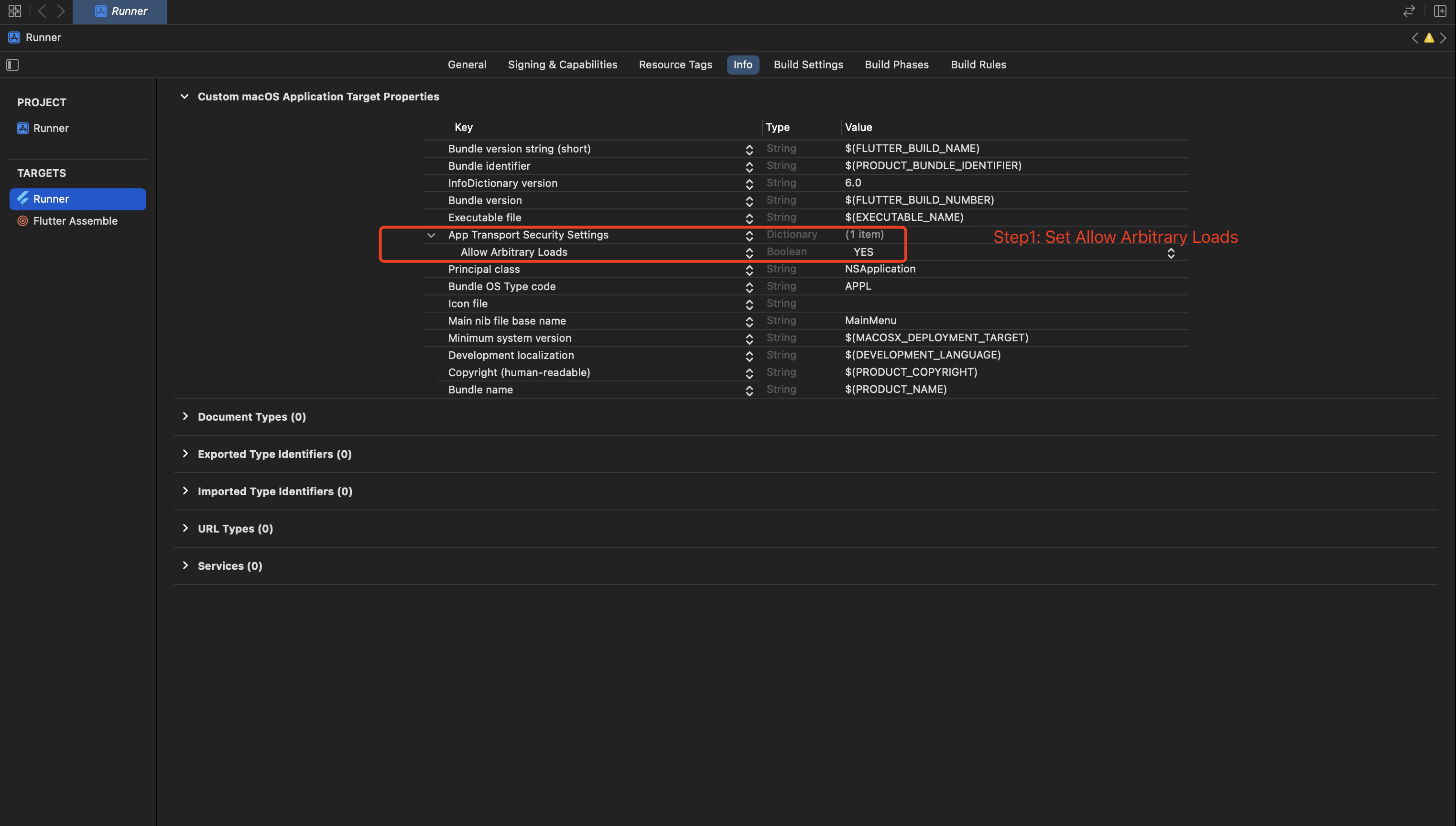
Just now, I had solved my problem. I'm using Flutter 3.7.1 to build MacOS app.
[!] Flutter (Channel stable, 3.7.1, on macOS 13.2 22D49 darwin-arm64, locale en-CN)
    • Flutter version 3.7.1 on channel stable at /Users/cee/fvm/versions/3.7.1
    ! Warning: `dart` on your path resolves to /opt/homebrew/Cellar/dart/2.18.6/libexec/bin/dart, which is not inside your current Flutter SDK checkout at /Users/cee/fvm/versions/3.7.1. Consider adding /Users/cee/fvm/versions/3.7.1/bin to the front of your path.
    • Upstream repository https://github.com/flutter/flutter.git
    • Framework revision 7048ed95a5 (2 weeks ago), 2023-02-01 09:07:31 -0800
    • Engine revision 800594f1f4
    • Dart version 2.19.1
    • DevTools version 2.20.1
    • If those were intentional, you can disregard the above warnings; however it is recommended to use "git" directly to perform update checks and upgrades.

[✓] Android toolchain - develop for Android devices (Android SDK version 32.1.0-rc1)
    • Android SDK at /Users/cee/Library/Android/sdk
    • Platform android-32, build-tools 32.1.0-rc1
    • ANDROID_HOME = /Users/cee/Library/Android/sdk
    • ANDROID_SDK_ROOT = /Users/cee/Library/Android/sdk
    • Java binary at: /Applications/Android Studio.app/Contents/jre/Contents/Home/bin/java
    • Java version OpenJDK Runtime Environment (build 11.0.11+0-b60-7772763)
    • All Android licenses accepted.

[✓] Xcode - develop for iOS and macOS (Xcode 14.2)
    • Xcode at /Applications/Xcode.app/Contents/Developer
    • Build 14C18
    • CocoaPods version 1.11.3

[✓] Chrome - develop for the web
    • Chrome at /Applications/Google Chrome.app/Contents/MacOS/Google Chrome

[✓] Android Studio (version 2021.1)
    • Android Studio at /Applications/Android Studio.app/Contents
    • Flutter plugin can be installed from:
      🔨 https://plugins.jetbrains.com/plugin/9212-flutter
    • Dart plugin can be installed from:
      🔨 https://plugins.jetbrains.com/plugin/6351-dart
    • Java version OpenJDK Runtime Environment (build 11.0.11+0-b60-7772763)

[✓] IntelliJ IDEA Ultimate Edition (version 2022.1)
    • IntelliJ at /Applications/IntelliJ IDEA.app
    • Flutter plugin version 70.0.4
    • Dart plugin version 221.5588

[✓] VS Code (version 1.75.1)
    • VS Code at /Applications/Visual Studio Code.app/Contents
    • Flutter extension can be installed from:
      🔨 https://marketplace.visualstudio.com/items?itemName=Dart-Code.flutter

[✓] Connected device (2 available)
    • macOS (desktop) • macos  • darwin-arm64   • macOS 13.2 22D49 darwin-arm64
    • Chrome (web)    • chrome • web-javascript • Google Chrome 110.0.5481.100

[✓] HTTP Host Availability
    • All required HTTP hosts are available

! Doctor found issues in 1 category.
Some of steps for me: