

 cucumber
How to attach screenshot in the report using EventListener?
Hi, I want to capture screenshots using EventListener. I know we can use EmbedEvent for this, but there how can i use Scenario.attach()?

You can only use Scenario.attach in your glue code. For example:
import io.cucumber.java.After;
import io.cucumber.java.Scenario;

public class Attachments {

    @After
    public void after(Scenario scenario) {
        if (scenario.isFailed()) {
            byte[] data = // get screenshot from somewhere
            scenario.attach(data, "image/png", "My screenshot");
        }
    }
When used like this, after each failed scenario an EmbedEvent is emitted.
This is currently not documented in: https://github.com/cucumber/cucumber-jvm/tree/main/java#hooks

Thanks for the reply, As per you feedback, now I am using as below.
@After
public void after(Scenario scenario) {
if (scenario.isFailed()) {
byte[] data =((TakesScreenshot) appiumDriver).getScreenshotAs(OutputType.BYTES);
scenario.attach(data, "image/png", "My screenshot");
}
}
Is there any ways to attach image using custom plugin?
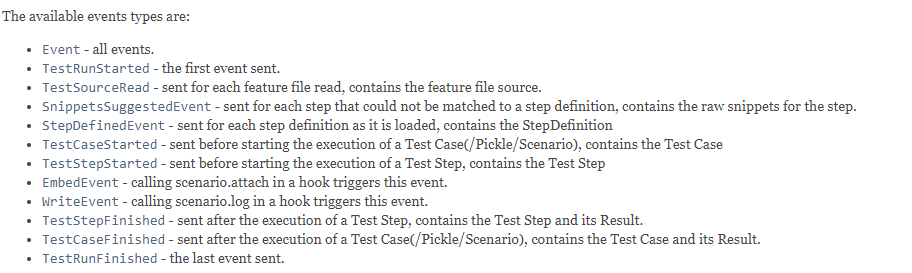 https://javadoc.io/doc/io.cucumber/cucumber-plugin/latest/io/cucumber/plugin/event/EventPublisher.html
@dipakkumar1225 Yes you can take screenshots via a custom plugin. Just need to implement the EventListener / ConcurrentEventListener, and there you can add event listeners for the events you have mentioned above.
Probably you are looking at taking a screenshot when the scenario has failed. Following snippet will help you.
public class ScreenshotEmitter implements ConcurrentEventListener{

  private static final String screenshotDirectory = "./target";

  public void setEventPublisher(EventPublisher publisher) {

	  publisher.registerHandlerFor(TestStepFinished.class,this::handleTestStepFinished);
  }

private void testStepFinished(TestStepFinished event){
  Result result = event.getResult();

  if (!Status.PASSED.equals(result.getStatus())) {
  String message = "Test did not pass (" + result.getStatus() + "): " + currentFeature + " - " + currentScenario;
  if (StringUtils.notEmpty(screenshotDirectory) && result.getError() != null) {
	  try {
              String screenshotName = currentFeature + "_" + currentScenario + "_" + TIMESTAMP.format(new Date()) + ".png";
              File file = getController().captureScreenshot();

              // Get destination directory
              File destinationDir = new File(screenshotDirectory);

              // Rename the screenshot
              File destinationFile = new File(destinationDir.getAbsolutePath() + File.separator + screenshotName);

              // Copy file
              FileUtils.copyFile(file, destinationFile);

              String screenshotLink = String.format("<a href='%s' target='_blank'>%s</a>", screenshotDirectory + "/" + screenshotName,
		              screenshotName);
              message += " - " + screenshotLink;
	  } catch (Exception ex) {
                // Just log exceptions caught here. Don't re-throw them otherwise
                // we'll loose the original test failure cause.

                ex.printStackTrace();
	  }
  }

  System.err.println(message);
  }

}

}
then you have to add the plugin via launcher parameters.

I am trying to attach screenshots only for specific steps (based on specific strings in the step name) and want to use the EventListener as in the example above, but I cannot access the scenario object in the scope of the handler method for TestStepFinished event in order to attach the screenshot directly after taking it. Is there a way to access the scenario for such a purpose, or is this not the intended use? If not, what would be the best practice to attach a screenshot directly to a test step, not to a test case?

This issue has been automatically marked as stale because it has not had recent activity. It will be closed in two months if no further activity occurs.
![stale[bot] avatar](https://avatars.githubusercontent.com/in/1724?v=4 "Published by a pub.dev verified publisher")