
macs-fan-control
 macs-fan-control copied to clipboard
 crystalidea
Custom fan control may throttle CPU on 16" MBP
Tested on both i7 and i9 16" 2019 Macbook Pro. While transcoding video and getting hot, I selected full blast for fans, and when engaged, there is an instant throttle down of the CPU, which returns to normal as soon as preset is changed back to automatic.

Unfortunately, number of users confirmed this, when using custom fan control, MBP 16" begins to throttle. There's no solution for that yet 😢
Another report:
Hardware Overview: Model Name: MacBook Pro Model Identifier: MacBookPro16,1 Processor Name: 6-Core Intel Core i7 Processor Speed: 2,6 GHz Number of Processors: 1 Total Number of Cores: 6 Boot ROM Version: 1037.100.362.0.0 (iBridge: 17.16.14281.0.0,0)
Catalina
Set up a custom profile depended on CPU PECI Make a load on the processor Stop loading processor Some time later (few minutes) a process called kernel_task begin to load mostly all cpu % After closing "Macs fan control" in a few minutes all become normal

I am a developer and I have MPB 16. Maybe I can help you somehow (Logs for example)?

Could you please do the following tests
-
When the computer is idle (fans are spinning at their minimum with automatic preset), put them to some constant RPM value e.g. 100 more than minimum. Check kernel_task CPU usage then. Thanks.
-
Select "Full blast" and load all CPU cores (e.g. with HandBrake), check kernel_task usage again.
Right now it works correctly
1 - Added 15% to speed. No problem with kernel_task in the 15 minutes. 2 - All cores loaded with yes > /dev/null command (8 times) and full blast selected. No problem with kernel_task in the 15 minutes. 3 - Stopped yes > /dev/null but still full blast. No problem with kernel_task in the 15 minutes. 4 - Custom preset - CPU PECI min=50 max=90. Started from idle to full cpu (one round of cinebench) and back to idle. Then wait (). No problem with kernel_task in the 6 hours.
I will continue to study the situation...
I have got it some time later with custom preset. I can't work out how it happens. It just started after long period of high cpu loading by another process. Forcing to full blast stopped high cpu kernel task. Switching to custom after that doesnt start high cpu kernel task immediately but later(in 10 mins) it started again.
Today (after update app to version 1.5.7) I launched app in custom preset mode. After about 40 minutes (I compiled my project 4-5 times, high cpu usage) it started high kernel_task again. Then I switched to automatic preset but throttle didn't stop until I shut down the application.
Any updates on this topic? Just booted up my new MBP 16, and noticed a significant FPS drop while gaming. Had the fans set to max out at 81 degrees (CPU PECI). The reported temps never went above 70 degrees, but the case felt a little (too) warm.
Got a little anxious and closed the app (the reported temps should be correct I believe?) and eventually the fps and CPU/fans went back to normal.

This kernel_task issue happens frequently with me when I have a few light VMs running in the background and a 4K monitor attached to the MBP 16, 2019.
HEADS UP: I am not using Macs Fan Control App. I came here to search the issues against MBP 16, 2019 before installing the app.

FWIW, I have a 2019 MBP 15" w/ i9 and use it with two 4k monitors and run Docker desktop (therefore a background VM). Automatic control wants to run the fans at full blast much of the time anyway. I'm not entirely sure why as load and temps seem pretty light. That's why I came to try MFC to force them to be more quiet, but slowing the fans leads to this kernel_task issue also.
Just guessing that the SMC is configured to throttle the processor at a certain temperature on a certain sensor and it manifests itself through kernel_task cpu usage. The CPU only seems to swing from 150F to 160F before it kicks in. Other sensors seem to have more a percentage swing like the airflow and thunderbolt proximity sensors, particularly on the left side, which unsurprisingly is where my TB cable is plugged in from my dock. I believe in my case this could be my limiting factor. It hangs at 140F normally with fans on and when the issue occurs with fans manually on low, it's very close to 150F. I can confirm that swapping sides the TB is plugged, almost instantly affects temperatures between the left and right sides.
I'm using iStat Menus to look at temps. Temps are in F. Here's a screengrab of TB plugged in left vs right side.
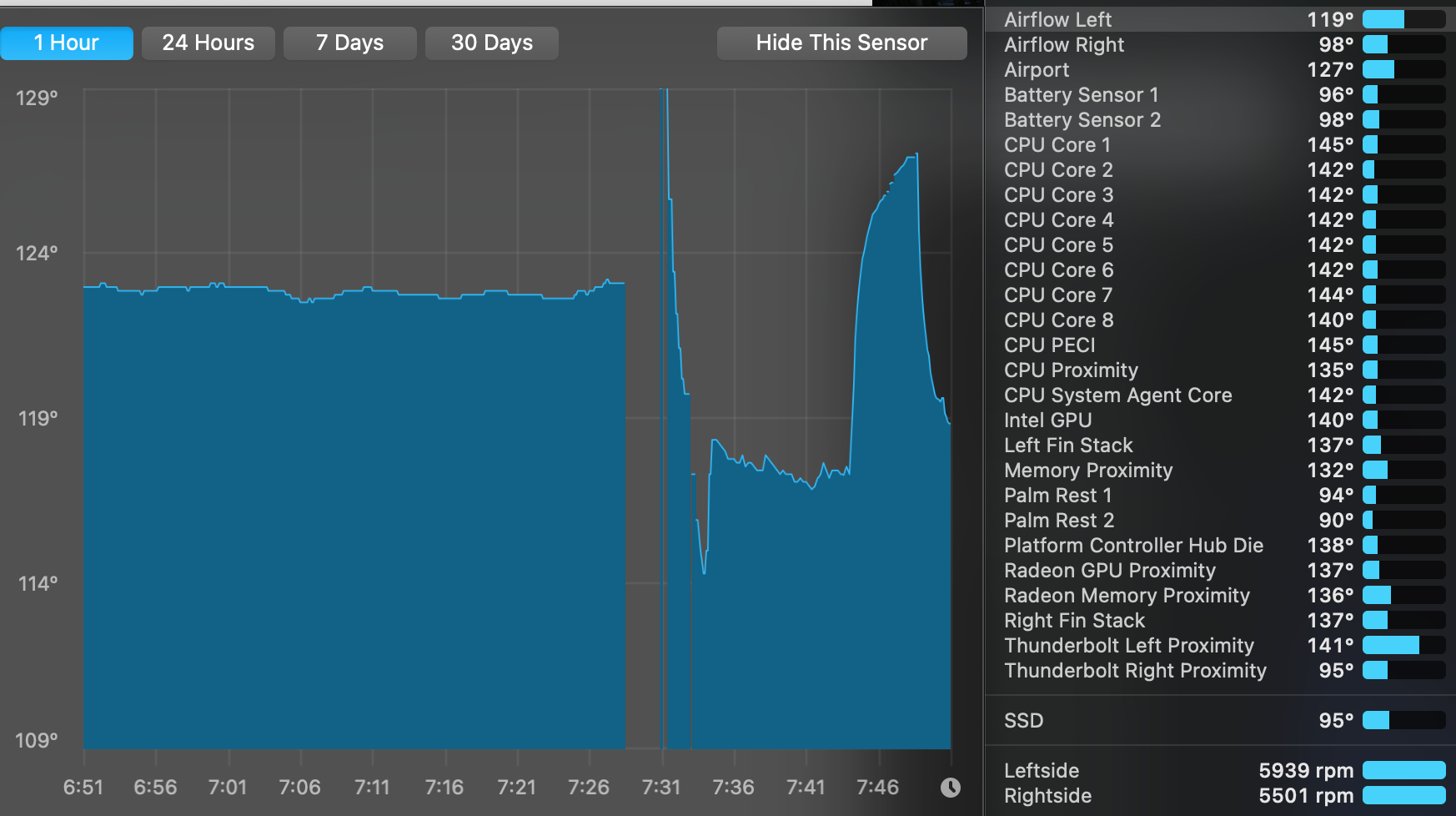
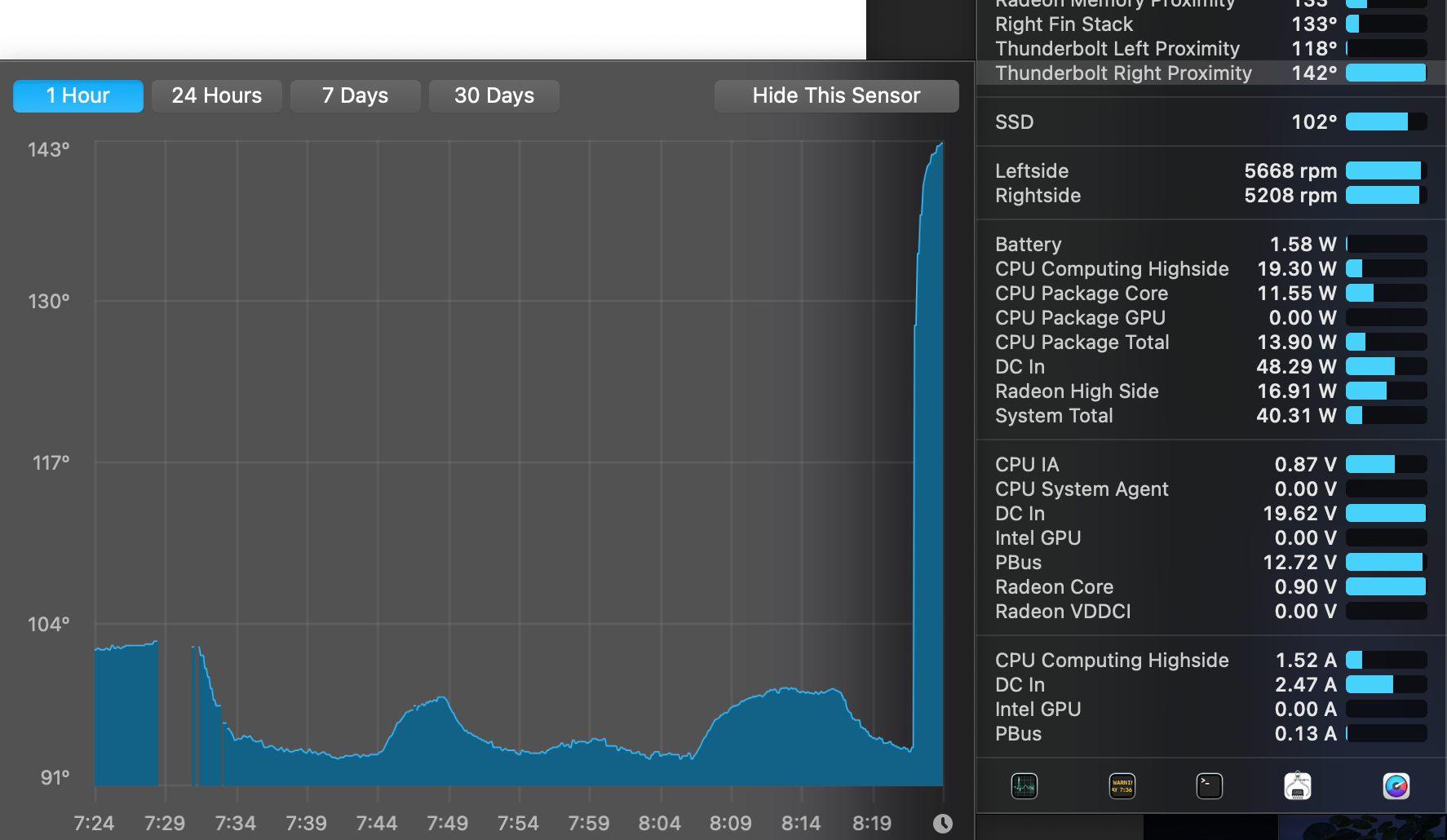
Honestly, my experience with this MBP has been poor, the thermal management just isn't there regardless of what specific component is pushing it too hard. Hopefully the Apple Silicon MBPs will be way better on this front.

I'm not entirely sure why as load and temps seem pretty light. That's why I came to try MFC to force them to be more quiet, but slowing the fans leads to this kernel_task issue also.
When using external monitor(s) macbook pro is known to max up its fan(s). Not sure why, probably because of potential extra GPU load? If you slow down the fan(s), SMC will think it's overheating and throttle CPU

@kleuter @mattlqx @pokekrishna @iamprofila @PaulAnderegg @Aazamandius Please attempt to uninstall Google Chrome and Keystone entries if you have it installed. My kernel_task never goes higher than 5% after doing that.
Please refer to: https://www.youtube.com/watch?v=VMtr-u0v8bk&feature=youtu.be Or: https://chromeisbad.com
@kleuter We are aware of this and my finds don't have any relation to this. I now can use macs fan control without problems.
So far this mac has been the most expensive blower heater keyboard combo I've ever seen. Still it's a great keyboard, though :| What has worked with my older Macbook pro was upgrading (not typo) from Big Sur to Catalina. 100% increase it performance. (eg: I can now leave 2 finder windows open)
