
coverlet
 coverlet copied to clipboard
 coverlet-coverage
Collector report name with tfm

I would still have to adapt tests but this the only thing I came up with. As far as I have analyzed vstest, they have the tfm information but currently don't expose it to the outside. But they have a Framework string inside the runsettings that can be converted back to the tfm using NuGet.Frameworks.
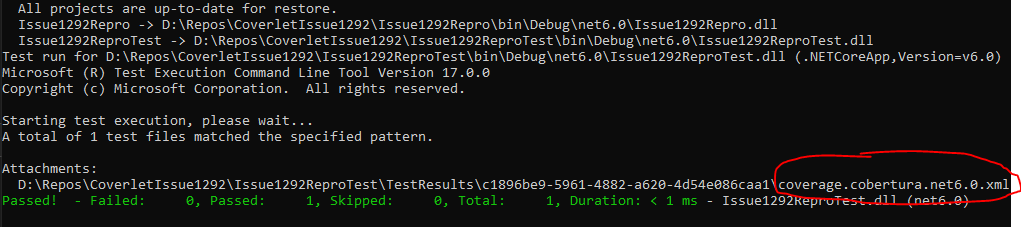
Personally I'm not so really happy with this solution because we have to add another dependency just for parsing a string. Also this isn't 100% aligned with what the msbuild driver does. msbuild driver only adds the tfm information to the file name when there are multiple frameworks specified. With this PR the tfm is added to the filename even when there is only one framework specified.
I just wanted to open this PR for discussion. 😉
Well the deps is not a big issue...now we don't override users dll so it's ok. I need to check if that config element is always filled with the correct information.

OK cool then I will go on with unit tests. In my analysis I didn't specifiy a runsettings file, so this config element was generated by vstest. As far as I've seen in vstest code this element is generated when it doesn't exist, but I didn't dive super deep into their code.
I was thinking that this might be a breaking change in some CI pipelines e.g. if someone searches hard for coverage.cobertura.xml.
It's ok looks like the framework element is injected, we could add an option like ReportFileNameIncludesTargetFramework to true by default so we can break with a fallback.
https://github.com/microsoft/vstest/blob/main/src/Microsoft.TestPlatform.Common/DataCollection/DataCollectorInformation.cs#L120-L143
@MarcoRossignoli Any idea what is going wrong here? l tested it locally and here everything seems to work. I assume this here is the main error:
Starting test execution, please wait...
Logging Vstest Diagnostics in file: D:\a\1\s\test\coverlet.integration.determisticbuild\log.txt
A total of 1 test files matched the specified pattern.
Data collector 'XPlat code coverage' message: [coverlet]System.IO.FileLoadException: Could not load file or assembly 'NuGet.Frameworks, Version=6.0.0.280, Culture=neutral, PublicKeyToken=31bf3856ad364e35'. Could not find or load a specific file. (0x80131621)
File name: 'NuGet.Frameworks, Version=6.0.0.280, Culture=neutral, PublicKeyToken=31bf3856ad364e35'
   at Coverlet.Collector.DataCollection.CoverletSettingsParser.ParseFramework(XmlElement configurationElement)
   at Coverlet.Collector.DataCollection.CoverletSettingsParser.Parse(XmlElement configurationElement, IEnumerable`1 testModules) in /_/src/coverlet.collector/DataCollection/CoverletSettingsParser.cs:line 52
   at Coverlet.Collector.DataCollection.CoverletCoverageCollector.OnSessionStart(Object sender, SessionStartEventArgs sessionStartEventArgs) in /_/src/coverlet.collector/DataCollection/CoverletCoverageCollector.cs:line 132.
But I can't figure out why this happens when executing the integration tests in our pipeline.
Can you attatch the log --diag:log.txt
Are you able to see the lib on the bin close to the datacollector?
Thanks, yes locally the lib is there. I also don't have this issue locally.

I also analyzed the logs but couldn't find any usefull hint on whats wrong.
I need to verify but I think that SDK/vstest already ship a version of that lib and so maybe we need to use the same...take a look inside SDK folder(programfiles/dotnet/sdk/ver)
OK I now tried several things but nothing seems to work. When I add nuget.fraweworks dependency the tests start to fail with the error from above. Any other ideas why this happens?
Unfortunately I also don't see another way how to add the tfm to the collector reports.
Can you try a thing?Put the offending code inside a try/catch and add a breakpoint on it and print somewhere the AppDomain.Current.GetAssemblies to check if another version is already loaded and which one
I finally found time to finish this one. It was really a conflicting version with the version Microsoft.TestPlatform.Objectmodel is using.
@daveMueller is this good to go?
Sorry for the late response. I think it was at least ready for review. But I will check this again on the weekend and let you know.