
vim-sql-workbench
 vim-sql-workbench copied to clipboard
 cosminadrianpopescu
Windows sql workbench/j config file
Set SQL Workbench/J to not use JLine (in SQL Workbench/J config file, add the following line: workbench.console.use.jline=false)
Excuse me sir, i just wanna talk about where config file sql workbench in windows 10 os?, Thank you.

You can check out the documentation here: https://www.sql-workbench.eu/manual/install.html#config-dir

You can check out the documentation here: https://www.sql-workbench.eu/manual/install.html#config-dir
Ok sir, but right now my "sqlworkbench.exe is not executable. Make sure the permissions are set correctly". I don't know what the problem with that i've searching at google and can't get the answer why & what the solution for this problem
May u answer what the solution for this one?
set the g:sw_config_dir, g:sw_exe and g:sw_cache variables
Did you set the 3 variables?
- g:sw_config_dir
- g:sw_exe
- g:sw_cache ?

set the g:sw_config_dir, g:sw_exe and g:sw_cache variables
Did you set the 3 variables?
- g:sw_config_dir
- g:sw_exe
- g:sw_cache ? yes sir, i'm adding at my init.vim
and this error when i start my neovim
Can you try from a cmd to run c:/Users/FX553VD/appdata/local/nvim/sql-workbench/sqlwbconsole.exe?
Because I have the impression that this is your nvim install folder.
You need to install separately the SQL Workbench/J application (basically just unzip the downloaded zip from here) and then point the g:sw_exe variable to the sqlwbconsole.exe in the unzipped folder.
Anyway, just check also the cmd result.
Can you try from a
cmdto runc:/Users/FX553VD/appdata/local/nvim/sql-workbench/sqlwbconsole.exe?Because I have the impression that this is your
nviminstall folder.You need to install separately the
SQL Workbench/Japplication (basically just unzip the downloaded zip from here) and then point theg:sw_exevariable to thesqlwbconsole.exein the unzipped folder.Anyway, just check also the
cmdresult.
Yes sir, this work when i open from cmd

Can you try from a
cmdto runc:/Users/FX553VD/appdata/local/nvim/sql-workbench/sqlwbconsole.exe?Because I have the impression that this is your
nviminstall folder.You need to install separately the
SQL Workbench/Japplication (basically just unzip the downloaded zip from here) and then point theg:sw_exevariable to thesqlwbconsole.exein the unzipped folder.Anyway, just check also the
cmdresult.
the latest version don't have sqlwbconsole.exe just have cmd extensions sir instead i use version 125

Normally you only have to change .exe with .cmd in the g:sw_exe variable. Can you try to find the sqlwbconsole.exe or sqlwbconsole.cmd in WIndow explorer and right click it, check the executable attribute. If it's not set, set it and try again. If it's already set, let me know and I will see if I can find a Windows to test it.
this user permission at sqlwbconsole.cmd sir
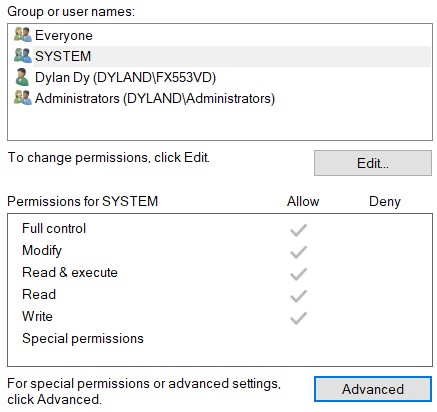 an
and this one attribute sqlwbconsole.cmd, i was set attribute r for readonly file but not working sir
an
and this one attribute sqlwbconsole.cmd, i was set attribute r for readonly file but not working sir
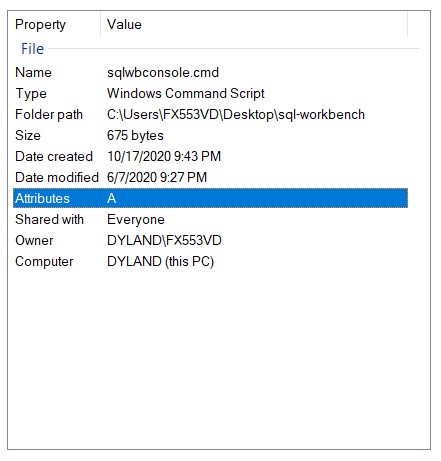
I am facing same issue.
sqlwbconsole.cmd is not executable. Make sure the permissions are set correctly. Error detected while processing function sw#profiles#update[1]..sw#background#run[8]..sw#server#execute_sql[38]..<SNR>89_log_channel: line 6: E716: Key not present in Dictionary: "0" Error detected while processing function sw#profiles#update[1]..sw#background#run[8]..sw#server#execute_sql: line 43: E900: Invalid channel id Error detected while processing function sw#profiles#update[1]..sw#background#run[8]..sw#server#execute_sql: line 47: E716: Key not present in Dictionary: "0" Error detected while processing function sw#profiles#update[1]..sw#background#run[8]..sw#server#execute_sql: line 47: E15: Invalid expression: g:sw_command_timer && !s:channel_handlers[channel].background Error detected while processing function sw#profiles#update[1]..sw#background#run[9]..sw#server#execute_sql[38]..<SNR>89_log_channel: line 6: E716: Key not present in Dictionary: "0" Error detected while processing function sw#profiles#update[1]..sw#background#run[9]..sw#server#execute_sql: line 43: E900: Invalid channel id Error detected while processing function sw#profiles#update[1]..sw#background#run[9]..sw#server#execute_sql: line 47: E716: Key not present in Dictionary: "0" Error detected while processing function sw#profiles#update[1]..sw#background#run[9]..sw#server#execute_sql: line 47: E15: Invalid expression: g:sw_command_timer && !s:channel_handlers[channel].background
able to run sqlwbconsole.cmd from command prompt

@3rdey3 what is the g:sw_exe variable value? Is it prompting to the right sqlwbconsole.cmd?