podman-desktop
 podman-desktop copied to clipboard
 containers
Podman Desktop requires hyper-v enabled
Bug description
Podman Desktop requires hyper-v being enabled in order to install podman. This is not a prerequisite for podman installation on windows:
- https://github.com/containers/podman/blob/main/docs/tutorials/podman-for-windows.md
Operating system
windows 11 home
Version
0.0.7
Steps to reproduce
- Ensure you dont have hyper-v enabled on your windows machine
- Ensure you dont have podman installed on your windows machine
- download Podman Dekstop
- Visit Podman Dekstop home page and validate that Podman Desktop shows the message about installing hyper-v before installing podman
- Follow instructions on installing podman for windows https://github.com/containers/podman/blob/main/docs/tutorials/podman-for-windows.md
- After finishing the installation, open Podman Desktop and validate your are able to use podman and Podman Desktop.
Relevant log output
No response
Additional context
A solution would be to remove the "enable hyper-v" step on Podman Desktop as we are able to use podman and Podman Desktop without hyper-v being enabled.

@pacostas Thanks for the feedback, how WSL2 is enabled on Windows Home edition ? I thought it was using Hyper-V

From what I see it only requires "virtual machine platform" https://github.com/MicrosoftDocs/WSL/issues/899#issuecomment-690753034
"Virtual machine platform" is installed during the installation process of wsl (powershell -> wsl --install )
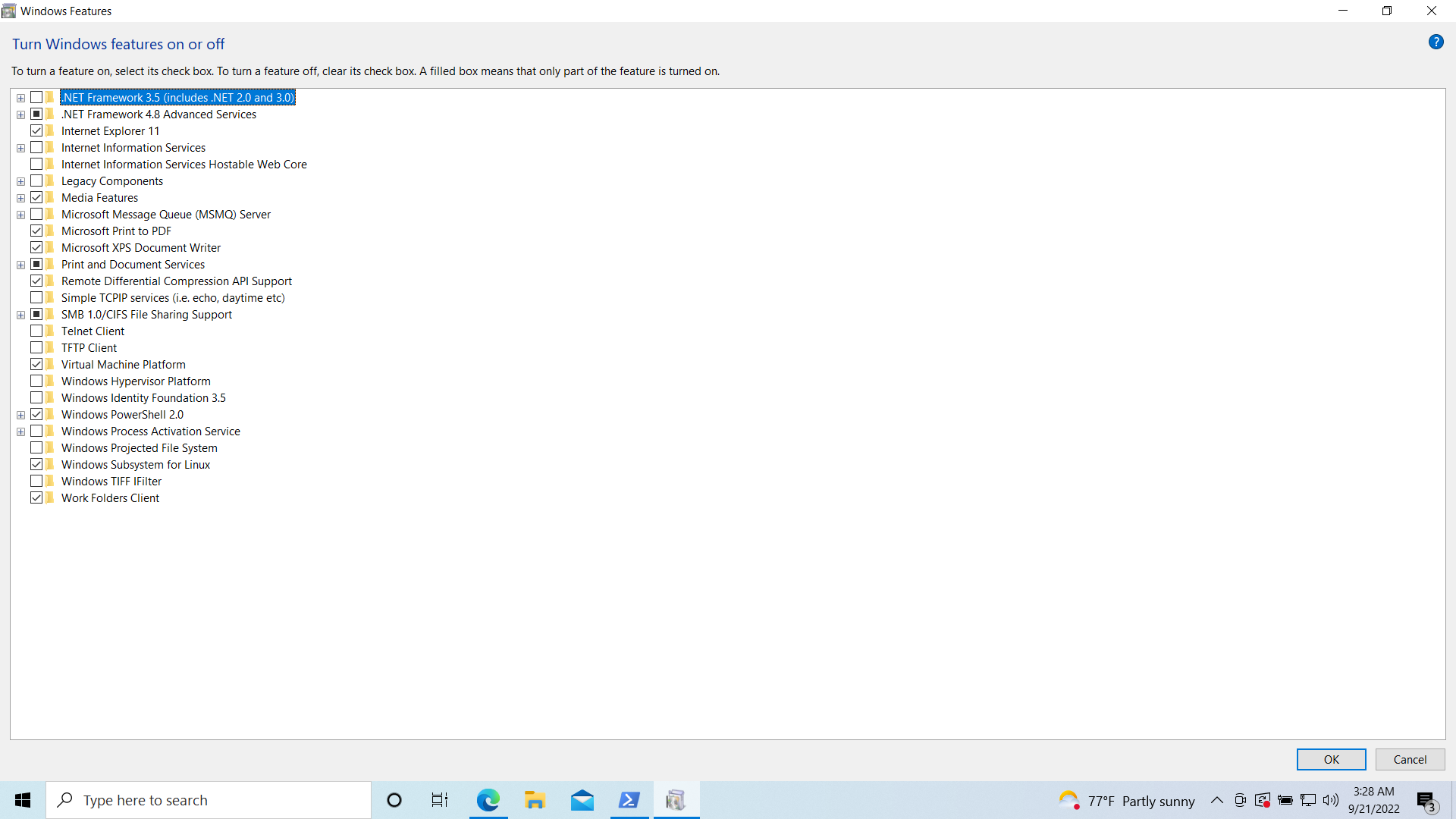
Another issue which is related to that case is that if you have installed wsl and then open Podman Desktop, shows that hyper-v is enabled despite there is not such a feature on windows 10/11
Hyper-V is a requirement to use WSL2. While 'Home' does not have an actual Hyper-V installable 'Optional feature' for this, it includes the components and facility. This is most likely why WSL2 works on these editions, while preventing to actually run VMs.
So this report is more about the check not being correct? @evidolob might have a look at this.

We check output of (Get-Service vmcompute).DisplayName PS command.
It seems that it prints Hyper-V even on systems which doesn’t have Hyper-V feature

So it has to do the validation if "Virtual Machine Platform" (a subset of Hyper-V) is enabled. In case windows editions other than home edition uses Hyper-v on wsl, then podman desktop shows proper message in that case.
@pacostas could you paste the output of the command
Get-Service vmcompute
in a powershell shell in your Windows 11 Home edition ?
I got on a W11 Home edition
OS Name: Microsoft Windows 11 Home, OS Version: 10.0.22621 N/A Build 22621
PS C:\Users\benoitf> Get-Service vmcompute

Status   Name               DisplayName
------   ----               -----------
Running  vmcompute          Hyper-V Host Compute Service
Yes, I have the same output too
Status   Name               DisplayName
------   ----               -----------
Running  vmcompute          Hyper-V Host Compute Service
Although, on windows features (image below), there is no hyper-v feature enabled. Instead the "Virtual Machine Platform" feature enabled, which is a subset of Hyper-v