
nerdctl
 nerdctl copied to clipboard
 containerd
portmap:curl connection refused
Description
nerdctl run ,localhost:192.168.162.119
sudo nerdctl run -d --name nginx -p 8080:80 nginx:alpine current machine: sudo curl http://localhost:8080 ---> work another machine: sudo curl http://192.168.162.119:8080 ---> connection refused
sudo nerdctl run -d --name nginx --net host nginx:alpine current machine: sudo curl http://localhost:80 ---> work another machine: sudo curl http://192.168.162.119:80 ---> work
Steps to reproduce the issue
Describe the results you received and expected
when i use "sudo nerdctl -p",the port can't be accessed from another machine
What version of nerdctl are you using?
0.19,release cni: 1.1.1
Are you using a variant of nerdctl? (e.g., Rancher Desktop)
No response
Host information
No response

I guess that you are missing routes between the other machine netns and your container ns or there is blocking firewall rules
What shows this cmd :
ip route in he container and in the other machine
also iptables --list-rules



I guess that you are missing routes between the other machine netns and your container ns or there is blocking firewall rules What shows this cmd :
ip routein he container and in the other machine alsoiptables --list-rules
in the container:
 in another machine:
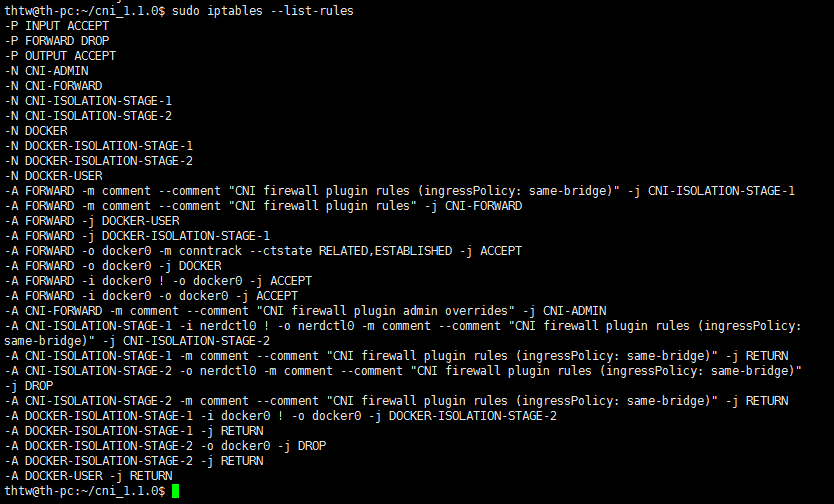
Can't repro (Ubuntu 22.04).
Probably a firewall issue?
I test this erroe in my two machines.
ubuntu version and firewall:
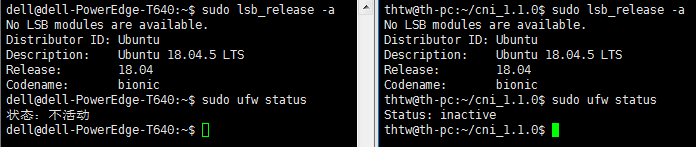
I test this with docker,docker works.
sudo nerdctl run -d -p 8999:8999 python python -m http.server 8999
When I run an http server on port 8999, it can be accessed locally, but the remote host cannot.
Here are some iptable rules:
$ sudo iptables --list-rules
-A FORWARD -m comment --comment "CNI isolation plugin rules" -j CNI-ISOLATION-STAGE-1
-A FORWARD -m comment --comment "CNI firewall plugin rules" -j CNI-FORWARD
-A CNI-FORWARD -m comment --comment "CNI firewall plugin admin overrides" -j CNI-ADMIN
-A CNI-FORWARD -d 10.4.0.96/32 -m conntrack --ctstate RELATED,ESTABLISHED -j ACCEPT
-A CNI-FORWARD -s 10.4.0.96/32 -j ACCEPT

$ sudo iptables -vnL -t nat |grep 8999
    0     0 CNI-HOSTPORT-SETMARK  tcp  --  *      *       10.4.0.0/24          0.0.0.0/0            tcp dpt:8999
    0     0 CNI-HOSTPORT-SETMARK  tcp  --  *      *       127.0.0.1            0.0.0.0/0            tcp dpt:8999
   24  1536 DNAT       tcp  --  *      *       0.0.0.0/0            0.0.0.0/0            tcp dpt:8999 to:10.4.0.222:8999
   24  1536 CNI-DN-27e4e8c39c7449c7e2c04  tcp  --  *      *       0.0.0.0/0            0.0.0.0/0            /* dnat name: "bridge" id: "default-0b75af3cc2cdff1b18ed588e0aacb3161dd3526e34cc1bd2c08dcaed4d7f0dd6" */ multiport dports 8999

$ sudo iptables-save |grep 8999
-A CNI-DN-27e4e8c39c7449c7e2c04 -s 10.4.0.0/24 -p tcp -m tcp --dport 8999 -j CNI-HOSTPORT-SETMARK
-A CNI-DN-27e4e8c39c7449c7e2c04 -s 127.0.0.1/32 -p tcp -m tcp --dport 8999 -j CNI-HOSTPORT-SETMARK
-A CNI-DN-27e4e8c39c7449c7e2c04 -p tcp -m tcp --dport 8999 -j DNAT --to-destination 10.4.0.222:8999
-A CNI-HOSTPORT-DNAT -p tcp -m comment --comment "dnat name: \"bridge\" id: \"default-0b75af3cc2cdff1b18ed588e0aacb3161dd3526e34cc1bd2c08dcaed4d7f0dd6\"" -m multiport --dports 8999 -j CNI-DN-27e4e8c39c7449c7e2c04
Adding something along the lines of this restores external connectivity:
sudo iptables -A CNI-FORWARD -p tcp -m tcp --dport 8999 -j ACCEPT
sudo nerdctl run -d -p 8999:8999 python python -m http.server 8999When I run an http server on port 8999, it can be accessed locally, but the remote host cannot.
Here are some iptable rules:
$ sudo iptables --list-rules
-A FORWARD -m comment --comment "CNI isolation plugin rules" -j CNI-ISOLATION-STAGE-1
-A FORWARD -m comment --comment "CNI firewall plugin rules" -j CNI-FORWARD
13a20,26
-A CNI-FORWARD -m comment --comment "CNI firewall plugin admin overrides" -j CNI-ADMIN
-A CNI-FORWARD -d 10.4.0.96/32 -m conntrack --ctstate RELATED,ESTABLISHED -j ACCEPT
-A CNI-FORWARD -s 10.4.0.96/32 -j ACCEPT

$ sudo iptables -vnL -t nat |grep 8999
    0     0 CNI-HOSTPORT-SETMARK  tcp  --  *      *       10.4.0.0/24          0.0.0.0/0            tcp dpt:8999
    0     0 CNI-HOSTPORT-SETMARK  tcp  --  *      *       127.0.0.1            0.0.0.0/0            tcp dpt:8999
   24  1536 DNAT       tcp  --  *      *       0.0.0.0/0            0.0.0.0/0            tcp dpt:8999 to:10.4.0.222:8999
   24  1536 CNI-DN-27e4e8c39c7449c7e2c04  tcp  --  *      *       0.0.0.0/0            0.0.0.0/0            /* dnat name: "bridge" id: "default-0b75af3cc2cdff1b18ed588e0aacb3161dd3526e34cc1bd2c08dcaed4d7f0dd6" */ multiport dports 8999

$ sudo iptables-save |grep 8999
-A CNI-DN-27e4e8c39c7449c7e2c04 -s 10.4.0.0/24 -p tcp -m tcp --dport 8999 -j CNI-HOSTPORT-SETMARK
-A CNI-DN-27e4e8c39c7449c7e2c04 -s 127.0.0.1/32 -p tcp -m tcp --dport 8999 -j CNI-HOSTPORT-SETMARK
-A CNI-DN-27e4e8c39c7449c7e2c04 -p tcp -m tcp --dport 8999 -j DNAT --to-destination 10.4.0.222:8999
-A CNI-HOSTPORT-DNAT -p tcp -m comment --comment "dnat name: \"bridge\" id: \"default-0b75af3cc2cdff1b18ed588e0aacb3161dd3526e34cc1bd2c08dcaed4d7f0dd6\"" -m multiport --dports 8999 -j CNI-DN-27e4e8c39c7449c7e2c04
Adding something along the lines of this restores external connectivity:
sudo iptables -A CNI-FORWARD -p tcp -m tcp --dport 8999 -j ACCEPT
thx! According to your method,now the port can be accessed from another machine! so when i use portmap,i must use"sudo iptables -A CNI-FORWARD -p tcp -m tcp --dport 8999 -j ACCEPT"?
so when i use portmap,i must use"sudo iptables -A CNI-FORWARD -p tcp -m tcp --dport 8999 -j ACCEPT"?
This is just a temporary solution, I haven't determined the specific problem yet, it may be a bug of the CNI plugin.
so when i use portmap,i must use"sudo iptables -A CNI-FORWARD -p tcp -m tcp --dport 8999 -j ACCEPT"?
This is just a temporary solution, I haven't determined the specific problem yet, it may be a bug of the CNI plugin.
nginx test ok.In my own container,the portmap still isn't work. In my container,it's a rtsp_push server. I can pull rtsp locally,another machine Connection timed out(not refused). I'll test in other project.
In my own container,the portmap still isn't work.
The above temporary solution is for TCP, you need to modify it for your use, maybe you use UDP.
this is my server print,it use TCP.

$ sudo iptables -A CNI-FORWARD -p udp -m udp --dport 8999 -j ACCEPT use above command,another machine also print "Connection timed out"
I have this same issue. It seems the nerdctl doesnt add the port forward at all.
In docker it works out of the box, but with nerdctl using the exact same command doesnt work similarly as with docker. Port doesnt get forwarded, so it's not visible outside of the machine containerd & nerdctl is running.

At the same host, execute nerdctl run as root, published port can't be accessible from LAN; but execute as another normal user, port is accessible.
Uncomment net.ipv4.ip_forward=1 in /etc/sysctl.conf or /etc/sysctl.d/*.conf, which works for me.


same issue,there is no problem with docker, but not with containerd
I don't know what's the problem, after I reboot the machine, the problem is solved
I solved my problem with "iptables -A CNI-FORWARD -p tcp -m tcp --dport xxxx -j ACCEPT". But it's strange that after adding this specific iptable rlue, other ports which using portmap also become accessible.

"iptables -P FORWARD ACCEPT" worked, and I found that it is ACCEPT when there's no docker
