
photon
 photon copied to clipboard
 connors
HTML5 Modals
This addresses #8 by adding default photon styling to the HTML5 <dialog> element.
Rationale:
<dialog> provides keyboard shortcuts and backdrop styling, and includes DOM methods to control modal behavor:
| Method | Description |
|---|---|
showModal() |
Show the dialog with a backdrop preventing further interaction |
show() |
Show the dialog but allow interaction with any partial obscured content |
close(result) |
close the dialog. Accepts a value, which is passed on to the close event that is emitted |
JSFiddle Demo:
http://jsfiddle.net/developit/ymx5qev6/
Preview:
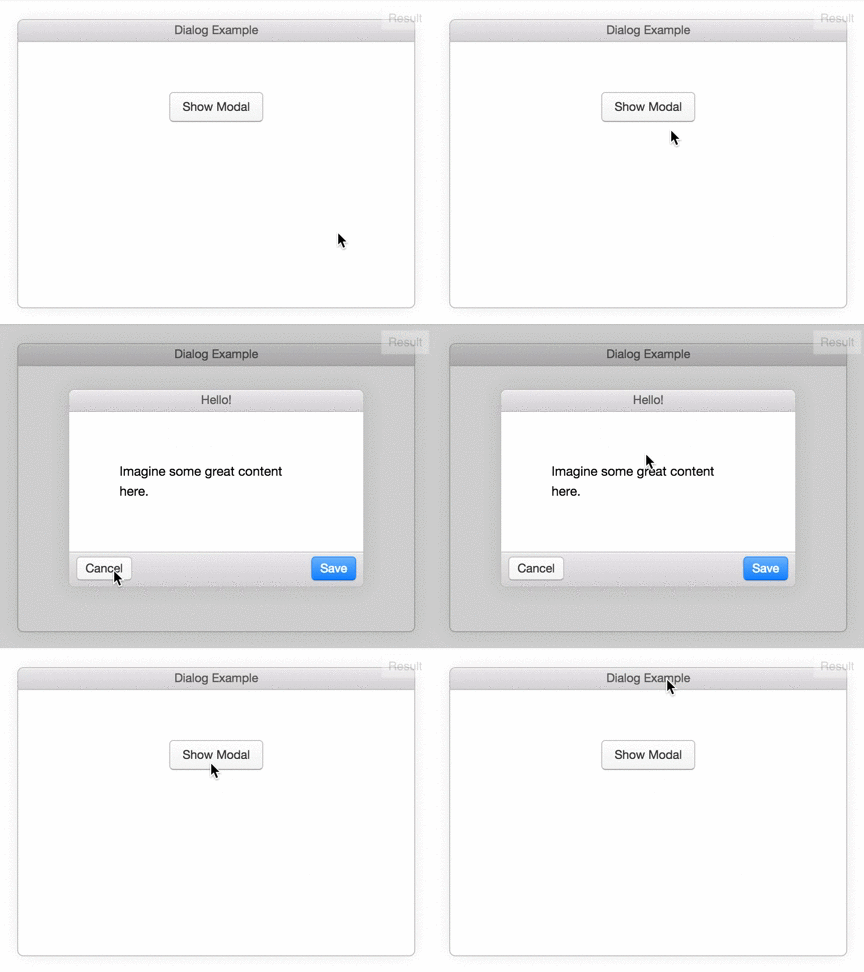


Step 1) Add HTML:
Example
Example /* The Modal (background) / .modal { display: none; / Hidden by default / position: fixed; / Stay in place / z-index: 1; / Sit on top / left: 0; top: 0; width: 100%; / Full width / height: 100%; / Full height / overflow: auto; / Enable scroll if needed / background-color: rgb(0,0,0); / Fallback color / background-color: rgba(0,0,0,0.4); / Black w/ opacity */ }
/* Modal Content/Box / .modal-content { background-color: #fefefe; margin: 15% auto; / 15% from the top and centered / padding: 20px; border: 1px solid #888; width: 80%; / Could be more or less, depending on screen size */ }
/* The Close Button */ .close { color: #aaa; float: right; font-size: 28px; font-weight: bold; }
.close:hover, .close:focus { color: black; text-decoration: none; cursor: pointer; } Step 3) Add JavaScript:
Example // Get the modal var modal = document.getElementById("myModal");
// Get the button that opens the modal var btn = document.getElementById("myBtn");
// Get the element that closes the modal var span = document.getElementsByClassName("close")[0];
// When the user clicks on the button, open the modal btn.onclick = function() { modal.style.display = "block"; }
// When the user clicks on (x), close the modal span.onclick = function() { modal.style.display = "none"; }
// When the user clicks anywhere outside of the modal, close it window.onclick = function(event) { if (event.target == modal) { modal.style.display = "none"; } }
