

 coder
coder
Fix settings sync login and "loading" text
Currently if you hover over the account login when you aren't logged in it just says "loading".
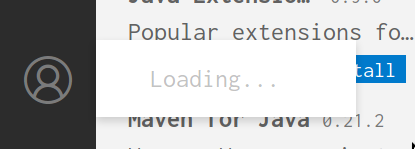
This is what it should look like instead:

Pressing "turn on settings sync" then takes you through the login process. It allows you to sign in with Microsoft and GitHub although I'm not sure we'll be able to support both or only GitHub.
If you are already logged in (to GitHub) supposedly syncing works and the icon works fine too but we should verify this.
Previous issues: https://github.com/cdr/code-server/issues/2587 https://github.com/cdr/code-server/issues/2913

Interestingly if you have the GitHub pull request extension installed the icon works but there is still no sync.
After poking around it seems that settings sync is intentionally not included in the OSS.
So we'll still want to have the "you are not signed in" verbiage when you aren't signed in and there are no extensions providing auth but we won't have the "turn on settings sync" option.
And then at a later date perhaps we can look into implementing sync.
After poking around it seems that settings sync is intentionally not included in the OSS. Any particular reason? My VS Code local install shows it here:

But when I go to the remote container it's missing as you said:

Just wondering why this would be intentional?

I can make guesses but I don't know for sure why it's not available for OSS builds. Here is the comment from one of the VS Code devs but there is no further explanation: https://github.com/microsoft/vscode/issues/105310#issuecomment-693262654
This issue has been automatically marked as stale because it has not had recent activity. It will be closed if no activity occurs in the next 5 days.
![stale[bot] avatar](https://avatars.githubusercontent.com/in/1724?v=4 "Published by a pub.dev verified publisher")


Same here...
I use WSL2 Ubuntu. I install git on the WSL Ubuntu from terminal, then the problem solved.

Same here...
I use WSL2 Ubuntu. I install git on the WSL Ubuntu from terminal, then the problem solved.
i'm using Mac OS Monterey. I've moved away from code-server, i never managed to fix this unfortunately.

@jsjoeio It worked for me for ages and suddenly broke (i.e worked in march broke on the 21st June). This issue doesn't seem to cover that context?

@Sharpz7 interesting...it's never worked for me. When you say "cover that context", what are you referring to?
Sorry, after more extensive testing it seems that Copilot had a login system change on the same day as this started, so is just a co-incidence. I apoligize ;)

I assume github.dev is owned by GitHub (Microsoft) in which case settings sync will work for them since they are not using the OSS version of Code.
if you may have noticed all microsoft extensions are missing in the oss version. thats why i uninstalled it after short testing about a year ago as i'm using a lot of them and setting-sync would be useless if half of my extensions are missing.
there is currently no workaround as long as there is no version like ,,bin-server"

same issue When I pressed "turn on settings sync" ,there is nothing happened... I run code-server with docker, any ideas to help me login?


It looks like upstream changed "loading" to "no accounts requested yet..." so I think we can consider that portion of the issue resolved.
And for the settings sync portion we have another issue tracking that (https://github.com/coder/code-server/issues/2195) so I will close this issue.