

 clopez
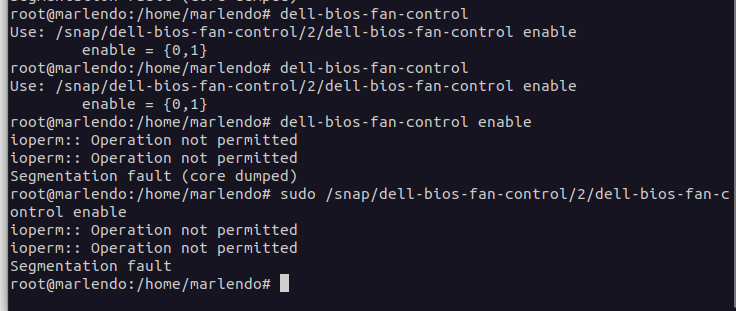
ioperm:: Operation not permitted
Testing on latest Dell 3551 laptop. The bios keeps overriding the fan speeds set by i8kmon.
My output when running is:
[email protected]:/home/user/Downloads/dellfan# ./dellfan 9
ioperm:: Operation not permitted
ioperm:: Operation not permitted
Please tune the startcode by editing the source code
[email protected]:/home/user/Downloads/dellfan# ./dellfan 9 0
ioperm:: Operation not permitted
ioperm:: Operation not permitted

Are you running Selinux, Apparmor or other security module that restricts ioperm() syscalls? If that is the case then you have to either whitelist this program or disable the security framework. Since you are running Ubuntu20.04 this is likely caused by Apparmor. Try to disable it

it could be that you have safeboot enabled in bios i had to disable this to get it working

Hey! I am just having the same ioperm:: Operation not permitted issue but my secure boot is disabled. I just updated to fedora 34 from 33 and it was working fine in 33. It only happens when the binary is executed in a service at boot, in the terminal works fine.

Looks like something on your system is blocking the ioperm() syscalls. Likely is the SELinux policy. Try to put your system into permissive mode to see if that fixes the issue. If that does, then you need to write a whitelist policy filter to allow this program to call ioperm() and then enable back the SELinux mode to restrictive.
If is not SELinux, then it may be a Seccomp filter.
Yep, it was SELinux! 3 hours of my day wasted by this error lol. Thanks a lot! I will try to write a whitelist policy filter! Any recommendations in who to do it?
I will try to write a whitelist policy filter! Any recommendations in who to do it?
Not really. I don't use SELinux. Search on google for some help with that :)
ioperm is also disabled by AppArmor default settings and lockdown (search ioperm to find relevant parts in both man pages). Easiest way to disable those is by adding lsm= security= (docs and lockdown enabling logic) settings to your kernel cmdline. Just remember to put those back on when done with testing.
If you have CONFIG_SECURITY_LOCKDOWN_LSM_EARLY=y config (zgrep LOCKDOWN /proc/config.gz) then you need to try out with another kernel or change your kernel config to disable it and rebuild. The early LSM modules are initialized unconditionally before parsing kernel cmdline.
With the security modules enabled user-space programs cannot do fan control via ioperm mechanisms so you can submit a patch to the dell-smm-hwmon kernel module to whitelist pwm toggle command (more details in the link at kernel documentation). Normal pwm control should be in /sys/devices/virtual/hwmon/hwmon*/pwm1 without any special configuration (more details on that in the module docs linked above)
EDIT: Got so many small bits wrong that this is 6th iteration of this comment but now it should be correct.

I installed dell-bios-fan-control via snap and got this error (Kubuntu 20.04). I tried disabling Apparmor by running
sudo systemctl disable apparmor
reboot
But before login, the system reboots a second time and apparmor is enabled again. So I tried to create a rule according to this.
whereis dell-bios-fan-control
points me to /snap/bin/dell-bios-fan-control but
aa-easyprof /snap/bin/dell-bios-fan-control
does not work, because this is just a link to snap...
I found an other dell-bios-fan-control at /snap/dell-bios-fan-control/2/. But running
sudo /snap/dell-bios-fan-control/2/dell-bios-fan-control 0
simply returns BIOS CONTROL DISABLED without any error. I still haven't created a apparmor-profile. But this doesn't change anything. I still cannot control the fans using fancontrol-gui.
Any Idea, what I could try?
It's an Dell Precition M7720.


sudo /snap/dell-bios-fan-control/2/dell-bios-fan-control 0 did the job
I'm using i8kutils to controll my fan, and it's working so well.

sudo /snap/dell-bios-fan-control/2/dell-bios-fan-control 0did the job I'm using i8kutils to controll my fan, and it's working so well.
And which device are you using?
sudo /snap/dell-bios-fan-control/2/dell-bios-fan-control 0did the job I'm using i8kutils to controll my fan, and it's working so well.And which device are you using?
Machine:
  Type: Laptop System: Dell product: Inspiron 5584 v: N/A
    serial: <superuser required>
  Mobo: Dell model: 0J0JFW v: A00 serial: <superuser required> UEFI: Dell
    v: 1.4.1 date: 04/12/2019
Disabling apparmor worked for me, until it suddenly didn't anymore, now even with disabled apparmor it says:
user@user-Latitude-5530:~$ sudo /snap/dell-bios-fan-control/2/dell-bios-fan-control enable
[sudo] lösenord för user:
ioperm:: Operation not permitted
ioperm:: Operation not permitted
Segmenteringsfel
user@user-Latitude-5530:~$

Why are you using snap for this? Is a very simple program without any dependency that you can build against your system. snap programs run under a sandbox (seccomp) that restrict what they can do, so the error is likely caused because of using snap.
I originally only found the snap.
When I found the source code and compiled it, it complained about libc.so.6 missing, when I symlinked /lib/i386-linux-gnu/libc.so.6 to /lib/libc.so.6 it changed the error message from "no such file or directory" to "Permission denied", even if running as root and with /lib's and /lib/libc.so.6's permissions set to 755. In the snap that worked and after connecting ioctl to the snap it worked - until it didn't anymore after two days.
This happened when I compiled it myself:
user@user-Latitude-5530:~$ git clone https://github.com/clopez/dellfan.git
Klonar till "dellfan"...
remote: Enumerating objects: 15, done.
remote: Counting objects: 100% (6/6), done.
remote: Compressing objects: 100% (6/6), done.
remote: Total 15 (delta 1), reused 1 (delta 0), pack-reused 9
Tar emot objekt: 100% (15/15), 15,15 KiB | 705,00 KiB/s, klart.
Analyserar delta: 100% (2/2), klart.
user@user-Latitude-5530:~$ cd dellfan/
user@user-Latitude-5530:~/dellfan$ make
cc -o dellfan dellfan.c
user@user-Latitude-5530:~/dellfan$ ./dellfan
need root privileges
user@user-Latitude-5530:~/dellfan$ sudo ./dellfan
[sudo] lösenord för user:
Use: ./dellfan speed [disable]
	speed = {0,1,2}
			[Use speed=9 to probe for SMBIOS codes to disable the BIOS fan control.]
	disable = {0,1}
user@user-Latitude-5530:~/dellfan$ sudo ./dellfan disable=0
ioperm: Operation not permitted
user@user-Latitude-5530:~/dellfan$