
vscode-clangd
 vscode-clangd copied to clipboard
 clangd
Support "grayed out" macro definitions
[edited to remove text left over from the issue template --HighCommander4]
Currently, Microsoft's native C/C++ extension supports graying out content inside macros that aren't going to be processed. The following screenshots demonstrate this:

However, the clangd extension does not support this, and it leaves the content not grayed out:
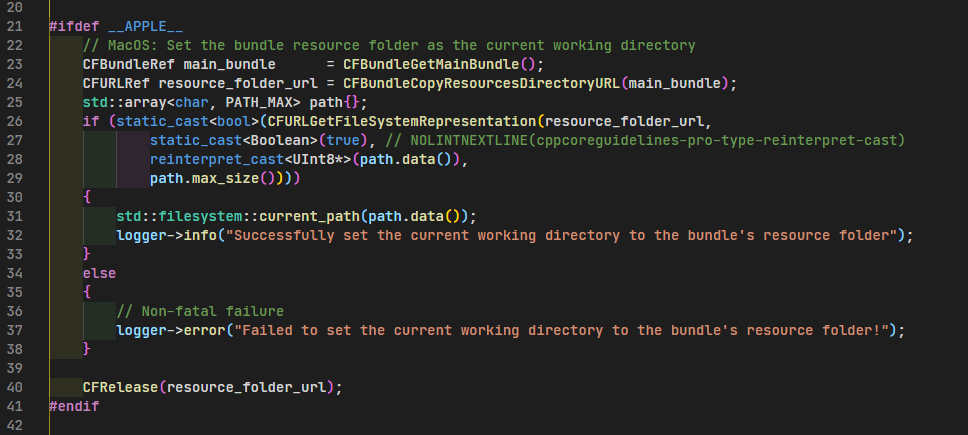
It'd be a nice touch to have the clangd extension do this.

It has been suggested that with a recent clangd this should already work.
(I haven't tried it myself. I still use the older, "Theia" semantic highlighting protocol (to which I've added support for this) for reasons).

I am currently using LLVM 11. Does that contain the new clangd with this feature?
Also, how do I check if I have the new semantic highlighting protocol?
Run the Inspect Editor Tokens command. If you see semantic tokens then you got it.

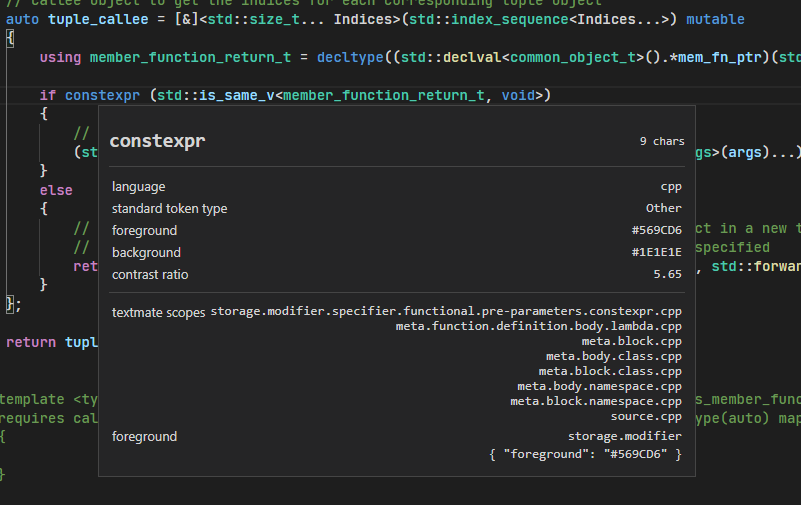
Try a variable. There needs to be another paragraph beneath textmate scopes.

I am currently using LLVM 11. Does that contain the new clangd with this feature?
TBH I've always been frustrated by the fact that I don't know of an easy way to find the answer to questions like this.
Is there an official place that records "The Date LLVM 11 Branched From Trunk", so that I can compare it to the date of a fix (in this case, that's August 26 2020), and conclude whether or not the fix is present in LLVM 11?
Apparently not: https://github.com/llvm/llvm-project/commit/0aaa2acc4ca0389a79a46bca3dc5b9365c641d77 Looks like this is the last one that went in: https://github.com/llvm/llvm-project/commit/f782d9c7002edaaf56c06a6cc1775f8f67713a29
https://github.com/llvm/llvm-project/commits/master/clang-tools-extra/clangd
Looks like this is the last one that went in: llvm/llvm-project@f782d9c
For future reference, how did you determine this?
See the tags at the top: master llvmorg-12-init llvmorg-11.0.0 llvmorg-11.0.0-rc6 llvmorg-11.0.0-rc5 llvmorg-11.0.0-rc4 llvmorg-11.0.0-rc3 llvmorg-11.0.0-rc2 llvmorg-11.0.0-rc1
Thanks. To summarize:
I am currently using LLVM 11. Does that contain the new clangd with this feature?
No, it does not. You'd have to use a weekly snapshot from https://github.com/clangd/clangd/releases, or build clangd from source, or wait until LLVM 12.
As a workaround, if you have a recent build you can add to your settings.json the following snippet:
    "editor.semanticTokenColorCustomizations": {
        "[Default Dark+]": {
            "rules": {
                "comment:cpp": "#707070",
                "comment:c": "#707070",
            }
        }
    },
Adapted to your theme (e.g. substituting [Default Dark]+ with the name of the theme you're using)

Going to copy over a comment from the duplicate issue #149 which is relevant:
This does work in clangd 12 using the new standard semanticTokens protocol. Each preprocessor-disabled line gets a comment semantic token spanning the text on the line. The appearance can be customized via editor.semanticTokenColorCustomizations.
There are a couple of limitations of this approach as compared to inactive code highlighting as seen in some other editors:
- The styling is limited to foreground color and text styling. You cannot, for instance, specify a grey background color for these lines (at least, not until https://github.com/microsoft/vscode/issues/3429 is resolved).
- Even if background styling is permitted, since the semantic token only covers the text on the line, only the portion of each inactive line that contains text will be colored, rather than the whole line, as in other editors.
I wrote a patch a while ago which implements a different approach, with a custom protocol between clangd and vscode-clangd, which allows styling the background of the whole line.
I'm not sure yet if there is a way to extend the current implementation to achieve this more flexible styling, or if I should resurrect my patch. Opinions are welcome.
This does work in clangd 12 using the new standard semanticTokens protocol. Each preprocessor-disabled line gets a comment semantic token spanning the text on the line.
It is better than nothing for sure but was very confusing at first. I thought someone actually commented out that block. This is much more intuitive:
Maybe it should at least only mark the inactive content as comments and leave the #if, #else etc in place like in the picture. Also even with the current way there's a bug:
#ifdef PLATFORM_X
...
#elif PLATFORM_Y
It marks #elif PLATFORM_Y as a comment if PLATFORM_Y is active.
It's worth noting that preprocessor-disabled regions are the only thing for which clangd sends comment semantic tokens. (Actual comments are styled client-side and do not get semantic tokens.)
So, you can change the appearance to something less comment-like with:
"editor.semanticTokenColorCustomizations": {
  "enabled": true,
  "rules": {
    "comment": {
       // your preferred style here
    },
  },
}
Also even with the current way there's a bug:
#ifdef PLATFORM_X
...
#elif PLATFORM_Y
It marks
#elif PLATFORM_Yas a comment if PLATFORM_Y is active.
That's determined by the ranges sent by the server, could you file a server-side bug (clangd repo) for it please?
It's worth noting that preprocessor-disabled regions are the only thing for which clangd sends
commentsemantic tokens. (Actual comments are styled client-side and do not get semantic tokens.)
Ok that's unexpected. So everything that doesn't get a token is a comment? Otherwise it would have to know the comment styles for all languages.
Ok that's unexpected. So everything that doesn't get a token is a comment? Otherwise it would have to know the comment styles for all languages.
No; besides comments, other kinds of C++ tokens for which clangd does not send a semantic token include: most keywords, string and numeric literals, and punctuation such as parentheses (there may be other things i'm forgetting).
Such tokens are styled client-side, if at all. VSCode does it using TextMate grammars, as described here. I believe it does ship with rules for C++ by default, though this extension provides better-quality ones.
Ah yeah of course the Textmate grammars.
I'm not sure yet if there is a way to extend the current implementation to achieve this more flexible styling, or if I should resurrect my patch. Opinions are welcome.
https://github.com/microsoft/vscode/issues/123352#issuecomment-836599414
I'm not sure yet if there is a way to extend the current implementation to achieve this more flexible styling, or if I should resurrect my patch. Opinions are welcome.
While we wait for Microsoft to chime in on https://github.com/microsoft/vscode/issues/123352, I wrote a vscode-clangd patch which achieves the desired styling (whole-line, background color) without needing any protocol or server changes.
The patch uses the vscode language client's "middleware" feature to observe the semantic tokens requests from the server, decode them to find the inactive regions, and apply custom styling to them using TextEditor.setDecorations() (the same API that our previous, do-it-ourselves semantic highlighting implementation used).
Does anyone know if there a way to simply disable the inactive region code from changing color at all? My project's preprocessor directives are very complication to pass to clangd and it'd just be easier to disable the highlighting rather than recolor it to some other non-comment-like color.
"clangd.semanticHighlighting": false,
and
"editor.semanticTokenColorCustomizations": {
	"[Default Dark+]": {
		"enabled": false
	}
},
both have no effect. I did verify though that the below color does in fact recolor the inactive regions to red
"editor.semanticTokenColorCustomizations": {
	"[Default Dark+]": {
		"rules": {
			"comment:cpp": {
				"foreground": "#ff0000"
			}
		}
	}
},

Does anyone know if there a way to simply disable the inactive region code from changing color at all?
Clangd doesn't parse the inactive branches, so it's not going to have regular semantic tokens (e.g. "function", "variable", etc.) to show for them. So, I'm not sure what kind of colors you're hoping to see in those sections.
@HighCommander4 Ah, I see. However, this doesn't explain why disabling semantic highlighting via either of the options in my prior comment doesn't affect it (it still renders as the configured or comment solid color). Disabling the clangd extension, however, does get my desired effect (fallback on the Microsoft C/C++ extension's syntax highlighting with Intellisense disabled):
(WITH_EDITOR here is an inactive region)
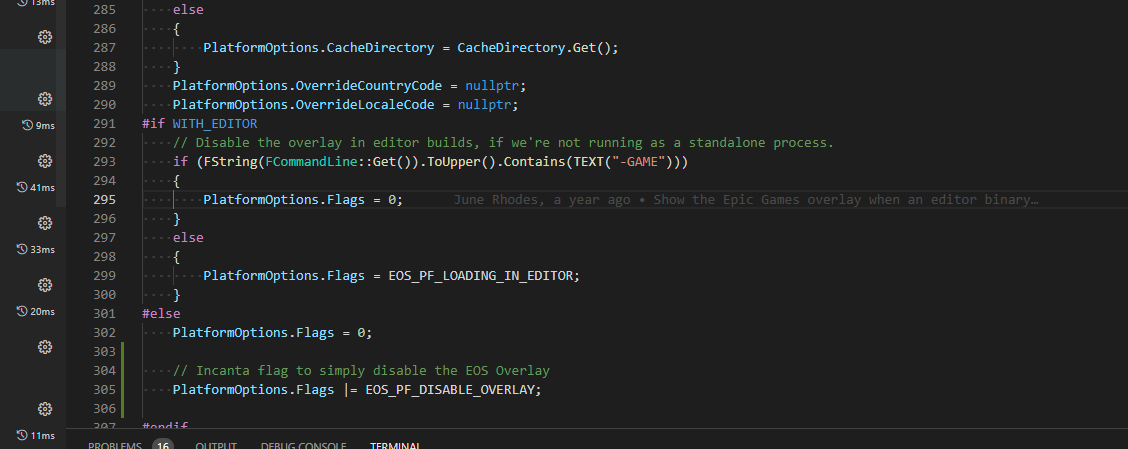
My question comes down to: am I correct that "clangd.semanticHighlighting": false, should disable the extensions functionality of changing inactive region highlighting and fallback on the prior colors (which Microsoft's C/C++ syntax highlighting does provide)? If so, I can make a new issue to document why it's not working; if not and there's some other config variable specific to inactive regions that I need, then what is it/where can I look for it (or do I need to change extension code to do it)?
"clangd.semanticHighlighting" controls the old, clangd-specific semantic highlighting protocol that was used before LSP had a standard one, and has been removed in newer clangd versions.
The current one is gated at the vscode level via "editor.semanticHighlighting.enabled".
I think this issue can be closed, as this has been implemented in https://github.com/clangd/vscode-clangd/pull/193 (requires clangd 17, since we ended up using a dedicated protocol extension for inactive regions).