
tcpview
 tcpview copied to clipboard
 chipmunk-sm
TcpView For Linux
TcpView For Linux
Graphical network connections viewer for Linux



Project status (appveyor)
Master branch status (appveyor)
To get the last release version, please use the PPA:
https://launchpad.net/~chipmunk.sm/+archive/ubuntu/ppa
$ sudo add-apt-repository ppa:chipmunk.sm/ppa
$ sudo apt-get update
$ sudo apt-get install tcpview
Debian packages (.deb)
https://launchpad.net/~chipmunk.sm/+archive/ubuntu/ppa/+packages
Home page:
https://github.com/chipmunk-sm/tcpview

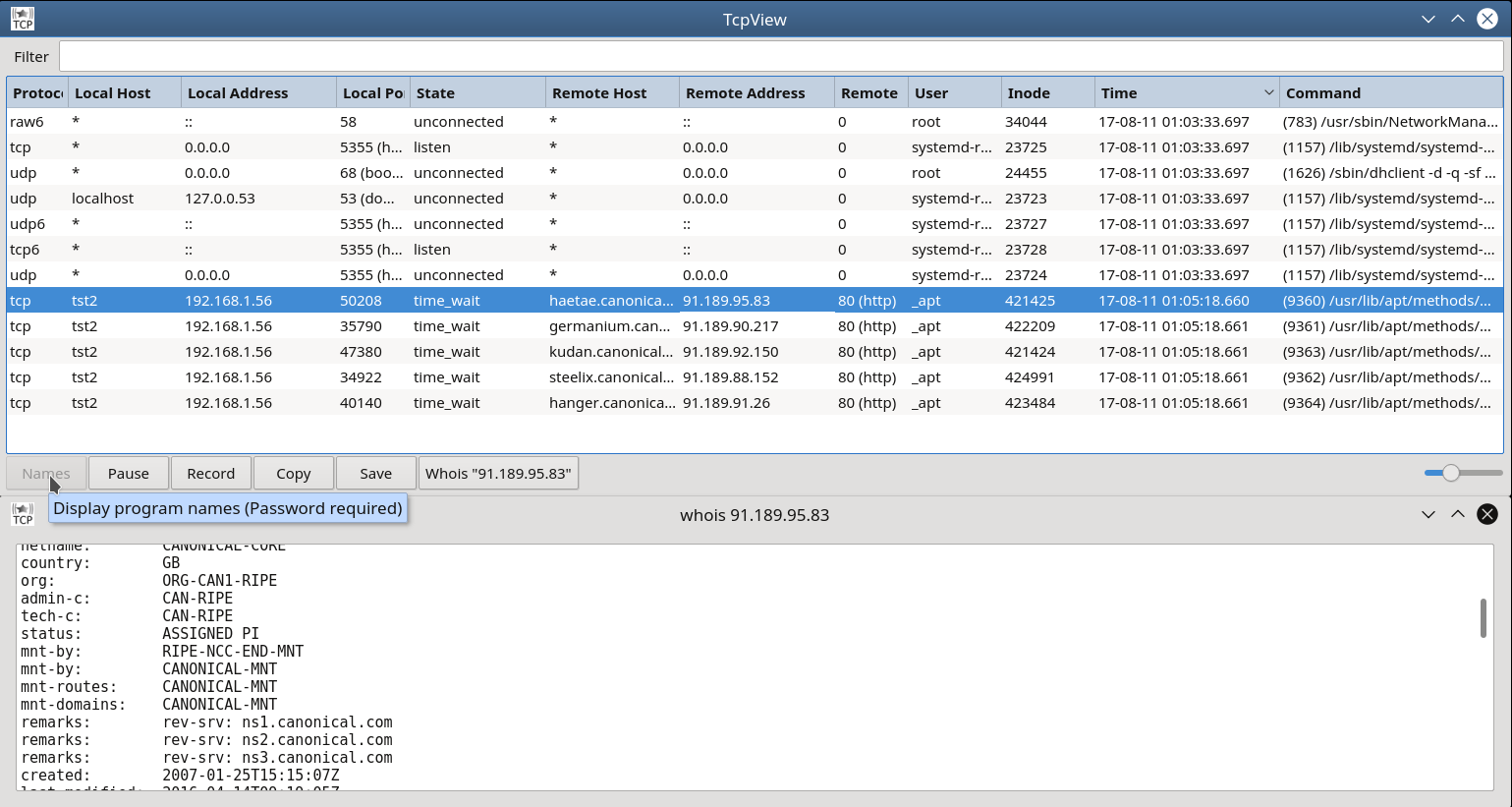
Description
TcpView For Linux. Graphical network connections viewer for Linux.
Show processes – Display the path of the executable process.  (Password required)
Pause - Stop loading new records
Record - Stop delete old records.
Copy - Copy the data of a row to the clipboard
Save – Export data to a CSV or XML file
Whois - Service gives you the ability to find out the registered domain holder.
*Zoom - ctrl + mouse wheel
How does it work?
"Base module"
Read and parse the information available from
    /proc/net/tcp
    /proc/net/udp
    /proc/net/tcp6
    /proc/net/udp6
    /proc/net/raw
    /proc/net/raw6
The data used from output is:
sl - The number of the line in the output listing.
local_address
rem_address
st - The socket status.
Uid - The ID of the user that owns the socket.
Inode - A cryptic-looking number that identifies the socket to the Linux virtual filesystem.
"Root module"
Loop through /proc/pid/fd/ for collect "inode list" and associated "command line" data
How to build
Install the build-dependencies on the host system
$ sudo apt-get install build-essential
$ sudo apt-get install qtcreator
$ sudo apt-get install qt5-default
$ sudo apt-get install uuid-dev
Clone
Open terminal in your preferred folder:
$ git clone https://github.com/chipmunk-sm/tcpview.git
Build
Either open tcpview.pro with Qt Creator for editing and building, or from the terminal:
$ cd tcpview
$ qmake
$ make
Run tcpview
$ ./tcpview
Translation
Use the Qt Linguist tool to translate text
$ sudo apt-get install qttools5-dev-tools
Open tcpview folder with terminal and update translations:
$ lupdate -no-obsolete -verbose -pro tcpview.pro
Open all editable translations:
$ cd translations
$ linguist language_cs.ts language_de.ts language_es.ts language_fr.ts language_ja.ts language_pl.ts language_ru.ts language_sl.ts language_zh_CN.ts language_zh_TW.ts
$ cd ..
And update .qm files:
$ lrelease -removeidentical -compress tcpview.pro
Finally, rebuild tcpview.
Adding new translations
Add a new translations xx.ts file to tcpview.pro, rebuild tcpview and add your new xx.qm to tcpview.qrc. Finally rebuild tcpview.
 chipmunk-sm